Johdanto
This manual provides detailed instructions for the AGPTEK A55PL USB C MP3 Player. It covers setup, operation, maintenance, and troubleshooting to ensure optimal use of your device. The A55PL is a versatile music player featuring USB-C connectivity, 64GB storage, FM radio, and voice recording capabilities, powered by a replaceable AAA battery.
Pakkauksen sisältö
Varmista, että pakkauksessasi on kaikki alla luetellut tuotteet:
- AGPTEK A55PL MP3 Player
- 64GB TF-kortti (esiasennettu)
- Type-C-USB-latauskaapeli
- Käyttöopas

Image: Contents of the AGPTEK A55PL MP3 Player package, showing the player, USB-C cable, 64GB TF card, and user manual.
Tuote loppuview ja Ominaisuudet
The AGPTEK A55PL MP3 Player is designed for portability and ease of use, offering multiple functionalities in a compact form factor.
Tärkeimmät ominaisuudet:
- Direct Type-C & Universal USB Connectivity: Connects directly to Type-C phones for file transfer or to laptops/PCs using the included adapter/cable.
- Swappable AAA Batteries: Operates on a single AAA battery (not included), allowing for instant power replacement without needing charging outlets.
- Massive 64GB Storage: Comes with a pre-loaded 64GB TF card, supporting over 13,000 songs and high-fidelity formats like FLAC, APE, and WAV. Functions as a U disk for data transfer.
- Crisp LED Display: Features an energy-efficient LED screen for clear navigation and song title display.
- Voice Recorder & FM Radio: Built-in voice recorder for capturing audio and an FM radio (requires wired headset as antenna) for broadcasts.

Kuva: Yliview of the AGPTEK A55PL MP3 Player's capabilities, including its Type-C port, music playback, recording, FM radio, and 64GB TF card storage.
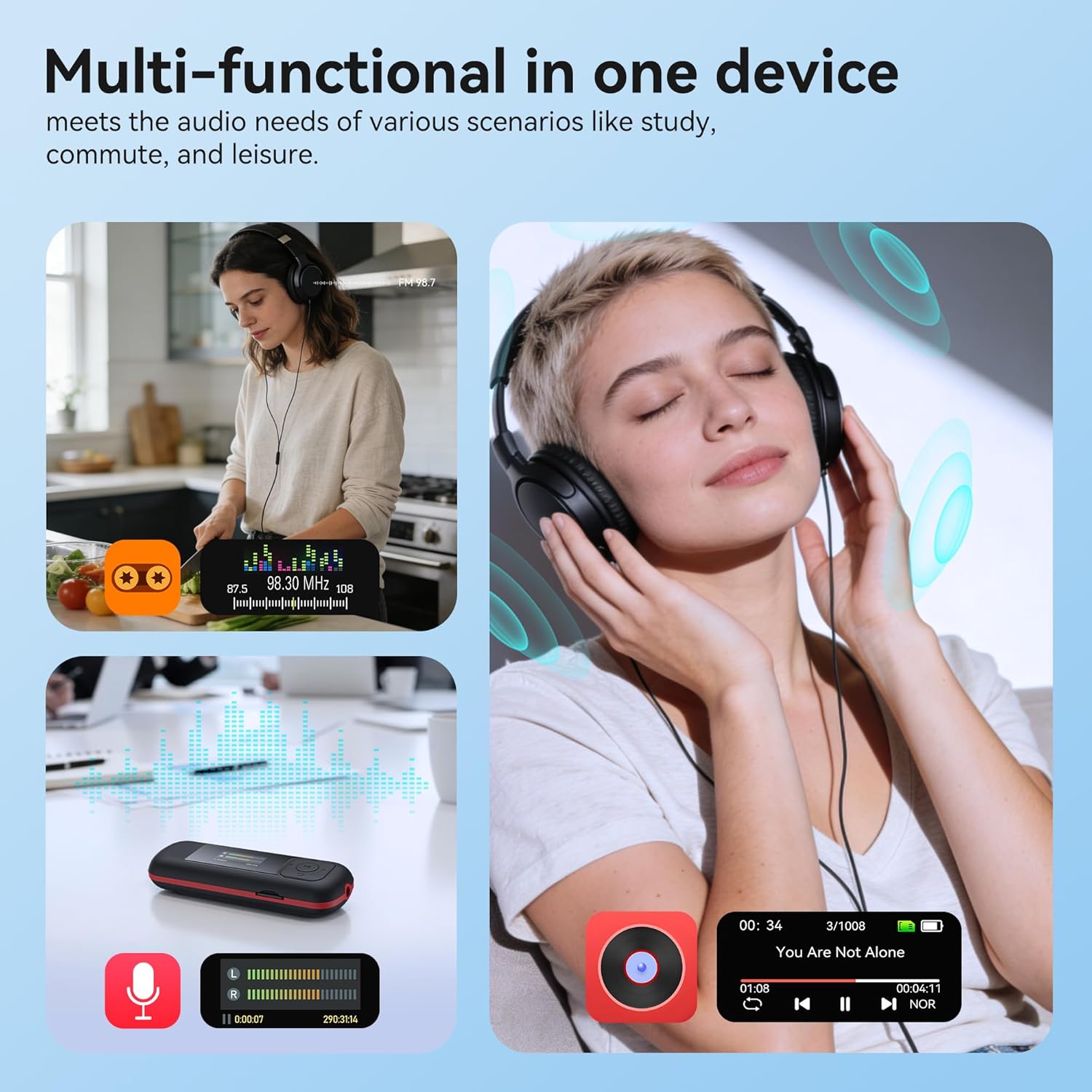
Image: The AGPTEK A55PL MP3 Player showcasing its multi-functional capabilities, including FM radio, voice recording, and music playback, suitable for various scenarios.
Asennus
1. Akun asennus
The AGPTEK A55PL uses one AAA battery (not included). Ensure correct polarity when inserting the battery.
- Paikanna laitteen takaosassa oleva paristolokeron kansi.
- Press the center of the cover and slide it forward to unlock and remove.
- Insert one AAA battery, matching the positive (+) and negative (-) terminals with the indicators inside the compartment.
- Liu'uta kansi takaisin paikalleen, kunnes se napsahtaa tukevasti.

Image: Step-by-step guide for removing the USB cap and installing the AAA battery into the AGPTEK A55PL MP3 Player.
Huomautus: USB charging is not supported. The device relies solely on AAA battery power. The battery display on the screen is based on voltage changes at the battery terminal.
2. Initial Connection and File Siirtää
You can transfer music and other files to your MP3 player from a computer or a Type-C smartphone.
- Tietokoneille: Use the included Type-C to USB cable. Connect the Type-C end to the player and the USB-A end to your computer's USB port. The player will appear as a removable disk.
- For Type-C Phones: Plug the player's Type-C connector directly into your phone's Type-C port. The player will be recognized as external storage. (For iPhones, a Lightning-to-Type-C OTG adapter is needed, not included).

Image: Demonstrates connecting the AGPTEK A55PL MP3 Player to a computer via USB cable and directly to a Type-C smartphone for file siirtää.
Käyttöohjeet
Perusohjaimet
The player features a simple interface with dedicated buttons for easy navigation.
- Virtapainike: Paina pitkään kytkeäksesi päälle/pois päältä.
- Toisto/tauko-painike: Paina toistaaksesi tai keskeyttääksesi musiikin.
- Navigointipainikkeet (ylös/alas/vasemmalle/oikealle): Käytetään valikoissa navigointiin ja asetusten muuttamiseen.
- Äänenvoimakkuuspainikkeet (+/-): Dedicated buttons on the side to adjust playback volume.
- Valikkopainike (M): Avaa kontekstiherkät valikot.
- Takaisin-painike: Palaa edelliseen näyttöön tai valikkoon.
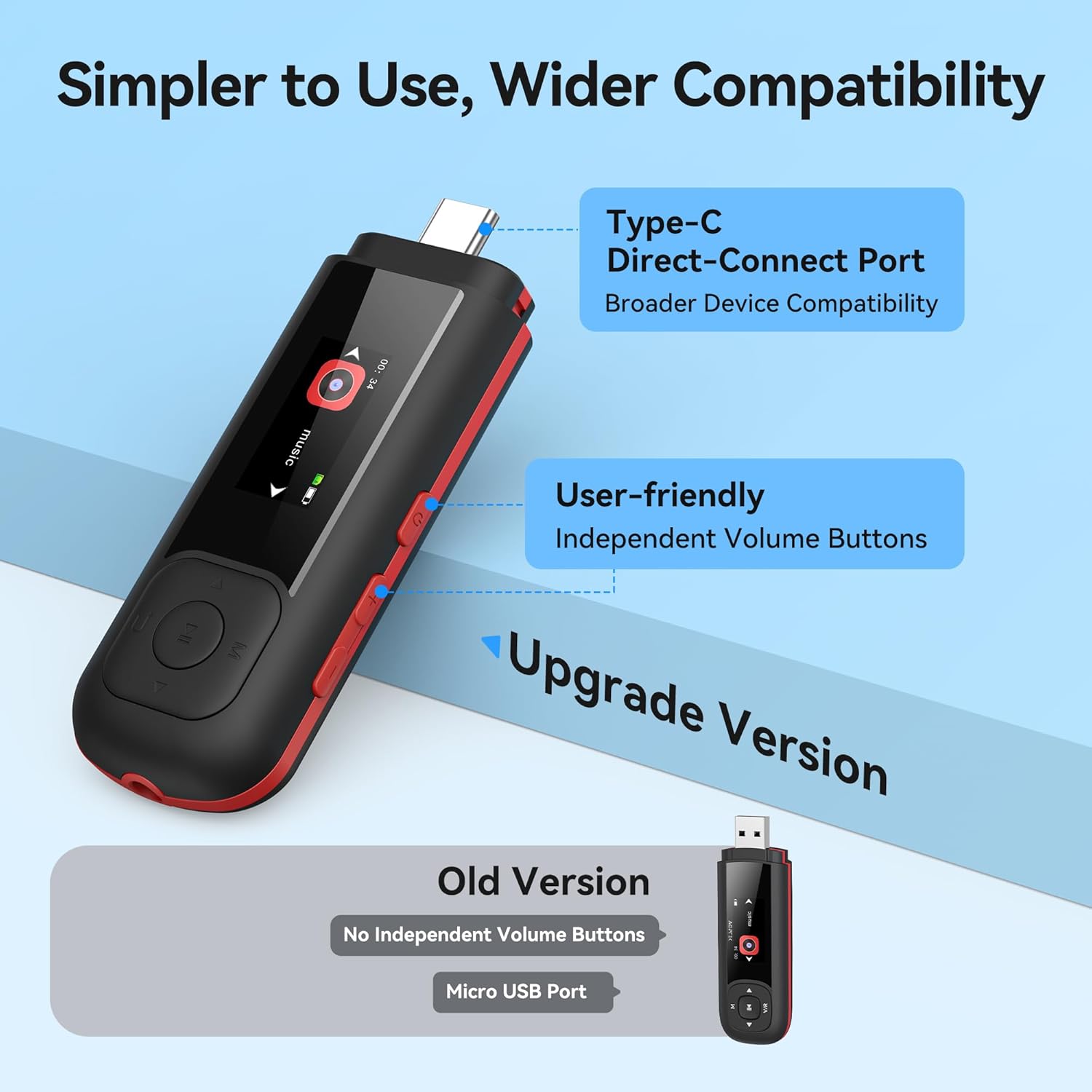
Image: Close-up of the AGPTEK A55PL MP3 Player, showing the Type-C direct-connect port and the independent volume buttons for user-friendly operation.
Musiikin toisto
The player supports various audio formats including MP3, WMA, APE, FLAC, and WAV.
- Connect wired headphones to the 3.5mm audio jack.
- Siirry päävalikossa "Musiikki"-vaihtoehtoon.
- Browse through your music library by artist, album, or folder.
- Aloita toisto valitsemalla kappale.
- Use the Play/Pause button to control playback and the volume buttons to adjust sound levels.

Image: A person enjoying music through headphones, highlighting the AGPTEK A55PL MP3 Player's support for multi-format lossless audio quality.

Image: Illustrates the different playback modes available on the AGPTEK A55PL MP3 Player, including Folder Mode and Music Mode with options like repeat, shuffle, and play in order.
FM-radio
To use the FM radio function, a wired headset must be connected as it acts as the antenna.
- Liitä langalliset kuulokkeet.
- Navigate to the "FM Radio" option from the main menu.
- Käytä navigointipainikkeita asemien hakemiseen tai taajuuden manuaaliseen virittämiseen.

Image: A user enjoying FM radio on the AGPTEK A55PL MP3 Player, emphasizing that wired headphones are required to function as an antenna.
Ääninauhuri
The built-in voice recorder allows you to capture audio on the go.
- Navigate to the "Recorder" option from the main menu.
- Aloita valitsemalla "Aloita tallennus".
- Press the Play/Pause button to stop and save the recording.
- Recordings can be accessed and played back from the "Recordings" list.

Image: The AGPTEK A55PL MP3 Player showing its portable recorder function, ready for effortless on-the-go audio capture.
Custom Playlists
You can create and manage custom playlists by connecting the player to a computer.
- Connect the MP3 player to your computer using the Type-C to USB cable.
- Access the player's storage as a removable disk.
- Järjestä musiikkisi files into folders or create M3U playlist filesuoraan laitteessa.
- The player supports up to 3 built-in customizable playlists.

Image: Demonstrates how to create and edit custom playlists by connecting the AGPTEK A55PL MP3 Player to a computer via USB.
Huolto
- Puhdistus: Puhdista laite pehmeällä, kuivalla liinalla. Vältä nestemäisiä puhdistusaineita tai liuottimia.
- Varastointi: Säilytä soitinta viileässä, kuivassa paikassa, poissa suorasta auringonvalosta ja äärimmäisistä lämpötiloista.
- Akun hoito: Remove the AAA battery if the device will not be used for an extended period to prevent leakage.
- Tietojen varmuuskopiointi: Säännöllinen varmuuskopiointi on tärkeää files from the player to a computer to prevent data loss.
Vianetsintä
Laite ei käynnisty
- Ensure the AAA battery is inserted correctly with the correct polarity.
- Vaihda AAA-paristo uuteen.
- Paina virtapainiketta muutaman sekunnin ajan.
Ei voida siirtää Files
- Verify the Type-C to USB cable is securely connected to both the player and the computer/phone.
- Kokeile toista tietokoneesi USB-porttia.
- Ensure your computer's operating system recognizes external storage devices.
- For phones, ensure the phone supports OTG (On-The-Go) functionality for external storage.
Ei ääntä toiston aikana
- Check if wired headphones are properly plugged into the 3.5mm audio jack.
- Varmista, ettei äänenvoimakkuutta ole asetettu minimiin tai mykistetty.
- Test with a different pair of headphones to rule out headphone issues.
- Varmista ääni files are not corrupted and are in a supported format (MP3, WMA, APE, FLAC, WAV).
FM-radio ei toimi
- Confirm that wired headphones are connected, as they serve as the antenna.
- Try scanning for stations again in an open area.
Tekniset tiedot
| Ominaisuus | Yksityiskohta |
|---|---|
| Mallin nimi | A55PL |
| Merkki | AGPTEK |
| Muistin tallennuskapasiteetti | 64 GB (via TF Card) |
| Yhteystekniikka | USB Type-C, Aux (3.5mm) |
| Erikoisominaisuudet | FM Radio, Voice Recorder, Replaceable AAA Battery |
| Väri | Musta |
| Näytön koko | 0.96 Inches (LED) |
| Yhteensopivat laitteet | Headphones, Computers, Type-C Smartphones |
| Mediatyyppi | Micro SD |
| Tuotteen paino | 3.87 unssia |
| Pakkauksen mitat | 6.57 x 5.12 x 0.94 tuumaa |
Takuu ja tuki
For warranty information and technical support, please refer to the official AGPTEK websivustolta tai ota yhteyttä heidän asiakaspalveluunsa. Säilytä ostokuitti ostotodistuksena mahdollisten takuuvaatimusten varalta.
Online-tuki: Vieraile osoitteessa AGPTEK-kauppa Amazonissa tuotetietoja ja tukiresursseja varten.


