1. Johdanto
The KONNWEI MAXOBD OBD2 Scanner is a professional diagnostic tool designed to read and clear diagnostic trouble codes (DTCs) from your vehicle's engine control unit (ECU). It provides access to various vehicle systems, allowing users to monitor live data, perform I/M readiness tests, and retrieve vehicle information. This manual provides detailed instructions for the proper use and maintenance of your MAXOBD scanner.
2. Turvallisuustiedot
Before operating the MAXOBD OBD2 Scanner, please read and understand all safety messages and instructions in this manual. Failure to do so may result in personal injury or damage to the vehicle or the scanner.
- Suorita autojen testaus aina turvallisessa ympäristössä.
- Käytä ANSI-standardien mukaisia silmäsuojaimia.
- Pidä vaatteet, hiukset, kädet, työkalut, testilaitteet jne. poissa kaikista liikkuvista tai kuumista moottorin osista.
- Käytä ajoneuvoa hyvin ilmastoidussa työtilassa; pakokaasut ovat myrkyllisiä.
- Aseta vaihteisto PARK-asentoon (automaattivaihteisto) tai NEUTRAL-asentoon (manuaalivaihteisto) ja varmista, että seisontajarru on kytkettynä.
- Pidä lähellä bensiini-/sähköpaloihin soveltuvaa sammutinta.
- Älä kytke tai irrota testauslaitteita sytytysvirran ollessa päällä tai moottorin käydessä.
3. Tuote ohiview
The MAXOBD scanner features a clear display and intuitive button layout for easy navigation and operation. It connects directly to your vehicle's OBD-II port to retrieve diagnostic information.
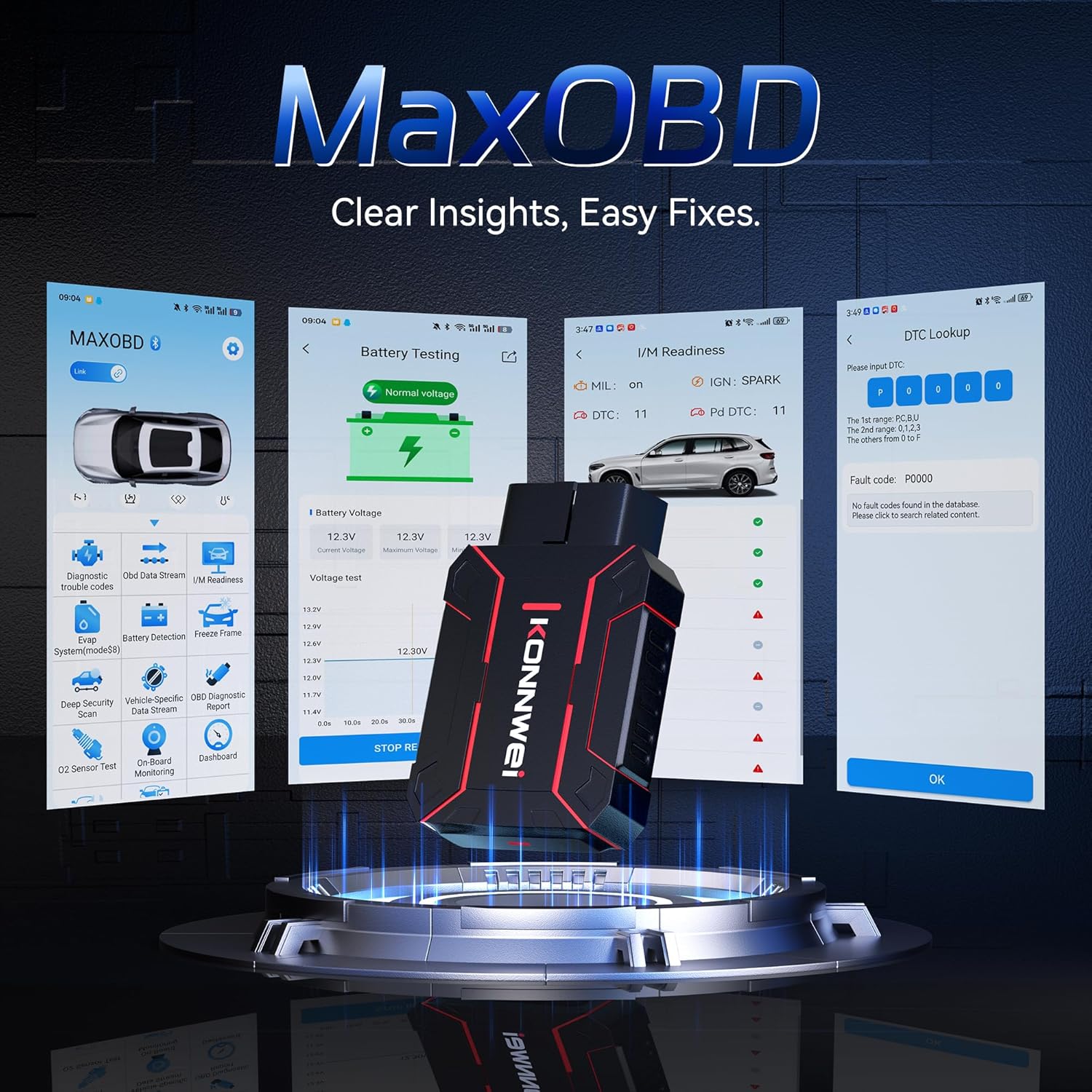
Image: The KONNWEI MAXOBD OBD2 Scanner device, illustrating its physical form and various diagnostic screen interfaces such as battery testing, I/M readiness, and DTC lookup.
Tärkeimmät komponentit:
- OBD-II-liitin: Liitetään ajoneuvon datalinkkiliittimeen (DLC).
- LCD-näyttö: Näyttää testitulokset ja valikkovaihtoehdot.
- Navigointipainikkeet: Käytetään valikoiden selaamiseen ja vaihtoehtojen valitsemiseen.
- Enter/Exit Buttons: Confirm selections or return to previous screens.
4. Asennus
Follow these steps to set up your MAXOBD OBD2 Scanner:
- Paikanna ajoneuvon OBD-II-portti: 16-nastainen datalinkkiliitin (DLC) sijaitsee yleensä kojelaudan alla kuljettajan puolella ajoneuvossa. Jos et löydä sitä, katso tarkka sijainti ajoneuvosi huolto-oppaasta.
- Skannerin kytkeminen: Plug the MAXOBD scanner's OBD-II connector firmly into the vehicle's DLC. Ensure a secure connection.
- Virta päälle: Once connected, the scanner will automatically power on. If it does not, turn the vehicle's ignition to the 'ON' position (engine off).
5. Käyttöohjeet
The MAXOBD scanner offers various diagnostic functions. Use the navigation buttons to move through menus and the Enter button to select options.

Image: A visual representation of a vehicle highlighting various systems (Engine, ABS, SAS, SRS, DPF, TPMS) that the MAXOBD scanner can perform a full system scan on.
Päävalikon toiminnot:
- Lue koodit: Retrieves Diagnostic Trouble Codes (DTCs) from the vehicle's ECU. These codes indicate specific issues detected by the vehicle's onboard diagnostic system.
- Tyhjennä koodit: Clears all DTCs from the vehicle's ECU and turns off the Malfunction Indicator Lamp (MIL). Ensure the underlying issue is resolved before clearing codes.
- I/M -valmius: Tarkistaa päästöihin liittyvien valvontajärjestelmien tilan määrittääkseen, ovatko ne valmiita päästötestiin.
- Tietovirta: Displays real-time operational parameters from the vehicle's sensors and components. This can include engine RPM, vehicle speed, oxygen sensor readings, and more.
- Pysäytyskuva: Captures a snapshot of sensor data at the moment a DTC was set. This data can help identify the conditions under which a fault occurred.
- O2-anturikoe: Hakee ajoneuvon tietokoneelta viimeksi suoritettujen O2-anturin valvontatestien tulokset.
- Sisäänrakennetun näytön testi: Hakee tuloksia päästöihin liittyvistä voimansiirron osista ja järjestelmistä, joita ei valvota jatkuvasti.
- Höyrystymisjärjestelmän testi: Käynnistää ajoneuvon haihtumispäästöjen rajoitusjärjestelmän vuototestin.
- Ajoneuvon tiedot: Näyttää ajoneuvon tunnistenumeron (VIN), kalibrointitunnuksen (CALID) ja kalibroinnin tarkistusnumeron (CVN).
Performing a Diagnostic Scan:
- Connect the scanner to the vehicle's DLC and turn the ignition to 'ON'.
- From the main menu, select 'Read Codes' and press Enter.
- The scanner will communicate with the vehicle and display any detected DTCs.
- Use the navigation buttons to scroll through the codes and their descriptions.
- To clear codes, return to the main menu, select 'Erase Codes', and confirm.
6. Huolto
Proper maintenance ensures the longevity and reliable operation of your MAXOBD scanner.
- Puhdistus: Käytä pehmeää, damp liinalla skannerin ulkopinnan puhdistamiseen. Älä käytä hankaavia puhdistusaineita tai liuottimia.
- Varastointi: Store the scanner in a dry, clean environment away from extreme temperatures and direct sunlight. Keep it in its original packaging or a protective case when not in use.
- Ohjelmistopäivitykset: Tarkista KONNWEI:n virallinen website for available software updates to ensure your scanner has the latest vehicle compatibility and features. Follow the instructions provided on the website for updating the device.
7. Vianmääritys
If you encounter issues with your MAXOBD scanner, refer to the following common problems and solutions:
| Ongelma | Mahdollinen syy | Ratkaisu |
|---|---|---|
| Skanneri ei käynnisty. | Loose connection; vehicle ignition off; faulty OBD-II port. | Ensure the scanner is securely plugged into the DLC. Turn vehicle ignition to 'ON'. Test on another vehicle if possible. |
| Viesti "Linkkivirhe" tai "Tietoliikennevirhe". | Loose connection; vehicle not OBD-II compliant; ignition off; communication protocol issue. | Verify connection. Ensure vehicle is OBD-II compliant (most vehicles 1996 and newer). Turn ignition to 'ON'. Try a different vehicle if available. |
| Näyttö on tyhjä tai jumiutunut. | Ohjelmistohäiriö; sähkökatkos. | Disconnect and reconnect the scanner. If the issue persists, contact customer support. |
If the problem persists after attempting these solutions, please contact KONNWEI customer support for further assistance.
8. Tekniset tiedot
- Merkki: KONNWEI
- Malli: maxobdTM
- Virtalähde: Paristokäyttöinen (OBD-II-portin kautta)
- Käyttöjärjestelmä: Linux
- Näytön koko: 2.8 tuumaa
- Auton sovitustyyppi: Universal Fit (for OBD-II compliant vehicles)
- Paketin mitat: 10.04 x 7.28 x 2.76 tuumaa
9. Takuu ja tuki
KONNWEI products are designed for reliability and performance. For warranty information, please refer to the documentation included with your purchase or visit the official KONNWEI website. For technical support, troubleshooting assistance, or any other inquiries, please contact KONNWEI customer service through their official channels.
KONNWEI Official Websivusto: Käy KONNWEI-kaupassa Amazonissa