1. Johdanto
The ATTACK SHARK G800 is a versatile wireless RGB gaming headset designed for an immersive audio experience across multiple platforms. It features tri-mode connectivity (2.4Ghz wireless, Bluetooth, and wired), 7.1 virtual surround sound, 50mm drivers, and a detachable AI noise-canceling microphone. This manual provides instructions for setup, operation, and maintenance to ensure optimal performance.
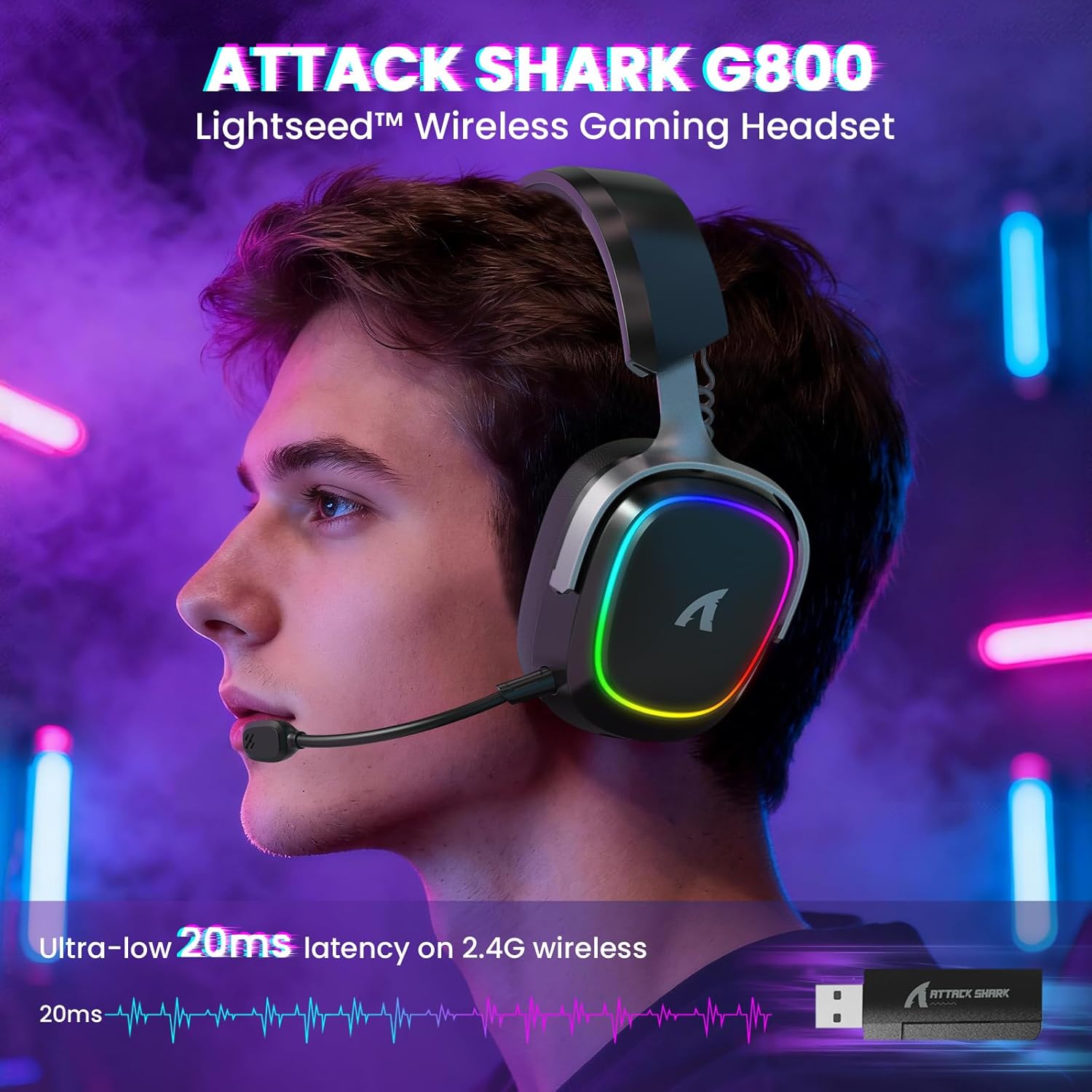
Image: The G800 headset in use, highlighting its RGB lighting and comfortable fit.
2. Mitä laatikossa on
- ATTACK SHARK G800 Wireless RGB Gaming Headset
- Irrotettava tekoälyllä varustettu melunvaimennusmikrofoni
- 2.4Ghz Wireless USB-A + Type-C Dual-Head Receiver
- USB-A-USB-C-latauskaapeli
- USB-C–USB-C-äänikaapeli
- Käyttöopas (tämä asiakirja)
3. Tuote ohiviewOhjaimet ja portit
Familiarize yourself with the various controls and ports on your G800 headset for seamless operation.
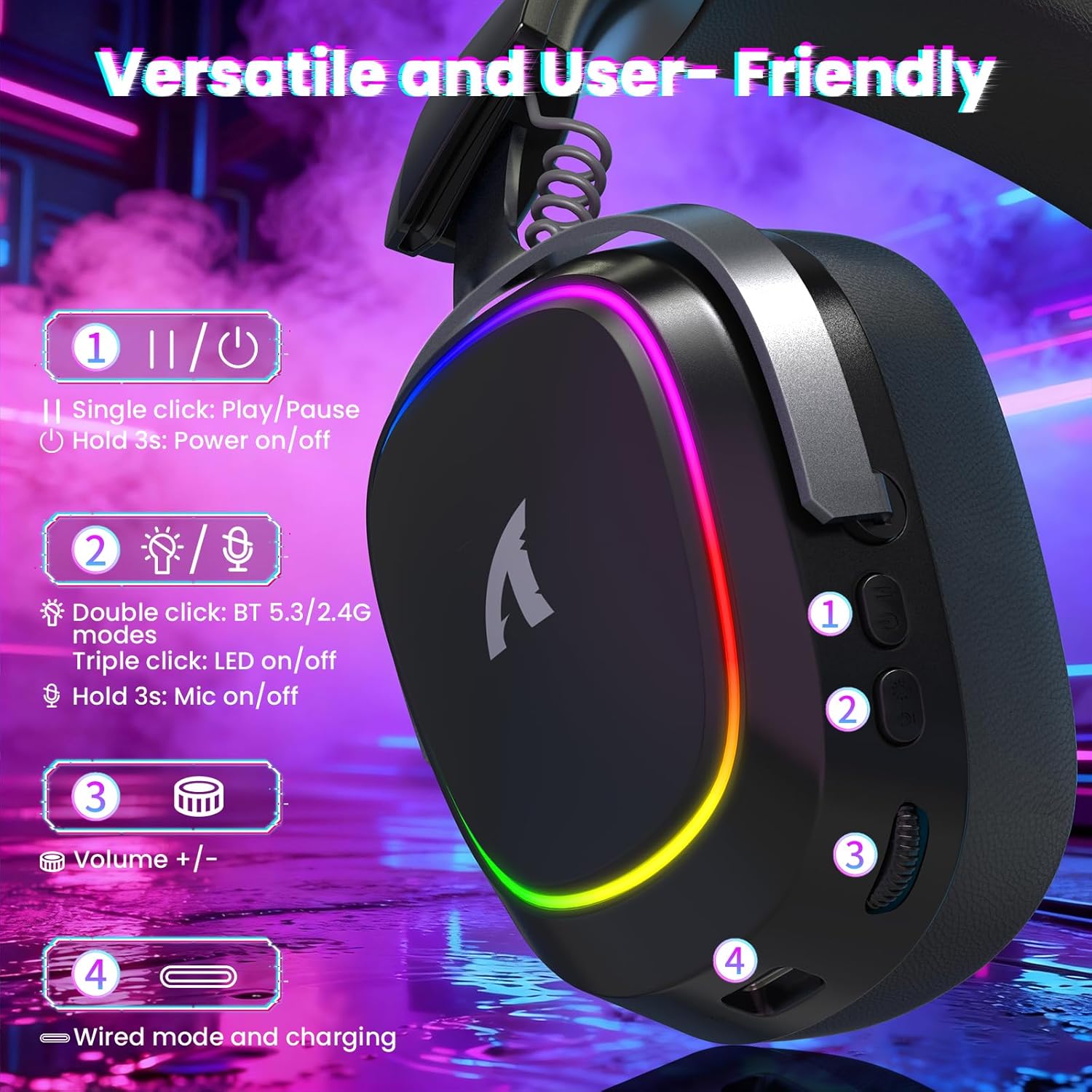
Kuva: Yksityiskohtainen view of the headset's left earcup with numbered controls and their functions.
- Play/Pause & Power Button: Single click for play/pause. Hold for 3 seconds to power on/off.
- Mode Switch & LED/Mic Control: Double click to switch between Bluetooth (BT 5.3) and 2.4Ghz wireless modes. Triple click to toggle RGB LED on/off. Hold for 3 seconds to toggle microphone on/off.
- Äänenvoimakkuuspyörä: Rotate to adjust audio volume up or down.
- Wired Mode & Charging Port: USB-C port for wired connection and charging.
- Mikrofoniliitäntä: Portti irrotettavan mikrofonin kytkemistä varten.
4. Asennus ja yhteys
The G800 headset offers three connection methods: 2.4Ghz wireless, Bluetooth, and wired.
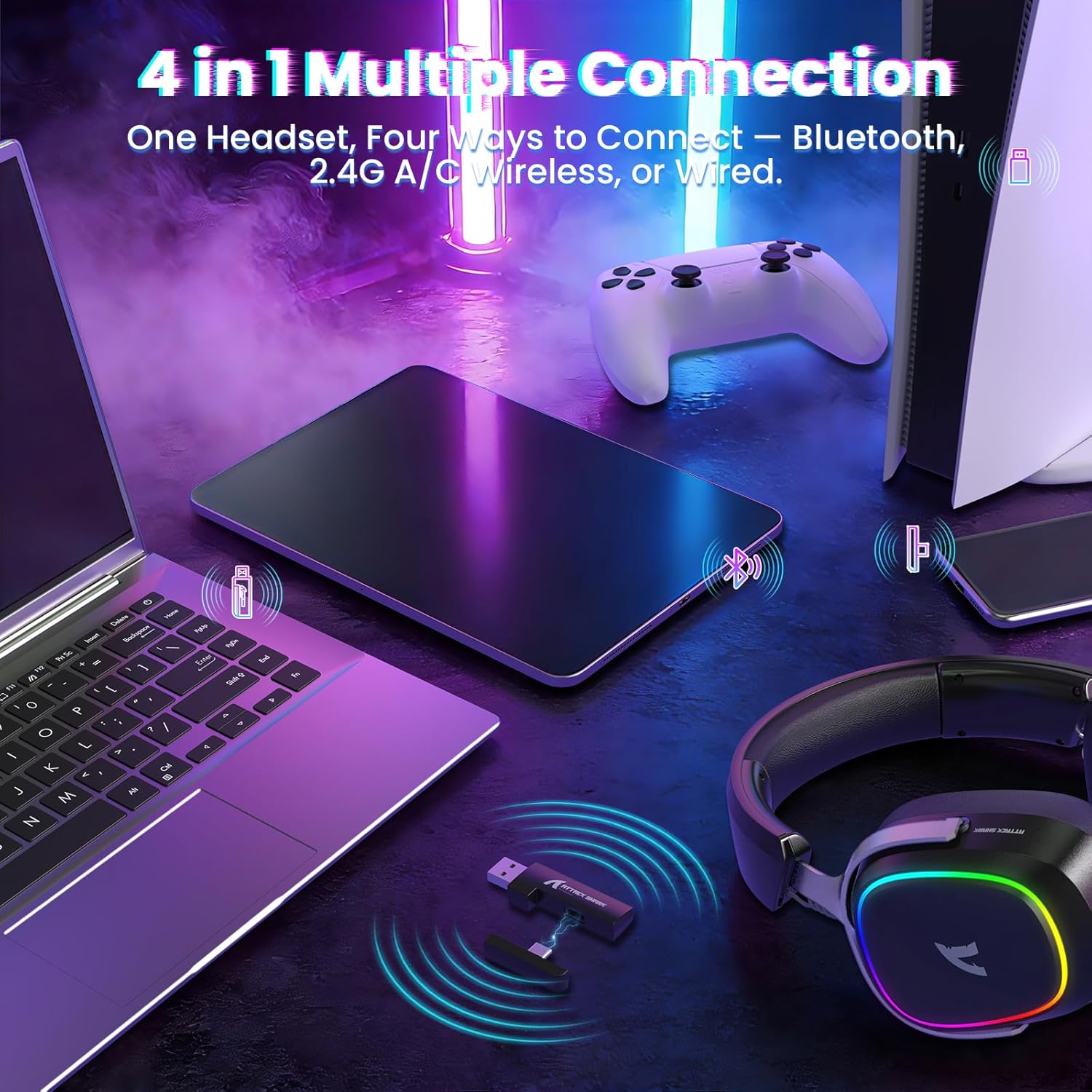
Image: The headset demonstrating its multi-platform connectivity options.
4.1. 2.4 GHz:n langaton yhteys
- Insert the 2.4Ghz USB-A or Type-C dual-head receiver into an available USB port on your PC, laptop, or PS5.
- Power on the G800 headset by holding the Power Button (1) for 3 seconds.
- Double click the Mode Switch (2) until the headset indicates 2.4Ghz mode (usually via an LED indicator or voice prompt).
- The headset should automatically connect to the receiver. If not, ensure the receiver is properly inserted and the headset is in 2.4Ghz mode.
4.2. Bluetooth-yhteys
- Power on the G800 headset by holding the Power Button (1) for 3 seconds.
- Double click the Mode Switch (2) until the headset indicates Bluetooth mode (usually via an LED indicator or voice prompt). The headset will enter pairing mode.
- On your device (e.g., mobile phone, tablet, PC), go to Bluetooth settings and search for available devices.
- Select "ATTACK SHARK G800" from the list to pair.
4.3. Langallinen yhteys
- Connect one end of the USB-C audio cable to the Wired Mode & Charging Port (4) on the headset.
- Connect the other end of the USB-C audio cable to your device's compatible port.
- Kuulokkeet siirtyvät automaattisesti langalliseen tilaan.
4.4. Kuulokkeen lataaminen
The G800 headset is equipped with a 1000mAh battery for extended use.

Image: Visual representation of the headset's 1000mAh battery capacity.
- Connect the USB-A to USB-C charging cable to the Wired Mode & Charging Port (4) on the headset and to a USB power source (e.g., computer USB port, wall adapter).
- Kuulokkeiden LED-merkkivalo näyttää latauksen tilan.
- The headset includes charging over-voltage protection for safety.
- An auto-shutdown function activates after 5 minutes of inactivity to conserve power.
5. Käyttöohjeet
5.1. Äänikokemus
The G800 features 50mm large-aperture biological diaphragm drivers and virtual 7.1 surround sound for an immersive audio experience.

Image: The 50mm audio drivers, responsible for high-fidelity sound.

Image: Demonstrating the 7.1 surround sound capability for precise audio positioning.
5.2. Mikrofonin käyttö
The detachable 360° AI Noise-Canceling Microphone ensures clear voice communication by filtering out background noise.
- Insert the detachable microphone into the dedicated microphone jack on the headset.
- Hold the Mode Switch (2) for 3 seconds to toggle the microphone on or off.
5.3. RGB-valaistuksen ohjaus
The headset features customizable RGB lighting.
- Triple click the Mode Switch (2) to toggle the RGB LED lighting on or off.
5.4. Ohjelmiston mukauttaminen
Enhance your audio experience with the dedicated driver software.
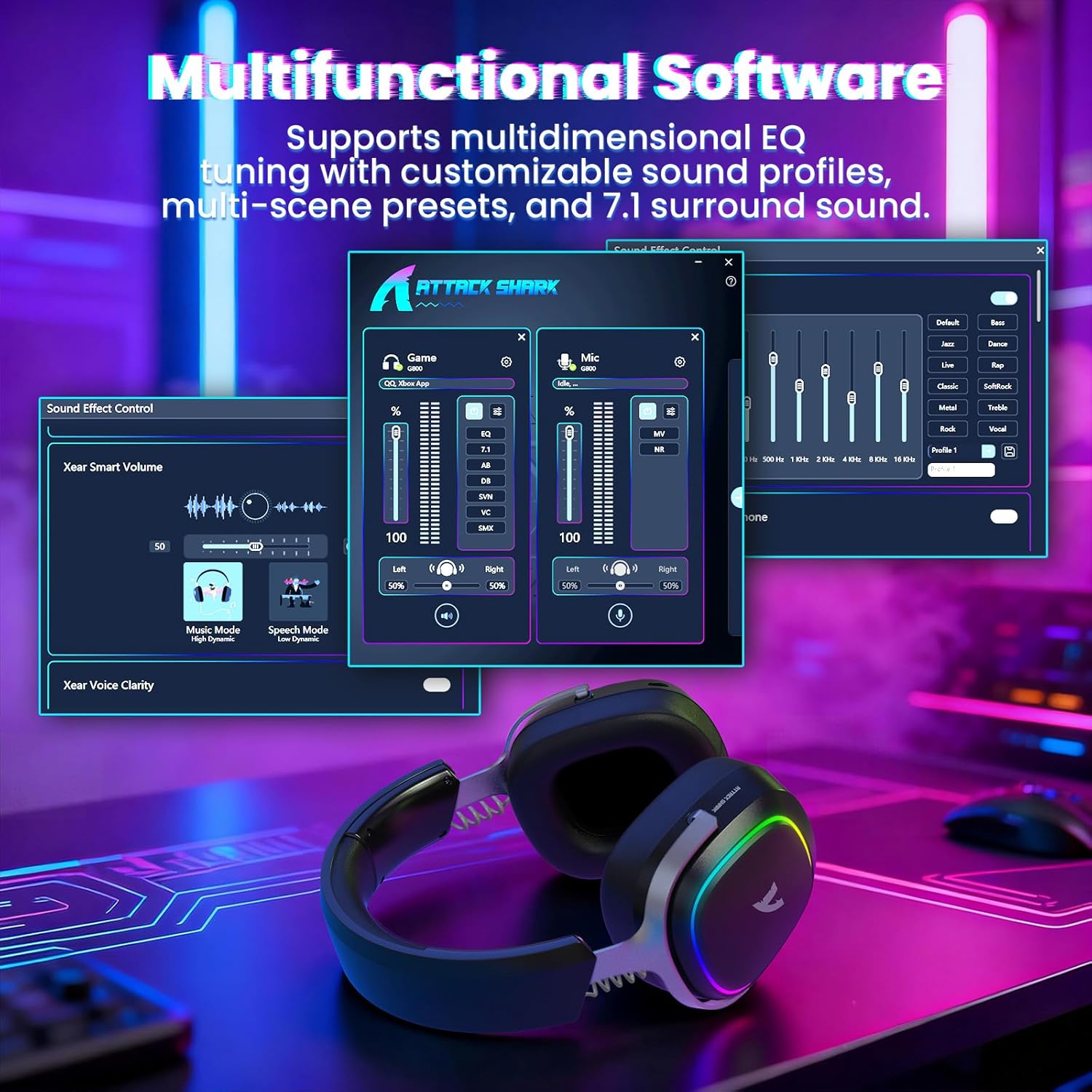
Image: The software interface for customizing audio settings.
- Download the official ATTACK SHARK G800 driver software from the manufacturer's websivusto.
- The software allows you to create custom EQ sound profiles and fine-tune 7.1 surround sound settings to match your preferences and game types.
6. Huolto
Proper maintenance ensures the longevity and performance of your G800 headset.
- Puhdistus: Use a soft, dry cloth to clean the headset. Avoid liquid cleaners or abrasive materials.
- Varastointi: Säilytä kuulokkeita viileässä, kuivassa paikassa, poissa suorasta auringonvalosta ja äärimmäisistä lämpötiloista.
- Korvatyynyt: The ear cushions are replaceable. Refer to the manufacturer's websivustolta varaosia ja ohjeita varten.

Image: Components of the headset, including replaceable ear cushions.
7. Vianmääritys
- Ei ääntä:
- Tarkista äänenvoimakkuustasot sekä kuulokkeista että yhdistetystä laitteesta.
- Ensure the correct audio output device is selected in your device's sound settings.
- Verify the headset is properly connected (2.4Ghz receiver, Bluetooth paired, or wired cable).
- Reboot the headset and your device.
- Mikrofoni ei toimi:
- Varmista, että mikrofoni on kiinnitetty tukevasti kuulokkeisiin.
- Check if the microphone is muted (hold Mode Switch (2) for 3 seconds to toggle).
- Varmista, että laitteesi ääniasetuksissa on valittu oikea mikrofonitulolaite.
- Testaa mikrofonia toisella laitteella, jos mahdollista.
- Yhteysongelmat:
- For 2.4Ghz, ensure the receiver is fully inserted and the headset is in 2.4Ghz mode.
- For Bluetooth, ensure the headset is in pairing mode and within range of your device. Try unpairing and re-pairing.
- For wired, ensure the cable is securely connected to both the headset and your device.
- Avoid sources of interference (e.g., other wireless devices, microwaves).
- RGB-valot eivät toimi:
- Triple click the Mode Switch (2) to toggle the RGB LED on/off.
- Varmista, että kuulokkeiden akussa on riittävästi virtaa.
8. Tekniset tiedot
| Ominaisuus | Erittely |
|---|---|
| Mallin nimi | G800 |
| Yhteystekniikka | Wired, Bluetooth (BT 5.3), 2.4Ghz Wireless |
| Ääniohjaimen tyyppi | Dynaaminen elementti (50 mm) |
| Surround Sound | Virtual 7.1 Spatial Audio |
| Mikrofoni | Detachable 360° AI Noise-Canceling |
| Wireless Latency (2.4Ghz) | 20ms (Lightseed Wireless Technology) |
| Wireless Range (2.4Ghz) | Jopa 10 m / 32.8 jalkaa |
| Bluetooth-alue | Jopa 30 m / 98.4 jalkaa |
| Akun kapasiteetti | 1000 mAh |
| Korvien sijoitus | Korvan yli |
| Materiaali | Aluminum Alloy, Protein Leather, Memory Foam |
| Paino | 1.1 puntaa (noin) |
| Yhteensopivat laitteet | PC, Laptops, PS5, Mobile Devices |
9. Turvallisuustiedot
- Vältä pitkäaikaista kuuntelua suurilla äänenvoimakkuuksilla kuulovaurioiden välttämiseksi.
- Do not expose the headset to extreme temperatures, humidity, or liquids.
- Pidä poissa lasten ulottuvilta.
- Älä yritä purkaa tai muokata kuulokkeita. Tämä mitätöi takuun.
- Hävitä tuote vastuullisesti paikallisten määräysten mukaisesti.
10. Virallinen tuotevideo
Video: Virallinen tuotevideo-esittelyasing the ATTACK SHARK G800 Wireless Tri Mode RGB Gaming Headset's features and design. This video is provided by the seller, UrWorthLtd US.
11. Takuu ja tuki
For warranty information, technical support, or customer service, please refer to the documentation included with your purchase or visit the official ATTACK SHARK websivusto. Säilytä ostokuitti takuuvaatimuksia varten.


