
1. Tärkeitä turvallisuusohjeita
Before using the THERUN Walking Pad Treadmill, please read all instructions carefully to ensure safe operation and prevent injury. Keep this manual for future reference.
- Aseta juoksumatto tasaiselle ja vakaalle alustalle.
- Ensure adequate clear space around the treadmill (at least 2 feet on sides and rear).
- Älä päästä lapsia tai lemmikkejä juoksumaton lähelle käytön aikana.
- Käyttäjän enimmäispaino on 120 kg.
- Käytä aina sopivia urheilujalkineita.
- Jos tunnet kipua, huimausta tai hengenahdistusta, lopeta liikunta välittömästi.
- Irrota juoksumatto pistorasiasta, kun sitä ei käytetä tai ennen puhdistusta/huoltoa.
- Do not use the treadmill if it is damaged or malfunctioning. Contact customer support.
2. Tuote ohiview
The THERUN YT05-CP Walking Pad Treadmill is a compact and portable fitness device designed for home and office use. It features a 2.5 HP motor, LED display, and app connectivity for enhanced workout tracking and control.

Kuva 2.1: Etuosa view of the THERUN Walking Pad Treadmill.
Kuva 2.2: Sivu view of the THERUN Walking Pad Treadmill, highlighting its low profile.
3. Asennus ja asennus
The THERUN YT05-CP Walking Pad Treadmill requires no assembly and is ready for use directly out of the box.
- Purkaminen: Carefully remove the treadmill from its packaging. Retain packaging for future storage or transport.
- Sijoitus: Place the treadmill on a firm, level surface. Ensure there is sufficient space around the unit for safe operation. The compact design allows for placement under desks or in small areas.
- Virtaliitäntä: Liitä virtajohto juoksumattoon ja sitten maadoitettuun pistorasiaan.
- Alkutarkastus: Before first use, ensure the running belt is centered and free from obstructions.

Figure 3.1: The treadmill is ready to use without installation. Includes remote control and user manual.
4. Käyttöohjeet
The treadmill can be operated via the included remote control or through a compatible mobile application.
4.1 Virran kytkeminen päälle/pois
- To power on, connect the treadmill to a power source and press the power button on the unit or remote control. The LED display will illuminate.
- To power off, press the power button again. Unplug the unit from the wall when not in use.
4.2 Kaukosäätimen käyttö
The remote control allows for easy adjustment of speed.
- Aloitus/lopetus: Press the start/stop button to begin or end a workout.
- Nopeuden säätö: Use the '+' and '-' buttons to increase or decrease the speed. The speed range is 0.6 to 3.8 mph.
4.3 Sovellusyhteydet
This walking pad can be linked to three compatible applications, allowing for enhanced control, scenario switching, and exercise data recording.
- Download one of the compatible fitness apps to your smartphone or tablet.
- Varmista, että Bluetooth on käytössä laitteessasi.
- Open the app and follow the on-screen instructions to pair with your THERUN treadmill.
- Once connected, you can control speed, track progress, and access various workout modes through the app.

Figure 4.1: App integration for personalized workouts and virtual scenery runs.
4.4 LED-näyttöä
The integrated LED display shows essential workout information such as speed, time, distance, and calories burned.
4.5 Hiljainen käyttö
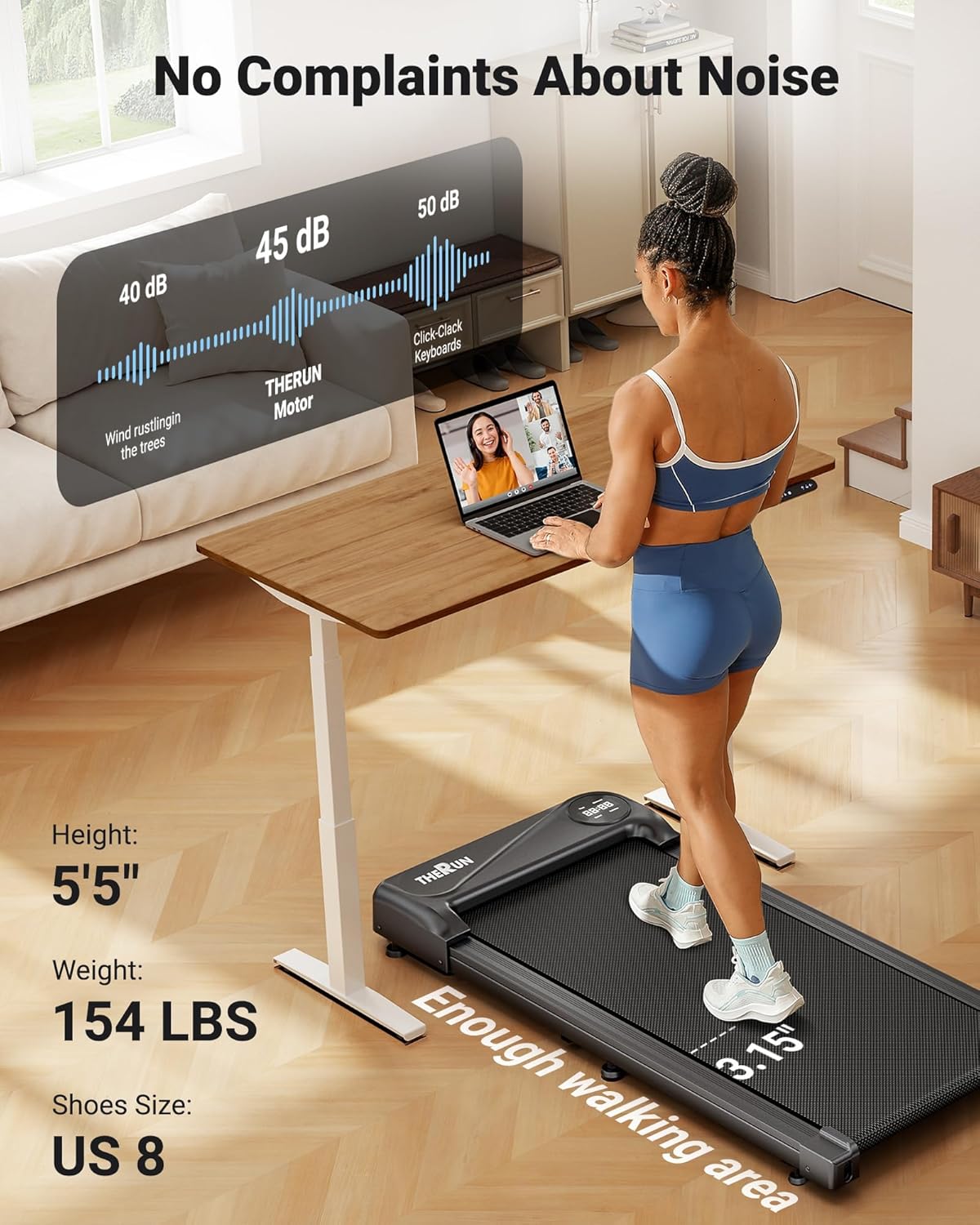
The treadmill is equipped with a 2.5 HP motor designed for quiet operation, producing approximately 45 dB of noise. This is comparable to ambient library noise, ensuring minimal disturbance during use.

Figure 4.2: The 45 dB motor ensures quiet operation, suitable for home or office environments.
5. Huolto
Säännöllinen huolto varmistaa juoksumattosi pitkän käyttöiän ja optimaalisen suorituskyvyn.
- Puhdistus: Pyyhi juoksumaton pinta mainoksellaamp liinalla jokaisen käyttökerran jälkeen. Vältä hankaavien puhdistusaineiden tai liuottimien käyttöä.
- Hihnan voitelu: The running belt may require lubrication periodically. Refer to the specific instructions in the included user manual for your model regarding lubrication frequency and type of lubricant.
- Hihnan säätö: If the running belt shifts to one side or slips, it may need adjustment. Consult the detailed instructions in the full user manual for proper belt centering and tensioning procedures.
- Varastointi: When not in use, the compact design and built-in transport wheels allow for easy movement and storage under furniture or in narrow spaces.

Figure 5.1: The treadmill's compact design and transport wheels facilitate easy storage.
6. Vianmääritys
Jos juoksumatollasi on ongelmia, katso seuraavat yleiset ratkaisut:
- Juoksumatto ei käynnisty: Ensure the power cord is securely plugged into both the treadmill and a functional electrical outlet. Check if the power switch on the treadmill is in the 'ON' position.
- Running belt stops or slows unexpectedly: Check the power connection. Ensure the maximum weight capacity (265 lbs) is not exceeded. The belt may require lubrication or adjustment.
- Kaukosäädin ei vastaa: Replace the batteries in the remote control. Ensure there are no obstructions between the remote and the treadmill's receiver.
- Sovelluksen yhteysongelmat: Ensure Bluetooth is enabled on your device and the app is updated to the latest version. Try restarting both the treadmill and your device.
For persistent issues or problems not listed here, please contact THERUN customer support.
7. Tekniset tiedot
| Ominaisuus | Erittely |
|---|---|
| Merkki | JUOKSU |
| Mallin nimi | YT05-CP |
| Tuotteen mitat (PxLxK) | 41.9" S x 19.6" L x 4.5" K |
| Tuotteen paino | 34.4 puntaa |
| Materiaali | Seosteräs |
| Suurin nopeus | 3.8 mailia tunnissa |
| Miniminopeus | 0.6 mailia tunnissa |
| Erikoisominaisuus | Sovellusten liitettävyys |
| Kohdeyleisö | Aikuinen |
| Maksimi hevosvoimat | 2.5 hevosvoimaa |
| Asennus vaaditaan | Ei |
| Näytön tyyppi | LED |
| Enimmäispainosuositus | 265 puntaa |
| Melutaso | Noin 45 dB |
8. Takuu ja tuki
8.1 Takuutiedot
Your purchase includes a 1-year protection plan. This warranty covers manufacturing defects and ensures the product meets quality standards under normal use.
8.2 Asiakastuki
For any questions, concerns, or assistance with your THERUN Walking Pad Treadmill, our professional support team is available. Please contact us via email for product guides, documents, or troubleshooting assistance.

Figure 8.1: THERUN offers exclusive after-sales service and support for your treadmill.