Johdanto
This manual provides comprehensive instructions for the safe and efficient operation of your Crosley CR3505A-LN Cruiser Portable CD Player. Please read this manual thoroughly before using the device and retain it for future reference. This portable audio player combines classic design with modern functionality, offering CD playback, Bluetooth connectivity, FM radio, and auxiliary input.
Mitä laatikossa on
Varmista, että kaikki osat ovat mukana purkaessasi pakkauksesta:
- Crosley CR3505A-LN Portable CD Player
- USB-kaapeli
Tuotteen ominaisuudet
- Kannettava musiikkisoitin: Equipped with a rechargeable lithium battery, providing up to 4 hours of playback at 50% volume after a 3.5-hour charge.
- Versatile Audio Options: Features built-in stereo speakers and a headphone jack. Supports CD playback, Bluetooth streaming to wireless headphones/speakers, and auxiliary input for other devices.
- Retro Style, Modern Function: Blends nostalgic aesthetics with contemporary features, including a tonearm-inspired power switch and a built-in FM radio.
- Designed for Portability: Lightweight construction with a magnetic lid closure for easy transport.
Komponenttien tunnistus
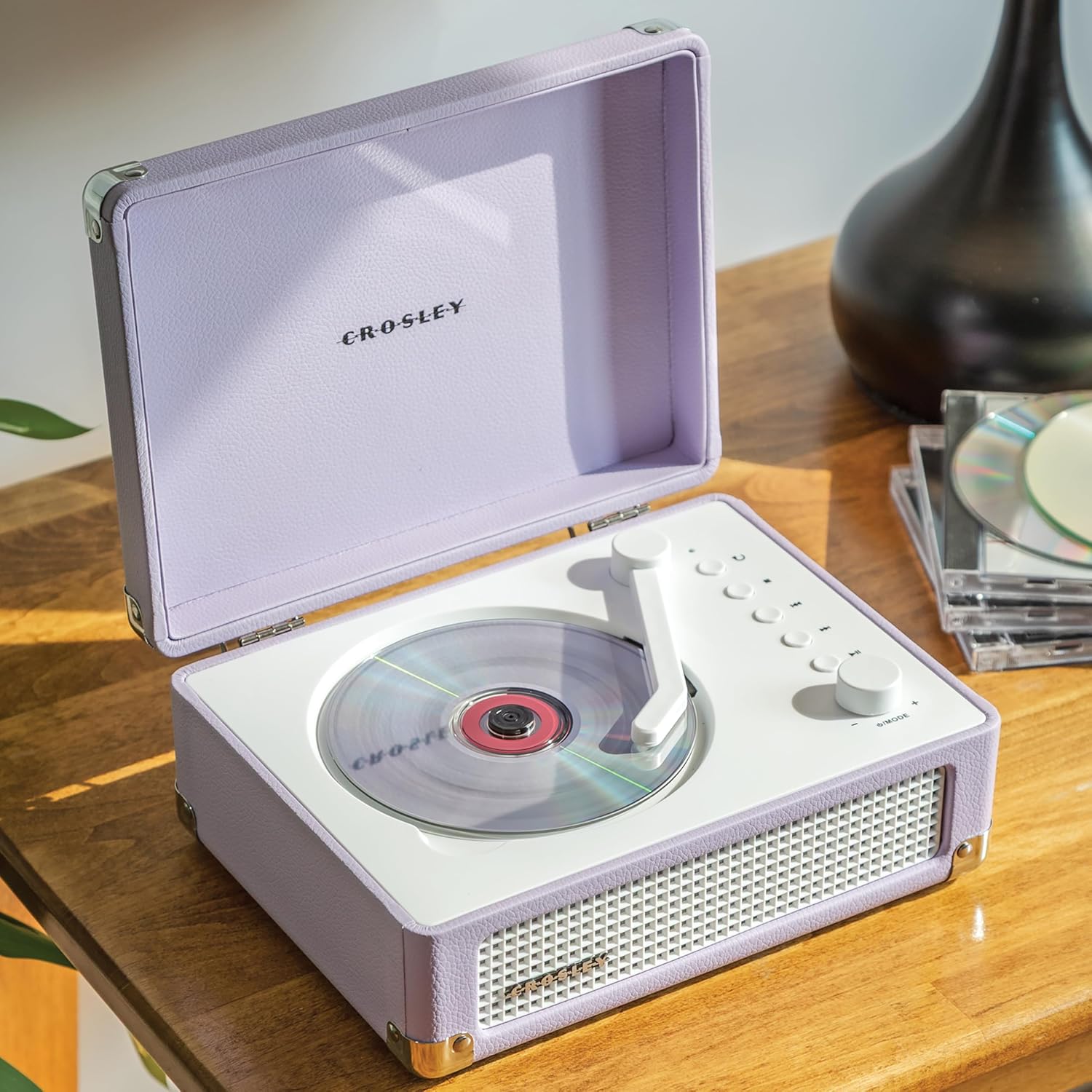
Kuva 1: Yläosa view of the Crosley CR3505A-LN with lid open, highlighting the CD compartment and control panel.

Kuva 2: Takaosa view of the unit, displaying the headphone jack, AUX In port, and USB-C charging port.
Ohjauspaneeli ohiview
- Tonearm-inspired Power Switch: Activates/deactivates the unit and initiates CD playback.
- Mode/Power Dial: Rotates to adjust volume. Press to cycle through modes (CD, Bluetooth, FM, AUX).
- Toista-painike: Repeats current track or album.
- Stop-painike: Pysäyttää CD-toiston.
- Edellinen kappale/kelaus taaksepäin -painike: Skips to the previous track or rewinds during playback.
- Seuraava kappale/pikakelaus eteenpäin -painike: Skips to the next track or fast forwards during playback.
- Toisto/tauko-painike: Ohjaa CD-levyn ja Bluetoothin toistoa.
- Bluetooth/FM Indicator Light: Indicates current mode and pairing status.
Asennus
Akun lataaminen
- Connect the supplied USB-C cable to the DC 5V port on the rear of the unit (Figure 2).
- Liitä USB-C-kaapelin toinen pää yhteensopivaan USB-virtalähteeseen (ei sisälly toimitukseen).
- Merkkivalo näyttää latauksen tilan. Täysi lataus kestää noin 3.5 tuntia.
Virran kytkeminen päälle/pois
To power on the unit, move the tonearm-inspired switch over the CD spindle. To power off, move the switch back to its resting position.
Käyttöohjeet
CD-toisto
- Open the lid of the CD player.
- Carefully place a CD onto the spindle in the CD compartment, label side up.
- Sulje kansi.
- Move the tonearm-inspired switch over the CD spindle to power on and initiate playback.
- Use the Play/Pause, Stop, Previous Track/Rewind, and Next Track/Fast Forward buttons to control playback.
- Press the Repeat button to cycle through repeat modes (repeat one track, repeat all tracks, random play).
Bluetooth-pariliitos
- Kytke laitteeseen virta.
- Press the Mode/Power dial repeatedly until the Bluetooth indicator light flashes blue, indicating pairing mode.
- On your Bluetooth-enabled device (e.g., smartphone, tablet), search for "Crosley CR3505A-LN" in the Bluetooth settings.
- Select the device to pair. Once connected, the Bluetooth indicator light will turn solid blue.
- You can now stream audio from your device to the CD player.
FM-radio
- Kytke laitteeseen virta.
- Press the Mode/Power dial repeatedly until the FM indicator light illuminates.
- Use the Previous Track/Rewind and Next Track/Fast Forward buttons to tune to desired FM stations.
Aputulo
- Kytke laitteeseen virta.
- Press the Mode/Power dial repeatedly until the AUX indicator light illuminates.
- Connect an external audio device (e.g., MP3 player) to the AUX In port on the rear of the unit (Figure 2) using a 3.5mm audio cable (not included).
- Audio from the external device will now play through the CD player's speakers.
Äänenvoimakkuuden säätö
Rotate the Mode/Power dial clockwise to increase volume and counter-clockwise to decrease volume.
Huolto
Puhdistus
- Irrota laite aina virtalähteestä ennen puhdistamista.
- Pyyhi ulkopinnat pehmeällä, kuivalla liinalla. Älä käytä hankaavia puhdistusaineita, vahoja tai liuottimia.
- For the CD lens, use a specialized CD lens cleaner. Avoid touching the lens directly.
Akun hoito
- Akun käyttöiän pidentämiseksi vältä akun usein tapahtuvaa täydellistä tyhjentymistä.
- Jos laitetta säilytetään pitkään, lataa akku noin 50-prosenttisesti muutaman kuukauden välein.
Vianetsintä
| Ongelma | Mahdollinen syy | Ratkaisu |
|---|---|---|
| Ei virtaa | Battery is discharged; Unit is not powered on. | Charge the battery using the USB-C cable; Ensure the tonearm-inspired switch is moved to the ON position. |
| CD-levy ei soi | CD inserted incorrectly; CD is dirty or scratched; Unit is not in CD mode. | Reinsert CD label side up; Clean or replace CD; Press Mode/Power dial to select CD mode. |
| Bluetooth ei muodosta yhteyttä | Laite ei ole pariliitostilassa; Laite liian kaukana; Aiemmin paritettu laite yhdistetty. | Press Mode/Power dial until Bluetooth light flashes; Move device closer; Disconnect from other Bluetooth devices. |
| Huono FM-radion vastaanotto | Heikko signaali; Häiriöitä. | Adjust the unit's position; Try tuning to a stronger station. |
| Ei ääntä | Äänenvoimakkuus liian alhainen; Väärä tila valittu; Kuulokkeet kytketty. | Increase volume; Ensure correct mode (CD, BT, FM, AUX) is selected; Disconnect headphones if using speakers. |
Tekniset tiedot
- Tuotteen mitat: 6.75 x 8.75 x 3.75 tuumaa
- Tuotteen paino: 2.54 kiloa
- Tuotteen mallinumero: CR3505A-LN
- Merkki: Crosley
- Väri: Laventeli
- Yhteystekniikka: Bluetooth
- Levyjen määrä: 1
Turvallisuustiedot
- Älä altista laitetta äärimmäisille lämpötiloille, kosteudelle tai suoralle auringonvalolle.
- Vältä laitteen sijoittamista lämmönlähteiden lähelle tai huonosti ilmastoituun paikkaan.
- Älä pura tai yritä korjata laitetta itse. Jätä kaikki huoltotyöt pätevän henkilöstön tehtäväksi.
- Pidä laite poissa vedestä tai muista nesteistä.
- Käytä ainoastaan määritettyä latauskaapelia.
Takuu ja tuki
Crosley-tuotteet on suunniteltu Yhdysvalloissa, ja niillä on Yhdysvalloissa toimiva asiakastuki. Takuutietoja tai teknistä tukea varten katso Crosleyn virallinen verkkosivusto. websivustolta tai ota yhteyttä suoraan heidän asiakaspalveluunsa. Säilytä ostokuitti ostotodistuksena takuuvaatimuksia varten.


