1. Johdanto
This manual provides essential information for the safe and efficient operation of your Telefunken 50FTV825 50-inch 4K UHD Smart Fire TV. Please read these instructions thoroughly before using the television and retain them for future reference.
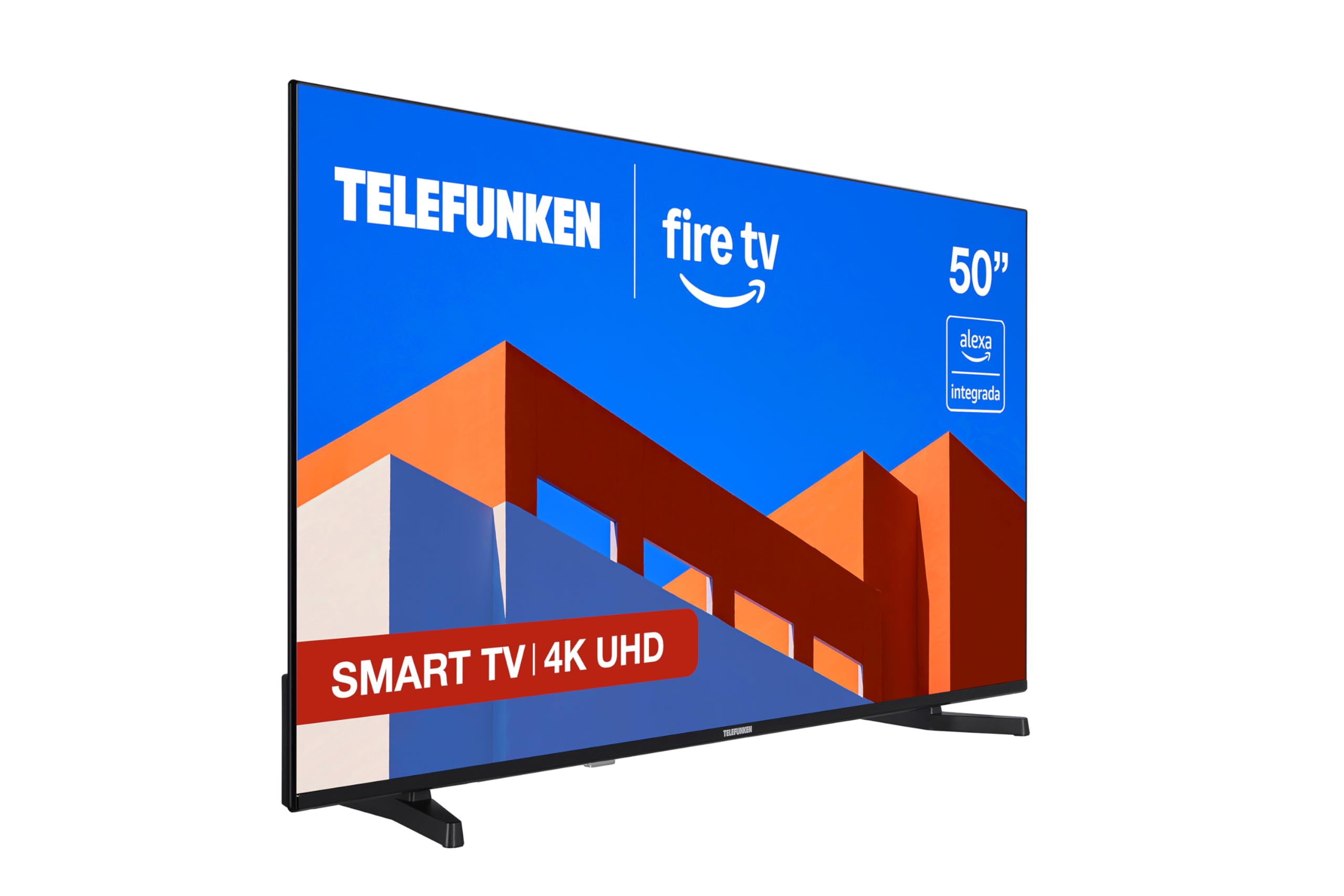
Kuva: Edessä view of the Telefunken 50FTV825 50-inch 4K UHD Smart Fire TV.
2. Turvallisuustiedot
Noudata aina televisiota käyttäessäsi perusturvallisuusohjeita tulipalon, sähköiskun ja loukkaantumisen riskin vähentämiseksi.
- Älä altista televisiota sateelle tai kosteudelle.
- Varmista oikea ilmanvaihto television ympärillä.
- Älä tuki tuuletusaukkoja esimerkiksi sanomalehdillä, pöytäliinoilla tai verhoilla.
- Do not place the TV on unstable carts, stands, tripods, brackets, or tables.
- Irrota televisio pistorasiasta ukkosmyrskyjen aikana tai jos sitä ei käytetä pitkään aikaan.
- Anna kaikki huoltotoimenpiteet pätevän huoltohenkilöstön tehtäväksi.
3. Mitä laatikossa on
Varmista, että kaikki osat ovat mukana pakkauksesta purkamisen yhteydessä:
- Telefunken 50FTV825 50-inch 4K UHD Smart Fire TV
- Kaukosäädin
- Paristot (kaukosäädintä varten)
- Käyttöopas (tämä asiakirja)
4. Asennus
4.1. Jalustan tai seinäkiinnikkeen kiinnittäminen
Carefully place the TV face down on a soft, flat surface. Attach the stand using the provided screws, ensuring it is securely fastened. If wall-mounting, follow the instructions provided with your VESA-compatible wall mount (sold separately).
4.2. Virran ja laitteiden kytkeminen
- Liitä virtajohto televisioon ja sitten pistorasiaan.
- Connect external devices (e.g., cable box, gaming console, Blu-ray player) to the HDMI ports.
- For internet access, connect an Ethernet cable to the LAN port or prepare for Wi-Fi setup.
4.3. Ensimmäinen käynnistys ja asennustoiminto
Press the power button on the remote control. The TV will guide you through the initial setup process, including language selection, network connection, and Fire TV account login.
5. Operating Your Telefunken Fire TV
5.1. Fire TV -liitäntä
Your TV features an integrated Fire OS, providing access to a wide range of streaming services and applications. Navigate the home screen using the remote control to browse content from Netflix, Prime Video, Disney+, and more.

Image: The Fire TV home screen displaying available streaming applications.
5.2. Alexan ääniohjaus
The remote control includes an integrated Alexa button. Press and hold this button to activate voice commands. You can ask Alexa to:
- Vaihda kanavaa tai säädä äänenvoimakkuutta.
- Etsi movies, TV shows, or music.
- Ohjaa yhteensopivia älykodin laitteita.
- Tarkista sää tai hae tietoa.

Image: Close-up of the remote control highlighting the Alexa voice button.
5.3. Apple AirPlay
Utilize Apple AirPlay to stream content directly from your iPhone, iPad, or Mac to the television. This allows for easy sharing of photos, videos, and screen mirroring without complex configurations.
5.4. Kuvan ja äänen parannukset
- 4K UHD + HDR10: Experience stunning visuals with four times the resolution of Full HD, enhanced by HDR10 for vibrant colors and deep contrasts.
- Dolby Audio: Enjoy immersive and clear sound quality, bringing movies, series, and games to life.
- MEMC: Motion Estimation, Motion Compensation technology ensures smoother motion in fast-paced scenes.
6. Huolto
6.1. Näytön puhdistaminen
Pyyhi näyttö varovasti pehmeällä, kuivalla ja nukkaamattomalla liinalla. Pinttyneisiin tahroihin pyyhi kevyestiampKostuta liina vedellä tai erikoisnäytönpuhdistusaineella. Vältä voimakkaiden kemikaalien tai hankaavien materiaalien käyttöä.
6.2. Kaapin puhdistaminen
Pyyhi television kotelo pehmeällä, kuivalla liinalla. Älä käytä nestemäisiä tai aerosolipuhdistusaineita suoraan koteloon.
6.3. Ohjelmistopäivitykset
Your Fire TV will periodically receive software updates. Ensure your TV is connected to the internet to receive these updates, which improve performance and add new features.
7. Vianmääritys
Jos televisiossasi on ongelmia, katso seuraavia yleisiä ratkaisuja:
| Ongelma | Mahdollinen syy | Ratkaisu |
|---|---|---|
| Ei virtaa | Power cord not connected, power outlet not working. | Tarkista virtajohdon liitäntä. Testaa pistorasiaa toisella laitteella. |
| Ei kuvaa, mutta ääni kuuluu | Väärä tulolähde valittu. | Press the 'Input' button on the remote to select the correct source. |
| Ei ääntä, mutta kuva näkyy | Volume is muted or too low. External audio device issues. | Unmute or increase volume. Check connections to external audio systems. |
| Kaukosäädin ei toimi | Paristot ovat tyhjät tai ne on asetettu väärin. Kaukosäätimen ja television välissä on este. | Vaihda paristot. Varmista, että television infrapunatunnistimeen on esteetön näköyhteys. |
| Wi-Fi-yhteysongelmia | Incorrect password, router issues, TV too far from router. | Anna Wi-Fi-salasana uudelleen. Käynnistä reititin uudelleen. Siirrä televisiota lähemmäs reititintä tai käytä Ethernetiä. |
For further assistance, please contact Telefunken customer support.
8. Tekniset tiedot
| Ominaisuus | Yksityiskohta |
|---|---|
| Merkki | Telefunken |
| Mallinumero | 50FTV825 |
| Näytön koko | 50 tuumaa |
| Näyttötekniikka | LED |
| Resoluutio | 4K UHD (3840 2160 x XNUMX XNUMX) |
| Päivitystaajuus | 120 Hz |
| Käyttöjärjestelmä | Fire-käyttöjärjestelmä |
| Erikoisominaisuudet | Alexa Compatible, Bezel-less Design, VESA Wall Mountable, HDR - HLG, Smart TV |
| Yhteystekniikka | Bluetooth, Ethernet, HDMI, USB, Wi-Fi |
| Kuvasuhde | 16:9 |
| Tuotteen mitat (L x S x K) | 112 x 26.1 x 68.6 cm |
| Tuotteen paino | 9.56 kg |
| Alkuperämaa | Turkki |
| Energy Efficiency Rating (SDR) | E |
| Energy Efficiency Rating (HDR) | G |
For detailed energy information, refer to the product information sheet and energy label:

Image: Product Information Sheet detailing technical specifications and energy consumption.
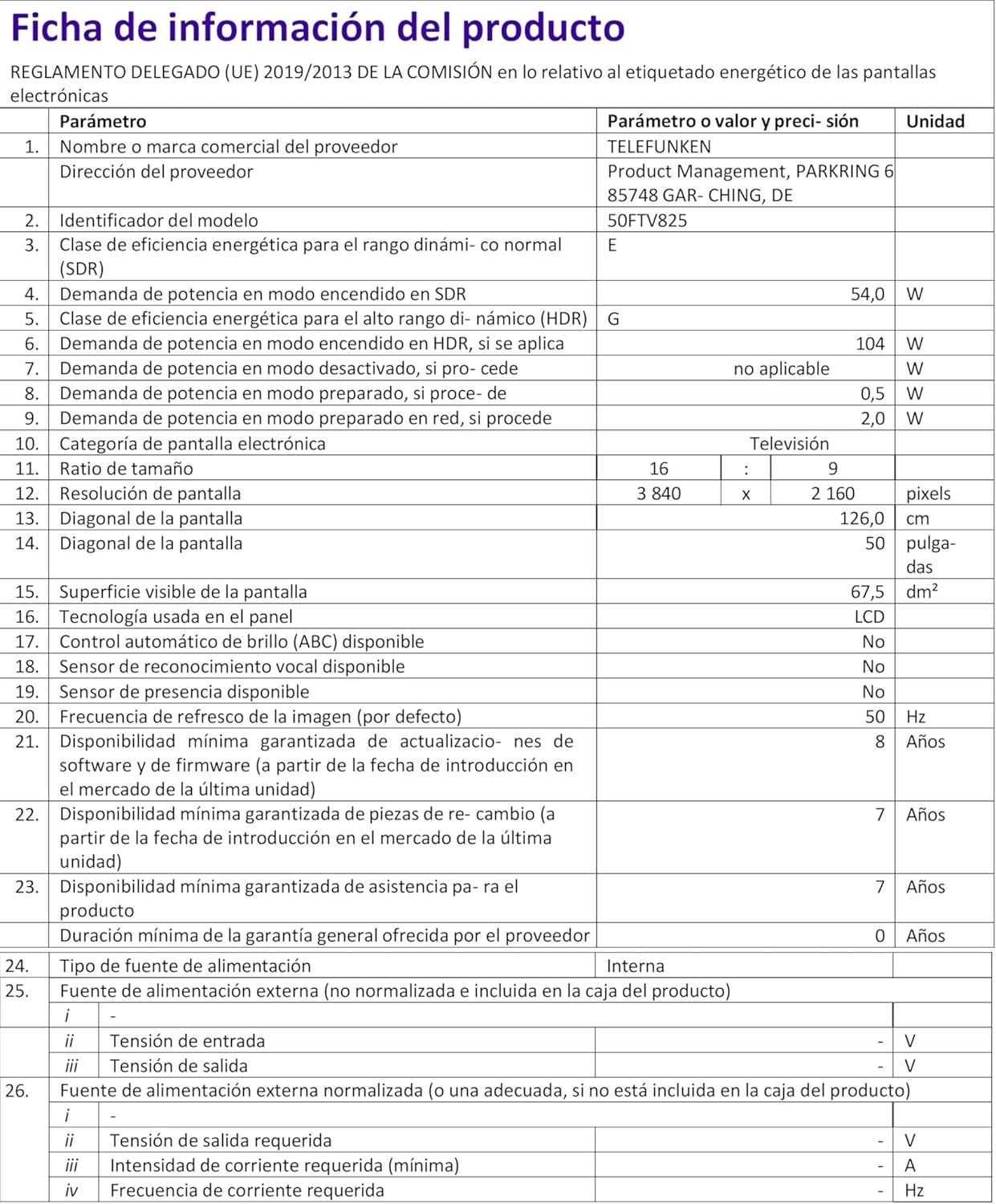
Image: Energy Efficiency Label showing ratings for SDR and HDR modes.
Additional energy information can be found at: https://eprel.ec.europa.eu/qr/2400040
9. Takuu ja tuki
Your Telefunken 50FTV825 television comes with a standard manufacturer's warranty. Please refer to the warranty card included in your packaging for specific terms and conditions, including warranty duration and coverage details.
For technical support, troubleshooting assistance beyond this manual, or warranty claims, please contact Telefunken customer service through their official websivustolla tai takuuasiakirjoissa annettujen yhteystietojen kautta.


