
Johdanto
This manual provides essential information for the setup, operation, and maintenance of your Hyperkin The Competitor Wired Controller. Designed for precision and performance, this controller is compatible with Xbox Series X|S, Xbox One, and Windows PC. Please read this manual thoroughly before use to ensure optimal performance and longevity of your device.
Pakkauksen sisältö
Varmista, että pakkauksessasi on kaikki tarvittavat osat:
- Hyperkin The Competitor Wired Controller
- Irrotettava USB-C-kaapeli
- Pika-aloitusopas
- Swappable Stick Caps (Domed & Concave)

Image: Contents of the Hyperkin The Competitor package, including the controller, cable, and documentation.
Asennus
The Hyperkin The Competitor Wired Controller offers plug-and-play functionality for supported platforms.
Yhdistäminen Xbox Series X|S:ään tai Xbox Oneen:
- Varmista, että Xbox-konsolisi on päällä.
- Connect the detachable USB-C cable to the USB-C port on the top of the controller.
- Plug the USB-A end of the cable into an available USB port on your Xbox console.
- The controller will automatically connect and be ready for use.
Tietokoneeseen liittäminen (Windows):
- Varmista, että tietokoneesi on päällä.
- Connect the detachable USB-C cable to the USB-C port on the top of the controller.
- Plug the USB-A end of the cable into an available USB port on your PC.
- Windows will automatically detect and install the necessary drivers. The controller will be ready for use once the installation is complete.
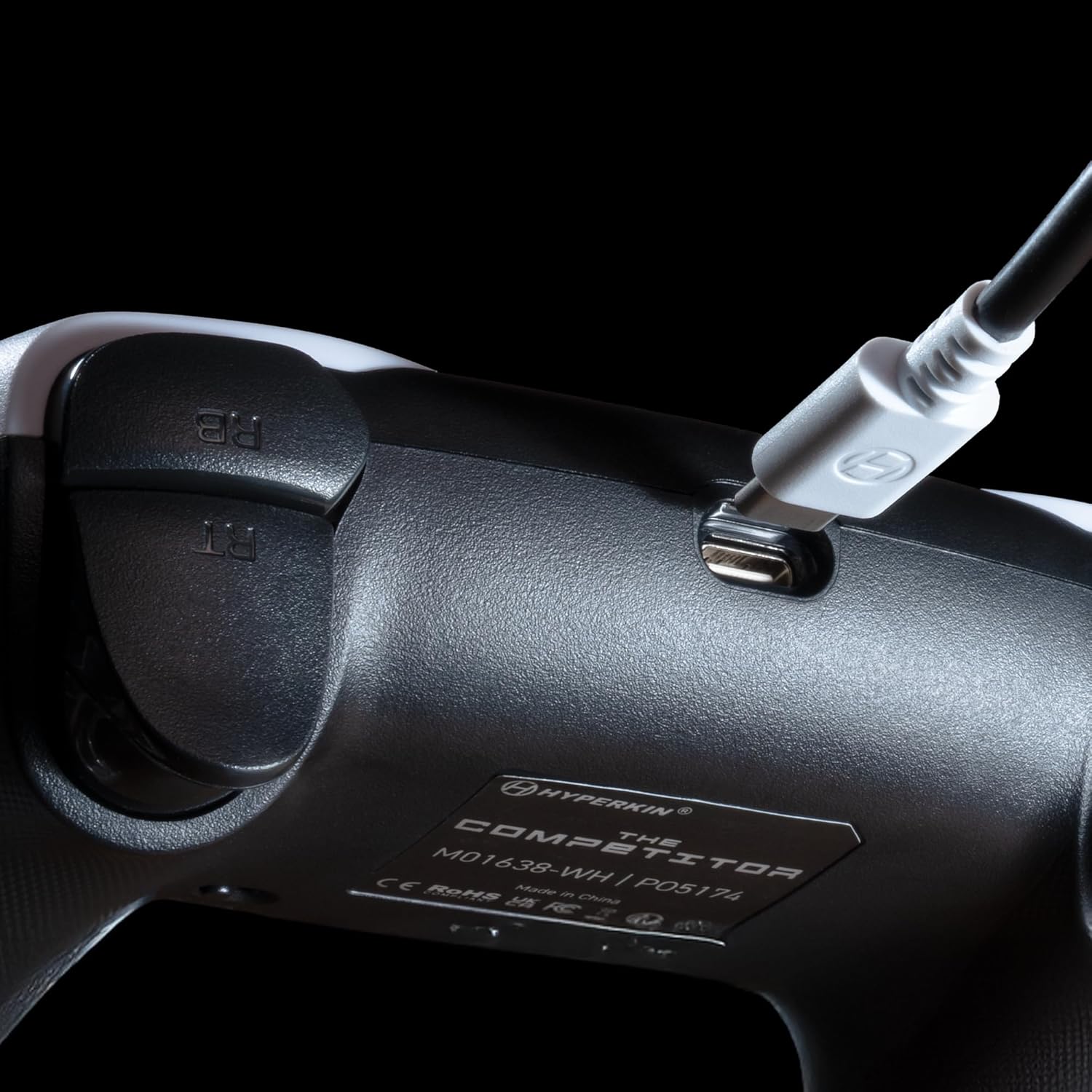
Kuva: Lähikuva view of the USB-C port on the Hyperkin The Competitor controller, illustrating the connection point for the detachable cable.
Ohjaimen käyttö
Familiarize yourself with the key features and controls of your Hyperkin The Competitor controller.
Tärkeimmät ominaisuudet:
- Hall-efektiohjaimia: Experience drift-free accuracy and magnetic precision for ultra-smooth movement and long-lasting durability.
- Impulssilaukaisimet: Provides immersive and reliable haptic feedback for enhanced gameplay.
- Symmetrical Analog Stick Layout: Offers a balanced and comfortable design, supporting precision play.
- Segmented Traditional D-pad: Delivers ultra-responsive control and satisfying feedback for pinpoint accuracy.
- Ohjelmoitavat takaisin-painikkeet: Two customizable rear buttons for on-the-fly remapping to suit your playstyle.
- Oma mykistyspainike: Quickly mute your microphone during gameplay.
- Swappable Stick Caps: Customize your feel with included Domed and Concave stick caps.
- Anti-Friction Gates & Metal Glide Rings: Engineered for ultra-smooth control and reduced wear.

Image: Diagram highlighting the Hall Effect Sticks and the Symmetrical Twin Stick Layout of the controller.

Image: Diagram illustrating the Hall Effect Impulse Triggers and the location of the programmable Back Buttons.

Kuva: Yksityiskohtainen views of the Traditional Segmented D-Pad, the interchangeable Dome and Concave stick caps, and the Metal Glide Rings.
Programming Back Buttons:
Specific instructions for programming the back buttons are typically found in the Quick Start Guide included with your product or on the Hyperkin official support website. Generally, this involves a combination of holding a program button and pressing the desired back button and the button you wish to map.
Huolto
Varmistaaksesi ohjaimesi pitkän käyttöiän ja optimaalisen suorituskyvyn, noudata näitä huolto-ohjeita:
- Puhdistus: Pyyhi ohjain pehmeällä, kuivalla liinalla. Pinttyneeseen likaan pyyhi kevyestiampKostuta liina vedellä. Vältä voimakkaiden kemikaalien tai hankaavien puhdistusaineiden käyttöä.
- Varastointi: Säilytä ohjainta viileässä, kuivassa paikassa, poissa suorasta auringonvalosta ja äärimmäisistä lämpötiloista.
- Kaapelihuolto: Avoid sharply bending or twisting the USB-C cable. Always grasp the connector, not the cable, when plugging or unplugging.
- Vältä pudotuksia: Suojaa ohjainta putoamisilta ja iskuilta, jotka voivat vahingoittaa sen sisäisiä komponentteja.
Vianetsintä
If you encounter issues with your Hyperkin The Competitor controller, try the following steps:
- Ohjain ei vastaa:
- Varmista, että USB-C-kaapeli on kytketty kunnolla sekä ohjaimeen että konsoliin/tietokoneeseen.
- Kokeile kytkeä ohjain toiseen USB-porttiin.
- Käynnistä konsoli tai tietokone uudelleen.
- Testaa ohjainta toisella yhteensopivalla laitteella, jos mahdollista.
- Buttons/Joysticks Not Working Correctly:
- Varmista, ettei painikkeiden tai ohjaussauvojen ympärille ole juuttunut roskia.
- Perform a system update on your console or PC to ensure the latest drivers are installed.
- Jos käytät tietokonetta, tarkista ohjaimen kalibrointiasetukset käyttöjärjestelmässäsi.
- Audio Issues (Mic Mute Button):
- Ensure the dedicated mute button is not activated.
- Check your in-game or system audio settings.
If problems persist after attempting these steps, please contact Hyperkin customer support for further assistance.
Tekniset tiedot
| Mallinumero | M01638-WH |
| Yhteensopivuus | Xbox Series X|S, Xbox One, PC (Windows) |
| Yhteydet | Langallinen (irrotettava USB-C–USB-A-kaapeli) |
| Ohjaussauvat | Hall-efekti |
| Liipaisimet | Impulssilaukaisimet |
| Layout | Symmetrical Analog Sticks |
| D-Pad | Segmented Traditional D-pad |
| Painikkeet | ABXY, Menu, View, Share, Xbox Guide, 2 Programmable Back Buttons, Dedicated Mic Mute Button |
| Räätälöinti | Swappable Stick Caps (Domed & Concave) |
| Mitat | 6.25 x 2.5 x 5 tuumaa |
| Paino | 15.6 unssia |
Takuu ja tuki
Takuutiedot:
Warranty details for the Hyperkin The Competitor Wired Controller are typically provided with your product packaging or can be found on the official Hyperkin websivusto. Säilytä ostokuittisi mahdollisten takuuvaatimusten varalta.
Asiakastuki:
For technical assistance, troubleshooting, or further inquiries, please visit the official Hyperkin support page or contact their customer service directly. Refer to the contact information provided in your product's Quick Start Guide or on the Hyperkin websivusto.


