1. Tärkeitä turvallisuusohjeita
Please read all instructions carefully before using your Olvy Contact Grill. Keep this manual for future reference.
- Sähköturvallisuus: Varmista voltage matches your power supply. Do not immerse the appliance, cord, or plug in water or other liquids. Unplug from the outlet when not in use and before cleaning.
- Lämpö- ja palovammavaara: Surfaces of the grill become hot during use. Use oven mitts or a cool-touch handle. Do not touch hot surfaces directly. Allow the appliance to cool completely before cleaning or storing.
- Lapset ja heikossa asemassa olevat henkilöt: Tätä laitetta ei ole tarkoitettu henkilöiden käyttöön, joilla on heikentyneet fyysiset, aistilliset tai henkiset kyvyt tai joilta puuttuu kokemusta ja tietoa, ellei heidän turvallisuudestaan vastaava henkilö ole valvonut tai antanut heille ohjeita laitteen käytöstä. Lapsia on valvottava sen varmistamiseksi, etteivät he leiki laitteella.
- Oikea käyttö: Use the appliance only for its intended household purpose. Do not use outdoors. Do not operate with a damaged cord or plug.
- Ilmanvaihto: Ensure adequate ventilation around the grill during operation. Do not place near flammable materials.
2. Tuote ohiview
The Olvy H2010 Contact Grill is designed for versatile cooking, featuring a touch screen interface and 7 automatic programs. Its 1800W power ensures fast heating, and the PFAS-free non-stick plates make cooking and cleaning easy.
Komponentit
- Ylempi grillilevy
- Alempi grillilevy
- Cool-Touch-kahva
- Kosketusnäytön ohjauspaneeli
- Tippa-alusta
- Virtajohto
Tärkeimmät ominaisuudet
- 7 automaattista ohjelmaa: Pre-set programs for various foods like meat, fish, paninis, and vegetables.
- 1800W teho: For rapid heating and efficient cooking.
- PFAS-Free Non-Stick Plates: Ensures healthy cooking and easy food release.
- 180° avautuminen: Allows the grill to be used as an open table grill for a larger cooking surface.
- Integroitu ajastin: Up to 30 minutes with automatic shut-off.
- Cool-Touch-kahva: Turvallista käyttöä varten.
- Irrotettava tippakaukalo: Collects excess fat for healthier cooking and easy disposal.
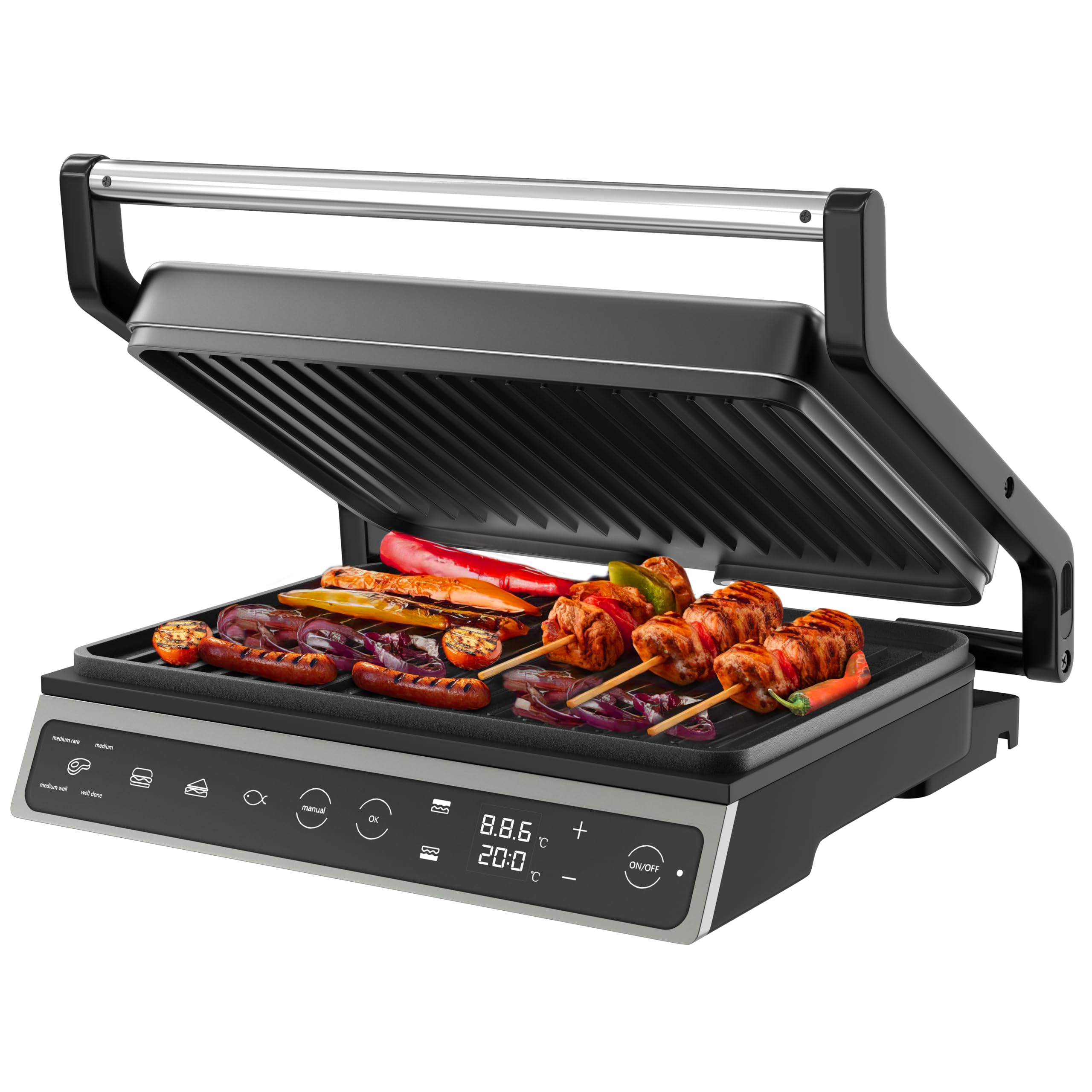
Image: The Olvy H2010 Contact Grill in its closed position, showcasing its sleek design and touch screen control panel.

Kuva: Lähikuva view of the Olvy H2010 Contact Grill's smart LED touch screen, highlighting its intuitive controls and digital display.
3. Asennus ja ennen ensimmäistä käyttökertaa
- Pura pakkauksesta: Poista grilli ja kaikki lisävarusteet varovasti pakkauksesta. Säilytä pakkaus säilytystä tai hävittämistä varten.
- Puhdas: Pyyhi grillilevyt mainoksellaamp cloth or sponge. Ensure they are completely dry before use. Wash the drip tray with warm, soapy water and dry thoroughly.
- Asema: Place the grill on a stable, heat-resistant, and flat surface. Ensure there is sufficient space around the appliance for ventilation.
- Alkulämmitys: Plug the grill into a grounded electrical outlet. The display will light up. Allow the grill to preheat for approximately 5-10 minutes without food. A slight odor or smoke may occur during the first use; this is normal and will dissipate. Unplug and allow to cool.
4. Käyttöohjeet
Yleinen toiminta
- Plug the appliance into a suitable power outlet. The touch screen will illuminate.
- Paina ON/OFF painiketta grillin käynnistämiseksi.
- Select your desired cooking method: Automatic Program or Manual Mode.
Automaattisten ohjelmien käyttäminen
The Olvy H2010 offers 7 pre-set programs for optimal cooking results. The grill automatically adjusts time and temperature based on the selected program.

Image: The Olvy H2010 Contact Grill displaying its 7 automatic programs for various food types like steak, chicken, fish, bacon, sausage, hamburger, and a manual option.
- Paina Ohjelman valinta button (often represented by an icon like a chef's hat or menu).
- Tap the icon corresponding to the food you are cooking (e.g., Steak, Chicken, Fish, Panini, Vegetables, Bacon, Sausage, Hamburger).
- The grill will begin preheating to the optimal temperature for the selected program. Wait for the 'Ready' indicator (or audible signal) before placing food.
- Place your food on the lower grill plate and close the lid. The grill will automatically detect the thickness and adjust cooking time.
- Monitor the cooking progress on the display. The grill may indicate different doneness levels (e.g., rare, medium, well-done) for certain programs.
- Once cooking is complete, carefully remove the food using heat-resistant utensils.

Image: Visual representation of different doneness levels (rare, medium, well-done) for grilled meat, indicating the grill's ability to achieve desired results.
Manual Mode, Temperature, and Timer Adjustment
For custom cooking, use the manual mode to set your preferred temperature and time.
- Paina Manuaalinen painiketta kosketusnäytössä.
- Käytä + ja - buttons to adjust the desired temperature. The temperature can be set for each plate independently if the feature is available.
- Paina Ajastin button (often represented by a clock icon) and use the + ja - buttons to set the cooking time (up to 30 minutes).
- Paina OK tai Aloita button to begin cooking. The grill will automatically shut off when the timer expires.

Image: A hand adjusting the integrated timer function on the Olvy H2010 Contact Grill's control panel, showing the digital display for time and temperature settings.
Using as an Open Grill (180° Function)
The grill can be fully opened to a 180-degree flat position, providing a larger cooking surface for simultaneous grilling of different foods.

Image: The Olvy H2010 Contact Grill fully opened to a 180-degree flat position, showcasing its expanded cooking surface with various foods being grilled.
- Ensure the grill is unplugged and cool before attempting to open it fully.
- Grasp the handle and gently pull the upper plate upwards until it locks into the 180-degree open position.
- Plug in the grill and select your desired temperature or program. Both plates will heat up.
- Place food on both the upper and lower plates.
- To close, gently lift the upper plate slightly and push it back into the closed position.
5. Huolto ja puhdistus
Regular cleaning ensures optimal performance and extends the life of your Olvy Contact Grill.
- Irrota aina pistoke: Irrota grilli aina pistorasiasta ennen puhdistusta ja anna sen jäähtyä kokonaan.
- Puhdista grillilevyt: Wipe the non-stick grill plates with a soft, damp cloth or sponge. For stubborn food residue, use a plastic scraper or a small amount of mild dish soap. Do not use abrasive cleaners, metal scouring pads, or sharp objects, as these can damage the non-stick coating.
- Tyhjä tippakaukalo: Remove the drip tray from the front of the grill. Empty any collected fat or liquids. Wash the drip tray with warm, soapy water and dry thoroughly before reinserting.

Image: A hand removing the practical drip tray from the front of the Olvy H2010 Contact Grill, designed to collect fat and juices for easy disposal.

Image: A hand cleaning the non-stick grill plates of the Olvy H2010 Contact Grill with a soft cloth, demonstrating the ease of maintenance.
- Puhdas ulkopuoli: Pyyhi grillin ulkopinta mainoksellaamp kangas. Älä käytä voimakkaita kemikaaleja tai hankaavia materiaaleja.
- Varastointi: Once clean and completely dry, store the grill in a cool, dry place. The compact design allows for easy storage.
6. Vianmääritys
If you encounter any issues with your Olvy Contact Grill, please refer to the following common problems and solutions:
| Ongelma | Mahdollinen syy | Ratkaisu |
|---|---|---|
| Grilli ei käynnisty. | Ei kytketty pistorasiaan; pistorasiaongelma; laitevika. | Ensure the grill is properly plugged into a working outlet. Check your circuit breaker. If the problem persists, contact customer support. |
| Ruoka ei kypsy tasaisesti. | Grill not preheated; uneven food thickness. | Always allow the grill to fully preheat before placing food. Ensure food items are of similar thickness for even cooking. |
| Savua tai hajua ensimmäisen käyttökerran aikana. | Valmistusjätteet poltetaan pois. | This is normal for the first use. Ensure good ventilation. It should dissipate quickly. |
| Ruoka tarttuu lautasiin. | Plates not clean; insufficient oil/fat; damaged non-stick coating. | Ensure plates are clean before use. Lightly brush plates with cooking oil if needed. Avoid using metal utensils that can damage the coating. |
7. Tekniset tiedot
| Erittely | Yksityiskohta |
|---|---|
| Mallinumero | H2010 |
| Merkki | Olvy |
| Tehoa | 1800 wattia |
| Mitat (suljettu) | 31 x 12 x 31 cm (pituus x leveys x korkeus) |
| Keittopinta | Approximately 27 x 22 cm per plate |
| Paino | 3.15 kg |
| Materiaali | Ruostumaton teräs (runko) |
| Erikoisominaisuudet | Cool-Touch Handle, 7 Automatic Programs, Touch Screen, 180° Opening, PFAS-free Non-stick Coating, Integrated Timer |
8. Takuu ja asiakastuki
Olvy products are manufactured to high-quality standards. This product is covered by a standard manufacturer's warranty against defects in materials and workmanship from the date of purchase.
For warranty claims, technical assistance, or any questions regarding your Olvy Contact Grill, please contact our customer support team. Please have your model number (H2010) and proof of purchase ready when contacting support.
Yhteystiedot:
Please refer to the contact details provided on your purchase receipt or the official Olvy websivustolta ajantasaisimmat asiakastukitiedot.


