Johdanto
This manual provides detailed instructions for the DIERYA DK81E 75% Mechanical Gaming Keyboard. Please read this manual thoroughly before using the product to ensure proper setup and operation. Retain this manual for future reference.
The DIERYA DK81E is a compact 75% layout mechanical keyboard designed for gaming and productivity. It features hot-swappable switches, a gasket-mount design with multi-layer sound dampening, customizable RGB backlighting, a dedicated volume knob, and a powerful web-based driver for advanced customization.
Pakkauksen sisältö
- DIERYA DK81E Mechanical Keyboard x 1
- USB-C-USB-A-kaapeli x 1
- Avaimenperän vedin x 1
- Kytkimen vedin x 1
- Käyttöohje x 1

Asennus
- Avaa näppäimistö: Carefully remove the DIERYA DK81E keyboard and all accessories from the packaging.
- Liitä USB-kaapeli: Insert the USB-C end of the provided cable into the port on the back of the keyboard. Connect the USB-A end to an available USB port on your computer or gaming console.
- Järjestelmän tunnistus: Your operating system (Windows, macOS, Linux) should automatically detect and install the necessary drivers. No additional software installation is required for basic functionality.
- Näppäimistön jalkojen säätäminen: Näppäimistössä on kaksi näppäintätage adjustable feet. Flip them out to achieve your preferred typing angle. The anti-slip rubber pads on the bottom ensure stability.


Käyttöohjeet
Näppäimistön perustoiminnot
The DIERYA DK81E operates as a standard 75% layout keyboard. All keys function as labeled. For keys that are typically present on a full-size keyboard but not on a 75% layout (e.g., F-keys, Page Up/Down, Home, End, Delete), they are accessible via the Function (Fn) key combinations. Refer to the keycap legends for specific Fn key functions.
Multimedia Volume Knob
The dedicated metal knob located on the top right of the keyboard provides convenient control over audio and media playback.
- Kiertää myötäpäivään: Lisää äänenvoimakkuutta.
- Kierrä vastapäivään: Vähennä äänenvoimakkuutta.
- Paina alas: Toista/keskeytä media.

RGB-taustavalon säätö
The keyboard features vibrant RGB backlighting with 16.8 million colors and over 15 preset lighting effects. Specific key combinations (often involving the Fn key) are used to cycle through effects, adjust brightness, and change colors. Consult the included quick start guide or the web driver for detailed instructions on RGB customization.

Web-Based Driver for Customization
The DIERYA DK81E utilizes a browser-based driver for advanced customization, eliminating the need for software installation and ensuring zero memory footprint. This driver allows for:
- Key remapping
- Makrotallennus
- Quick shortcuts
- In-depth RGB personalization
Päästäksesi web driver, open a web browser and navigate to the address provided in the quick start guide or on the manufacturer's website. The driver is compatible with Windows, macOS, and Linux operating systems.

Tärkeimmät ominaisuudet
- Vaihdettavat kytkimet: The DK81E features universal hot-swappable sockets compatible with 3-pin and 5-pin mechanical switches. This allows users to easily change switches without soldering, enabling personalized typing feel and sound.
- Gasket-Mount Design with 6-Layer Dampening Foam: The advanced gasket-mount structure, combined with six layers of sound-absorbing foam, provides a flexible typing experience and a deeper, more satisfying acoustic profile.
- Esivoidellut lineaarikytkimet: The keyboard comes equipped with factory pre-lubricated linear switches, ensuring a smooth and consistent keystroke experience right out of the box. These switches are rated for 50 million keystrokes.
- Double-Shot-näppäinhatut: The keycaps are manufactured using a double-shot injection molding process, which ensures legends will not fade or wear off over time, maintaining a pristine look and feel.
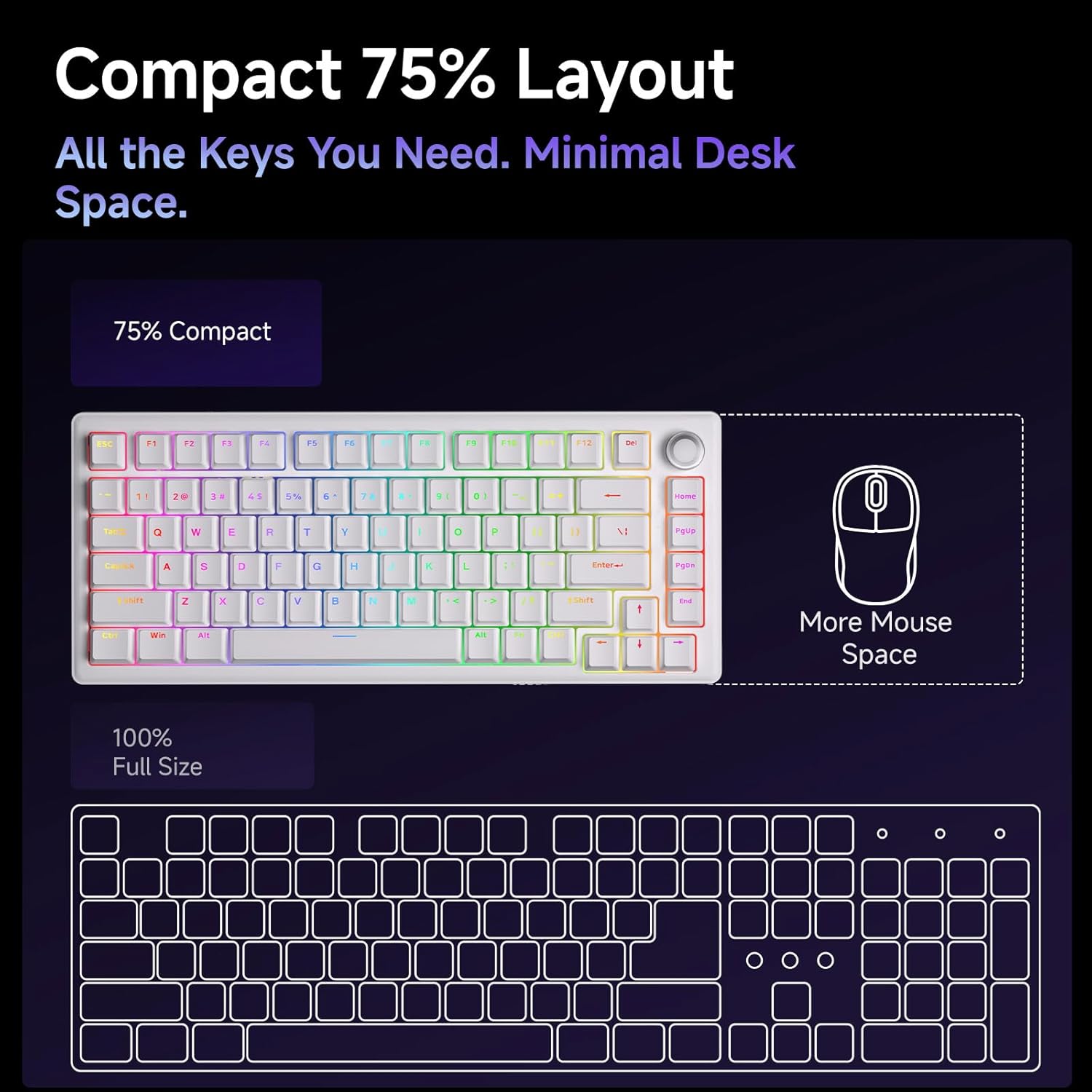
- Kompakti 75 %:n asettelu: The 75% layout provides all essential keys while minimizing desk space, offering more room for mouse movement.



Huolto
Näppäimistön puhdistus
Säännöllinen puhdistus auttaa ylläpitämään näppäimistön suorituskykyä ja ulkonäköä.
- Pölynpoisto: Puhalla pöly ja roskat näppäinhattujen välistä paineilmapullolla.
- Näppäinkansien puhdistus: Gently remove keycaps using the provided keycap puller. Clean them with a soft cloth dampmiedolla puhdistusliuoksella (esim. vedellä laimennettua isopropyylialkoholia). Varmista, että näppäinhatut ovat täysin kuivat ennen niiden kiinnittämistä takaisin.
- Pintojen puhdistus: Wipe the keyboard's surface with a soft, lint-free cloth. Avoid harsh chemicals or abrasive materials.
Kytkimen ja näppäinhatun vaihto
The hot-swappable design allows for easy replacement of switches and keycaps.
- Näppäinhattujen poistaminen: Use the keycap puller to carefully grip and lift keycaps straight up.
- Kytkimien poistaminen: Use the switch puller to gently clamp the top and bottom clips of the switch, then pull the switch straight up from the PCB.
- Kytkimien asentaminen: Kohdista uuden kytkimen nastat piirilevyn reikiin. Paina kytkintä lujasti alas, kunnes se napsahtaa paikalleen. Varmista, etteivät nastat ole taipuneet.
- Näppäinhattujen asentaminen: Align the keycap stem with the switch stem and press down gently until it is securely seated.
Vianetsintä
- Näppäimistö ei vastaa:
- Varmista, että USB-C-kaapeli on kytketty kunnolla sekä näppäimistöön että tietokoneeseen.
- Kokeile kytkeä näppäimistö tietokoneen toiseen USB-porttiin.
- Testaa näppäimistöä toisella tietokoneella sulkeaksesi pois järjestelmäkohtaiset ongelmat.
- RGB-valot eivät toimi/toimivat väärin:
- Check the RGB control key combinations (refer to the quick start guide) to ensure brightness is not set to zero or an incorrect mode is selected.
- Käytä web driver to verify RGB settings and apply changes.
- Avaimet eivät rekisteröidy:
- If a specific key is not working, carefully remove its keycap and switch. Inspect the switch pins for any bends or damage. Straighten bent pins or replace the switch if damaged.
- Varmista, että kytkin on kokonaan paikallaan piirilevyssä.
- Äänenvoimakkuuden säätönuppi ei toimi:
- Verify that the keyboard is properly connected and recognized by the system.
- Test media playback in different applications.
Tekniset tiedot
| Ominaisuus | Yksityiskohta |
|---|---|
| Mallin nimi | DK81E |
| Merkki | DIERYA |
| Layout | 75 % |
| Kytkimen tyyppi | Mechanical (Pre-lubed Creamy Linear Switch) |
| Kuumavaihdettava | Kyllä (3-/5-nastainen yhteensopiva) |
| Asennustyyli | Tiivistekiinnitys |
| Dampvahvista- mista | 6-Layer Sound-Absorbing Foam |
| Taustavalo | RGB (16.8 Million Colors, 15+ Effects) |
| näppäinten yläpuolelle | Double-Shot Injection Molded |
| Yhteydet | Langallinen USB-C (irrotettava kaapeli) |
| Äänestysprosentti | 1000 Hz |
| Erikoisominaisuudet | Volume Knob, Programmable Web Kuljettaja |
| Yhteensopivat laitteet | Pelikonsoli, PC |
| Käyttöjärjestelmät | Windows, macOS, Linux |
| Tuotteen paino | 1.96 kiloa |
| Pakkauksen mitat | 15.31 x 5.79 x 1.85 tuumaa |
Takuu ja tuki
Specific warranty information for the DIERYA DK81E keyboard is not provided in this manual. For detailed warranty terms, technical support, or further assistance, please visit the official DIERYA websivustolta tai ota yhteyttä suoraan heidän asiakaspalveluunsa.
Official DIERYA Websivusto: DIERYA Store on Amazon


