Johdanto
Kiitos ostoksestasiasing the Matbip Multi-Platform Wireless Gaming Controller. This controller is designed to enhance your gaming experience across various platforms, including Nintendo Switch, Android, iOS, and PC. It features advanced functions such as TURBO burst, macro programming, customizable RGB lighting, and HD vibration, providing precise control and immersive feedback. Please read this manual carefully before use to ensure proper operation and to fully utilize all features.
Tuote loppuview
Familiarize yourself with the various components and buttons of your Matbip controller.
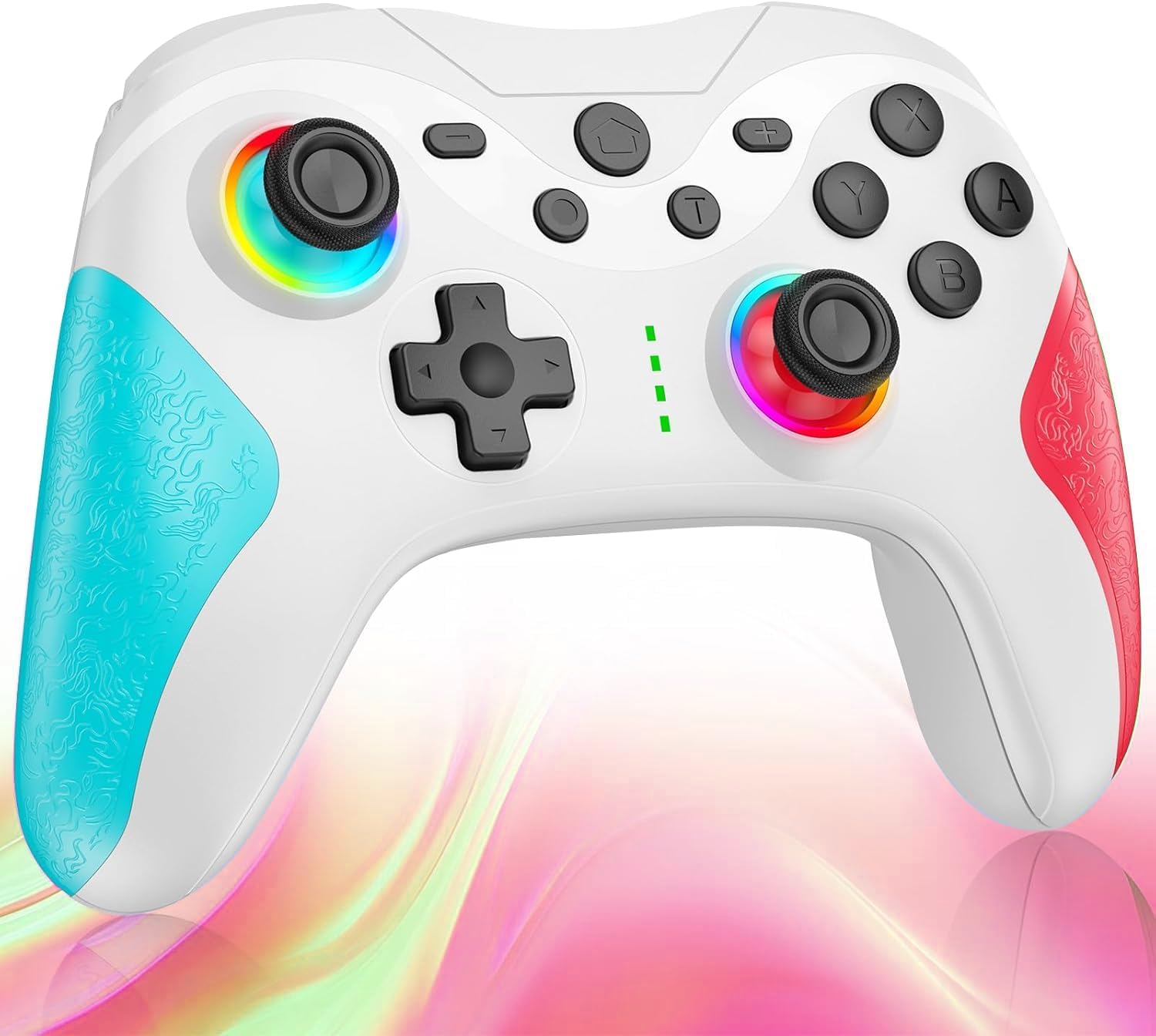
Kuva: Edessä view of the Matbip Multi-Platform Wireless Gaming Controller. It features a white body with blue textured grips on the left and red textured grips on the right. The joysticks are illuminated with a rainbow RGB light. Standard buttons (A, B, X, Y), a D-pad, and central function buttons (Home, Plus, Minus, T) are visible.
Tärkeimmät komponentit:
- Vasen/oikea ohjaussauva: For directional control, with customizable RGB lighting.
- D-Pad: Tarkkaan suuntasyöttöön.
- Toimintopainikkeet (A/B/X/Y): Tavalliset pelin syöttöpainikkeet.
- Shoulder Buttons (L/R/ZL/ZR): Top-mounted trigger and bumper buttons.
- Back Buttons: Additional programmable buttons on the rear for strategic gameplay.
- Koti näppäin: Palaa järjestelmän aloitusnäyttöön.
- Plus (+) / Miinus (-) -painikkeet: Järjestelmäkohtaiset toimintopainikkeet.
- T Button (TURBO): Activates and manages the TURBO burst function.
- Latausportti: USB-C-portti latausta varten.
- Merkkivalot: Näytä yhteyden tila ja akun varaustaso.
Asennus
1. Ohjaimen lataaminen
Before first use, fully charge the controller. Connect the provided USB-C cable to the controller's charging port and the other end to a USB power source (e.g., console, PC, or USB wall adapter). The indicator lights will show charging status and turn off when fully charged.
2. Pariliitos laitteiden kanssa
The controller supports Bluetooth wireless connection across multiple platforms.
Nintendo Switchille:
- On the Switch HOME Menu, select Ohjaimet > Muuta pitoa/järjestystä.
- Paina ja pidä painettuna Koti-painike on the Matbip controller for 3-5 seconds until the indicator lights flash rapidly.
- Once paired, the indicator light(s) on the controller will remain solid.
Android/iOS-laitteille:
- Ota Bluetooth käyttöön Android- tai iOS-laitteellasi.
- Paina ja pidä painettuna Koti-painike on the Matbip controller for 3-5 seconds until the indicator lights flash rapidly.
- On your device's Bluetooth settings, select the controller (e.g., "Matbip Controller") from the list of available devices to pair.
PC:lle (Windows):
- Ensure your PC has Bluetooth enabled. Go to Asetukset > Laitteet > Bluetooth ja muut laitteet.
- Napsauta Lisää Bluetooth tai muu laite > Bluetooth.
- Paina ja pidä painettuna Koti-painike on the Matbip controller for 3-5 seconds until the indicator lights flash rapidly.
- Select the controller from the list of devices to pair.
Käyttöohjeet
TURBO Burst -toiminto:
The TURBO function allows for rapid, automatic button presses, ideal for combat games.
- To activate TURBO: Paina ja pidä painettuna T-painike, then press the desired action button (e.g., A, B, X, Y, L, R, ZL, ZR). The button will now continuously activate when held down.
- TURBO-nopeuden säätäminen: Kun pidät T-painike, siirrä right joystick up or down to cycle through 3 different burst speeds.
- To deactivate TURBO: Paina ja pidä painettuna T-painike, then press the same action button again.
Makrotoiminto:
Program a sequence of button presses to a single back button for complex actions.
- Specific instructions for macro programming will be detailed in the full manual. Generally, this involves entering a programming mode, pressing the sequence, and assigning it to a back button.
Mukautettava RGB-valaistus:
The joysticks feature 9-color RGB lighting to enhance your gaming atmosphere.
- To change RGB color/mode: Press a specific button combination (e.g., T + Left Joystick click) to cycle through different colors and lighting effects.
HD Vibration Adjustment:
Adjust the intensity of the HD vibration feedback to your preference (4 levels).
- To adjust vibration: Press a specific button combination (e.g., T + D-Pad Up/Down) to cycle through the 4 vibration levels.
Gyro-anturi:
The high-precision gyro sensor enables intuitive motion control in supported games.
- The gyro sensor is automatically active when connected to a compatible device (e.g., Nintendo Switch) and used in games that support motion controls.
Sleep Wake-up Function:
The controller supports waking up your Nintendo Switch console from sleep mode.
- When the Switch is in sleep mode, simply press the Koti-painike on the controller to wake it up and reconnect.
Huolto
Asianmukainen huolto varmistaa ohjaimesi pitkän käyttöiän ja optimaalisen suorituskyvyn.
- Puhdistus: Pyyhi ohjain pehmeällä, kuivalla liinalla. Pinttyneeseen likaan pyyhi kevyesti.ampKostuta liina vedellä. Älä käytä voimakkaita kemikaaleja tai hankaavia puhdistusaineita.
- Varastointi: Säilytä ohjainta viileässä, kuivassa paikassa, poissa suorasta auringonvalosta, äärimmäisistä lämpötiloista ja kosteudesta.
- Akun hoito: Avoid fully discharging the battery frequently. If storing for a long period, charge the controller to about 50% every few months.
- Vältä pudotuksia: Suojaa ohjainta putoamisilta ja iskuilta, jotka voivat vahingoittaa sen sisäisiä komponentteja.
Vianetsintä
Jos kohtaat ongelmia ohjaimen kanssa, katso seuraavia yleisiä ratkaisuja:
| Ongelma | Mahdollinen ratkaisu |
|---|---|
| Ohjain ei käynnisty. | Varmista, että ohjain on ladattu. Liitä se virtalähteeseen USB-C-kaapelilla. |
| Controller does not pair. | Varmista, että Bluetooth on käytössä laitteessasi. Varmista, että ohjain on pariliitostilassa (vilkkuvat valot). Käynnistä sekä ohjain että laite uudelleen. |
| Syöttöviive tai -katkos. | Ensure there are no strong wireless interferences nearby. Move closer to the device. Re-pair the controller. |
| Painikkeet tai ohjaussauvat eivät reagoi. | Try resetting the controller (refer to the full manual for reset instructions, usually a small pinhole button). Ensure no debris is obstructing the buttons. |
| Tärinä ei toimi. | Check if vibration is enabled in the game or system settings. Adjust the vibration intensity on the controller. |
Tekniset tiedot
| Ominaisuus | Yksityiskohta |
|---|---|
| Tuotteen mitat | 10 x 15 x 6.5 cm |
| Paino | 300 g |
| Yhteydet | Langaton Bluetooth |
| Yhteensopivuus | Nintendo Switch, Android, iOS, PC (Windows) |
| Erikoisominaisuudet | TURBO Burst, Macro Function, 9-Color RGB Lighting, 4-Level HD Vibration, Gyro Sensor, Back Buttons, Sleep Wake-up |
| ASIN | B0FHWRK7CQ |
| Julkaisupäivä | 16. heinäkuuta 2025 |
Takuu ja tuki
Matbip is committed to providing high-quality products and customer satisfaction. This product comes with a standard manufacturer's warranty. For detailed warranty information, please refer to the documentation included with your purchase or contact Matbip customer support.
If you require further assistance, have questions, or encounter issues not covered in this manual, please contact our customer support team. A Japanese instruction manual is included with the product to ensure ease of use for first-time users.
Yhteystiedot: Please refer to the packaging or the official Matbip websivustolta ajantasaisimmat asiakastuen yhteystiedot.


