1. Johdanto
Thank you for choosing the Transformers GM04 Lightweight Wireless Gaming Mouse. This manual provides essential information for setting up, operating, and maintaining your new gaming mouse. Designed for precision and comfort, the GM04 features a high-precision PAW3311 sensor, triple connection modes (2.4G wireless, Bluetooth 5.3, and USB-C wired), 5 programmable buttons, and up to 100 hours of battery life. Its ergonomic design and lightweight construction ensure a comfortable and responsive experience for gaming, work, and study.
2. Mitä laatikossa on
- TF-GM04 Wireless Gaming Mouse x 1
- USB Wireless Dongle x 1
- USB-C-kaapeli x 1
- Käyttöohje x 1
3. Tuote ohiview
Familiarize yourself with the key features and components of your Transformers GM04 gaming mouse.
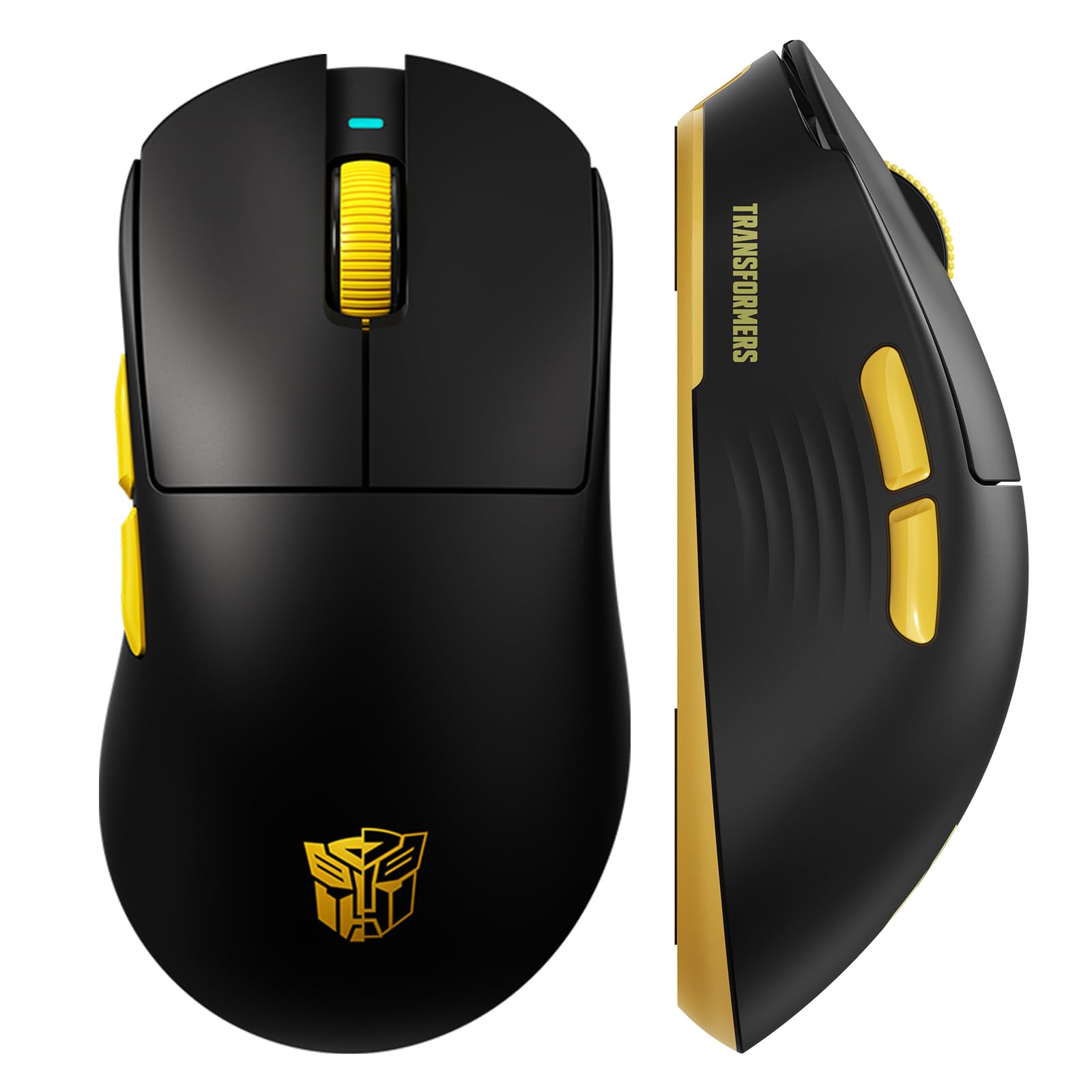
Kuva 1: The Transformers GM04 Wireless Gaming Mouse, showcasing its sleek black and yellow design, along with icons highlighting its core features such as PixArt PAW3311 sensor, up to 12000 DPI, 1000Hz polling rate, 20 million clicks, Tri-Mode connectivity, custom macros, 63g lightweight design, and up to 100 hours of battery life. A USB wireless dongle is also visible next to the mouse.

Kuva 2: A hand demonstrating the ergonomic design of the Transformers GM04 mouse. The image highlights how the mouse fits comfortably in the palm, promoting more comfort and less fatigue during extended use, thanks to its non-slip texture.

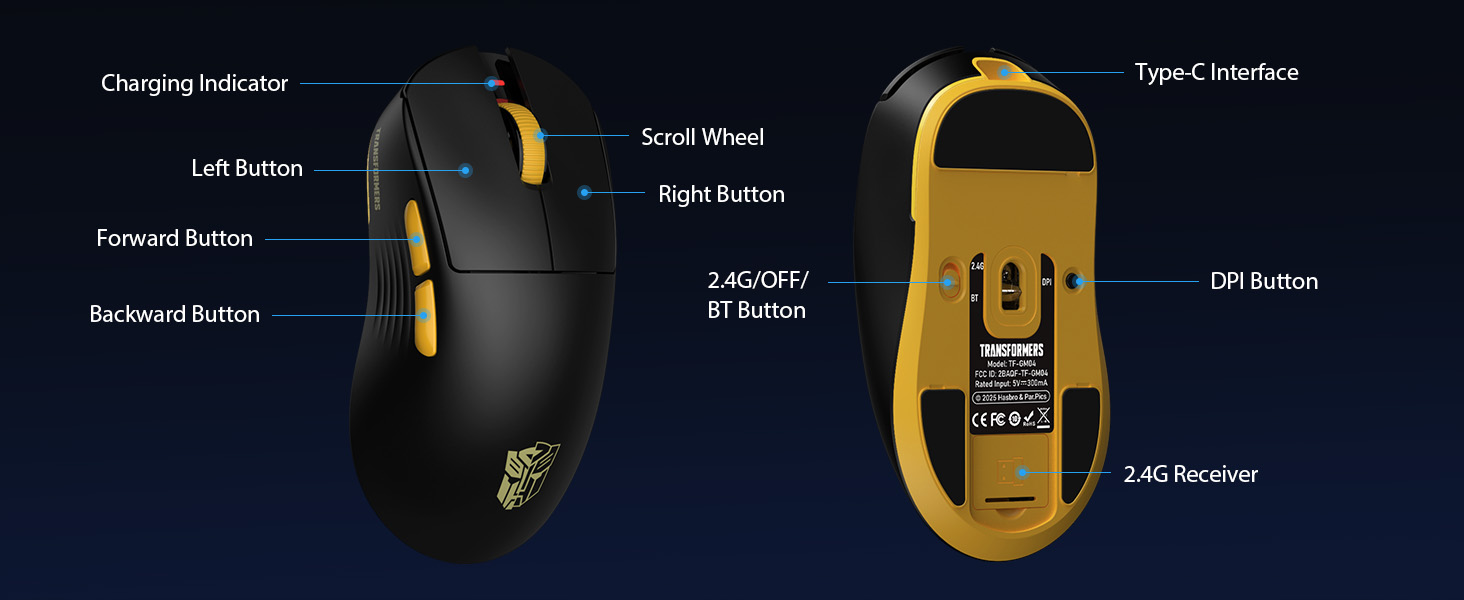
Kuva 3: The underside of the Transformers GM04 mouse, detailing the 2.4G/OFF/BT switch for connection modes, the DPI button, and the storage compartment for the 2.4G wireless receiver. This view is crucial for understanding how to switch modes and adjust settings.

Kuva 4: An illustration of the 6-level adjustable DPI settings for the Transformers GM04 mouse. It shows the DPI values (1200, 2400, 3200, 4800, 6400, 12000) and their corresponding LED indicator colors (Red, Green, Blue, Purple, Yellow, Cyan), which helps users identify the current DPI level.
Kuva 5: Räjähti view diagram of the Transformers GM04 mouse, highlighting the HUANO micro switches. This image emphasizes the precision-engineered mechanical switches designed for crisp feedback and a lifespan of over 20 million clicks, ideal for rapid gaming actions.
Video 1: An official product video from Transformers Keyboard showcasing the GM04 Lightweight Wireless Gaming Mouse. This short video provides a dynamic overview of the mouse's design and features.
4. Asennus
4.1. Hiiren lataaminen
Before first use, it is recommended to fully charge your GM04 mouse. Connect the provided USB-C cable to the mouse's front port and the other end to a USB power source (e.g., computer USB port, USB wall adapter). The LED indicator will show charging status.
4.2. Hiiren liittäminen
The GM04 mouse supports three connection modes: 2.4G Wireless, Bluetooth 5.3, and USB-C Wired. Use the switch on the bottom of the mouse to select your desired mode.
4.2.1. 2.4G langaton tila
- Remove the USB wireless dongle from its storage slot on the bottom of the mouse.
- Plug the USB wireless dongle into an available USB-A port on your computer.
- Liu'uta hiiren pohjassa oleva tilanvalitsin asentoon "2.4G".
- Hiiren pitäisi muodostaa automaattisesti yhteys tietokoneeseen.
4.2.2. Bluetooth-tila
- Liu'uta hiiren pohjassa oleva tilanvalitsin "BT"-asentoon.
- Avaa tietokoneellasi tai laitteellasi Bluetooth-asetukset ja hae uusia laitteita.
- Select "TF-GM04 BT" from the list of available devices to pair.
- The mouse should connect and be ready for use.
4.2.3. USB-C-langallinen tila
- Connect the provided USB-C cable to the mouse's front port and the other end to a USB-A port on your computer.
- Hiiri siirtyy automaattisesti langalliseen tilaan ja alkaa latautua.
5. Käyttö
5.1. DPI-säätö
The GM04 mouse offers 6 default DPI settings. To cycle through these settings, press the DPI-painike located on the bottom of the mouse. The LED indicator will change color to reflect the current DPI level:
- Punainen: 1200 DPI
- Vihreä: 2400 DPI
- Sininen: 3200 DPI
- Violetti: 4800 DPI
- Keltainen: 6400 DPI
- Syaani: 12000 DPI
5.2. Ohjelmoitavat painikkeet
The mouse features 5 programmable buttons. To customize these buttons with macro commands, shortcut keys, or other functions, you will need to use the dedicated driver software. This software is typically available for Windows systems under 2.4G wireless and wired modes. Bluetooth mode may not support full software customization.
5.3. Connection Mode Switching
Easily switch between 2.4G Wireless, Bluetooth, and Wired modes using the dedicated switch on the bottom of the mouse. This allows for seamless transitions between multiple devices.
5.4. LED-ilmaisimet
- DPI-ilmaisin: Changes color according to the current DPI setting (see 5.1).
- Latausilmaisin: A green LED near the scroll wheel indicates charging. It turns off when fully charged.
6. Huolto
6.1. Puhdistus
Optimaalisen suorituskyvyn ja ulkonäön ylläpitämiseksi puhdista hiiri säännöllisesti. Pyyhi pinta pehmeällä, kuivalla liinalla. Pinttyneeseen likaan käytä hieman kuivaa liinaa.amp liinaa voidaan käyttää varmistaen, ettei kosteutta pääse sisäisiin komponentteihin. Vältä voimakkaita kemikaaleja tai hankaavia materiaaleja.
6.2. Akun hoito
The GM04 mouse is equipped with a 500mAh high-capacity battery. To prolong battery life:
- Vältä akun usein toistuvaa täydellistä tyhjentymistä.
- Säilytä hiirtä viileässä ja kuivassa paikassa, kun sitä ei käytetä pitkään aikaan.
- If using wired mode, the mouse will charge automatically.
7. Vianmääritys
7.1. Hiiri ei vastaa
- Tarkista akku: Ensure the mouse is charged. Connect it via USB-C cable.
- Tarkista yhteystila: Verify the switch on the bottom is set to the correct mode (2.4G, BT, or Wired).
- Re-pair (2.4G/Bluetooth): For 2.4G, try plugging the dongle into a different USB port. For Bluetooth, unpair and re-pair the device in your computer's settings.
- Kokeile langallista tilaa: Connect the mouse directly via USB-C cable to see if it functions.
7.2. DPI ei muutu
- Varmista, että painat oikeaa DPI-painiketta hiiren pohjassa.
- Observe the LED indicator for color changes to confirm DPI cycles.
- Jos käytät mukautettua ohjelmistoa, varmista, että asetukset on otettu käyttöön oikein.
7.3. Lag or Disconnection in Wireless Mode
- Vähennä häiriötä: Move the mouse closer to the receiver/device. Avoid obstacles or other wireless devices that may cause interference.
- Tarkista akku: Low battery can affect wireless performance.
- Päivitä ajurit: Ensure your computer's Bluetooth or USB drivers are up to date.
8. Tekniset tiedot
| Ominaisuus | Yksityiskohta |
|---|---|
| Tuotteen mitat | 4.68 x 2.52 x 0.1 tuumaa |
| Tuotteen paino | 2.22 unssia (noin 63 g) |
| Tuotteen mallinumero | TF-GM04 |
| Yhteystekniikka | 2.4G langaton, Bluetooth 5.3, USB-C-langallinen |
| Liiketunnistustekniikka | Optinen (PAW3311-anturi) |
| DPI-asetukset | 1200/2400/3200/4800/6400/12000 (Adjustable) |
| Äänestysprosentti | 1000Hz (1ms latency) |
| Seurantanopeus | 300 IPS |
| Kiihtyvyys | 35G |
| Painikkeet | 5 ohjelmoitavaa painiketta |
| Kytkimen tyyppi | HUANO Micro Switches (20 Million Clicks) |
| Akun kapasiteetti | 500 mAh |
| Akun kesto | Up to 100 hours (Bluetooth mode) |
| Yhteensopivuus | Windows, Mac OS, and other systems |
9. Takuu ja tuki
9.1. Takuutiedot
The Transformers GM04 Lightweight Wireless Gaming Mouse comes with a standard manufacturer's warranty. Please refer to the packaging or the official Transformers webTarkemmat takuuehdot löytyvät sivustolta. Säilytä ostokuitti ostotodistuksena mahdollisten takuuvaatimusten varalta.
9.2. Asiakastuki
For technical assistance, troubleshooting, or any questions regarding your Transformers GM04 mouse, please contact Transformers customer support. Contact details can typically be found on the product packaging or the official brand websivusto.


