1. Johdanto
Kiitos ostoksestasiasing the Moukey MAMP3 2.0 Channel Stereo AmpTämä käyttöohje sisältää olennaisia tietoja laitteen turvallisesta ja tehokkaasta käytöstä. Lue se huolellisesti ennen käyttöä ja säilytä se myöhempää tarvetta varten.
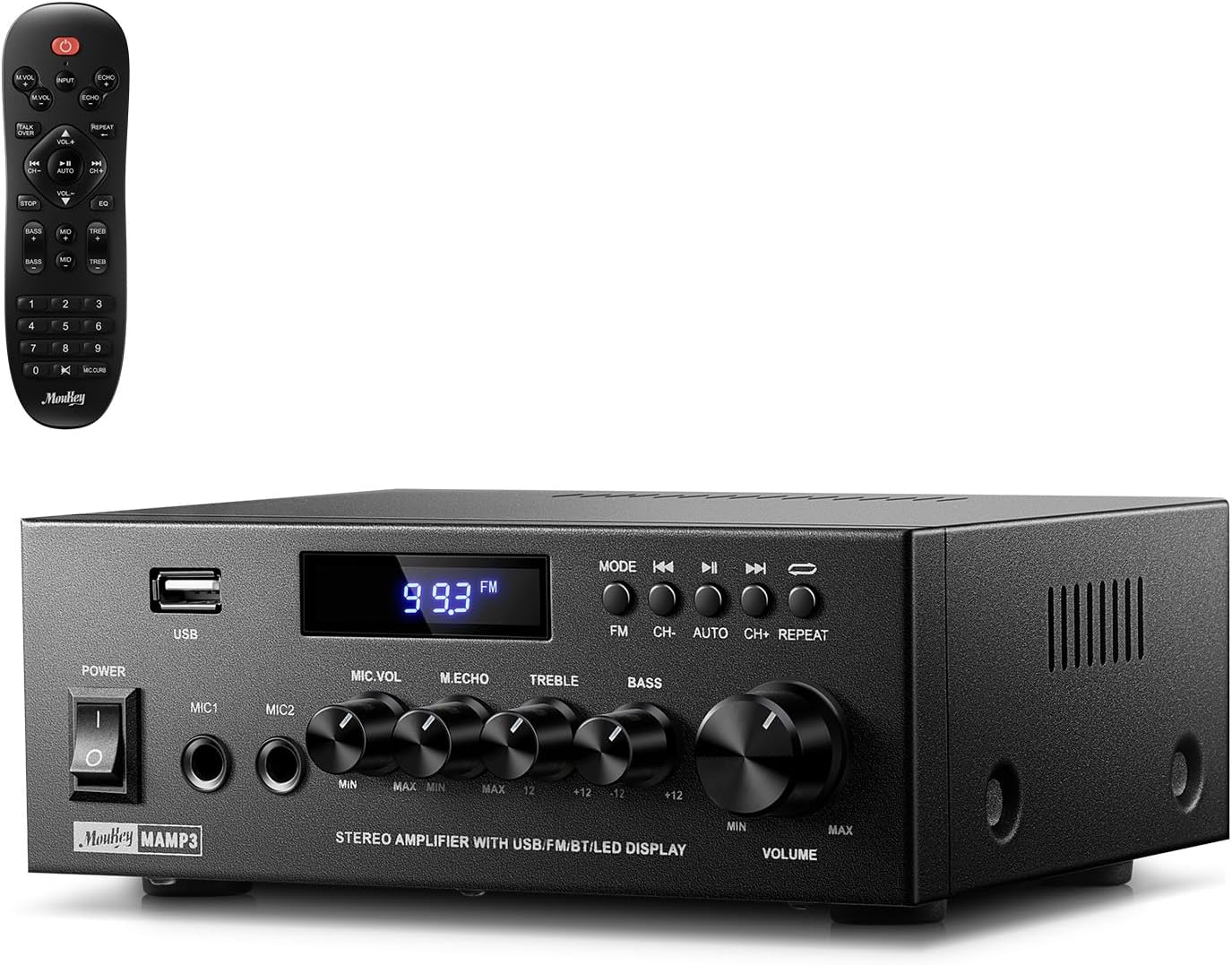
Image 1.1: The Moukey MAMP3 amplifier ja sen kaukosäädin.
2. Turvallisuusohjeet
- Lue kaikki ohjeet ennen laitteen käyttöä ampelävämpi.
- Pidä amplifier away from water, moisture, and extreme temperatures.
- Do not block ventilation openings. Ensure proper airflow around the unit.
- Käytä vain laitteen mukana toimitettua virtalähdettä.
- Älä yritä korjata tai muokata laitetta itse. Jätä kaikki huoltotyöt pätevän henkilöstön tehtäväksi.
- Disconnect the power cord from the outlet if the unit will be unused for extended periods.
3. Tuote ohiview
3.1 Tärkeimmät ominaisuudet
- 2.0 Channel Stereo Audio Output
- Bluetooth 5.3 vakaata langatonta yhteyttä varten
- Multiple Audio Inputs: RCA, USB, FM Radio, 2 Microphone Inputs
- Full-function Remote Control with EQ adjustments
- Customizable Treble, Midrange, and Bass controls
- Memory function for mode, volume, and EQ settings
- 300 watin huipputeho
3.2 Etupaneelin säätimet ja ilmaisimet

Image 3.1: Front Panel Layout
- Virtakytkin: Kytkee laitteen päälle tai pois päältä.
- MIC1/2: 6.35 mm mikrofonituloliittimet.
- Mikrofonin äänenvoimakkuuden säädin: Säätää liitettyjen mikrofonien äänenvoimakkuutta.
- Kaiunuppi: Säätää mikrofonien kaikuefektiä.
- Diskantti nuppi: Säätää korkeataajuisten äänien lähtöä.
- Basson nuppi: Säätää matalataajuisten äänien lähtöä.
- Musiikin äänenvoimakkuuden säädin: Kaikkien äänilähteiden päääänenvoimakkuuden säätö.
- USB-paikka: USB-tallennuslaitteiden liittämiseen äänen toistoa varten.
- LED-näyttö: Näyttää nykyisen tilan, kappaleen tiedot tai FM-taajuuden.
- MODE-painike: Switches between input sources (BT, Aux, CD, USB, FM).
- Edellinen painike: Skips to the previous track (USB/BT) or FM station.
- Toisto/tauko-painike: Plays or pauses audio (USB/BT).
- Seuraava-painike: Skips to the next track (USB/BT) or FM station.
- Toista-painike: Repeats current track or all tracks (USB).
3.3 Takapaneelin liitännät

Kuva 3.2: Takapaneelin liitännät
- FM-antennitulo: Liitä mukana toimitettu FM-antenni radiovastaanottoa varten.
- ÄÄNITULO (RCA): Connect external audio sources like CD/DVD players using RCA cables.
- ÄÄNILÄHTÖ (kaiutinliitännät): Liitä passiivikaiuttimet. Varmista oikea napaisuus (+ ja + sekä - ja -).
- POWER AC INPUT: Liitä virtajohto pistorasiaan.
4. Asennus
4.1 Pakkauksesta purkaminen
Poista varovasti amplifier and all accessories from the packaging. Verify that all items listed in the 'What's in the Box' section are present.
4.2 Kaiuttimien liittäminen
MAMP3 amplifier supports two passive speakers. Connect your speakers to the ÄÄNEN ULOSTULO terminals on the rear panel. Ensure that the positive (+) terminal on the amplifier connects to the positive (+) terminal on your speaker, and the negative (-) terminal on the amplifier connects to the negative (-) terminal on your speaker. Incorrect polarity can affect sound quality.

Image 4.1: Speaker Connection Diagram
4.3 Äänilähteiden liittäminen
The amplifier tarjoaa useita syöttövaihtoehtoja:
- RCA-tulo: Use RCA cables to connect devices such as CD players, DVD players, or other audio equipment to the ÄÄNITULO takapaneelin liittimiin.
- USB-tulo: Aseta USB-muistitikku laitteeseen USB-paikka on the front panel for direct audio playback.
- Bluetooth: Pair your Bluetooth-enabled device (smartphone, tablet, laptop) wirelessly.
- FM-radio: Liitä mukana toimitettu FM-antenni FM-antennitulo on the rear panel for radio reception. Extend the antenna for optimal signal.
- Mikrofonitulot: Liitä enintään kaksi mikrofonia MIC1/2 jacks on the front panel for karaoke or public address.

Image 4.2: Available Signal Inputs
4.4 Virtaliitäntä
Liitä virtajohto POWER AC INPUT on the rear panel and then plug it into a standard AC power outlet.
5. Käyttöohjeet
5.1 Virta päälle/pois
Paina Virtakytkin etupaneelissa kytkeäksesi sen päälle amplifier on or off. The LED display will illuminate when the unit is powered on.
5.2 Tulon valinta
Paina MODE button on the front panel or the remote control to cycle through the available input sources: Bluetooth (BT), Auxiliary (Aux), CD, USB, and FM radio. The selected mode will be shown on the LED display.
5.3 Äänenvoimakkuuden säätö
Kierrä suurta Musiikin äänenvoimakkuuden säädin on the front panel clockwise to increase volume and counter-clockwise to decrease it. Volume can also be adjusted using the remote control.
5.4 Taajuuskorjaimen (EQ) säätö
Adjust the sound characteristics using the Diskantin nuppi ja Bassonuppi on the front panel. The remote control also provides dedicated buttons for Treble, Midrange, and Bass adjustments. The amplifier will automatically save your preferred EQ settings.
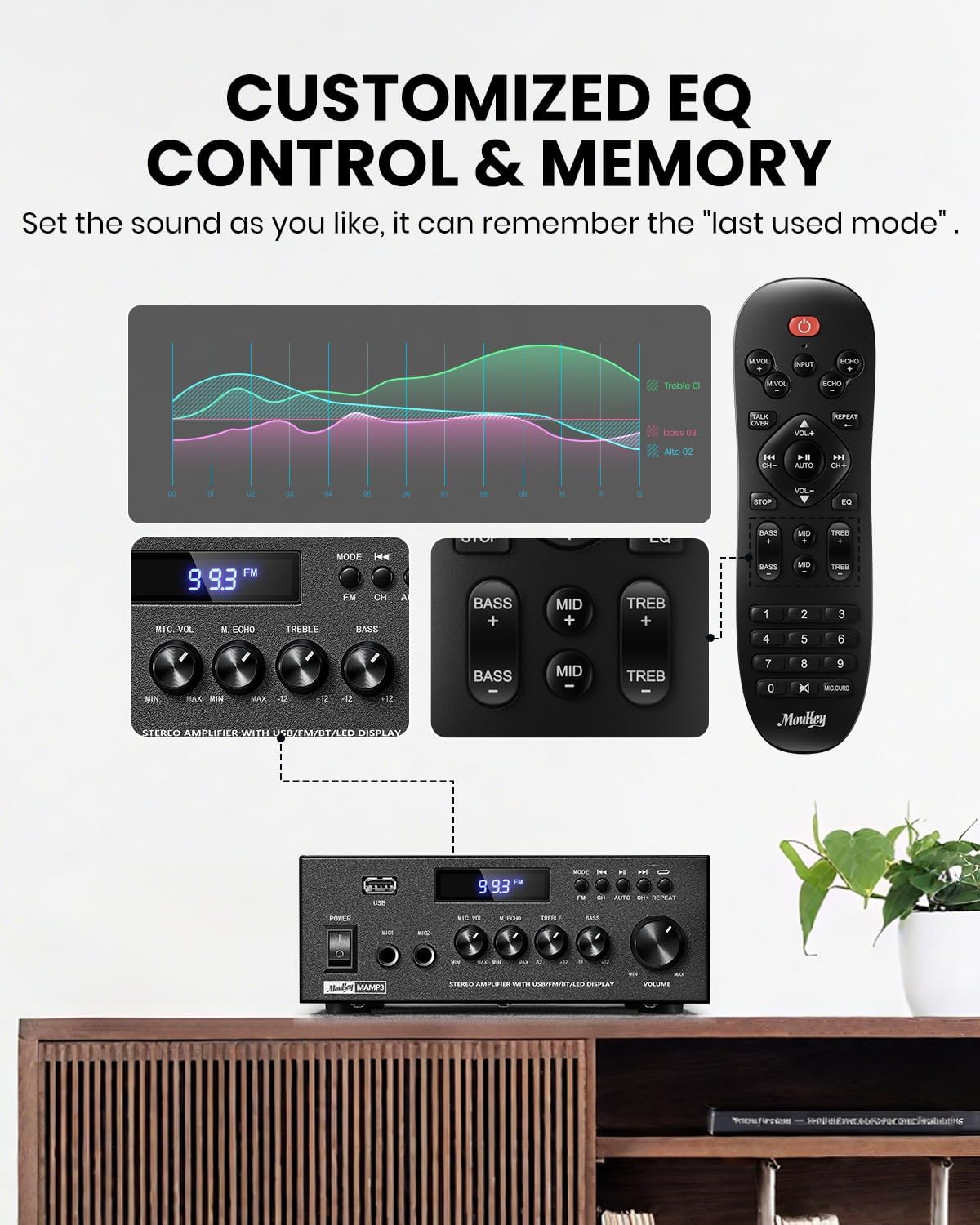
Image 5.1: Customizable EQ Control
5.5 Mikrofonin säätimet
If microphones are connected, use the Mikrofonin äänenvoimakkuuden säädin to adjust their output level and the Kaiun nuppi to add an echo effect. The remote control also features a 'Talkover' function.
5.6 Bluetooth-käyttö
- Paina MODE button until "BT" appears on the LED display. The amplifier is now in Bluetooth pairing mode.
- On your mobile device, enable Bluetooth and search for "Moukey MAMP3".
- Select "Moukey MAMP3" to pair. Once connected, you will hear a confirmation tone.
- Voit nyt toistaa ääntä laitteestasi laitteen kautta. ampelävämpi.

Image 5.2: Bluetooth Pairing
5.7 FM-radion käyttö
- Paina MODE -painiketta, kunnes LED-näyttöön tulee "FM".
- Automaattinen skannaus: Press the "AUTO" button on the remote to automatically scan and save available FM stations.
- Manuaalinen viritys: Use the number pad on the remote control to directly enter the desired FM frequency (e.g., for 101.1 MHz, enter 1011).
- Käytä Edellinen ja Seuraavaksi buttons to navigate between saved stations or fine-tune frequencies.
5.8 USB-toisto
Aseta USB-muistitikku, joka sisältää MP3- tai WAV-äänitiedostot files osaksi USB-paikka. The amplifier will automatically switch to USB mode and begin playback. Use the Edellinen, Toista/Tauko, ja Seuraavaksi buttons to control playback. The Toistaa -painikkeella voit toistaa nykyisen kappaleen tai kaikki kappaleet uudelleen.
5.9 Kaukosäädin
The included full-function remote control allows for convenient operation from a distance. It provides control over input selection, volume, EQ settings (treble, midrange, bass), microphone echo, and talkover functions across all input modes.

Image 5.3: Upgraded Remote Control Functionality
6. Huolto
- Puhdistus: Käytä pehmeää, kuivaa liinaa laitteen ulkopuolen puhdistamiseen ampÄlä käytä nestemäisiä puhdistusaineita tai liuottimia.
- Ilmanvaihto: Ensure that the ventilation openings are free from dust and debris to prevent overheating.
- Varastointi: Kun laitetta ei käytetä pitkään aikaan, säilytä ampviileässä, kuivassa paikassa, poissa suorasta auringonvalosta ja äärimmäisistä lämpötiloista.
7. Vianmääritys
| Ongelma | Mahdollinen syy | Ratkaisu |
|---|---|---|
| Ei virtaa | Virtajohto ei ole kytketty; pistorasia viallinen; virtakytkin pois päältä. | Ensure power cord is securely connected; Test outlet with another device; Turn power switch on. |
| Ei äänilähtöä | Volume too low; Incorrect input selected; Speaker wires loose/incorrectly connected; Audio source issue. | Increase volume; Select correct input mode; Check speaker wire connections and polarity; Verify audio source is playing. |
| Bluetooth ei muodosta yhteyttä | Amplifier not in BT mode; Device too far; Device already connected to another unit; Interference. | Kytkin amplifier to BT mode; Move device closer; Disconnect from other devices; Reduce interference. |
| Huono FM -vastaanotto | Antennia ei ole kytketty tai se on huonosti sijoitettu; Heikko signaali. | Connect and adjust FM antenna position; Try auto-scan or manual tuning for stronger stations. |
| USB-toisto-ongelmat | Ei tueta file format; USB drive not formatted correctly; USB drive capacity too large. | Varmista files are MP3/WAV; Format USB drive to FAT32; Use USB drives 32GB or less. |
8. Tekniset tiedot
| Ominaisuus | Erittely |
|---|---|
| Mallinumero | MAMP3 |
| Lähtöteho | 300 XNUMX wattia (huippu) |
| Kanavat | 2.0 stereot |
| Yhteystekniikka | Auxiliary, Bluetooth 5.3, FM, USB |
| Yhteensopivat laitteet | Smartphone, Tablet, Laptop, Computer, Speakers, CD/DVD Player |
| Liittimen tyyppi | RCA, USB, 2 Mic input |
| Äänilähtötila | Stereot |
| Tuotteen mitat | 6.1"S x 7.1"L x 2.8"K (15.5 x 18.0 x 7.1 cm) |
| Tuotteen paino | 2.14 puntaa (0.97 kg) |
| Väri | Musta |
8.1 Pakkauksen sisältö
- Moukey MAMP3 Ampelävämpi
- Kaukosäädin
- FM antenni
- Käyttöopas
- Virtalähde
9. Takuu ja tuki
9.1 Takuutiedot
Moukey products are designed and manufactured to the highest quality standards. This product is covered by a limited warranty against defects in materials and workmanship. Please refer to the warranty card included with your purchase for specific terms and conditions, or visit the official Moukey webtarkemmat takuutiedot.
9.2 Asiakastuki
If you encounter any issues or have questions regarding your Moukey MAMP3 amplifier, please contact our customer support team. You can find contact information on the official Moukey websivustosi tai ostoalustasi kautta.
Websivusto: www.moukey.com (Esimamplinkki, katso varsinaisen tuotteen dokumentaatio)
Sähköposti: support@moukey.com (Esimample email, please refer to actual product documentation)