1. Johdanto
This manual provides detailed instructions for the setup, operation, maintenance, and troubleshooting of your DIERYA DK68 Wireless Mechanical Keyboard. Please read this manual thoroughly before using the product to ensure proper functionality and to maximize your user experience.
2. Pakkauksen sisältö
Varmista, että pakkauksessa on kaikki tarvittavat osat:
- 1 x DIERYA DK68 68-Key Wireless Mechanical Keyboard
- 1 x 2.4 G langaton vastaanotin
- 1 x USB-C-USB-A-kaapeli
- 1 x Käyttöohje (tämä asiakirja)
3. Tuote ohiview
The DIERYA DK68 is a compact 68-key mechanical keyboard featuring triple-mode connectivity (wired USB-C, 2.4GHz wireless, and Bluetooth 5.0). It is equipped with linear red mechanical switches and customizable RGB backlighting.

Image: The DIERYA DK68 Wireless Mechanical Keyboard in white, showcasinsen kompaktin 68-näppäimen asettelun ja RGB-taustavalaistuksen ansiosta.
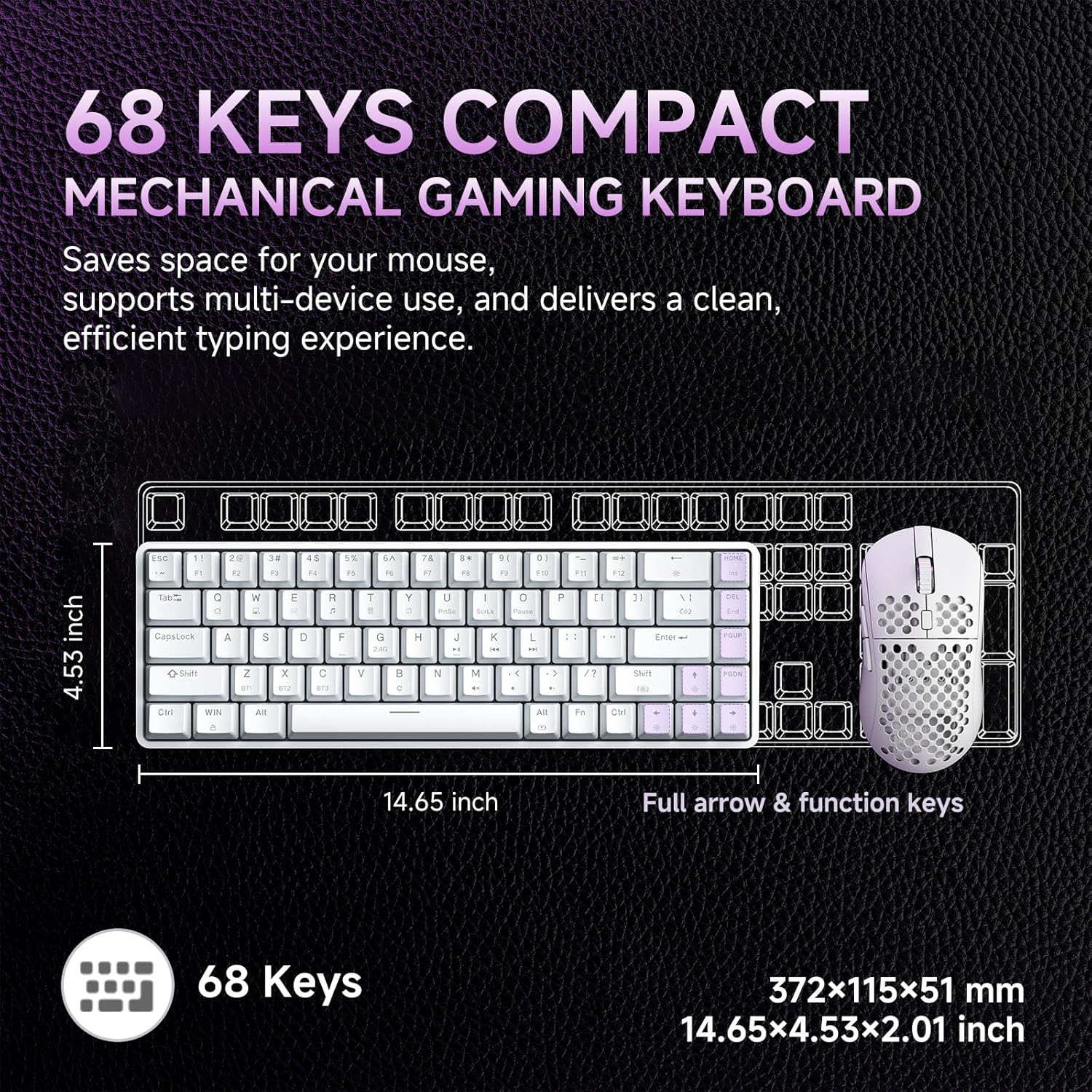
Image: A diagram illustrating the compact dimensions of the DIERYA DK68 keyboard, measuring 14.65 inches in length and 4.53 inches in width.
4. Asennus
4.1 Langallinen yhteys (USB-C)
- Liitä mukana toimitettu USB-C-kaapeli näppäimistön USB-C-porttiin.
- Connect the other end of the USB-C cable to an available USB-A port on your computer.
- Näppäimistö tunnistetaan automaattisesti ja on käyttövalmis.
4.2 2.4 GHz:n langaton yhteys
- Locate the 2.4G wireless receiver included in the package.
- Plug the 2.4G receiver into an available USB-A port on your computer.
- Turn on the keyboard using the switch located on the back or side of the keyboard.
- Näppäimistön pitäisi muodostaa automaattisesti yhteys vastaanottimeen. Jos ei, paina Fn + R aloittaaksesi pariliitoksen.
4.3 Bluetooth 5.0 -yhteys
Näppäimistö tukee jopa kolmen Bluetooth-laitteen yhdistämistä.
- Varmista, että näppäimistö on päällä.
- Paina ja pidä painettuna Fn+Z, Fn + X, tai Fn+C for 3-5 seconds to enter pairing mode for Bluetooth device 1, 2, or 3 respectively. The indicator light will flash rapidly.
- Ota Bluetooth käyttöön laitteellasi (tietokone, kannettava tietokone, tabletti, älypuhelin) ja etsi uusia laitteita.
- Select "DIERYA DK68" from the list of available devices to pair.
- Kun pariliitos on muodostettu, merkkivalo lakkaa vilkkumasta ja palaa tasaisesti muutaman sekunnin.
- Vaihda paritettujen Bluetooth-laitteiden välillä painamalla Fn+Z, Fn + X, tai Fn+C lyhyesti.

Image: Visual representation of the DIERYA DK68's triple-mode connectivity options: USB-C, Bluetooth 5.0, and 2.4GHz wireless, compatible with various operating systems.
5. Käyttöohjeet
5.1 Näppäimistön perustoiminnot
The DK68 features a 68-key layout. Many standard functions are accessed via the Fn näppäinyhdistelmät.
- Fn + 1-12: F1-F12 function keys.
- Fn + Q/W/E/R/T/Y: Multimedia controls (specific functions may vary).
- Fn + nuolinäppäimet: Page Up, Page Down, Home, End.
- Fn + askelpalautin: Delete.
5.2 RGB-valaistuksen ohjaus
The keyboard offers 20 built-in RGB lighting effects and 16.8 million customizable colors.
- Fn + askelpalautin: Turn backlight On/Off.
- Fn + Vaihto: Switch light colors (for certain modes).
- Fn + |\: Switch light modes (cycle through 20 effects).
- Fn + ylänuoli: Lisää kirkkautta.
- Fn + alanuoli: Vähennä kirkkautta.
- Fn + vasen nuoli: Decrease light speed.
- Fn + oikea nuoli: Increase light speed.

Image: A visual guide to controlling the RGB backlighting on the DIERYA DK68 keyboard using Fn key combinations for mode, color, brightness, and speed adjustments.
5.3 Akun hallinta
The keyboard is equipped with a 3000mAh lithium battery.
- Lataus: Connect the keyboard via the USB-C cable to a power source (computer USB port or USB wall adapter). The charging indicator light will show charging status.
- Akun kesto: Up to 12 hours with backlighting on, and up to 333 hours with backlighting off.
- Automaattinen lepotila: The keyboard enters auto-sleep mode after 3 minutes of inactivity to conserve power. Press any key to wake it up.

Image: An infographic detailing the 3000mAh battery capacity, showing 12 hours of use with lights on, 333 hours with lights off, 3-minute auto-stop, and Type-C charging.
5.4 Ohjelmiston mukauttaminen
For advanced customization of keys, macros, and lighting effects, download the dedicated software from the official DIERYA website. This software allows for:
- 16.8 million customizable lighting colors.
- Music-sync lighting effects.
- Full-key macro programming.
- Macro recording and editing.
- Custom shortcut keys.
6. Huolto
- Puhdistus: Use a soft, dry cloth to wipe the keyboard surface. For deeper cleaning, use compressed air to remove dust and debris from between keycaps. Avoid using liquid cleaners directly on the keyboard.
- Varastointi: Säilytä näppäimistöä viileässä, kuivassa paikassa, poissa suorasta auringonvalosta ja äärimmäisistä lämpötiloista.
- Näppäinhatun poistaminen: If removing keycaps for cleaning or switch replacement, use a keycap puller to avoid damage.
7. Vianmääritys
| Antaa | Ratkaisu |
|---|---|
| Näppäimistö ei vastaa (langallinen) | Varmista, että USB-C-kaapeli on kytketty kunnolla sekä näppäimistöön että tietokoneeseen. Kokeile toista USB-porttia tai kaapelia. |
| 2.4GHz wireless connection unstable or not connecting | Ensure the 2.4G receiver is plugged in and the keyboard is powered on. Re-pair by pressing Fn + R. Move the receiver closer to the keyboard. Avoid interference from other wireless devices. |
| Bluetooth-yhteysongelmat | Ensure Bluetooth is enabled on your device. Re-enter pairing mode (Fn + Z/X/C) and re-pair. Forget the device on your computer/phone and try pairing again. Ensure the keyboard is charged. |
| RGB backlighting not working | Paina Fn + askelpalautin to toggle the backlight. Check brightness settings (Fn + Ylös/Alas-nuoli). Ensure the keyboard battery is not critically low. |
| Avaimet eivät rekisteröidy (Anti-Ghosting) | The keyboard features full N-Key Rollover (NKRO). If specific keys are not registering, try cleaning under the keycap or contact support. |
| Näppäimistö ei lataudu | Verify the USB-C cable and power source are functional. Try a different cable or charging port. |
8. Tekniset tiedot
| Ominaisuus | Yksityiskohta |
|---|---|
| Malli | DIERYA DK68 |
| Yhteydet | USB-C-johdollinen, 2.4 GHz:n langaton, Bluetooth 5.0 |
| Kytkimen tyyppi | Lineaariset punaiset mekaaniset kytkimet |
| Avainten määrä | 68 näppäintä (60 % asettelu) |
| Taustavalo | RGB (16.8 Million Colors, 20 Modes) |
| Akun kapasiteetti | 3000 mAh |
| Akun kesto | Up to 12 hours (backlight on), 333 hours (backlight off) |
| Anti-Ghosting | Täysi N-näppäimen rollover (NKRO) |
| Avaimenperän materiaali | Acrylonitrile Butadiene Styrene (ABS) Double-shot |
| Yhteensopivat laitteet | Kannettava tietokone, PC, älypuhelin |
| Mitat | 14.65 x 4.53 x 2.01 tuumaa (372 x 115 x 51 mm) |
| Tuotteen paino | 1.83 puntaa (820 g) |
| Mukana olevat komponentit | Keyboard, 2.4G Receiver, USB Cable, Instruction Manual |
9. Takuu ja tuki
DIERYA products are designed for reliability and performance. For warranty information, technical support, or service inquiries, please refer to the official DIERYA websivustolta tai ota yhteyttä suoraan heidän asiakastukeen. Säilytä ostokuitti ostotodistuksena takuuvaatimuksia varten.
For the latest drivers and software, please visit: www.dierya.com


