1. Johdanto
This manual provides essential information for the proper use and maintenance of your Picun F5 Active Noise Cancelling Headphones. Please read it thoroughly before operating the device.
2. Pakkauksen sisältö
Varmista, että pakkauksessasi on kaikki tarvittavat osat:
- 1 x Picun F5 -kuulokkeet
- 1 x 3.5 mm audiokaapeli
- 1 x USB-latauskaapeli
- 1 x Käyttöohje

3. Tuotteen ominaisuudet
- Aktiivinen melunvaimennus (ANC): Advanced technology to reduce ambient noise for an immersive audio experience.
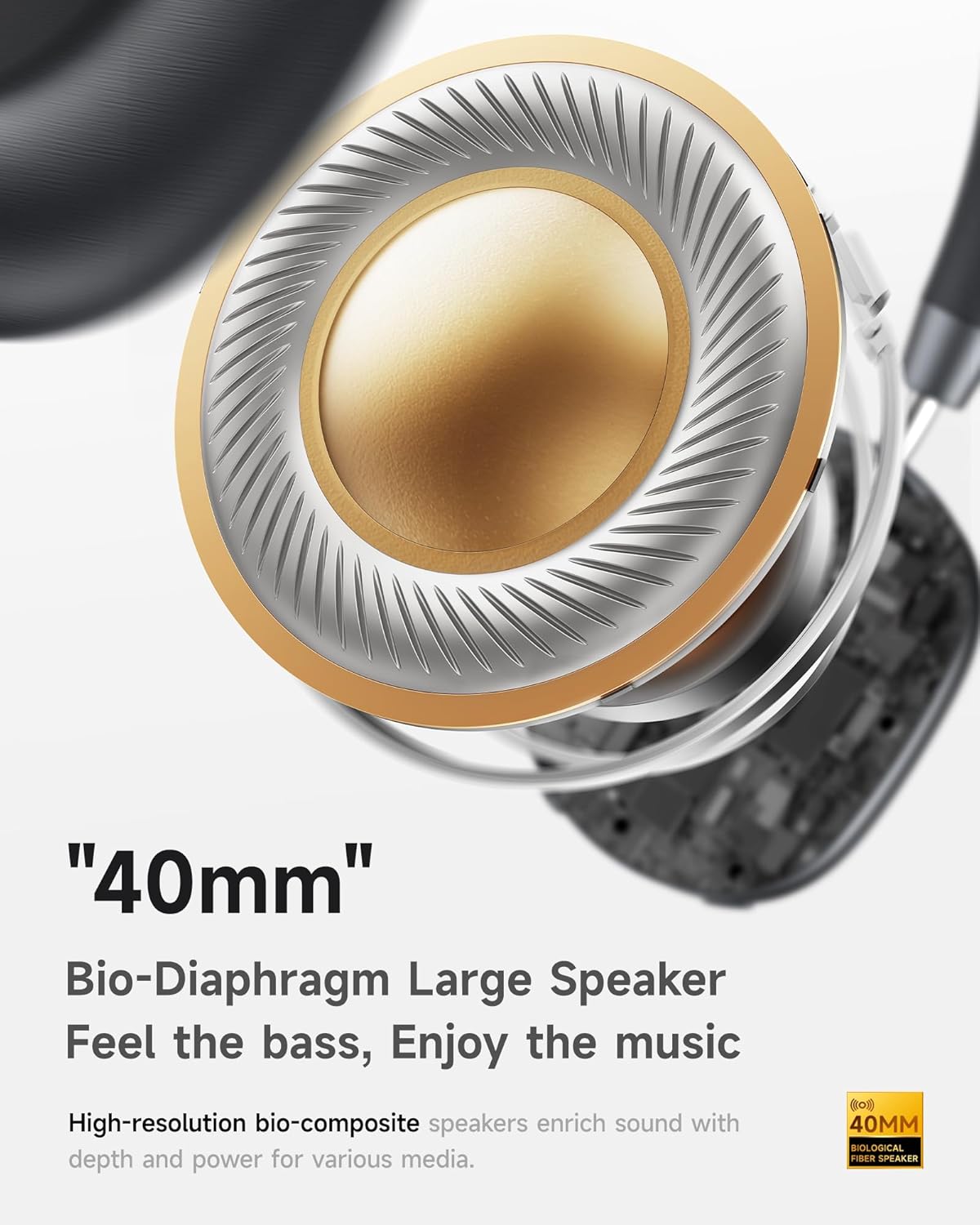
- Hi-Fi Audio with Deep Bass: Delivers clear sound with enhanced bass.
- App-Controlled EQ: Customize audio settings via a dedicated companion application.
- Sisäänrakennettu mikrofoni: Ensures clear voice calls.
- Monipisteyhteys: Allows seamless switching between two connected Bluetooth devices.
- Ergonominen muotoilu: Lightweight build with soft memory-foam earcups for extended comfort.
- Long Playtime & Fast Charging: Up to 30 hours of playback on a single charge, with quick recharge capabilities.



4. Asennus
4.1 Kuulokkeiden lataaminen
Before first use, fully charge your Picun F5 headphones. Connect the provided USB charging cable to the headphone's charging port and a compatible USB power source. The charging indicator light will show the charging status.
4.2 Bluetooth -pariliitos
- Varmista, että kuulokkeista on katkaistu virta.
- Pidä virtapainiketta painettuna, kunnes merkkivalo vilkkuu osoittaen pariliitostilaa.
- Ota Bluetooth käyttöön laitteellasi (älypuhelin, tabletti, tietokone) ja hae käytettävissä olevia laitteita.
- Select "Picun F5" from the list of devices to connect.
- Kun yhteys on muodostettu, merkkivalo muuttuu tasaiseksi siniseksi tai sammuu mallista riippuen.
4.3 Monipisteyhteys
The Picun F5 supports connecting to two Bluetooth devices simultaneously. After pairing with the first device, disable Bluetooth on that device. Pair the headphones with the second device. Then, re-enable Bluetooth on the first device. The headphones should now be connected to both devices, allowing seamless audio switching.

5. Käyttö
5.1 Perusohjaimet
Kuulokkeissa on intuitiiviset säätimet äänen ja puheluiden hallintaan:
- Virta päälle/pois: Pidä virtapainiketta painettuna.
- Äänenvoimakkuuden säätö: Use the dedicated volume knob/buttons on the earcup.
- Toista/tauko: Paina monitoimipainiketta kerran.
- Seuraava kappale: Paina monitoimipainiketta kahdesti.
- Edellinen kappale: Paina monitoimipainiketta kolme kertaa.
- Puhelun vastaaminen/lopetus: Single press the Multi-function button during an incoming call.
- Hylkää puhelu: Paina ja pidä monitoimipainiketta painettuna saapuvan puhelun aikana.
5.2 Aktiivinen melunvaimennus (ANC) -tilat
The ANC feature can be toggled or adjusted using a dedicated button on the headphones. Refer to the specific button layout on your device for exact functionality. Some models may offer different ANC levels or transparency modes.
5.3 App Control and Custom EQ
Download the companion app for your Picun F5 headphones to unlock personalized features. The app allows you to:
- Customize Equalizer (EQ) settings to match your audio preferences.
- Adjust ANC levels or switch between different noise control modes.
- Access additional smart features and settings.


6. Huolto
To ensure the longevity and optimal performance of your Picun F5 headphones, follow these maintenance guidelines:
- Puhdistus: Puhdista korvakuvut ja sanka pehmeällä, kuivalla liinalla. Vältä voimakkaiden kemikaalien tai hankaavien materiaalien käyttöä.
- Varastointi: Store the headphones in a cool, dry place, away from direct sunlight and extreme temperatures. When not in use, consider storing them in a protective case.
- Vältä kosteutta: Älä altista kuulokkeita vedelle tai liialliselle kosteudelle.
- Käsittele varovasti: Vältä kuulokkeiden pudottamista tai voimakkaiden iskujen kohteeksi altistamista.

7. Vianmääritys
If you encounter issues with your Picun F5 headphones, refer to the following common solutions:
- Ei virtaa: Varmista, että kuulokkeet ovat täyteen ladatut. Liitä ne virtalähteeseen ja tarkista latauksen merkkivalo.
- Paritusta ei voi muodostaa: Make sure the headphones are in pairing mode (indicator flashing). Disable and re-enable Bluetooth on your device, then try pairing again. Ensure the headphones are not already connected to another device.
- Ei ääntä: Check the volume levels on both the headphones and your connected device. Ensure the headphones are properly paired. If using a wired connection, ensure the 3.5mm audio cable is securely plugged in.
- Huono äänenlaatu: Move closer to your connected device to avoid interference. Check for any obstructions between the headphones and the device. Ensure the audio source is of good quality.
- ANC ei toimi: Ensure the ANC feature is activated. Check for any physical obstructions around the microphones.
If the issue persists, try resetting the headphones (refer to the full user manual for specific reset instructions) or contact customer support.
8. Tekniset tiedot
| Merkki | Picun |
| Mallin nimi | F5 |
| Yhteystekniikka | Langaton (Bluetooth 4.0) |
| Melunhallinta | Ääneneristys (aktiivinen melunvaimennus) |
| Taajuusvaste | 20 kHz |
| Herkkyys | 42 dB |
| Kuulokkeet Jack | 3.5 mm Jack |
| Akun kesto | 30 tuntia |
| Ääniohjaimen tyyppi | Dynaaminen ohjain |
| Kuulokkeen muoto | Pyöristää |
| Impedanssi | 32 ohmia |
| Tuotteen paino | 14 unssia (0.4 kiloa) |
| Materiaali | Akryylinitriilibutadieenistyreeni (ABS) |
9. Takuu ja tuki
Picun products are designed for reliability and performance. For warranty information, product support, or technical assistance, please refer to the warranty card included in your package or visit the official Picun websivusto. Säilytä ostokuitti takuuvaatimuksia varten.


