1. Johdanto
The Bluesound Pulse Flex 2i is a powerful, portable wireless speaker designed to deliver rich, detailed high-resolution audio. It supports Wi-Fi, Bluetooth aptX HD, AirPlay 2, and voice control, offering versatile connectivity for your music. This manual provides essential information for setting up, operating, and maintaining your Pulse Flex 2i speaker, including the BP100 battery pack and protective skin.
2. Tärkeimmät ominaisuudet
- Portable Hi-Res Audio: Experience crystal-clear sound with audiophile-grade amplification, 24-bit/192kHz playback, and support for MQA, FLAC, and other high-resolution formats.
- Langaton usean huoneen suoratoisto: Seamlessly connect via Wi-Fi, Bluetooth aptX HD, AirPlay 2, or Spotify Connect for whole-home audio with BluOS multi-room compatibility.
- Integroitu akkupaketti: The included Bluesound BP100 rechargeable battery pack provides up to 6 hours of high-fidelity playback, enabling true portability without a power outlet.
- Protective Skin: A custom-fit charcoal gray silicone skin is included to protect your speaker from everyday wear, bumps, and scratches.
- Älykäs ääniohjaus: Control your music hands-free using Alexa, Google Assistant, or Siri. Compatible with Roon Ready setups.
3. Tuotteen osat

Kuva 3.1: Edessä view of the Bluesound Pulse Flex 2i speaker, showcasinminimalistinen muotoilu ja kaiutinritilä.

Kuva 3.2: The Bluesound Pulse Flex 2i speaker bundled with its BP100 battery pack and the charcoal gray protective skin in its packaging.

Kuva 3.3: Rear panel of the Pulse Flex 2i, detailing the LAN, USB, Headphone Out, Optical In, Analog In, and power input ports.

Kuva 3.4: Top control panel of the speaker, featuring touch-sensitive buttons for playback, volume, and preset selection.
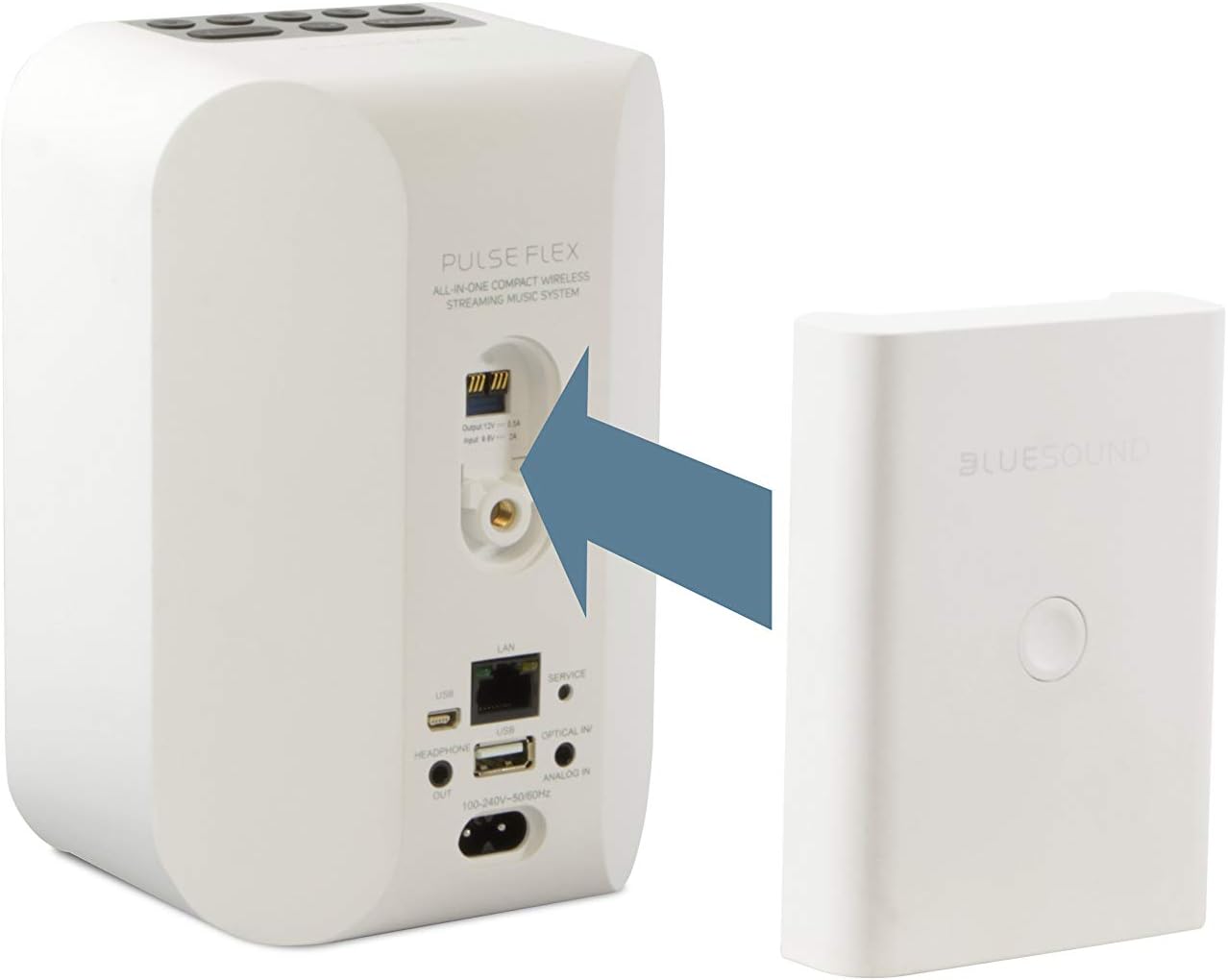
Kuva 3.5: Visual guide demonstrating the attachment of the BP100 battery pack to the dedicated slot on the speaker's rear.

Kuva 3.6: The Pulse Flex 2i speaker fully enclosed in its charcoal gray protective silicone skin, offering enhanced durability.
4. Asennus
4.1 Ensimmäinen lataus
Before first use, ensure the BP100 battery pack is fully charged. Connect the speaker to a power outlet using the provided power cable. The LED indicator will show charging status.
4.2 Attaching the BP100 Battery Pack
- Paikanna paristolokero Pulse Flex 2i -kaiuttimen takaosasta.
- Kohdista BP100-akkuyksikkö lokeroon ja liu'uta se varovasti paikalleen, kunnes se napsahtaa tukevasti.
- Ensure the battery pack is firmly connected to maintain power and charging functionality.
4.3 Applying the Protective Skin
- Carefully slide the charcoal gray protective silicone skin over the Pulse Flex 2i speaker.
- Ensure all ports, buttons, and the speaker grille are properly aligned with the skin's openings.
- Smooth out any wrinkles or misalignments for a snug fit.
4.4 Virran kytkeminen päälle
Press the power button located on the top panel of the speaker. The LED indicator will illuminate, indicating the speaker is powering on.
4.5 Verkkoyhteys
The Pulse Flex 2i supports both Wi-Fi and Ethernet connections for optimal streaming performance.
- Wi-Fi: For wireless connection, proceed to install the BluOS Controller App (Section 4.6).
- Ethernet: Connect an Ethernet cable from your router to the LAN port on the rear of the speaker.
4.6 BluOS Controller App Installation
- Download the BluOS Controller App from your device's app store (iOS, Android, Windows, macOS).
- Open the app and follow the on-screen instructions to discover and connect your Pulse Flex 2i to your home network.
- The app will guide you through the setup process, including naming your player and configuring Wi-Fi settings if applicable.
5. Käyttöohjeet
5.1 Perussäätimet (yläpaneeli)
- Toista/tauko: Press the central play/pause button to start or stop playback.
- Äänenvoimakkuus: Säädä äänenvoimakkuutta '+'- ja '-'-painikkeilla.
- Reitin navigointi: Use the left and right arrow buttons to skip tracks.
- Esiasetukset (1–5): Assign your favorite radio stations, playlists, or music services to these buttons for quick access. Configure via the BluOS app.
5.2 Musiikin suoratoisto
- BluOS App: Use the BluOS Controller App to access a wide range of music streaming services, internet radio, and your local music library.
- Bluetooth: Activate Bluetooth on your device and pair with "Pulse Flex 2i" for direct audio streaming. Supports aptX HD for high-quality sound.
- Air Play 2: For Apple device users, select the Pulse Flex 2i from the AirPlay menu on your device to stream audio.
- Analog/Optical Input: Connect external audio sources using the 3.5mm analog input or optical input on the rear panel.
5.3 Multi-Room Setup
The Pulse Flex 2i can be grouped with other BluOS-enabled devices to create a seamless multi-room audio system. Use the BluOS Controller App to group players, synchronize music, or play different music in different rooms.
5.4 Ääniohjaus
Integrate your Pulse Flex 2i with Amazon Alexa, Google Assistant, or Apple Siri for hands-free control. Follow the instructions in the respective voice assistant app to link your BluOS account.
6. Huolto
- Puhdistus: Puhdista kaiuttimen ulkopinta pehmeällä, kuivalla liinalla. Vältä hankaavia puhdistusaineita tai liuottimia.
- Akun hoito: For optimal battery life, avoid fully discharging the BP100 battery pack frequently. Store the speaker in a cool, dry place when not in use for extended periods.
- Ohjelmistopäivitykset: Regularly check for and install firmware updates via the BluOS Controller App to ensure optimal performance and access to new features.
7. Vianmääritys
| Antaa | Mahdollinen syy | Ratkaisu |
|---|---|---|
| Ei virtaa/Kaiutin ei käynnisty | Power cable not connected, battery discharged, power outlet issue. | Ensure power cable is securely connected. Charge the BP100 battery pack. Try a different power outlet. |
| Ei ääntä | Volume too low, incorrect input selected, source device issue. | Increase volume. Check input selection in BluOS app. Verify audio is playing on the source device. |
| Verkkoyhteysongelmat | Weak Wi-Fi signal, incorrect Wi-Fi password, router issue. | Move speaker closer to router. Re-enter Wi-Fi password in BluOS app. Restart your router. Try Ethernet connection. |
| Bluetooth-pariliitosvirhe | Speaker not in pairing mode, device too far, interference. | Ensure speaker is discoverable. Move device closer. Turn off other Bluetooth devices. |
8. Tekniset tiedot
- Malli: Bluesound Pulse Flex 2i
- Äänen resoluutio: Jopa 24-bittinen/192 kHz
- Tuetut äänimuodot: MQA, FLAC, WAV, AIFF, MP3, AAC, WMA, OGG, ALAC
- Liitettävyys: Dual-band Wi-Fi (802.11ac), Gigabit Ethernet, Bluetooth aptX HD, Apple AirPlay 2, USB (Type-A), Optical In, Analog In (3.5mm), Headphone Out (3.5mm)
- Ääniohjaus: Amazon Alexa, Google Assistant, Apple Siri compatible
- Monihuone: BluOS multi-room compatible
- Akkupaketti: BP100 (included), up to 6 hours playback
- Protective Skin: Charcoal Gray Silicone (included)
9. Takuu ja tuki
For warranty information, technical support, and further assistance, please visit the official Bluesound websivustolta tai ota yhteyttä heidän asiakaspalveluunsa. Säilytä ostokuitti takuuvaatimuksia varten.