
Johdanto
Welcome to the Parsonver SR2 Smart Watch user manual. This guide provides detailed instructions on how to set up, operate, maintain, and troubleshoot your new smart watch. Please read this manual thoroughly to ensure optimal performance and longevity of your device.

Image: The Parsonver SR2 Smart Watch, showcasing its display with time, date, steps, and heart rate, alongside a smaller inset of its GPS tracking feature.
1. Asennus
1.1 Pakkauksen sisältö
Ennen kuin aloitat, varmista, että pakkauksessa on kaikki tarvittavat osat:
- Parsonver SR2 Smart Watch
- Latauskaapeli
- Käyttöopas (tämä asiakirja)

Image: An illustration showing the Parsonver SR2 Smart Watch, its magnetic charging cable, and the included user manual.
1.2 Laitteen lataaminen
Upon first use, fully charge your smart watch. Connect the magnetic charging cable to the charging contacts on the back of the watch and plug the USB end into a power adapter (not included) or a computer's USB port. A full charge typically takes approximately 2 hours.
Image: The Parsonver SR2 Smart Watch connected to its magnetic charging cable, displaying a 100% charge indicator.
1.3 Sovelluksen asennus ja pariliitos
To unlock the full functionality of your Parsonver SR2 Smart Watch, download and install the companion application on your smartphone.
- Scan the QR code in the manual or search for the 'Parsonver' app in your phone's app store (Google Play Store for Android, Apple App Store for iPhone).
- Asenna sovellus ja luo tili tai kirjaudu sisään.
- Varmista, että Bluetooth on käytössä älypuhelimellasi.
- Open the Parsonver app, navigate to the device section, and follow the on-screen instructions to pair your SR2 Smart Watch.
- Grant all necessary permissions requested by the app for full functionality, including notifications and location services.
2. Älykellon käyttö
2.1 Perusnavigointi
The Parsonver SR2 Smart Watch features a responsive touchscreen and dual physical buttons for intuitive control.
- Kosketusnäyttö: Pyyhkäise vasemmalle/oikealle, ylös/alas navigoidaksesi valikoissa ja ominaisuuksissa. Napauta valitaksesi.
- Yläpainike: Yleensä käytetään palaamaan aloitusnäyttöön tai herättämään laite.
- Alempi painike: Customizable. Can be set to quickly access workout modes or frequently used applications via the companion app.

Image: A close-up of the Parsonver SR2 Smart Watch highlighting its dual button design and a menu showing 'Exercise', 'Walking', and 'Treadmill' options.
2.2 Bluetooth-puhelut ja älykkäät ilmoitukset
The SR2 Smart Watch supports Bluetooth 5.3 for stable connectivity, allowing you to answer and make calls directly from your wrist and receive smart notifications.
- Puheluihin vastaaminen/puheluiden soittaminen: Once paired, incoming calls will display on your watch. You can answer or reject them. Use the integrated microphone and speaker for conversations.
- Älykkäät ilmoitukset: Receive alerts for calls, SMS, and various social media applications directly on your watch. Ensure app permissions are granted for notifications.
- Quick Call Replies: (Android only) Respond instantly to calls with pre-set messages.

Image: A person interacting with the Parsonver SR2 Smart Watch, showing a call screen with a dial pad and contact list, along with icons for various social media notifications.
2.3 Sports Modes & Built-in GPS
Track your fitness activities with over 100 sports modes and accurate built-in GPS.
- Yli 100 urheilutilaa: Select your activity from a wide range of sports to get precise tracking of duration, distance, calories burned, and heart rate zones.
- Sisäänrakennettu GPS: Accurately record your workout routes without needing your phone. View detailed maps and statistics in the companion app after your activity.
- Älykäs tunnistus: The watch can automatically recognize when you are running, walking, or using a treadmill.

Image: A person running outdoors, with the Parsonver SR2 Smart Watch displaying a GPS-tracked route on its screen and a smartphone app showing detailed workout data including distance and time.
2.4 24-Hour Health Monitoring
Monitor your health metrics continuously with the SR2 Smart Watch.
- Sykemittaus: Tracks your heart rate throughout the day. Set custom alerts for high or low readings.
- Unenvalvonta: Analyzes your sleep patterns (deep sleep, light sleep, REM, awake time, sporadic naps) to provide insights into your sleep quality.
- Veren hapen (SpO2) seuranta: Measures your blood oxygen levels, providing clear trends and real-time tracking.
- Stressin seuranta: Understand your emotional fluctuations through data-driven body-mind analysis.
- Women's Health Companion: Provides data-driven cycle management features.

Image: A person sleeping, wearing the Parsonver SR2 Smart Watch, with graphics illustrating sleep monitoring, heart rate monitoring, stress monitoring, and blood oxygen monitoring features.
2.5 Watch Faces & DIY
Personalize your watch with a variety of watch faces or create your own.
- Yli 100 kellotaulua: Choose from a wide selection of pre-installed watch faces to match your style.
- Tee-se-itse-kellotaulut: Use the companion app to upload your own photos and customize your watch face.

Image: The Parsonver SR2 Smart Watch displaying a custom watch face with a photo, surrounded by various other watch face designs and a smartphone screen showing the watch face synchronization interface.
2.6 Lisäominaisuudet
The SR2 Smart Watch offers a range of other useful functions:
- Maailmankello
- Kirkkauden säätö
- Hälytys
- Laskin
- Ajastin
- Etsi puhelimeni
- Lift-to-wake
- Sekuntikello
- Musiikin ohjaus
- Remote Camera Trigger
- Hengitysharjoitukset
- Reminders (Handwashing, Medication, Event, Drinking, Standing)

Image: The Parsonver SR2 Smart Watch screen surrounded by icons representing various features like weather, music, camera control, alarm, and more.
3. Huolto
3.1 vedenpitävyysluokitus (IP68)
The Parsonver SR2 Smart Watch is rated IP68 waterproof, meaning it is rigorously tested to withstand splashes, hand washing, face washing, and intense sweat. It is suitable for daily use and light water exposure.
Note: Avoid using the watch while showering, in saunas, or swimming, as hot water, steam, or prolonged submersion can compromise the seal and cause damage.

Image: A man kayaking on a river, wearing the Parsonver SR2 Smart Watch, illustrating its IP68 waterproof capability against splashes.
3.2 Puhdistus ja hoito
- Puhdista kellosi ja rannekkeesi säännöllisesti pehmeällä,amp kangas.
- Vältä voimakkaiden kemikaalien, hankaavien puhdistusaineiden tai liuottimien käyttöä.
- Varmista, että latauskoskettimet ovat puhtaat ja kuivat ennen lataamista korroosion estämiseksi.
3.3 Akun hoito
- Lataa kello säännöllisesti välttäen täydellistä purkautumista pitkiä aikoja.
- Säilytä kelloa viileässä ja kuivassa paikassa, kun sitä ei käytetä.
- Typical battery life is 5-7 days with normal use, and up to 40 days in standby mode. Actual battery life may vary based on usage.
4. Vianmääritys
Jos kohtaat ongelmia Parsonver SR2 -älykellosi kanssa, katso seuraavat yleiset ratkaisut:
| Antaa | Mahdollinen ratkaisu |
|---|---|
| Kello ei käynnisty | Varmista, että kello on ladattu täyteen. Liitä se laturiin vähintään 30 minuutiksi. |
| Ei voi yhdistää puhelimeen | Varmista, että Bluetooth on käytössä puhelimessasi. Käynnistä sekä kello että puhelin uudelleen. Varmista, että kello on Bluetooth-kantama-alueella. Tarkista sovellusten käyttöoikeudet. |
| Ilmoituksia ei vastaanotettu | Verify that notification permissions are granted in the Parsonver app and your phone's settings. Ensure the app is running in the background. |
| Epätarkat terveystiedot | Varmista, että kello on tiukasti ranteessasi, ei liian tiukasti eikä liian löysästi. Puhdista kellon takana oleva anturi. Vältä liiallista liikettä mittausten aikana. |
| GPS ei seuraa | Varmista, että olet avoimella ulkoalueella, jossa on esteetön view of the sky. Wait for the watch to acquire a GPS signal before starting your activity. |
| Lyhyt akunkesto | Reduce screen brightness, disable 'Lift-to-wake' if not needed, limit continuous heart rate monitoring, and close unused apps on the watch. |
Jos ongelma jatkuu, ota yhteyttä asiakastukeen lisäapua varten.
5. Tekniset tiedot
| Ominaisuus | Yksityiskohta |
|---|---|
| Mallinumero | SR2 |
| Tuotteen mitat | 9.84 x 1.69 x 0.46 tuumaa |
| Tuotteen paino | 1.41 unssia (40 grammaa) |
| Näytön koko | 1.27 tuumaa (seisomanäyttö) |
| Näkyvä näytön diagonaali | 2" / 4 cm |
| Muistin tallennuskapasiteetti | 256 Mt |
| Langaton viestintä | Bluetooth 5.3 |
| Ihmisen käyttöliittymän syöttö | Kosketusnäyttö |
| Kansainvälinen turva-arviointi | IP68 |
| Akku | Vaatii 1 C-pariston (sisältyy pakkaukseen) |
| Valmistaja | Parsonver |
| Ensimmäinen vapaapäivä | 12. lokakuuta 2025 |
6. Takuu ja tuki
6.1 Tuotetakuu
Parsonver products are designed and manufactured to the highest quality standards. This product is covered by a limited warranty against defects in materials and workmanship. Please refer to the warranty card included in your package or contact Parsonver customer support for specific warranty terms and conditions.
6.2 Asiakastuki
For any questions, technical assistance, or support needs, please contact Parsonver customer service. Our support team is available 24/7 to assist you.
- Online-tuki: Visit the official Parsonver website or contact us through the companion app for online assistance.
- Sähköpostituki: Refer to your warranty card or product packaging for email contact information.
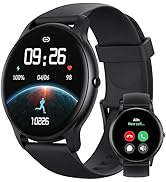
Image: An icon representing 24/7 online customer support, featuring a headset and chat bubbles.


