Johdanto
This user manual provides detailed instructions for the FREEWOLF T96 Smart Display Wireless Gaming Keyboard and Mouse Combo. This combo is designed for a seamless and responsive experience across various devices and applications, from gaming to office work.
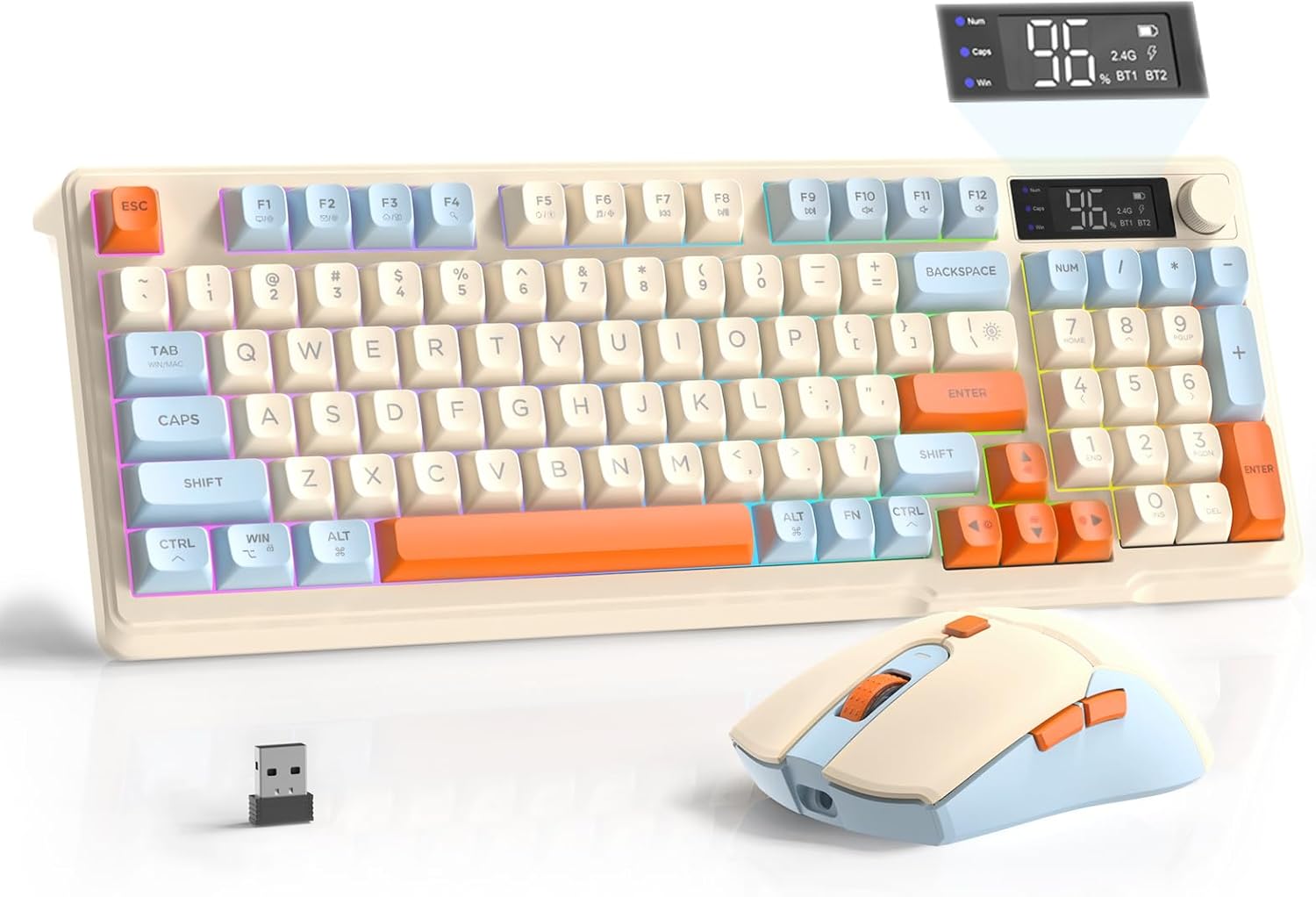
Image: The FREEWOLF T96 Wireless Gaming Keyboard and Mouse Combo, featuring the keyboard, mouse, and USB receiver.
Pakkauksen sisältö
Varmista, että pakkauksessa on kaikki tarvittavat osat:
- 1 x T96 Membrane Keyboard
- 1 x T96 Wireless Mouse
- 1 x USB-C kaapeli
- 1 x USB Receiver (stored in mouse bottom slot)
- 1 x Käyttöohje
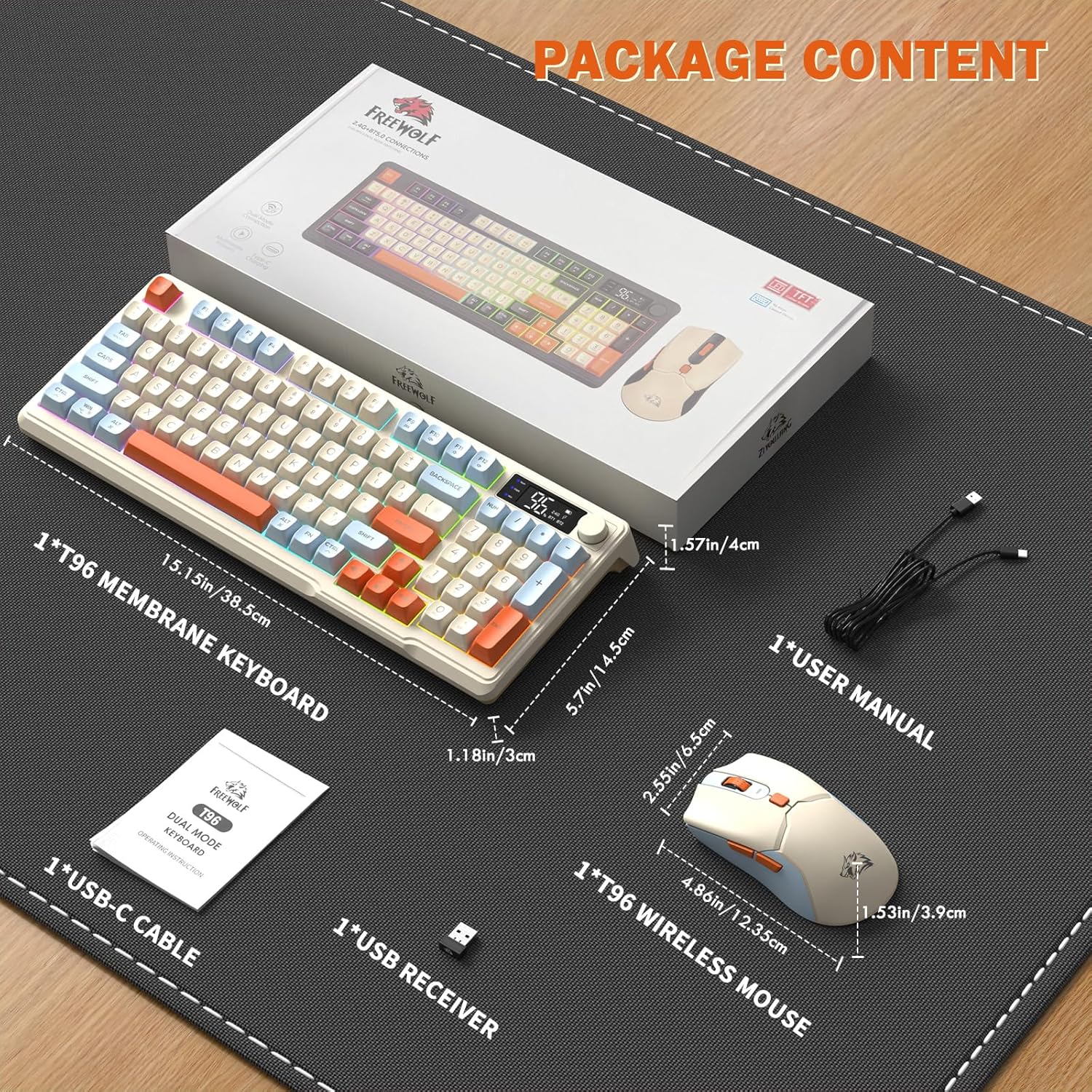
Image: A visual representation of the package contents, including the keyboard, mouse, USB-C cable, USB receiver, and user manual.
Asennus
Yhteysasetukset
The T96 combo supports dual-mode wireless connectivity:
- 2.4G langaton yhteys: Utilizes the included USB receiver for a stable, plug-and-play connection.
- Bluetooth Connections (BT1/BT2): Allows pairing with up to two Bluetooth-enabled devices, enabling seamless switching.
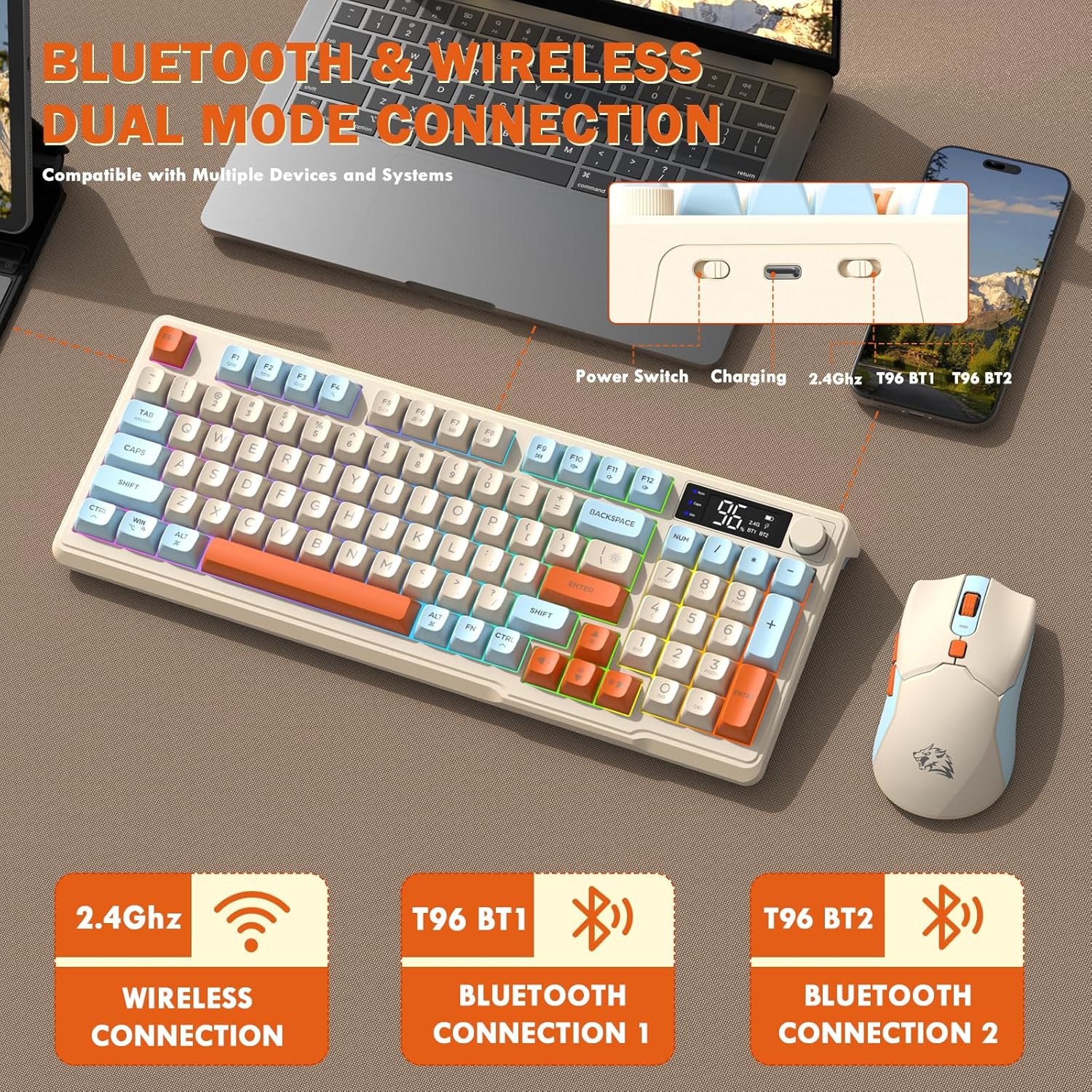
Image: Diagram illustrating the dual-mode connection options (2.4GHz, Bluetooth 1, Bluetooth 2) and the location of the power switch, charging port, and connection indicators on the keyboard.
Alkuasennusvaiheet
- Latauslaitteet: Before first use, fully charge both the keyboard and mouse using the provided USB-C cable. The keyboard has a 2000mAh battery, and the mouse has a 500mAh battery. The smart display on the keyboard will show charging progress.
- Paikanna USB-vastaanotin: The USB receiver for 2.4G wireless connection is stored in a slot on the bottom of the mouse. Remove it for use.
- Virta päälle: Käynnistä näppäimistö ja hiiri niiden virtakytkimillä.
- Connect via 2.4G Wireless:
- Liitä USB-vastaanotin tietokoneesi vapaaseen USB-porttiin.
- Ensure the keyboard and mouse are set to 2.4G mode (indicated on the keyboard's smart display). They should connect automatically.
- Yhdistä Bluetoothin kautta:
- Switch the keyboard and mouse to BT1 or BT2 mode.
- On your device (PC, laptop, tablet, smartphone), open Bluetooth settings.
- Etsi "T96 Keyboard" and "T96 Mouse" in the list of available devices and pair them.
- The smart display will indicate the active Bluetooth connection (BT1 or BT2).
Käyttöohjeet
Näppäimistön käyttö
The T96 keyboard features a 94-key compact layout with various functions to enhance your experience.
Smart Display Functions
The intelligent LED display provides real-time information:
- Akun tila: Näyttää jäljellä olevan akun varauksen prosentteinatage.
- Yhteystila: Indicates active connection (2.4G, BT1, BT2).
- Latauksen edistyminen: Displays charging status when connected to power.
- Caps Lock/Num Lock/Win Lock Indicators: Shows status of these keys.
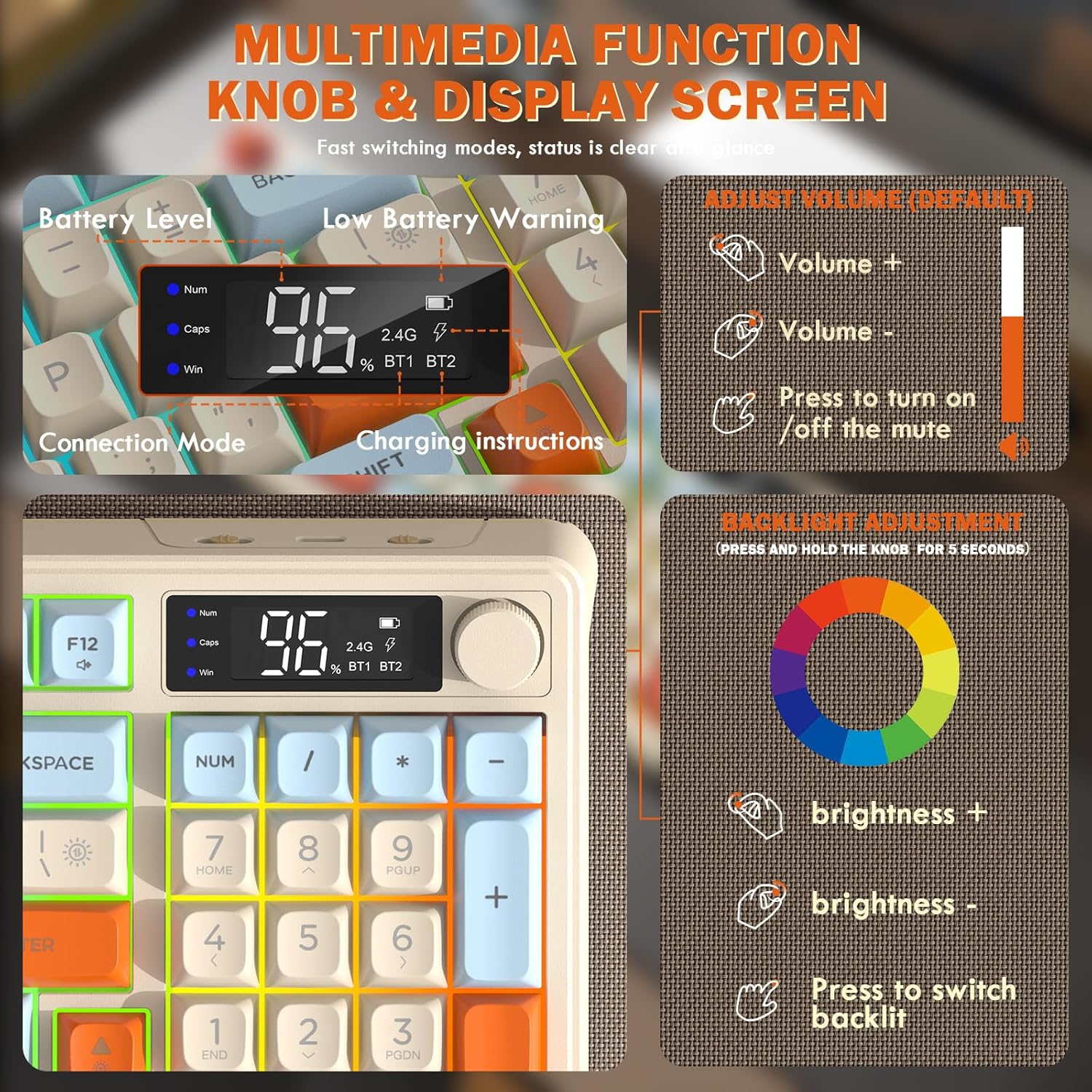
Image: Close-up of the keyboard's smart display showing battery level, connection mode, and charging instructions. Also details the multimedia knob's functions for volume and backlight control.
Multimedian ohjausnuppi
Located on the top right of the keyboard, this knob offers quick control:
- Kiertää: Adjusts system volume (clockwise for volume up, counter-clockwise for volume down).
- Paina: Toggles mute on/off.
- Paina ja pidä painettuna (5 sekuntia): Activates backlight adjustment mode. Rotate to change brightness, press to switch light effects.
Multimedia Hotkeys (FN Combinations)
The keyboard includes 12 dedicated multimedia hotkeys accessible via the FN avain:
- FN + F1–F12: Access various multimedia and system functions (e.g., media playback, volume, browser, email). Refer to keycap legends for specific functions.
Taustavalon ohjaus
The keyboard features vibrant rainbow LED backlighting. Control it using the following combinations:
- FN + ylänuoli: Lisää taustavalon kirkkautta.
- FN + alanuoli: Vähennä taustavalon kirkkautta.
- FN + oikea nuoli: Lisää taustavalon nopeutta.
- FN + vasen nuoli: Vähennä taustavalon nopeutta.
- FN + \|: Switch between different lighting modes (e.g., always on, breathing, off).
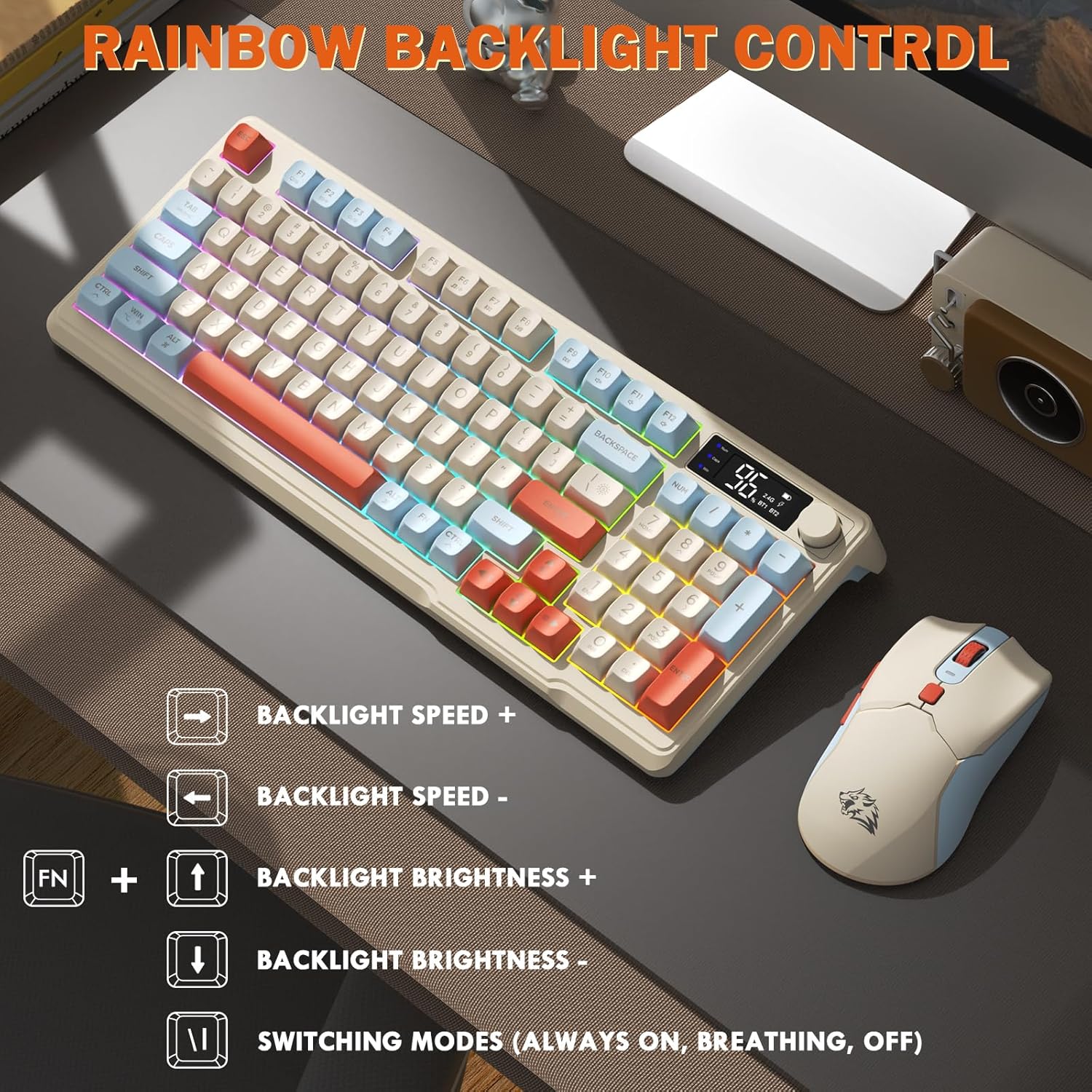
Image: Visual guide for controlling the rainbow LED backlight, showing key combinations for brightness, speed, and mode switching.
Anti-Ghosting
The keyboard supports 26-key rollover anti-ghosting technology, ensuring accurate registration of multiple simultaneous key presses, crucial for gaming.
Hiiren toiminta
The T96 gaming mouse is designed for precision and comfort.
DPI-säätö
Adjust the mouse sensitivity (DPI) to suit your preference:
- Paina DPI-painike (located behind the scroll wheel) to cycle through available DPI settings: 800 / 1600 / 2400 / 4000 DPI.
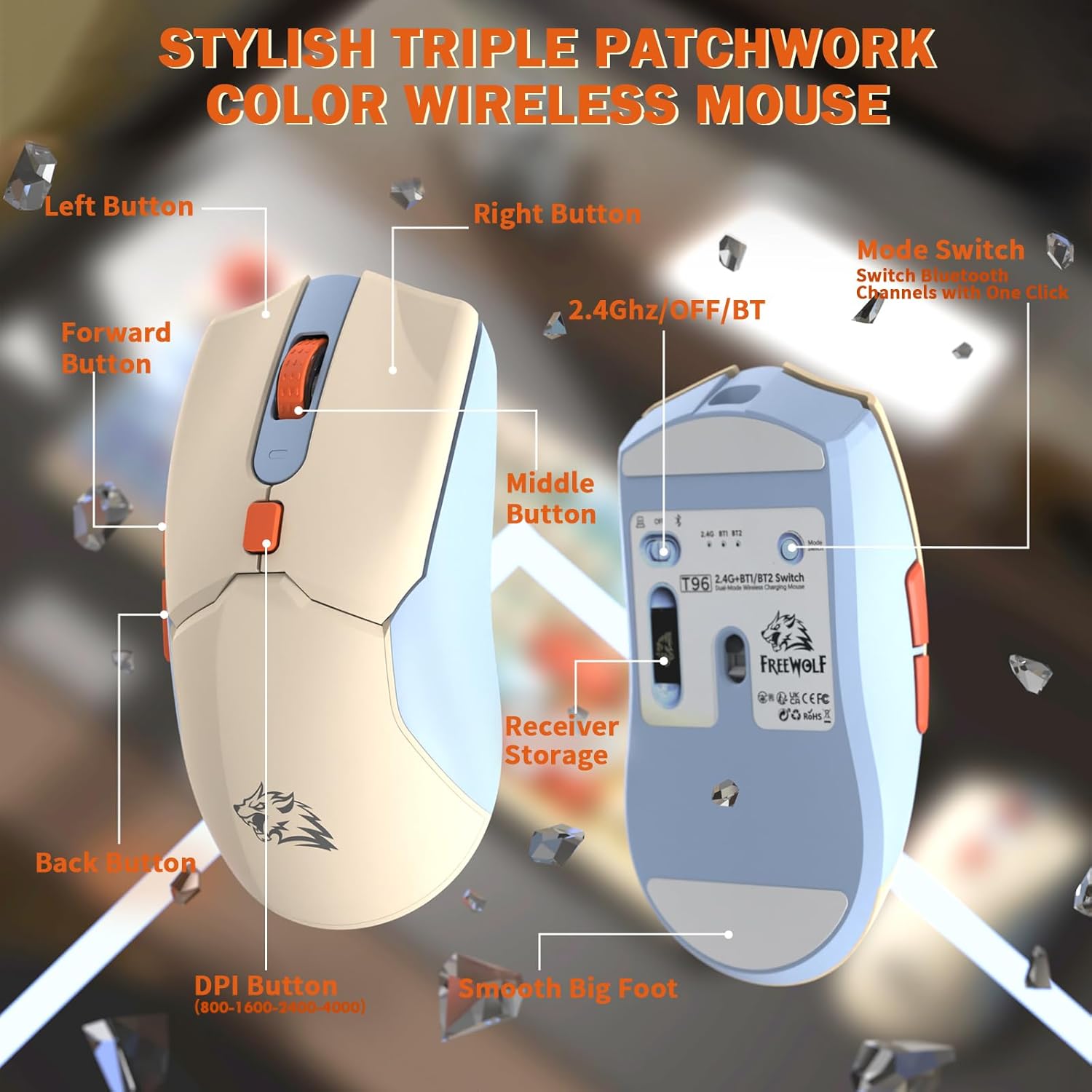
Kuva: Yksityiskohtainen view of the T96 wireless mouse, highlighting its buttons (Left, Right, Middle, Forward, Back, DPI) and the receiver storage compartment on the bottom.
Ohjelmoitavat painikkeet
The mouse features six programmable buttons. Refer to specific software (if applicable, not mentioned in data) or operating system settings for customization options.
Äänestysprosentit
The mouse operates at different polling rates depending on the connection mode:
- Bluetooth (BT): 115 Hz
- 2.4G langaton: 125 Hz
Huolto
Puhdistus
- Use a soft, dry cloth to clean the surfaces of the keyboard and mouse.
- Pinttyneeseen likaan, kevyesti dampfi pyyhi liina vedellä tai miedolla, hankaamattomalla puhdistusaineella.
- Vältä voimakkaiden kemikaalien, liuottimien tai hankaavien materiaalien käyttöä, sillä ne voivat vahingoittaa pintaa.
- Älä upota laitteita veteen tai mihinkään nesteeseen.
Akun hoito
Akun käyttöiän ja suorituskyvyn maksimoimiseksi:
- Recharge the devices when the low battery indicator appears on the keyboard's smart display.
- Vältä akun tyhjentymistä kokonaan usein.
- Säilytä laitteita viileässä ja kuivassa paikassa, kun niitä ei käytetä pitkään aikaan.
- The devices feature smart power-saving modes: the keyboard enters sleep mode after 3 minutes of inactivity, and the mouse after 2 minutes. They wake instantly upon touch.

Image: Illustration showing the 2000mAh battery capacity of the keyboard and 500mAh battery capacity of the mouse, emphasizing long-lasting power.
Vianetsintä
If you encounter issues with your T96 combo, refer to the following common solutions:
| Ongelma | Mahdollinen syy | Ratkaisu |
|---|---|---|
| Näppäimistö/hiiri ei reagoi | Akku vähissä; Väärä yhteystila; USB-vastaanotin ei ole kytketty (2.4G); Bluetooth-pariliitosta ei ole muodostettu. |
|
| Viive tai ajoittainen yhteys | Häiriöt; Etäisyys vastaanottimesta/laitteesta; Akun varaus on heikko. |
|
| Taustavalo ei toimi tai on himmeä | Taustavalo pois päältä; Kirkkaus on liian alhainen; Akku on vähissä. |
|
| Hiiren DPI ei muutu | DPI-painiketta ei painettu oikein. |
|
Tekniset tiedot
| Ominaisuus | Yksityiskohta |
|---|---|
| Merkki | VAPAA SUSSI |
| Malli | T96 |
| Yhteystekniikka | 2.4Ghz Wireless, Bluetooth (BT1, BT2) |
| Näppäimistön tyyppi | Membrane, 94-Key Compact Layout |
| näppäinten yläpuolelle | PBT Triple-Tone Spherical Keycaps |
| Taustavalo | Rainbow LED Backlight |
| Anti-Ghosting | 26-näppäimen rollover |
| Näppäimistön akun kapasiteetti | 2000 mAh |
| Hiiren DPI | 800 / 1600 / 2400 / 4000 DPI (säädettävä) |
| Mouse Polling Rate (BT) | 115 Hz |
| Mouse Polling Rate (2.4G) | 125 Hz |
| Hiiren akun kapasiteetti | 500 mAh |
| Yhteensopivat laitteet | Kannettava tietokone, Pelikonsoli, Tietokone, Tabletti, Älypuhelin |
| Käyttöjärjestelmät | Windows, macOS, Linux, iOS, Android |
| Tuotteen paino | 2.12 paunaa (noin 0.96 kg) |
| Pakkauksen mitat | 16.26 x 8.78 x 1.85 tuumaa (noin 41.3 x 22.3 x 4.7 cm) |
Takuu ja tuki
Tietoja tuotteen takuusta ja asiakastuesta ei löytynyt saatavilla olevista tiedoista. Katso lisätietoja tuotteen pakkauksesta tai valmistajan virallisesta dokumentista. websivustolta lisätietoja takuusta ja siitä, miten voit ottaa yhteyttä asiakastukeen.


