1. Johdanto
This manual provides detailed instructions for the setup, operation, and maintenance of your ATTACK SHARK X11 Wireless Gaming Mouse and X60 HE Magnetic Switch Gaming Keyboard Combo. Please read this manual thoroughly before using the product to ensure optimal performance and longevity.
2. Pakkauksen sisältö
Varmista, että pakkauksessasi on kaikki tarvittavat osat:
- ATTACK SHARK X60 HE Magnetic Switch Gaming Keyboard
- ATTACK SHARK X11 Langaton Pelihiiri
- USB-C–USB-A-kaapeli (latausta ja langallista yhteyttä varten)
- 2.4 GHz:n USB-vastaanotinadapteri
- RGB Charging Dock for X11 Mouse
- Käyttöopas (tämä asiakirja)

3. Tuote ohiview
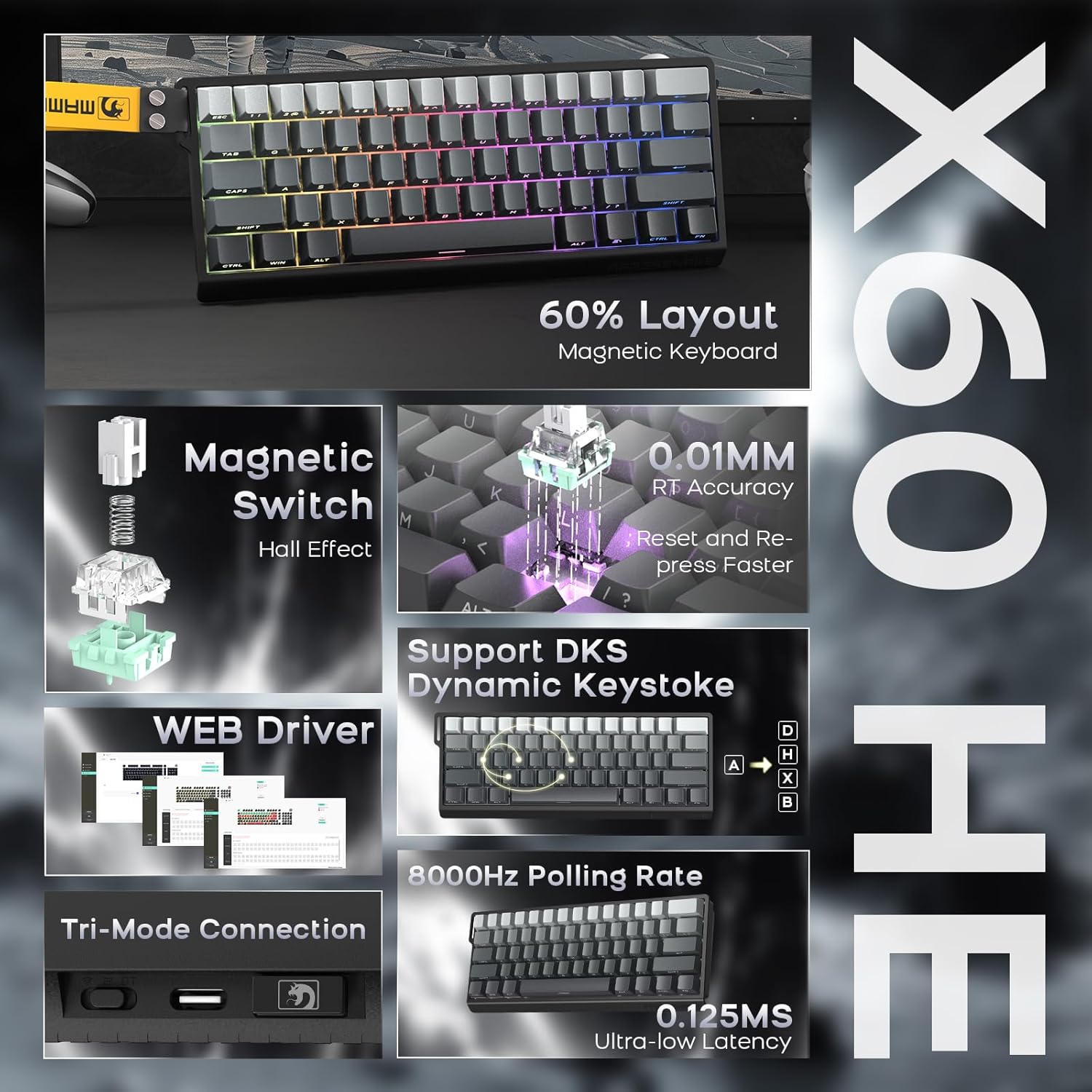
3.1. ATTACK SHARK X60 HE Keyboard
The X60 HE is a 60% layout magnetic switch keyboard designed for high-performance gaming. It features Hall effect switches with adjustable actuation points, rapid trigger functionality, and an 8000Hz polling rate for ultra-low latency response.
- Magneettiset kytkimet: Hall effect switches with adjustable actuation from 0.1mm to 3.2mm.
- Nopea laukaisu: Enables faster key resets and re-presses.
- 8000 Hz:n kyselytaajuus: Provides 0.125ms response time in wired mode.
- Dynaaminen näppäinpainallus (DKS): Supports advanced key functionalities.
- Kolmitilayhteys: USB-C wired, 2.4GHz wireless, and Bluetooth.
- RGB-taustavalo: Customizable 16.8 million color RGB effects.
- Hot-Swapped: Allows switch replacement without soldering.
- Akku: Integroitu 4000 mAh ladattava akku.

3.2. ATTACK SHARK X11 Mouse
The X11 is a lightweight wireless gaming mouse equipped with a high-precision PAW3311 optical sensor and tri-mode connectivity. It features a magnetic charging dock that also functions as a 2.4GHz wireless receiver hub.
- Anturi: PAW3311 optical sensor.
- DPI: Up to 22,000 DPI with 6 adjustable levels.
- Äänestysprosentti: 1000 Hz.
- Paino: Approximately 62g for effortless control.
- Kytkimet: HUYU switches with 20 million+ click lifespan.
- Kolmitilayhteys: USB-C wired, 2.4GHz wireless, and Bluetooth.
- Lataus: Magnetic fast charging via RGB dock.
- Akun kesto: Up to 65 hours of interval usage.


4. Asennus
4.1. Alkulataus
Ennen ensimmäistä käyttökertaa on suositeltavaa ladata sekä näppäimistö että hiiri täyteen.
- Näppäimistö: Connect the USB-C cable to the keyboard and a power source (e.g., computer USB port, USB wall adapter).
- Hiiri: Place the X11 mouse onto its RGB charging dock. Connect the USB-C cable to the charging dock and a power source. The dock will also serve as the 2.4GHz wireless receiver hub.

4.2. Yhteystilat
Both the X60 HE keyboard and X11 mouse support three connection modes: 2.4GHz wireless, Bluetooth, and USB-C wired.

4.2.1. 2.4 GHz:n langaton tila
- Näppäimistö: Ensure the keyboard is in 2.4GHz mode (check indicator light). Plug the 2.4GHz USB receiver dongle into an available USB port on your computer.
- Hiiri: The 2.4GHz USB receiver dongle is integrated into the RGB charging dock. Connect the charging dock to your computer via the USB-C cable. Ensure the mouse is in 2.4GHz mode.
4.2.2. Bluetooth-tila
- Näppäimistö: Switch the keyboard to Bluetooth mode. Activate Bluetooth on your device (computer, tablet, etc.) and search for available devices. Select "ATTACK SHARK X60 HE" to pair.
- Hiiri: Switch the mouse to Bluetooth mode. On your device, search for and select "ATTACK SHARK X11" to pair. The X11 mouse supports connecting to two Bluetooth devices (BT1/BT2) and can be switched between them.
4.2.3. USB-C-langallinen tila
- Näppäimistö: Connect the USB-C cable directly from the keyboard to your computer. The keyboard will automatically switch to wired mode and begin charging.
- Hiiri: Connect the USB-C cable directly from the mouse to your computer. The mouse will automatically switch to wired mode and begin charging.
5. Käyttö
5.1. X60 HE Keyboard Functions
- Säädettävä käyttöpiste: Use the dedicated software (web driver) to customize the actuation distance of each magnetic switch from 0.1mm to 3.2mm.
- Nopea laukaisu: This feature allows keys to activate and deactivate based on movement rather than a fixed point, enabling faster repeated inputs. Configure via the web kuljettaja.
- Dynaaminen näppäinpainallus (DKS): Assign up to four different actions to a single keypress based on how far the key is pressed.
- RGB-taustavalo: Cycle through various preset RGB lighting effects using keyboard shortcuts (refer to the keyboard's specific function key combinations) or customize extensively via the web kuljettaja.
- Web Kuljettaja: Käytä web-pohjainen kuljettaja osoitteessa www.gmk.top for advanced customization of key functions, actuation points, DKS, macros, and lighting effects.

5.2. X11 Mouse Functions
- DPI-säätö: The mouse features a DPI button (usually on the bottom or top) to cycle through 6 preset DPI levels: 800, 1600, 2400, 3200, 5000, and 22000 DPI.
- Tri-Mode Switching: Use the switch on the bottom of the mouse to select between 2.4GHz, Bluetooth (BT1/BT2), and wired modes.
- RGB-lataustelakka: The dock provides magnetic charging and features customizable RGB lighting. It also acts as the 2.4GHz receiver.
- X11 Driver Software: Download the dedicated X11 driver software for advanced customization, including button remapping, macro creation, DPI fine-tuning, polling rate adjustment, and RGB lighting control.

6. Huolto
Proper maintenance ensures the longevity and performance of your gaming combo.
- Puhdistus: Pyyhi näppäimistö ja hiiri pehmeällä, kuivalla liinalla. Pinttyneeseen likaan käytä hieman kuivaa liinaa.amp cloth with mild soap can be used, ensuring no liquid enters the devices. Use compressed air to clear debris from between keycaps.
- Akun hoito: Avoid fully discharging the batteries frequently. For optimal battery health, charge the devices when the battery level is low, but avoid leaving them plugged in for extended periods after reaching full charge.
- Varastointi: Säilytä laitteita viileässä, kuivassa paikassa, poissa suorasta auringonvalosta ja äärimmäisistä lämpötiloista.
7. Vianmääritys
Jos kohtaat ongelmia, tutustu seuraaviin yleisiin ratkaisuihin:
| Ongelma | Mahdollinen ratkaisu |
|---|---|
| Device not connecting wirelessly |
|
| Viive tai syöttöviive |
|
| RGB-valo ei toimi |
|
| Keyboard keys not responding |
|
If the problem persists, please contact ATTACK SHARK customer support.
8. Tekniset tiedot
8.1. ATTACK SHARK X60 HE Keyboard
- Kytkimen tyyppi: Hall-ilmiöön perustuvat magneettikytkimet (lineaariset)
- Käyttöpiste: Adjustable 0.1mm - 3.2mm (via software)
- Äänestysprosentti: 8000 Hz (langallinen), 1000 Hz (2.4 GHz:n langaton/Bluetooth)
- Liitettävyys: USB-C Wired, 2.4GHz Wireless, Bluetooth
- Akku: 4000mAh ladattava
- Erikoisominaisuudet: Rapid Trigger, Dynamic Keystroke (DKS), RGB Backlighting, Hot-Swappable
8.2. ATTACK SHARK X11 Mouse
- Anturi: PAW3311 Optinen anturi
- DPI: Up to 22,000 (6 adjustable levels: 800/1600/2400/3200/5000/22000)
- Äänestysprosentti: 1000 Hz
- Paino: Noin 62 g
- Kytkimet: HUYU (20 Million+ Clicks)
- Liitettävyys: USB-C Wired, 2.4GHz Wireless, Bluetooth
- Akun kesto: Up to 65 hours (interval usage)
- Lataus: Magnetic Fast Charging Dock (with RGB)
8.3. Yleiset tiedot
- Paketin mitat: 14.75 x 7 x 4.75 tuumaa
- Tuotteen paino: 2.94 kiloa
- Yhteensopivat laitteet: Personal Computer, Laptop, Tablet (Windows, macOS, Switch, Xbox, PlayStation)
- Valmistaja: HYÖKKIHAI
9. Takuu ja tuki
For warranty information or technical support, please contact the seller or visit the official ATTACK SHARK websivusto. Säilytä ostokuitti ostotodistuksena.
Myyjä: ATTACK SHARK US
Virallinen Websivusto: ATTACK SHARK -kauppa Amazonissa


