Johdanto
This manual provides essential information for the installation, operation, and maintenance of your Richmat HJA67S Actuator Motor. This motor is designed as a replacement part for adjustable bed bases, specifically compatible with models that utilize the HJA67S actuator with a 4-pin head configuration. Please read this manual thoroughly before proceeding with installation to ensure proper function and safety.
Turvallisuustiedot
- Katkaise virta: Always ensure the adjustable bed base is unplugged from the power outlet before attempting any installation, removal, or maintenance.
- Ammattimainen asennussuositus: If you are unsure about any steps, consult a qualified technician.
- Yhteensopivuuden tarkistus: Verify that the replacement motor's model number (HJA67S) and pin configuration (4-pin head) precisely match your existing motor. Incompatibility can lead to malfunction or damage.
- Käsittele varovasti: Avoid dropping or subjecting the motor to excessive force, which can damage internal components.
- Pidä kuivana: This motor is not waterproof. Avoid exposure to liquids or excessive moisture.
Mitä laatikossa on
- Richmat HJA67S Actuator Motor (4 Pin Head)
Asennus ja asennus
Follow these steps carefully to replace your adjustable bed's actuator motor.
- Valmistele sänky: Unplug the adjustable bed from the wall outlet. Position the bed to allow easy access to the motor.
- Identify the Existing Motor: Locate the actuator motor on your adjustable bed base. Note its position and how it connects to the bed frame.
- Tarkista yhteensopivuus: Before proceeding, carefully check the label on your existing motor to confirm it is a Richmat HJA67S model and has a 4-pin connector.

Image: Close-up of the Richmat HJA67S motor label. Verify the model number and specifications match your existing unit.

Image: Detail of the 4-pin connector. Ensure your bed's wiring harness is compatible with this connector type.
- Disconnect the Old Motor:
- Carefully disconnect the power cable from the old motor.
- Unbolt or unclip the motor from its mounting points on the bed frame. There are typically pins or bolts at both ends of the actuator.
- Remove the old motor.
- Install the New Motor:
- Position the new Richmat HJA67S actuator motor in the same location as the old one.
- Securely attach the motor to the bed frame using the existing bolts or clips. Ensure it is firmly in place and aligned correctly.
- Connect the 4-pin power cable from the bed's wiring harness to the new motor's connector. Ensure a snug fit.
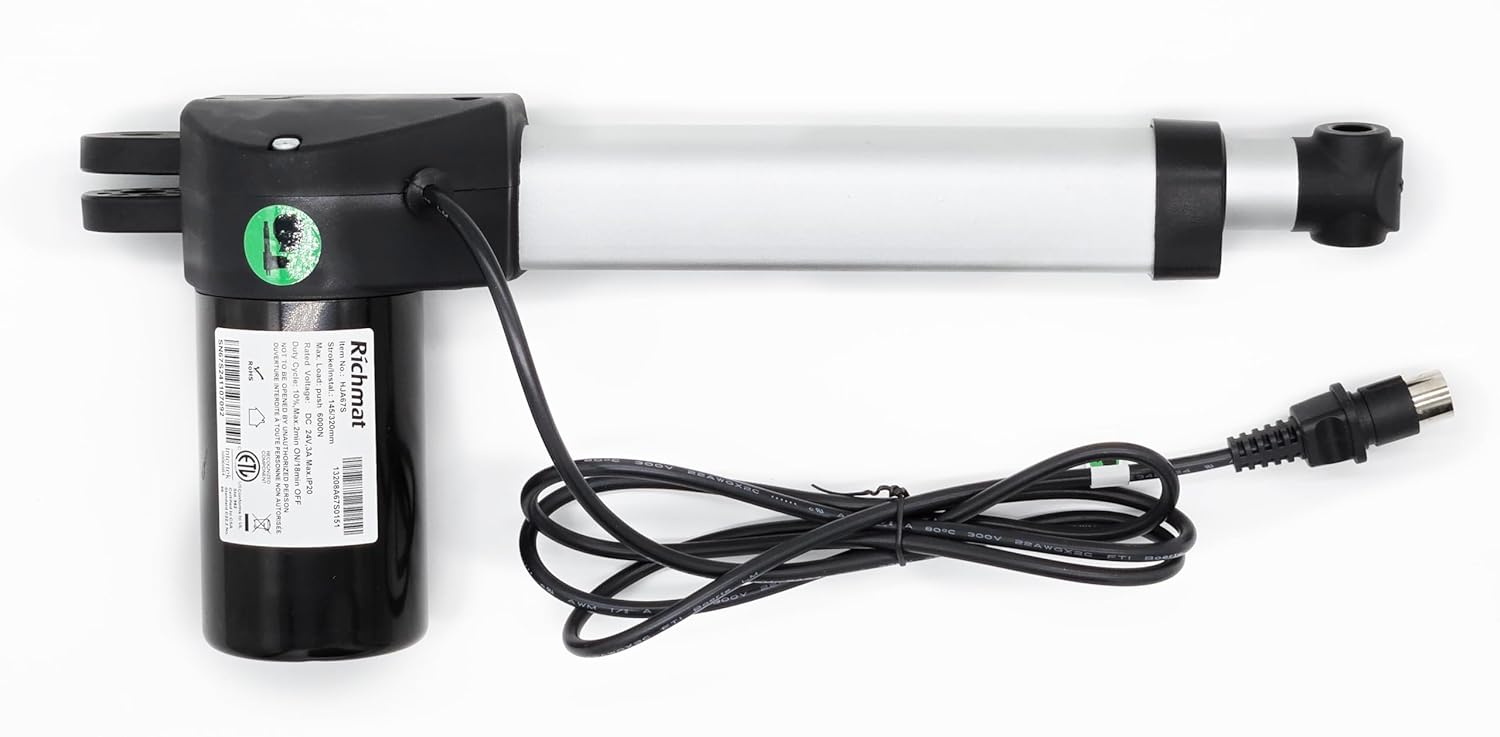
Image: The Richmat HJA67S actuator motor. Ensure proper orientation and secure mounting during installation.
- Testauksen toiminnallisuus: Once the motor is securely installed and connected, plug the adjustable bed back into the power outlet. Use the bed's remote control to test the motor's movement in both directions (head and foot, if applicable).
Käyttöohjeet
The Richmat HJA67S actuator motor operates as an integral part of your adjustable bed base. Its function is controlled directly by the bed's remote control or integrated control panel. There are no direct user controls on the motor itself.
- Use your adjustable bed's remote control to raise or lower the head and/or foot sections of the bed.
- The motor will activate to move the bed frame to the desired position.
- Avoid placing excessive weight on the moving parts of the bed, which could strain the motor.
Huolto
- Puhdistus: Periodically wipe the exterior of the motor with a dry, soft cloth to remove dust. Do not use liquid cleaners or abrasive materials.
- Tarkastus: Regularly inspect the motor and its connections for any signs of wear, damage, or loose cables. Ensure all mounting bolts remain tight.
- Voitelu: The motor is factory-lubricated and generally does not require additional lubrication. If you notice unusual noises, consult a professional.
Vianetsintä
| Ongelma | Mahdollinen syy | Ratkaisu |
|---|---|---|
| Moottori ei liiku. |
|
|
| Moottori pitää epätavallista ääntä. |
|
|
If troubleshooting steps do not resolve the issue, please contact the seller or manufacturer for further assistance.
Tekniset tiedot
| Ominaisuus | Yksityiskohta |
|---|---|
| Mallinumero | HJA67S |
| Merkki | Richmat |
| Liittimen tyyppi | 4 Pin Head |
| Materiaali | Muovi |
| Valmistaja | Richmat |
| ASIN | B0DYLXKJTT |
Huomaa: Teknisiä tietoja voidaan muuttaa ilman erillistä ilmoitusta.
Takuu ja tuki
For information regarding warranty coverage, please refer to the terms provided by your original seller or contact Richmat directly. Keep your purchase receipt as proof of purchase.
For technical support or assistance with installation and troubleshooting, please contact the seller from whom you purchased this product. They can provide specific guidance and support related to your purchase.
Myyjän yhteyshenkilö: Irvine Home Collection USA (as per product data)
Valmistaja: Richmat


