1. Johdanto
The CalDigit E5 Thunderbolt 5 Element 5 Hub is a compact and powerful connectivity solution designed to expand the capabilities of your computer. It provides multiple high-speed ports for data transfer, display connectivity, and power delivery, enhancing your workflow and desktop setup.
2. Mitä laatikossa on
- 1 x Element 5 Hub
- 1 x Thunderbolt 5 -kaapeli (0.8 m)
- 4 x kumijalkanauhat
- 1 x virtalähde (180W)
- 1 x virtajohto
3. Asennus
3.1 Virtalähteen liittäminen
Connect the provided 180W power supply to the DC In port (20V | 9A) on the rear of the Element 5 Hub. Plug the power cord into a wall outlet.
3.2 Yhdistäminen isäntätietokoneeseen
Use the included Thunderbolt 5 cable to connect the Element 5 Hub to your computer's Thunderbolt 5, Thunderbolt 4, Thunderbolt 3, USB4, or USB-C port. The host port on the hub is located on the side and labeled 'Computer'.

Image: CalDigit E5 Thunderbolt 5 Element 5 Hub with various cables connected to its ports, showcasing its compact design and multiple connectivity options.
3.3 Oheislaitteiden liittäminen
Connect your USB-A, USB-C, and additional Thunderbolt devices to the available ports on the Element 5 Hub. The hub features 4x Thunderbolt 5/USB4 v2 ports, 3x USB-A 10Gb/s ports, and 2x USB-C 10Gb/s ports.

Image: The CalDigit E5 Hub connected to a laptop, with several cables extending to various peripherals, illustrating its role as a central connectivity point.
4. Käyttö
4.1 Port Overview
- 1 x Thunderbolt 5 Host Port: Up to 120Gb/s bandwidth.
- 3 x Thunderbolt 5/USB4 v2 Ports: 80Gb/s each, supporting 64Gb/s PCIe technology for ultra-fast SSDs (up to 6,200MB/s).
- 3 x USB-A-porttia: 10Gb/s data transfer.
- 2 x USB-C-porttia: 10Gb/s data transfer.

Kuva: Edessä view of the CalDigit E5 Hub, highlighting the USB-C and USB-A data ports available for connecting various peripherals.

Kuva: Takaosa view of the CalDigit E5 Hub, displaying the Thunderbolt 5 ports, an additional USB-A port, and the DC power input.
4.2 Performance and Bandwidth
The Element 5 Hub leverages Thunderbolt 5 technology to provide exceptional performance. It offers 80Gb/s bandwidth across its Thunderbolt 5 ports. When connecting bandwidth-intensive displays, the hub can enable Kaistanleveyden tehostus, allocating up to 120Gb/s for displays while reserving 40Gb/s for other devices. This feature requires a compatible Thunderbolt 5 Mac or PC.
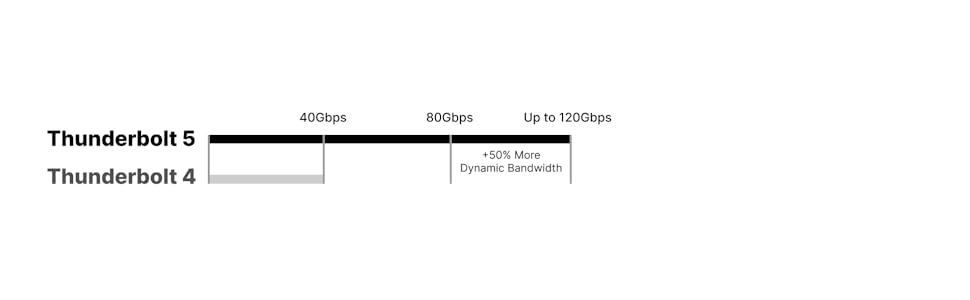
Image: A diagram illustrating the bandwidth capabilities of Thunderbolt 5 (up to 120Gbps with Boost Mode) compared to Thunderbolt 4 (40Gbps).
4.3 Näytön tuki
The Element 5 Hub supports various display configurations depending on your host computer's capabilities:
- MacOS: Connect up to dual 6K@60Hz or 8K@60Hz displays, or dual 4K@240Hz displays on Macs that support these resolutions. Note: Base M1-M3 Macs do not support dual external displays.
- Windows: Connect up to three 4K@144Hz displays on compatible Windows Thunderbolt 5 host computers. Triple displays are not supported on macOS, Thunderbolt 4/3, or USB-C PCs.

Image: A MacBook connected to the CalDigit E5 Hub, driving two external displays, demonstrating dual display support on macOS.

Image: A Windows laptop connected to the CalDigit E5 Hub, driving three external displays, illustrating triple display support on compatible Windows systems.

Image: A detailed chart outlining display compatibility, resolutions, and refresh rates for the CalDigit E5 Hub across different Mac (M1-M4) and Windows (Thunderbolt 4/5) computer models.
4.4 Virransyöttö
The Element 5 Hub provides up to 90W of sustained power delivery to your host laptop, tablet, or phone. Each downstream Thunderbolt 5/USB4 v2 port provides 15W (5V/3A), and each USB-A/USB-C port provides 7.5W (5V/1.5A). The hub also supports Offline Charging, allowing you to charge devices even when not connected to a host computer.

Image: A diagram showing the power distribution from the CalDigit E5 Hub to various connected devices, including a laptop, iPad, iPhone, and other USB accessories.
4.5 Yhteensopivuus
The Element 5 Hub is compatible with a wide range of devices:
- macOS 15 tai uudempi
- Windows 11 tai uudempi
- iPadOS
- Chrome-käyttöjärjestelmä
- Thunderbolt 5, 4, and 3 (Mac) computers
- USB-C (USB4, USB4 v2) computers, tablets, and phones
- Thunderbolt/USB4 iPads
- USB-C Chromebooks
*Thunderbolt 5 or USB4 v2 is required for unrestricted functionality of the Element 5 Hub.

Image: The CalDigit E5 Hub connected to an iPad Pro, demonstrating its compatibility with tablets for expanded connectivity.
5. Huolto
To ensure optimal performance and longevity of your CalDigit E5 Hub, keep it in a well-ventilated area to prevent overheating. Regularly check for firmware updates from the official CalDigit websivuston yhteensopivuuden ja suorituskyvyn ylläpitämiseksi.
6. Vianmääritys
If you experience issues with device connectivity or power delivery, try the following:
- Varmista, että kaikki kaapelit on kytketty kunnolla.
- Restart your host computer and the Element 5 Hub.
- Verify that your computer's drivers for Thunderbolt/USB are up to date.
- Check the CalDigit support website for specific troubleshooting guides or FAQs.
7. Tekniset tiedot
| Ominaisuus | Erittely |
|---|---|
| Tuotteen mitat | 4.5 x 2.75 x 1.12 tuumaa (114 x 70 x 28.5 mm) |
| Tuotteen paino | 8.9 unssia (0.25 kg) |
| Porttien määrä | 9 (1x Host Thunderbolt 5, 3x Downstream Thunderbolt 5/USB4 v2, 3x USB-A 10Gb/s, 2x USB-C 10Gb/s) |
| Isännän lataus | Jopa 90W |
| Downstream Thunderbolt 5/USB4 v2 Port Power | 15W (5V/3A) each |
| USB-A/USB-C Port Power | 7.5W (5V/1.5A) each |
| Virtalähde | 180W (20V | 9A) |
| Laitteistorajapinta | Thunderbolt 5, Thunderbolt 4, Thunderbolt 3, USB4, USB 3.1 Type A, USB 3.1 Type C, USB 3.2 Gen 2 |
| Väri | Space Grey |
8. Viralliset tuotevideot
CalDigit Element 5 Thunderbolt Hub Review: Ports & Features
Video: Kattava uudelleentarkasteluview of the CalDigit Element 5 Thunderbolt Hub, detailing its various ports, features, and overall functionality. This video provides an in-depth look at how the hub can enhance your computing experience.
Caldigit Element 5 Ports & Features
Video: Lyhyt yhteenvetoview of the CalDigit Element 5 Hub's ports and key features, ideal for a quick understanding of its capabilities and connectivity options.
Caldigit Thunderbolt 5 Docking Station Compared: TS5 E5 TS5+
Video: A comparative analysis of CalDigit's Thunderbolt 5 docking stations, including the E5, TS5, and TS5+, helping users understand the differences and choose the best option for their needs.
9. Takuu ja tuki
For warranty information and technical support, please refer to the official CalDigit websivustolta tai ota yhteyttä suoraan heidän asiakaspalveluunsa. Säilytä ostokuitti takuuvaatimuksia varten.


