Johdanto
This manual provides comprehensive instructions for setting up, operating, maintaining, and troubleshooting your NYXI Flexi Wireless PC Controller. Designed for precision and versatility, the Flexi controller offers an enhanced gaming experience across multiple platforms including PC, iOS, Android, and Nintendo Switch 2. Please read this manual thoroughly to ensure optimal performance and longevity of your device.
Tuote loppuview
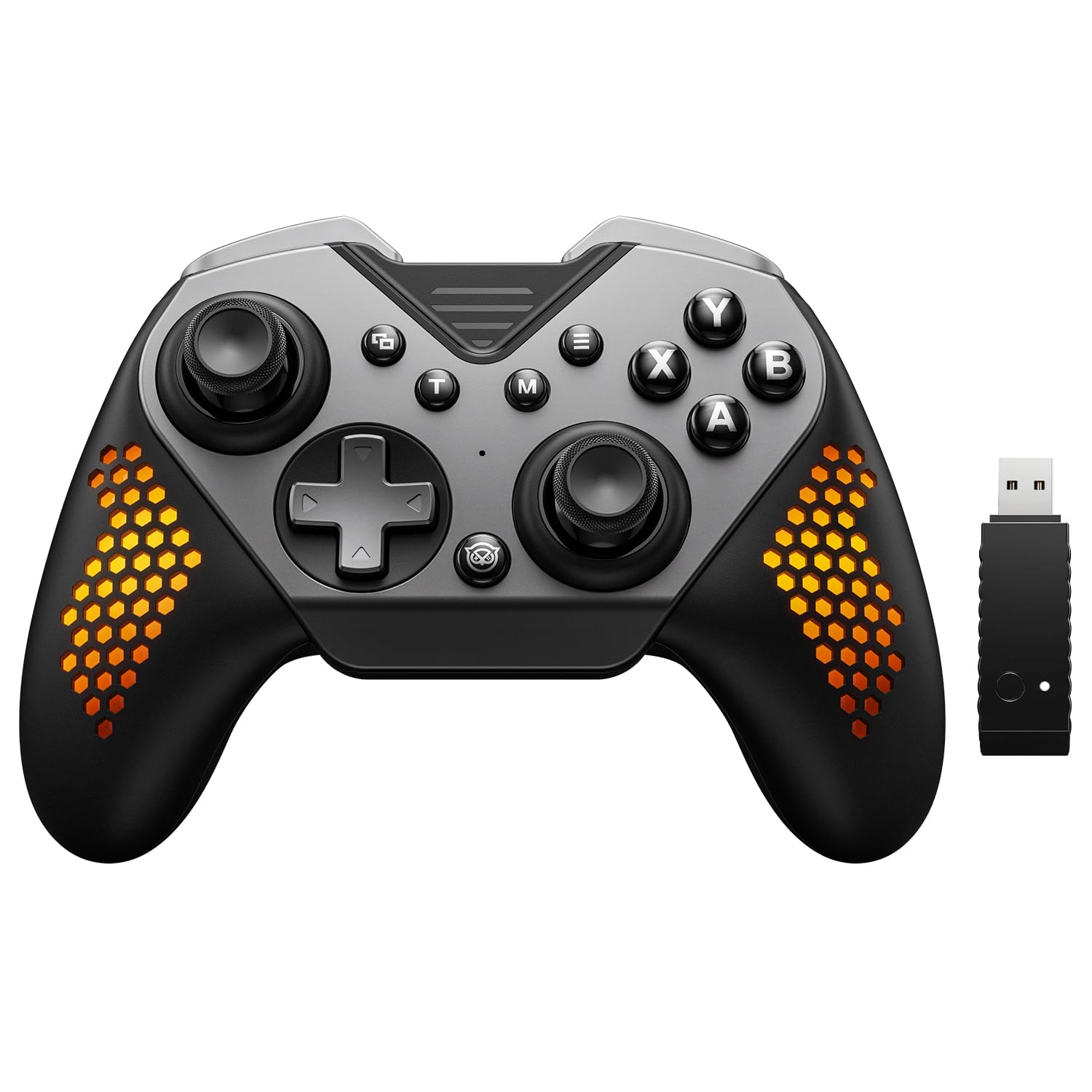
Figure 1: NYXI Flexi Wireless PC Controller with USB dongle.
The NYXI Flexi Wireless PC Controller is a high-performance gaming peripheral featuring Hall Effect Joysticks for anti-drift precision, Hall Linear Analog Triggers for responsive input, and a 1000Hz polling rate for ultra-fast response times. It boasts customizable module layouts, including interchangeable D-pad and left joystick, and swappable ABXY keycaps. The controller also includes four programmable M buttons, adjustable turbo function, immersive vibration feedback, and cool breathing RGB lighting.
Asennus
1. Alkulataus
Before first use, fully charge the controller using the provided USB-C cable. The controller has an 800mAh battery. The RGB lights may indicate charging status.
2. Yhteyden muodostaminen laitteisiin
The NYXI Flexi supports multiple connection methods:
- 2.4G langaton tila: For PC, use the included 2.4G USB dongle. Plug the dongle into an available USB port on your PC. The controller will automatically connect. This mode offers a 1000Hz polling rate for lightning-fast response.
- Langallinen tila: Connect the controller directly to your PC or compatible device using a USB-C cable. This mode also supports a 1000Hz polling rate.
- Langaton Bluetooth-tila: For PC, iOS, Android, and Nintendo Switch 2.
Pariliitos: Put the controller into pairing mode (refer to specific device instructions for button combinations, usually holding a sync button). On your device, search for Bluetooth devices and select "NYXI Flexi Controller".
Note for Switch 2: Switch 2's mouse mode and wakeup function are NOT supported. For SWITCH 2 compatibility updates, please contact NYXI after-sales service.

Figure 2: Wired and 2.4G wireless connection options for PC.

Figure 3: Multi-platform compatibility including PC, iOS, Android, and Switch.
3. Customizable Module Layout
The NYXI Flexi controller allows for seamless switching of the D-pad and left joystick modules, as well as swappable keycaps for the ABXY buttons.
- Interchanging Modules: Gently lift the magnetic cover to access the D-pad and left joystick modules. Carefully pull out the module you wish to change and insert the desired alternative. Ensure it clicks securely into place.
- Näppäinhattujen vaihtaminen: The ABXY keycaps can be removed and replaced to customize the button layout or appearance.

Figure 4: Illustration of seamless module switching for D-pad and left joystick.

Kuva 5: Räjähtänyt view showing interchangeable D-pad and left joystick modules.
Video 1: Demonstrates the interchangeable D-pad and left joystick feature of the NYXI Flexi Controller.
Käyttöohjeet
1. Hall Effect Joysticks and Triggers
The controller is equipped with Hall Effect Joysticks and Hall Linear Analog Triggers. These components use magnetic fields to detect position, providing anti-drift performance and no-delay input. The triggers have a sensing distance of less than 0.1mm for precise control.

Figure 6: Diagram illustrating Hall Effect Joysticks and Hall Linear Analog Triggers.
2. Programmable M Buttons & Turbo Function
The controller features four programmable M buttons (M1, M2, M3, M4) on the back, designed to reduce finger fatigue and enhance gameplay.
- Mapping Buttons: Refer to the controller's quick start guide or the KeyLinker app for detailed instructions on how to map these buttons to frequently used functions.
- Turbo-toiminto: The turbo function allows for automatic repeated actions by holding down a button. Activate and deactivate the turbo function as per your game requirements.
- Locking M Buttons: To prevent accidental presses, long press any M button for 3 seconds to lock its function.

Figure 7: Location of the four programmable M buttons on the back of the controller.
3. Immersive Vibration Feedback
Experience realistic tactile responses with the controller's powerful and detailed vibration feedback. This feature enhances immersion by allowing you to feel every hit and crash in your games. Vibration intensity may be adjustable through controller settings or the companion app.
4. Cool Breathing RGB Lighting
Customize your gaming atmosphere with the adjustable breathing RGB lights. A one-click adjustment allows you to cycle through vibrant colors or turn off the lighting according to your preference.

Figure 8: The NYXI Flexi Controller showcasing its adjustable breathing RGB lights.
5. 6-Axis Gyroscope Motion Sensing
The built-in 6-axis gyroscope provides precise motion control, particularly useful for Nintendo Switch games that require movement-based input.
Huolto
- Puhdistus: Puhdista ohjain pehmeällä, kuivalla liinalla. Vältä voimakkaiden kemikaalien tai hankaavien materiaalien käyttöä.
- Varastointi: Säilytä ohjainta viileässä, kuivassa paikassa, poissa suorasta auringonvalosta ja äärimmäisistä lämpötiloista.
- Akun hoito: Akun käyttöiän pidentämiseksi vältä ohjaimen jatkuvaa tyhjentämistä kokonaan. Lataa se säännöllisesti, vaikka sitä ei käytettäisikään jatkuvasti.
Vianetsintä
| Ongelma | Mahdollinen syy | Ratkaisu |
|---|---|---|
| Controller not connecting/disconnecting frequently. | Low battery, out of range, interference, incorrect pairing mode. | Ensure controller is charged. Move closer to the device. Re-pair the controller. Check for other wireless devices causing interference. |
| Joystick drift or unresponsive input. | Software glitch, physical obstruction, or rare hardware issue. | Restart the controller and device. Ensure no debris is around the joystick base. While Hall Effect joysticks are designed to prevent drift, if issues persist, contact support. |
| Programmable M buttons not working. | Buttons are locked, incorrect mapping. | Long press an M button for 3 seconds to unlock. Re-map the buttons using the controller's instructions or the KeyLinker app. |
| Turbo function stops after a short period. | Controller entering sleep mode. | Use the "KeyLinker" app to adjust sleep settings or ensure the controller is actively used to prevent auto-sleep. |
| Issues with Nintendo Switch 2 compatibility. | Specific features not supported or firmware outdated. | Note that Switch 2's mouse mode and wakeup function are not supported. For further compatibility or firmware updates, contact NYXI after-sales service. |
For advanced configuration and troubleshooting, consider downloading the "KeyLinker" app, which provides additional control over button binding, turbo functions, and other settings.
Tekniset tiedot
- Malli: Flexi
- Merkki: NYXI
- ASIN: B0DWSKDQLN
- Mitat: 4.33 x 2.76 x 6.3 tuumaa
- Paino: 1.26 kiloa
- Akku: 1 Nonstandard Battery (800mAh, included)
- Äänestysprosentti: 1000Hz (Wired & 2.4G Wireless modes)
- Joystick Type: Hall Effect Joysticks (Anti-Drift)
- Triggerin tyyppi: Hall Linear Analog Triggers (0.1mm Sensing Distance)
- Liitettävyys: 2.4G Wireless, Wired (USB-C), Bluetooth
- Yhteensopivuus: PC, iOS, Android, Nintendo Switch 2 (limited features for Switch 2)
- Erikoisominaisuudet: Interchangeable D-pad & Left Joystick, Swappable ABXY Keycaps, 4 Programmable M Buttons, Adjustable Turbo Function, Immersive Vibration Feedback, Adjustable Breathing RGB Lighting, 6-Axis Gyroscope Motion Sensing.
Takuu ja tuki
The NYXI Flexi Wireless PC Controller is manufactured by NYXI. For warranty information, technical support, or to inquire about Switch 2 compatibility updates, please visit the official NYXI websivustolla tai ota yhteyttä heidän asiakaspalveluunsa.
Official Manual and Support: nyxigame.com/pages/np05_manual


