1. Johdanto
Welcome to the user manual for your DOOGEE Blade GT Pro 5G Rugged Smartphone. This guide provides essential information to help you set up, operate, maintain, and troubleshoot your device. Please read this manual thoroughly to ensure optimal performance and longevity of your smartphone.

Kuva 1.1: Edestä ja takaa view of the DOOGEE Blade GT Pro 5G Rugged Smartphone.
2. Pakkauksen sisältö
Varmista, että tuotepakkauksessa on kaikki tarvittavat osat:
- 1 x DOOGEE Blade GT Pro Rugged Smartphone
- 1 x Type-C USB-kaapeli
- 1 x 18 W laturi
- 1 x Silkkipainettu suojakalvo (valmiiksi kiinnitetty)
- 1 x räjähdyssuojakalvo
- 1 x puhelinkotelo
- 1 x Pakkauslaatikko
- 1 x Käyttöopas ja takuukortti

Image 2.1: Illustration of the DOOGEE Blade GT Pro package contents.
3. Laite loppuview
Familiarize yourself with the physical components and features of your DOOGEE Blade GT Pro smartphone.
3.1 Physical Dimensions and Durability
The Blade GT Pro features a slim 10.5 mm body and weighs approximately 260 grams, designed for a comfortable grip. It is built with aerospace-grade metal for enhanced durability.

Image 3.1: Device thickness and weight for ergonomic handling.
3.2 LED Light Effect
The device includes a customizable LED light bar on the back that provides visual alerts for calls, messages, and music synchronization. It supports various effects triggered by scenarios such as charging, gaming mode, or party mode. Brightness and lighting styles (constant-on, strobe) are adjustable.

Image 3.2: Customizable RGB lighting effects.
4. Asennus
4.1 SIM-kortin ja MicroSD-kortin asentaminen
- Etsi SIM-kortin alusta laitteen sivusta.
- Aseta SIM-kortin poistotyökalu pieneen reikään alustan vieressä ja paina sitä lujasti, kunnes alusta ponnahtaa ulos.
- Aseta Nano-SIM-kortti(t) ja/tai MicroSD-kortti lokeron niille tarkoitettuihin paikkoihin. Varmista, että kultaiset koskettimet osoittavat alaspäin.
- Työnnä pidike varovasti takaisin puhelimeen, kunnes se on tasaisesti laitteen rungon kanssa.

Image 4.1: Dual-card slot for SIM and MicroSD.
4.2 Ensimmäinen käynnistys
- Press and hold the Power button (located on the side of the device) until the DOOGEE logo appears on the screen.
- Suorita alkuasetukset, mukaan lukien kielen valinta, Wi-Fi-yhteyden muodostaminen ja Google-tilin määrittäminen, noudattamalla näytön ohjeita.
5. Käyttöohjeet
5.1 Näyttö ja navigointi
The Blade GT Pro features a 6.72-inch FHD+ IPS display with a 120Hz refresh rate for smooth visuals. Navigation is primarily via touchscreen gestures and on-screen buttons.

Image 5.1: High refresh rate display for smooth visuals.
5.2 Kameran käyttö
The device is equipped with a 108MP main camera, an 8MP wide-angle lens, a 2MP macro camera, and a 32MP selfie camera. Various modes are available for different photographic needs.
- Pääkamera: Korkean resoluution valokuville.
- Laajakulmaobjektiivi: Capture broader scenes.
- Makrokamera: Yksityiskohtaisiin lähikuviin.
- Selfie-kamera: Omakuviin ja videopuheluihin.
- Erikoistilat: HDR, Night Mode, 360° Panorama, and Underwater Mode.

Image 5.2: Camera features and examplaukaukset.
5.3 Suojausominaisuudet
The Blade GT Pro offers multiple security options:
- Sivun sormenjälkitunnistuksen lukituksen avaaminen: Rekisteröi sormenjälkesi nopeaa ja turvallista käyttöä varten.
- Kasvotunnus: Käytä kasvojentunnistusta laitteen lukituksen avaamiseen.
- PIN-koodi/kuvio/salasana: Standard Android security options.
5.4 NFC-toiminnallisuus
NFC (Near Field Communication) allows for contactless transactions and quick pairing with compatible devices. Enable NFC in your phone's settings to use features like Google Pay.
6. Huolto
6.1 Laitteen puhdistaminen
To clean your smartphone, use a soft, lint-free cloth. Avoid abrasive materials or harsh chemicals that could damage the screen or casing. Pinttyneeseen likaan, d kevyestiampfi liina vedellä.
6.2 Water, Dust, and Drop Resistance
The DOOGEE Blade GT Pro is certified with IP68/IP69K and MIL-STD-810H standards, indicating strong resistance to water, dust, and drops. While designed for rugged use, proper care is still recommended:
- Varmista, että kaikki porttien kannet ovat tiiviisti kiinni ennen kuin altistat laitteen vedelle tai pölylle.
- Avoid intentional submersion in water beyond specified depths or durations.
- Huuhtele puhelin puhtaalla vedellä, jos se on altistunut suolavedelle tai muille syövyttäville nesteille, ja kuivaa se sitten huolellisesti.
- Vaikka se on pudotuksen kestävä, äärimmäiset iskut voivat silti aiheuttaa vahinkoa.
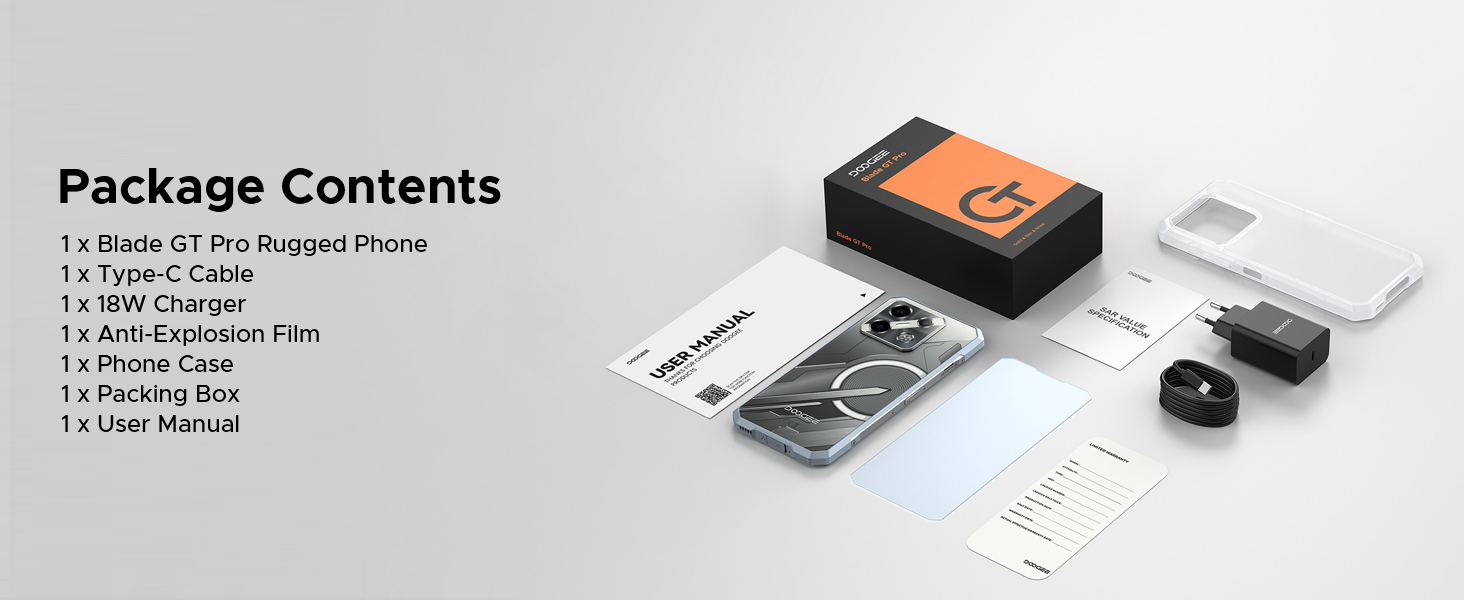
Image 6.1: Durability features for outdoor use.
6.3 Ohjelmistopäivitykset
Regularly check for and install software updates to ensure your device has the latest features, security patches, and performance improvements. You can usually find this option in the 'Settings' menu under 'System' or 'About Phone'.
7. Vianmääritys
This section addresses common issues you might encounter with your DOOGEE Blade GT Pro.
| Antaa | Mahdollinen ratkaisu |
|---|---|
| Laite ei käynnisty | Varmista, että akku on ladattu. Liitä laturi ja odota muutama minuutti ennen kuin yrität käynnistää laitteen uudelleen. Jos laite ei reagoi, suorita pakotettu uudelleenkäynnistys pitämällä virtapainiketta painettuna 10–15 sekuntia. |
| Huono verkkoyhteys | Check if the SIM card is correctly inserted. Verify that you are within network coverage. Restart the device. Ensure your carrier supports the device's frequency bands (Note: Does not support Verizon and AT&T networks). |
| Akku tyhjenee nopeasti | Reduce screen brightness. Close unused applications running in the background. Disable Wi-Fi, Bluetooth, or GPS when not in use. Check for power-intensive apps in battery settings. |
| Sovellukset kaatuvat tai jumiutuvat | Clear the cache of the problematic app. Update the app to its latest version. If the issue persists, uninstall and reinstall the app. Ensure the phone's operating system is up to date. |
| Sormenjälkiskanneri ei toimi | Ensure your finger is clean and dry. Re-register your fingerprint. Check for any physical obstruction or damage to the sensor. |
8. Tekniset tiedot
Key technical specifications for the DOOGEE Blade GT Pro 5G Rugged Smartphone:
| Ominaisuus | Yksityiskohta |
|---|---|
| Malli | Blade GT Pro |
| Käyttöjärjestelmä | Android 14 |
| Prosessori | MediaTek Dimensity 7250, 6nm Octa-core |
| RAM | 32GB (12GB physical + 20GB extended) LPDDR5 |
| Sisäinen tallennustila | 256 Gt (laajennettavissa jopa 2 Tt:iin MicroSD-kortilla) |
| Näyttö | 6.72-inch FHD+ IPS, 1080x2408 resolution, 120Hz Refresh Rate, 380 nits brightness |
| Takakamera | 108MP Main, 8MP Wide-Angle, 2MP Macro |
| Etukamera | 32 MP |
| Akku | 5800mAh, 18W pikalataus, OTG-tuki |
| Yhteydet | 5G, Wi-Fi 6, Bluetooth, NFC, USB Type-C |
| Kestävyys | IP68/IP69K, MIL-STD-810H (Waterproof, Dustproof, Drop-resistant) |
| Turvallisuus | Side Fingerprint Unlock, Face ID |
| Mitat | Paksuus 10.5 mm |
| Paino | 260 grammaa |
9. Takuu ja tuki
9.1 Takuutiedot
Your DOOGEE Blade GT Pro smartphone comes with a limited manufacturer's warranty. Please refer to the 'User Manual and Warranty Card' included in your package for specific terms, conditions, and duration of the warranty. Keep your proof of purchase for warranty claims.
9.2 Asiakastuki
For further assistance, technical support, or service inquiries, please contact DOOGEE customer service through their official websivustolla tai takuuasiakirjoissa annettujen yhteystietojen kautta.


