1. Johdanto
Thank you for choosing the Shokz OpenDots ONE Ear Cuff Wireless Earphones. These open-ear earphones are designed to provide a comfortable listening experience while keeping you aware of your surroundings. This manual provides detailed instructions for setup, operation, maintenance, and troubleshooting to ensure optimal performance.

Image 1.1: Shokz OpenDots ONE earphones and charging case.
The Shokz OpenDots ONE features:
- Open-ear ear-cuff design for pressure-free comfort and situational awareness.
- Dolby Audio support for immersive, high-quality sound with 16mm equivalent dual-driver system and Bassphere technology.
- Up to 40 hours of total battery life with the charging case, including quick charge functionality.
- Bluetooth 5.4 for stable multipoint connection.
- IP54 water resistance for protection against sweat and light splashes.
- Dedicated app for sound customization, touch control settings, and finding lost earphones.
- AI noise-canceling microphone for clear calls.
- DirectPitch technology to minimize sound leakage and enhance privacy.

Kuva 1.2: ohiview of key features including lightweight design, Dolby Audio, 40-hour battery, IP54 rating, and wireless charging.
2. Asennus
2.1. Kuulokkeiden ja kotelon lataaminen
Lataa kuulokkeet ja latauskotelo täyteen ennen ensimmäistä käyttökertaa.
- USB-C-lataus: Connect the provided USB-C cable to the charging case and a power source. The indicator light on the case will show charging status. A full charge takes approximately 60 minutes.
- Langaton lataus: Aseta latauskotelo yhteensopivalle langattomalle latausalustalle. Merkkivalo vahvistaa latauksen.
- Pikalataus: 10 minuutin pikalataus tarjoaa noin 2 tuntia toistoaikaa.

Image 2.1: The charging case connected via USB-C, illustrating the 40-hour total playback and quick charge feature.

Image 2.2: The charging case placed on a wireless charging pad, demonstrating wireless charging capability.
2.2. Pariliitoksen muodostaminen laitteesi kanssa
- Open the charging case. The earphones will automatically enter pairing mode, indicated by a flashing LED light.
- Siirry laitteellasi (älypuhelin, tabletti, tietokone) Bluetooth-asetuksiin.
- Select "Shokz OpenDots ONE" from the list of available devices.
- Kun kuulokkeet on yhdistetty, niiden LED-merkkivalo lakkaa vilkkumasta.
2.3. Kuulokkeiden käyttö
The OpenDots ONE features an ear-cuff design that rests gently on your ear without blocking the ear canal. They are designed to be worn without distinguishing between left and right, as the earphones automatically detect orientation.
- Gently place the earphone over your ear, ensuring the speaker rests comfortably near your ear canal.
- The flexible JointArc structure adapts to various ear shapes for a secure and comfortable fit.
- The design is compatible with glasses and masks, preventing interference.
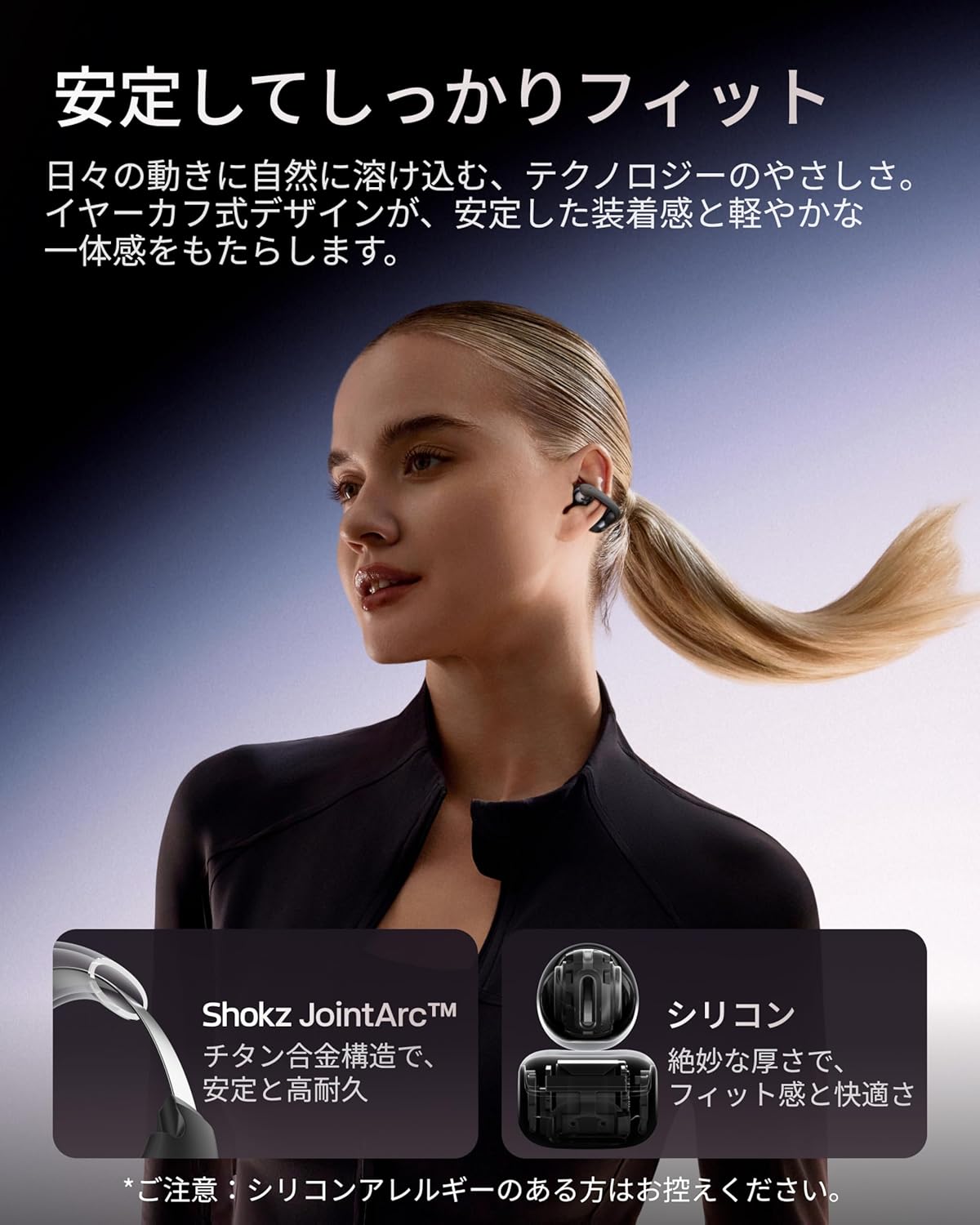
Image 2.3: A woman wearing the Shokz OpenDots ONE earphones, demonstrating the secure and comfortable ear-cuff fit.

Image 2.4: Visual guide for correct earphone placement and common incorrect wearing methods.
3. Kuulokkeiden käyttö
3.1. Peruskosketusohjaimet
The OpenDots ONE features intuitive touch controls on each earphone. You can customize these controls via the Shokz app.
- Toista/tauko: Double-tap the battery compartment or JointArc area.
- Äänenvoimakkuus ylös/alas: Touch and hold the top or bottom of the battery compartment.
- Seuraava kappale: Triple-tap (customizable).
- Edellinen kappale: Quadruple-tap (customizable).
- Puhelun vastaaminen/lopetus: Kaksoisnapauta.
- Hylkää puhelu: Kosketa pitkään.
- Aktivoi Voice Assistant: Triple-tap (customizable).
3.2. Shokz-sovelluksen ominaisuudet
Download the dedicated Shokz app for enhanced control and customization.
- Äänen mukauttaminen: Choose from 4 preset EQ modes (Standard, Vocal, Bass Boost, Private) and 2 custom modes to adjust the sound profile.
- Kosketusohjauksen asetukset: Customize touch gestures to your preference.
- Find My Earphones: Paikanna kadonneet kuulokkeet.
- Laiteohjelmistopäivitykset: Keep your earphones updated with the latest features and improvements.
- Prompt Volume Adjustment: Control the volume of system prompts.
- Yksityinen tila: Enhance sound leakage prevention for increased privacy.

Image 3.1: The Shokz app interface, showing options for EQ settings and other customizations.
3.3. Monipisteyhteys
The OpenDots ONE supports multipoint connection, allowing you to connect to two Bluetooth devices simultaneously. This enables seamless switching between devices, for example, from a laptop for music to a phone for a call.
- Ensure both devices are paired with your OpenDots ONE.
- The earphones will automatically switch audio source based on activity (e.g., incoming call).
4. Huolto
4.1. Puhdistus
- Pyyhi kuulokkeet ja latauskotelo pehmeällä, kuivalla ja nukkaamattomalla liinalla.
- Älä käytä hankaavia puhdistusaineita, liuottimia tai aerosolisuihkeita.
- Vältä kosteuden joutumista aukkoihin.
4.2. Varastointi
- Säilytä kuulokkeita latauskotelossa, kun niitä ei käytetä, jotta ne ovat suojassa ja latautuneet.
- Vältä säilyttämistä äärimmäisissä lämpötiloissa tai korkeassa kosteudessa.
4.3. Vedenkestävyys (IP54)
The OpenDots ONE earphones are rated IP54, meaning they are resistant to dust and splashing water from any direction. This makes them suitable for exercise and outdoor activities in light rain. However, they are not designed for submersion in water or exposure to pressurized water jets.
- Älä upota kuulokkeita tarkoituksella veteen.
- If the earphones get wet, wipe them dry before placing them back in the charging case.
5. Vianmääritys
5.1. Ei ääntä tai ääni katkeaa
- Varmista, että kuulokkeet on ladattu.
- Check that the earphones are properly paired and connected to your device.
- Verify the volume levels on both the earphones and your connected device.
- Siirry lähemmäs laitettasi varmistaaksesi vakaan Bluetooth-yhteyden.
- Kokeile Bluetooth-yhteyden katkaisemista ja yhdistämistä uudelleen.
5.2. Paritusongelmat
- Varmista, että kuulokkeet ovat pariliitostilassa (vilkkuva LED-valo).
- Vältä häiriöt poistamalla Bluetooth käytöstä muissa lähellä olevissa laitteissa.
- Unohda laite puhelimesi Bluetooth-asetuksista ja yritä pariliitosta uudelleen.
- Perform a factory reset (refer to the Shokz app or official support for instructions).
5.3. Latausongelmat
- Varmista, että USB-C-kaapeli on kytketty kunnolla sekä koteloon että virtalähteeseen.
- Jos käytät langatonta latausta, varmista, että kotelo on asetettu oikein latausalustalle.
- Kokeile toista latauskaapelia tai virtalähdettä.
- Puhdista kuulokkeiden ja kotelon sisäpuolen latauskoskettimet kuivalla vanupuikolla.
5.4. Sound Leakage
While DirectPitch technology significantly reduces sound leakage, some leakage may occur at very high volumes or in very quiet environments. To minimize this:
- Pienennä äänenvoimakkuutta.
- Activate "Private Mode" in the Shokz app.
6. Tekniset tiedot
| Ominaisuus | Yksityiskohta |
|---|---|
| Mallin nimi | OpenDots ONE |
| Valmistajan viite | SHOKZ E310 |
| Yhteystekniikka | Langaton |
| Langaton viestintätekniikka | Bluetooth 5.4 |
| Taajuusvaste | 2400 MHz |
| Herkkyys | 97.5 dB |
| Korvien sijoitus | Avoin korva |
| Kuulokkeiden muototekijä | Avoin korva |
| Väri | Musta |
| Vedenkestävyystaso | IP54 (vedenpitävä) |
| Akunkesto (kuulokkeet) | Jopa 10 tuntia |
| Akun kokonaiskesto (kotelon kanssa) | Jopa 40 tuntia |
| Latausaika | Noin 60 minuuttia |
| Charging Style | USB-C, langaton lataus |
| Ohjaustyyppi | Call Control, Volume Control, Media Control |
| Valvontamenetelmä | Sovellus, kosketa |
| Tuotteen paino | 65 grammaa |
| Materiaalit | Titanium Alloy, Silicone, PC |
| Suositellut käyttötavat | Exercise, Entertainment, Sports, Training, Running, Work, Meetings, Daily Use, Commuting |
| Yhteensopivat laitteet | Bluetooth-yhteensopivia laitteita |
| Mukana olevat komponentit | OpenDots ONE Earphones ×1, OpenDots ONE Charging Case ×1, USB-C Charging Cable ×1 |
7. Takuu ja tuki
7.1. Takuutiedot
For specific warranty details, please refer to the warranty card included with your product or visit the official Shokz website. Typically, Shokz products come with a limited warranty covering manufacturing defects.
7.2. Asiakastuki
If you encounter any issues not covered in this manual or require further assistance, please contact Shokz customer support through their official website or the dedicated Shokz app. You can also visit the Shokz Official Store on Amazon lisäresursseja varten.