1. Johdanto
The Excel Blades K71 Fingertip Craft Knife is a precision cutting tool designed for detailed work in various crafting applications. Its ergonomic finger-loop handle provides enhanced control and reduces hand fatigue during extended use. This manual provides essential information on the safe and effective operation, maintenance, and care of your K71 craft knife.

Image 1.1: The Excel Blades K71 Fingertip Craft Knife, featuring a pink ergonomic handle and a sharp #11 blade.
2. Turvallisuustiedot
This craft knife contains an extremely sharp blade. Improper handling can result in serious injury. Always adhere to the following safety guidelines:
- Säilytä poissa lasten ja lemmikkieläinten ulottuvilta.
- Always use the included safety cap when the knife is not in use or during storage.
- Handle the blade with extreme caution. Avoid touching the sharp edges.
- Leikkaa aina poispäin kehostasi ja sormistasi.
- Use a self-healing cutting mat or a protective surface underneath your work to prevent damage to furniture and to ensure a clean cut.
- Ensure the blade is securely fastened in the chuck before use.
- Dispose of dull or broken blades safely in a designated sharps container.
3. Tuotteen osat
The K71 Fingertip Craft Knife consists of several key parts designed for precision and comfort:
- Ergonomic Finger Loop Grip: Designed to fit comfortably on your index finger, providing superior control.
- Knurled Grip: A textured metal section for a secure hold and easy blade adjustment.
- Four-Jaw Chuck Blade Securing System: Holds the blade firmly in place.
- #11 Blade: The standard precision blade included with the knife.
- Suojahattu: Protects the blade and prevents accidental injury when not in use.

Image 3.1: Labeled diagram showing the ergonomic finger loop grip, knurled grip, four-jaw chuck blade securing system, included #11 blade, and safety cap of the K71 craft knife.
4. Setup and Blade Installation
To install or replace a blade in your K71 Fingertip Craft Knife:
- Remove Safety Cap: Carefully remove the safety cap from the blade.
- Loosen Chuck: Hold the ergonomic handle and twist the knurled grip counter-clockwise to loosen the four-jaw chuck.
- Aseta terä: Carefully insert the base of the #11 blade (or a compatible blade) into the chuck opening. Ensure the blade is seated firmly and straight.
- Kiristä istukka: Kierrä knurled grip clockwise until the chuck securely grips the blade. Do not overtighten, but ensure the blade does not wobble.
- Testiturvallisuus: Gently tug on the blade to confirm it is firmly held. If it moves, retighten the chuck.
- Replace Safety Cap: When finished, always replace the safety cap.
The K71 is compatible with various light-duty blades for different cutting needs. Additional compatible blades are sold separately.

Image 4.1: A selection of compatible light-duty blades for the K71 craft knife, including angled chisel, stencil edge, mini curved edge, curved edge, and small chisel blades.
5. Käyttöohjeet
The K71 craft knife is designed for precision cutting. Follow these steps for optimal use:
- Kädensija: Place your index finger through the ergonomic finger loop. Hold the knurled grip with your thumb and middle finger for stability and control.
- Leikkauspinta: Always work on a protective surface, such as a self-healing cutting mat, to protect your workspace and prolong blade life.
- Paikannus: Position the material to be cut on the cutting mat. For intricate designs, you may want to secure the material to prevent shifting.
- Leikkaustekniikka: Apply gentle, consistent pressure. Guide the blade along your desired cutting line. For curves, rotate the material as you cut, rather than twisting the knife. For straight lines, use a ruler or straight edge as a guide.
- Materiaalien yhteensopivuus: The K71 is suitable for cutting materials such as paper, vinyl, foam board, stencils, and other light-duty crafting materials.

Image 5.1: A hand demonstrating the correct grip of the K71 craft knife, with the index finger in the loop and the thumb and middle finger on the knurled grip, performing a precision cut on paper.
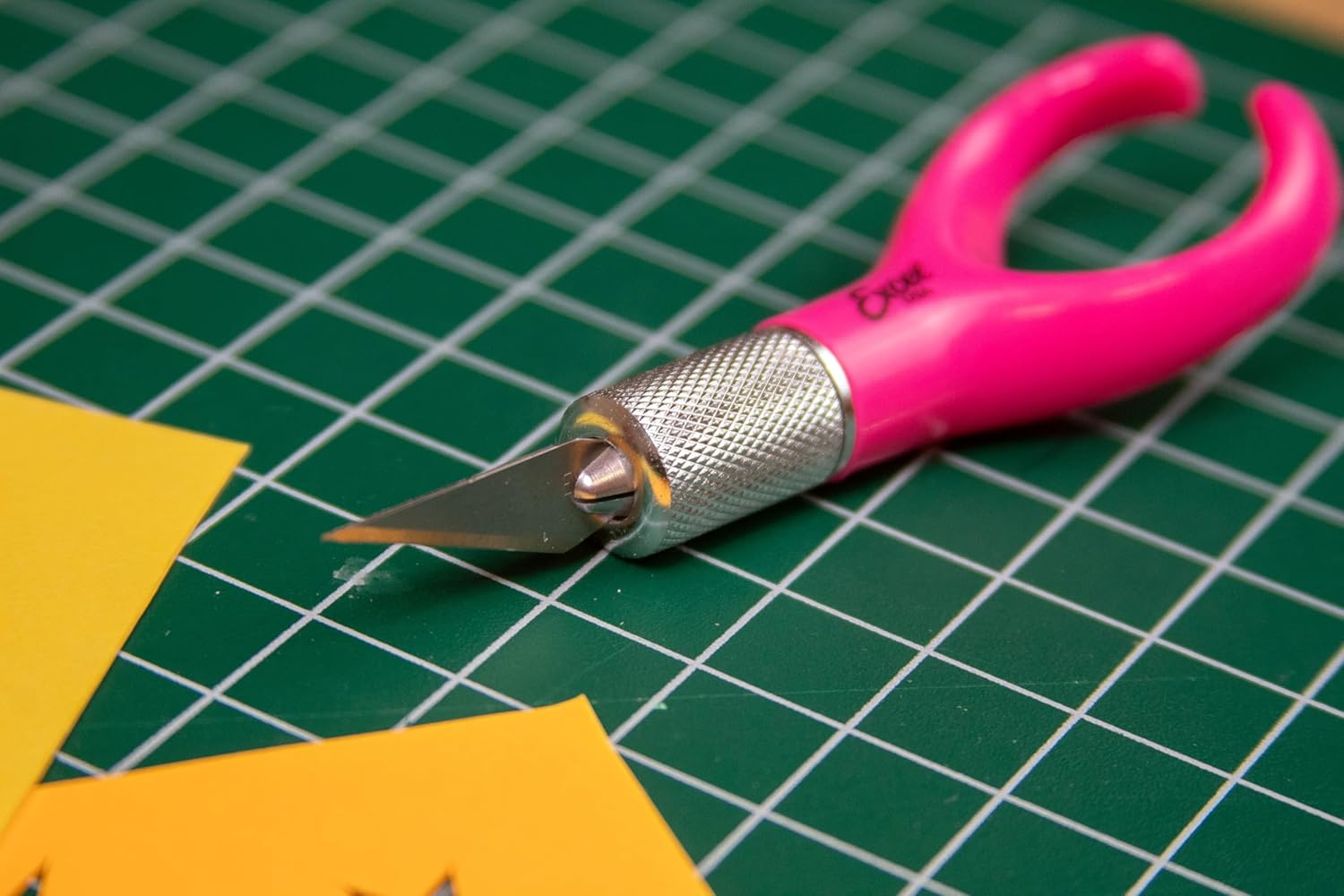
Image 5.2: The K71 craft knife positioned on a green self-healing cutting mat, ready for use on yellow paper, illustrating a typical crafting setup.
6. Huolto ja hoito
Proper maintenance ensures the longevity and performance of your K71 craft knife:
- Terän vaihto: Replace blades regularly as they become dull. A dull blade requires more force, increasing the risk of slippage and injury, and results in less precise cuts. Refer to Section 4 for blade installation.
- Puhdistus: After each use, carefully wipe any adhesive or debris from the blade and handle using a dry cloth. Avoid using harsh chemicals that may damage the handle material.
- Varastointi: Always store the knife with the safety cap securely in place. Store in a dry, safe location away from moisture and extreme temperatures.
- Blade Disposal: Used blades are still sharp. Wrap them in tape or paper and place them in a rigid, puncture-proof container (e.g., a plastic bottle) before disposing of them in general waste.
7. Vianmääritys
If you encounter issues with your K71 craft knife, consider the following:
- Blade not cutting cleanly: The blade may be dull. Replace it with a new #11 blade. Ensure you are using the correct cutting angle for your material.
- Blade wobbles or slips: The four-jaw chuck may not be tightened sufficiently. Loosen and re-tighten the knurled grip firmly, ensuring the blade is seated correctly.
- Hand fatigue during use: Ensure your grip is relaxed but firm. Take regular breaks during long crafting sessions. The ergonomic design is intended to minimize fatigue, but prolonged use can still cause strain.
- Difficulty inserting/removing blade: Varmista, että knurled grip is fully loosened. If the chuck is stiff, a small amount of lubricant (e.g., silicone spray) can be applied to the threads, avoiding contact with the blade gripping area.
8. Tekniset tiedot
| Ominaisuus | Yksityiskohta |
|---|---|
| Merkki | Excel-terät |
| Mallinumero | K71 (16072) |
| Terän materiaali | Hiiliteräs |
| Kahvan materiaali | Muovi |
| Tuotteen pituus | 7 tuumaa |
| Tuotteen paino | 0.634 unssia |
| Mukana olevat komponentit | #11 Hobby Blade, Safety Cap |
| Väri (tämä variantti) | Vaaleanpunainen |

Image 8.1: A visual representation of the K71 craft knife with its approximate length (2.78 inches for the blade/chuck section) and handle width (1.25 inches) indicated.
9. Yhteydenotto ja tuki
For further assistance, product information, or to explore other Excel Blades products, please visit the official Excel Blades store:


