1. Johdanto
This manual provides detailed instructions for the setup, operation, maintenance, and troubleshooting of your Transformers TF-Crystal 85 Keys Mechanical Keyboard. Please read this manual thoroughly before using the product to ensure proper functionality and longevity.
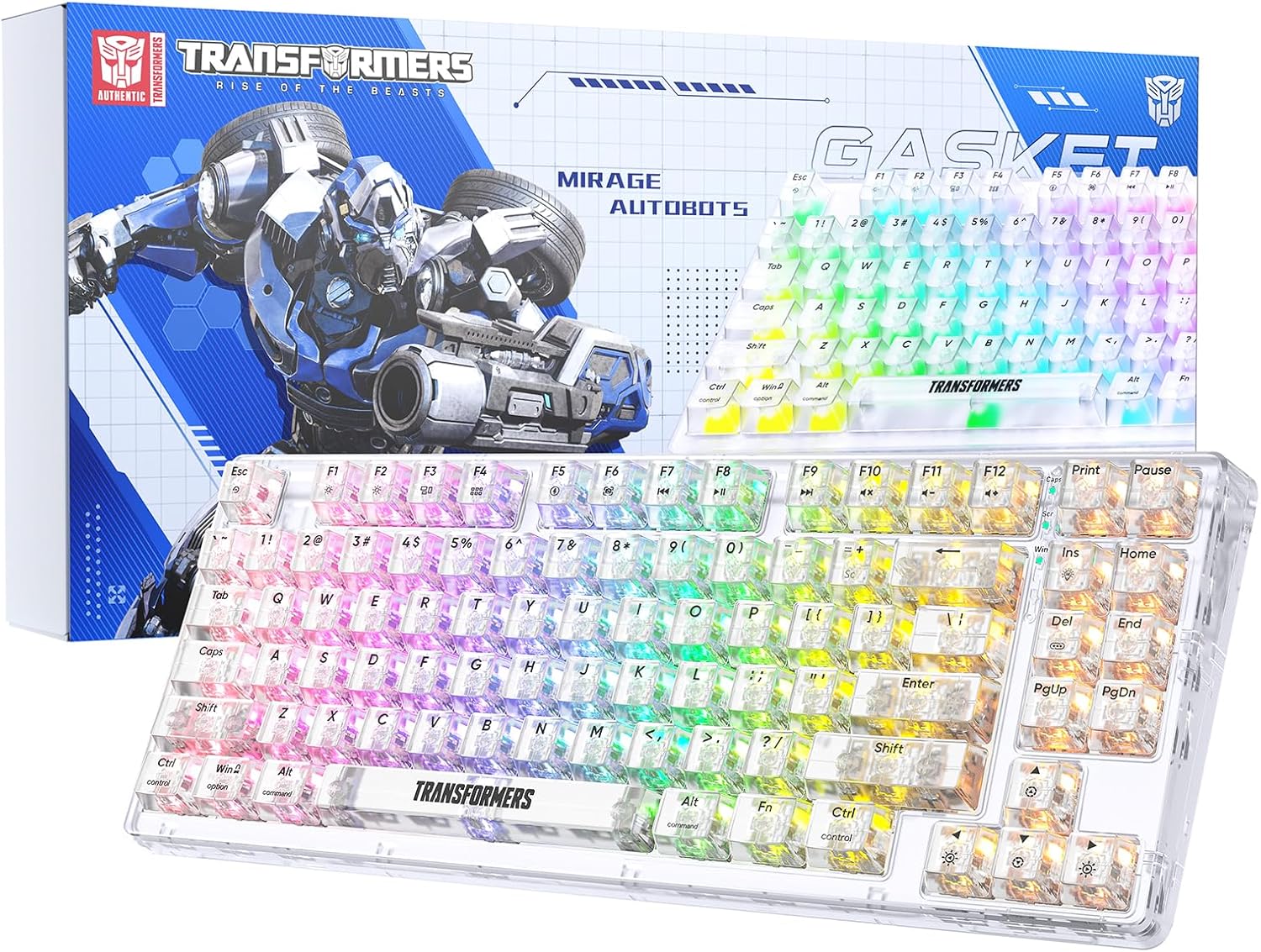
Image 1.1: Transformers TF-Crystal 85 Keys Mechanical Keyboard with its packaging, showcasing the transparent design and RGB lighting.
2. Tuote ohiview
2.1 Tärkeimmät ominaisuudet
- 85-näppäimen asettelu: Compact 75% design retaining essential functions, arrow, and navigation keys.
- Kolmitilayhteys: Tukee Bluetooth 5.0:aa, 2.4 GHz:n langatonta yhteyttä ja USB-C-langallista yhteyttä.
- Vaihdettava piirilevy: Compatible with most 3-pin and 5-pin mechanical switches, allowing for easy customization and replacement.
- Linear Switches: Pre-lubricated switches with a 50 million keystroke lifespan for durability and smooth operation.
- Tiivisteen rakenne: Incorporates high-quality gasket materials and a silicone pad to absorb vibrations and reduce typing noise.
- Mukautettava RGB-taustavalo: Features 20 built-in backlight modes, 16.8 million color options, and dynamic music rhythm effects.
- Programmable Driver: Enables macro customization, key function remapping, and advanced lighting control.
- Pitkä akun käyttöikä: Equipped with a 4000mAh battery, providing up to 240 hours of continuous use in 2.4GHz mode without backlighting.
- Laaja yhteensopivuus: Supports Mac, Windows, iOS, Android, PC, Laptop, Smartphone, Tablet, Switch, Xbox, and PlayStation.
- Läpinäkyvä muotoilu: Features transparent keycaps and base for enhanced aesthetic appeal.
3. Asennus
3.1 Näppäimistön lataaminen
Before initial use, fully charge the keyboard. Connect the provided USB-C cable to the keyboard's USB-C port and the other end to a powered USB port (e.g., computer, wall adapter). The charging indicator will show the charging status.
3.2 Connecting via 2.4GHz Wireless Mode
- Etsi 2.4 GHz:n USB-vastaanotin, joka sijaitsee yleensä näppäimistön lokerossa.
- Liitä USB-vastaanotin tietokoneesi vapaaseen USB-porttiin.
- Toggle the mode switch on the keyboard to the 2.4G asema.
- The keyboard will automatically connect to your device.
3.3 Connecting via Bluetooth 5.0 Mode
- Toggle the mode switch on the keyboard to the BT asema.
- Paina ja pidä painettuna fn+1 (tai fn+2, fn+3) 3–5 sekuntia, kunnes merkkivalo vilkkuu nopeasti osoittaen pariliitostilan.
- Ota Bluetooth käyttöön laitteellasi (tietokone, tabletti, älypuhelin) ja hae uusia laitteita.
- Select "TF-Crystal 85" from the list of available devices to pair.
- Once paired, the indicator light will stop flashing and remain solid. You can pair up to three Bluetooth devices using fn+1, fn+2, ja fn+3.
3.4 Connecting via USB-C Wired Mode
- Liitä mukana toimitettu USB-C-kaapeli näppäimistön USB-C-porttiin.
- Liitä USB-C-kaapelin toinen pää tietokoneen vapaana olevaan USB-porttiin.
- The keyboard will automatically switch to wired mode and function without battery power.

Image 3.1: Diagram illustrating the three connection modes: Bluetooth 5.0, 2.4GHz wireless, and USB-C wired, compatible with various devices.
4. Käyttöohjeet
4.1 Tilan vaihtaminen
Use the physical switch located on the keyboard to select between BT (Bluetooth), 2.4G (2.4GHz wireless), and USB-C (wired) modes.
4.2 RGB-taustavalon säätö
Näppäimistössä on mukautettava RGB-taustavalo. Säädä sitä seuraavilla näppäinyhdistelmillä:
- Fn + Ins: Cycle through 20 different backlight effects.
- Fn + Del: Switch backlight colors within certain modes.
- Fn + ↑ / ↓: Säädä taustavalon kirkkautta (5 tasoa).
- Fn + ← / →: Adjust backlight effect speed (5 levels).
- Fn + Esc (hold for 3s): Reset backlight settings to default.

Image 4.1: Visual guide for controlling RGB backlight effects, brightness, and speed using Fn key combinations.
4.3 Programmable Driver Usage
The keyboard includes a programmable driver for advanced customization. This driver allows you to:
- Makron muokkaus: Record and edit complex key sequences.
- Keskeinen uudelleenmäärittely: Customize the function of individual keys.
- RGB Effect Customization: Fine-tune lighting modes, colors, and speeds, including music rhythm lighting effects.
Refer to the software's dedicated user interface for detailed instructions on using these features.

Image 4.2: Screenshot of the programmable driver interface, showing options for macro editing, RGB effects, and key redefinition.
4.4 Pikavaihtokytkimet
The TF-Crystal 85 keyboard features a hot-swappable PCB, allowing you to change mechanical switches without soldering. This supports most 3-pin and 5-pin mechanical switches.
- Sammuta näppäimistö tai irrota se laitteestasi.
- Irrota haluttu näppäinhattu varovasti mukana toimitetulla ulosvetimellä.
- Use the provided switch puller to gently grip the switch from its top and bottom clips, then pull it straight up to remove it.
- Kohdista uuden kytkimen nastat piirilevyn reikiin. Varmista, että nastat ovat suorassa.
- Paina uutta kytkintä varovasti paikalleen, kunnes se napsahtaa tukevasti. Älä pakota sitä.
- Vaihda näppäinhattu.

Image 4.3: Illustration of the hot-swappable feature, showing how to remove and insert 3-pin/5-pin switches and the linear switch specifications.
5. Huolto
5.1 Näppäimistön puhdistaminen
- Irrota näppäimistö kaikista virtalähteistä ennen puhdistamista.
- Käytä pehmeää, nukkaamatonta liinaa hieman dampkastettu vedellä tai miedolla puhdistusliuoksella näppäinhattujen ja rungon pyyhkimiseksi.
- Poista pöly ja roskat näppäinten välistä paineilmalla tai pienellä harjalla.
- Avoid using harsh chemicals or abrasive materials that could damage the keyboard's surface.
5.2 Akun hoito
- Vältä akun usein toistuvaa täydellistä tyhjentymistä.
- Säilytä näppäimistöä viileässä ja kuivassa paikassa, kun sitä ei käytetä pitkään aikaan.
- Jos näppäimistöä ei käytetä pitkään aikaan, lataa se noin 50 %:iin ennen säilytystä.
6. Vianmääritys
| Ongelma | Mahdollinen syy | Ratkaisu |
|---|---|---|
| Näppäimistö ei vastaa langattomassa tilassa. | Low battery, incorrect mode selected, receiver not connected, Bluetooth not paired. | Charge the keyboard. Ensure the mode switch is set correctly (2.4G or BT). Re-insert the 2.4G receiver. Re-pair Bluetooth. |
| Avaimet eivät rekisteröidy tai niitä kirjoitetaan kahteen kertaan. | Faulty switch, debris under keycap, software issue. | Clean under the keycap. Try hot-swapping the switch with a known working one. Restart your computer. |
| RGB backlight not working or incorrect. | Backlight turned off, incorrect settings, software conflict. | Säädä kirkkautta käyttämällä Fn + ↑. Cycle modes with Fn + Ins. Reset backlight with Fn + Esc (hold 3s). Check programmable driver settings. |
| Keyboard not charging. | Faulty USB-C cable, power source issue, keyboard port damage. | Try a different USB-C cable. Use a different USB port or power adapter. Ensure the cable is fully inserted. |
7. Tekniset tiedot
| Ominaisuus | Yksityiskohta |
|---|---|
| Mallinumero | TF-Crystal 85 |
| Avaimen asettelu | 85 näppäintä (75 % kompakti) |
| Yhteydet | Bluetooth 5.0, 2.4 GHz langaton, USB-C-johdollinen |
| Kytkimen tyyppi | Pre-lubricated Linear Mechanical Switches |
| Vaihda elinikä | 50 miljoonaa näppäinpainiketta |
| Kuumavaihdettava | Kyllä (3-/5-nastainen yhteensopiva) |
| Taustavalo | RGB (20 modes, 16.8 million colors) |
| Akun kapasiteetti | 4000 mAh |
| Battery Life (2.4G, no light) | Jopa 240 tuntia |
| Battery Life (Backlit ON) | Noin 22 tuntia |
| Mitat (P x L x K) | 34.7 cm x 14 cm x 4.5 cm |
| Yhteensopivuus | Mac, Windows, iOS, Android, PC, Laptop, Smartphone, Tablet, Switch, Xbox, PlayStation |

Image 7.1: Visual representation of the keyboard's battery life: 240 hours with backlight off, 22 hours with backlight on, powered by a 4000mAh battery.
8. Takuu ja tuki
Transformers is committed to providing exceptional customer service. If you encounter any problems with your TF-Crystal 85 Keys Mechanical Keyboard, our after-sales support team is available to assist you. This includes technical support, exchanges, or installation guidance.
Please contact our customer service for assistance. We guarantee a hassle-free service experience.


