1. Johdanto
Thank you for choosing the Taiahiro Bk6301 Wireless Mechanical Gaming Keyboard and Mouse Combo. This manual provides detailed instructions for setting up, operating, and maintaining your new peripheral devices. This combo offers versatile connectivity options including 2.4G wireless, Bluetooth 5.0, and wired USB-C, ensuring compatibility with various devices.
2. Pakkauksen sisältö
Varmista, että pakkauksessasi on kaikki tarvittavat osat:
- Taiahiro Bk6301 Wireless Mechanical Gaming Keyboard
- Taiahiro Wireless Gaming Mouse
- USB 2.4G Receiver (stored in mouse battery compartment)
- USB-C-USB-A lataus-/datakaapeli
- Käyttöopas
- 1 AA Battery (for mouse, may be pre-installed or included separately)

Image 2.1: Contents of the Taiahiro Bk6301 Keyboard and Mouse Combo package, including the keyboard, mouse, USB receiver, and USB-C cable.
3. Tuote ohiview
3.1 Näppäimistön ominaisuudet
- 98-näppäimen asettelu: Compact design with a full numeric keypad.
- Mekaaniset siniset kytkimet: Provide tactile and audible feedback for typing.
- RGB-taustavalo: Mukautettavat valaistustehosteet.
- Adjustable Keyboard Stand: Mahdollistaa ergonomisen asennon.
- Monitilayhteys: Supports 2.4G wireless, Bluetooth 5.0, and wired USB-C.
- Ladattava akku: Built-in 2000mAh battery for wireless operation.
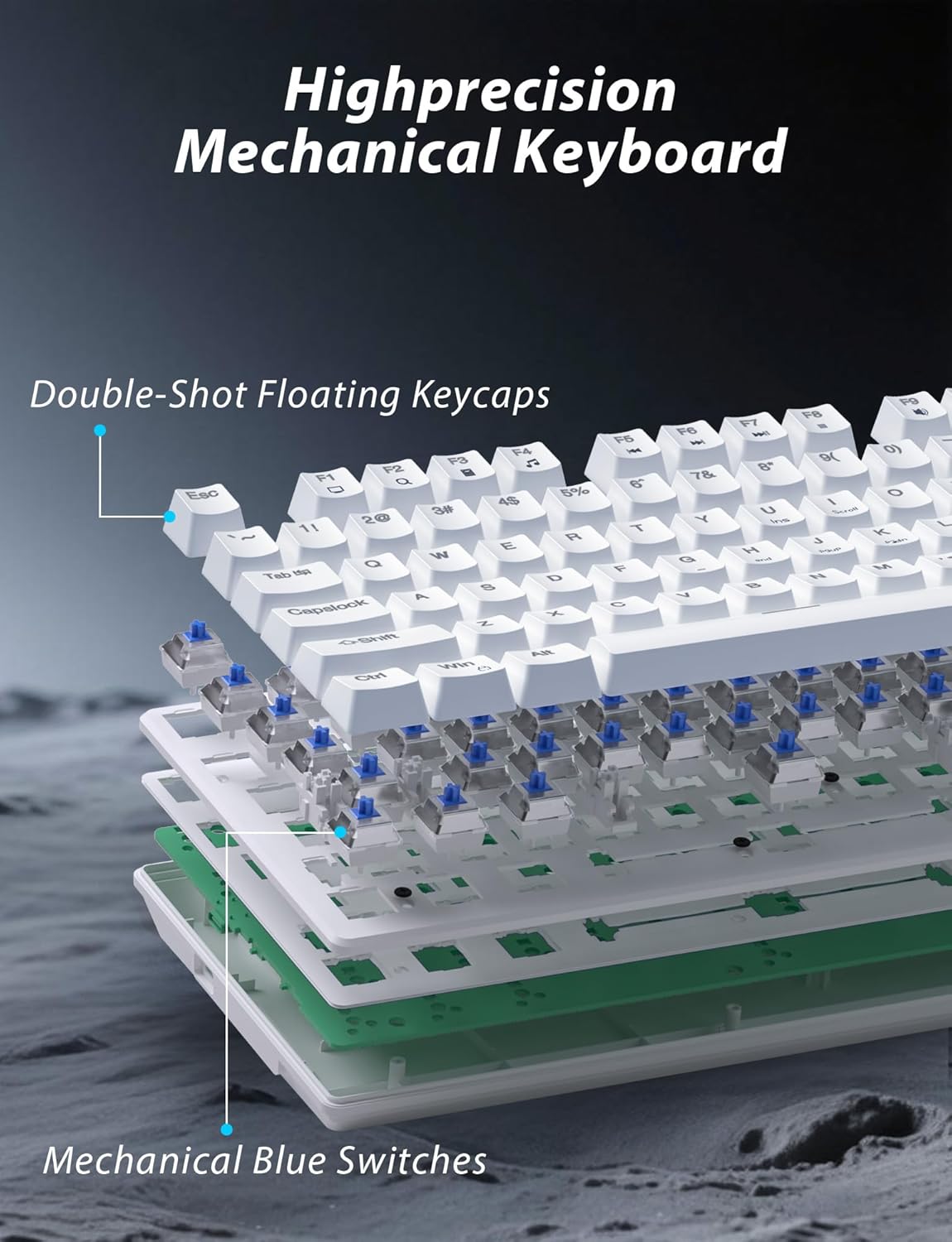
Kuva 3.1: Räjähtänyt view illustrating the internal structure of the mechanical keyboard, highlighting the double-shot floating keycaps and mechanical blue switches.

Kuva 3.2: Sivu view of the keyboard demonstrating its ergonomic design and adjustable stand for comfortable use.
3.2 Hiiren ominaisuudet
- Ergonominen muotoilu: Shaped for comfortable grip.
- Säädettävä DPI: Four levels (800/1600/2400/3200) for precision control.
- Eteen-/taaksepäin-painikkeet: Convenient side buttons for navigation.
- Kaksoistidatayhteys: Supports 2.4G wireless and Bluetooth.

Image 3.3: The wireless gaming mouse, highlighting its ergonomic shape and four adjustable DPI levels.
4. Asennusohjeet
4.1 Näppäimistön liitäntä
The keyboard supports three connection modes: 2.4G wireless, Bluetooth, and wired USB-C.

Image 4.1: The keyboard displaying its three connectivity options: Bluetooth, 2.4GHz wireless, and USB-C wired connection.
2.4G langaton tila:
- Locate the USB 2.4G receiver, typically stored in the mouse's battery compartment.
- Liitä USB-vastaanotin tietokoneesi vapaaseen USB-porttiin.
- On the keyboard, slide the mode switch (usually located on the top edge or bottom) to the '2.4G' position.
- Näppäimistön pitäisi muodostaa yhteys automaattisesti.
Bluetooth-tila:
- Slide the mode switch on the keyboard to the 'BT' (Bluetooth) position.
- The keyboard's indicator light will flash, indicating it is in pairing mode.
- On your device (computer, laptop, smartphone), open Bluetooth settings and search for new devices.
- Select "Taiahiro Bk6301" or a similar name from the list of available devices to pair.
- Kun pariliitos on muodostettu, merkkivalo palaa tasaisesti.
Langallinen USB-C-tila:
- Liitä mukana toimitettu USB-C-kaapeli näppäimistön USB-C-porttiin.
- Liitä toinen pää (USB-A) tietokoneen vapaaseen USB-porttiin.
- The keyboard will function as a wired device and will charge simultaneously.
4.2 Hiiren liitäntä
The mouse supports 2.4G wireless and Bluetooth connectivity.

Image 4.2: The underside of the mouse, illustrating the battery compartment for one AA battery and the storage slot for the tiny USB receiver.
Akun asennus:
- Open the battery compartment on the underside of the mouse.
- Insert one AA battery, ensuring correct polarity.
- Sulje paristolokero.
2.4G langaton tila:
- Ensure the USB 2.4G receiver is plugged into your computer.
- Slide the mode switch on the underside of the mouse to the '2.4G' position.
- Hiiren pitäisi muodostaa yhteys automaattisesti.
Bluetooth-tila:
- Slide the mode switch on the underside of the mouse to the 'BT' (Bluetooth) position.
- Hiiri siirtyy pariliitostilaan.
- Avaa laitteellasi Bluetooth-asetukset ja hae uusia laitteita.
- Select "Taiahiro Mouse" or a similar name from the list to pair.
5. Käyttöohjeet
5.1 Näppäimistön toiminnot
Taustavalon ohjaus:
Näppäimistössä on mukautettava RGB-taustavalaistus.
- Vaihda taustavalon tila: Paina Fn + Koti selaillaksesi yhdeksän erilaisen valaistustehosteen välillä.
- Säädä kirkkautta: Paina Fn + ↑ (Ylösnuoli) or Fn + ↓ (Alaspäin osoittava nuoli) to adjust between 5 brightness levels.
- Säädä nopeutta: Paina Fn + ← (Vasen nuoli) or Fn + → (Oikea nuoli) to adjust between 5 lighting speed levels.

Image 5.1: Keyboard layout highlighting the function key combinations for controlling backlight modes, brightness, and speed.
Multimediatoiminnot:
Käytä multimedian säätimiä painamalla Fn key in combination with the designated F-keys (F1-F12).
- Fn+F1: Mediasoitin
- Fn+F2: Äänenvoimakkuuden vähentäminen
- Fn+F3: Äänenvoimakkuuden lisääminen
- Fn+F4: Mykistä
- Fn+F5: Stop
- Fn+F6: Edellinen kappale
- Fn+F7: Toista/Tauko
- Fn+F8: Seuraava kappale
- Fn+F9: Sähköposti
- Fn+F10: Web Selain
- Fn+F11: Oma tietokone
- Fn+F12: Laskin
5.2 Hiiren toiminnot
DPI-säätö:
Paina DPI-painike (located behind the scroll wheel) to cycle through the four DPI settings: 800, 1600, 2400, and 3200. Each press changes the sensitivity, allowing you to adjust cursor speed to your preference.
6. Huolto
6.1 Puhdistus
- Näppäimistö: Use a soft, dry cloth to wipe the surface. For deeper cleaning, use compressed air to remove debris from between keys. Avoid using harsh chemicals or abrasive materials.
- Hiiri: Pyyhi hiiren pinta pehmeällä, hieman kosteallaamp liinalla. Varmista, ettei nestettä pääse laitteen sisäisiin osiin.
6.2 Akun hallinta
- Näppäimistö: The keyboard has a built-in rechargeable battery. Connect the USB-C cable to a power source (e.g., computer USB port, USB wall adapter) to charge. The indicator light will show charging status.
- Hiiri: The mouse uses one AA battery. Replace the battery when the mouse performance degrades or it stops responding. Ensure proper polarity when inserting a new battery.
7. Vianmääritys
If you encounter issues with your Taiahiro keyboard and mouse combo, please refer to the following solutions:
| Ongelma | Mahdollinen ratkaisu |
|---|---|
| Näppäimistö/hiiri ei vastaa (2.4G) |
|
| Näppäimistö/hiiri ei muodosta yhteyttä (Bluetooth) |
|
| Keyboard backlight not working or stuck |
|
| Keys not responding or double-typing |
|
8. Tekniset tiedot
| Ominaisuus | Yksityiskohta |
|---|---|
| Mallinumero | Bk6301 |
| Yhteydet | Bluetooth 5.0, 2.4G langaton, USB-C-johdollinen |
| Näppäimistön tyyppi | Mekaaninen pelinäppäimistö |
| Avaimen asettelu | 98 Keys (with Numeric Keypad) |
| Kytkimen tyyppi | Mekaaniset siniset kytkimet |
| näppäimistön taustavalo | RGB (18 tilaa, 5 kirkkaustasoa, 5 nopeustasoa) |
| Näppäimistön akku | 2000mAh ladattava |
| Hiiren DPI-tasot | 800/1600/2400/3200 |
| Hiiren akku | 1 x AA-paristo |
| Yhteensopivat laitteet | Personal Computer, Laptop, Smartphone |
| Tuotteen paino | 2.72 paunaa (yhdistelmä) |
| Pakkauksen mitat | 15 x 5.59 x 3.11 tuumaa |
9. Takuu ja tuki
9.1 Takuutiedot
Taiahiro products are covered by a limited warranty from the date of purchase. Please refer to the warranty card included in your package or visit the official Taiahiro website for detailed warranty terms and conditions. This warranty typically covers manufacturing defects and material faults under normal use.
9.2 Asiakastuki
For technical assistance, troubleshooting, or any questions regarding your Taiahiro Bk6301 combo, please contact our customer support team. You can find contact information on the Taiahiro official website or through your purchase platform. When contacting support, please have your product model number (Bk6301) and purchase details ready.


