Johdanto
This manual provides detailed instructions for the setup, operation, and maintenance of your Taiahiro Wireless Gaming Keyboard and Mouse Combo. This combo features a 98-key RGB backlit mechanical keyboard with blue switches and an ergonomic wireless gaming mouse, offering versatile connectivity options (USB-C, 2.4G, Bluetooth 5.0) for various devices.
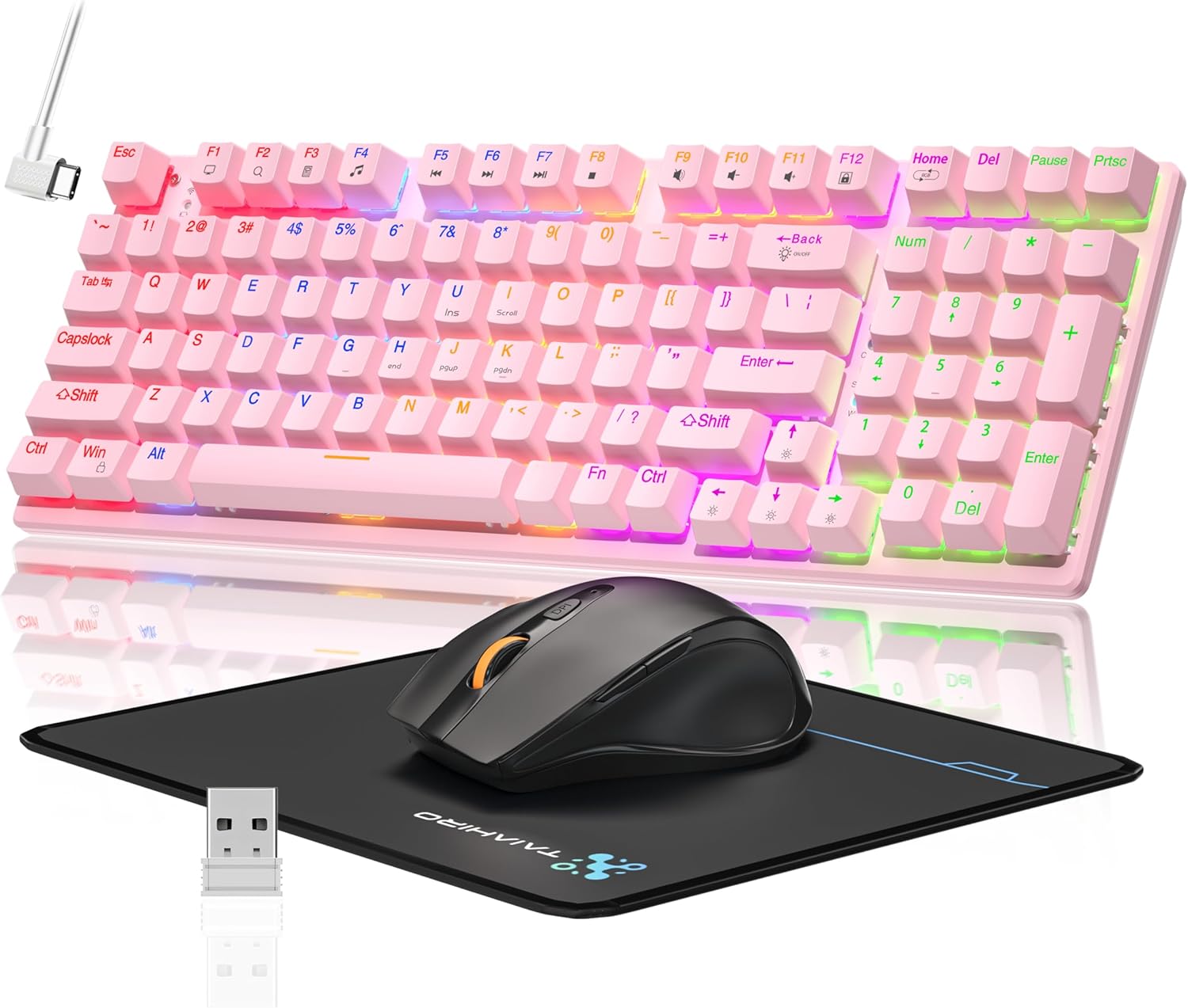
Image: The Taiahiro Wireless Gaming Keyboard and Mouse Combo, featuring a pink 98-key mechanical keyboard with RGB backlighting, a black ergonomic mouse, and a mouse pad. A USB receiver is also visible.
Pakkauksen sisältö
- Langaton mekaaninen näppäimistö
- Langaton pelihiiri
- USB-kaapeli
- 2.4G USB-vastaanotin
- Hiirimatto
- Käyttöopas (tämä asiakirja)
Asennus
Näppäimistön asetukset
The keyboard supports three connectivity modes: USB-C wired, 2.4G wireless, and Bluetooth 5.0.
- USB-C-langallinen yhteys: Connect the provided USB-C cable from the keyboard to an available USB port on your computer. The keyboard will be recognized automatically.
- 2.4G langaton yhteys:
- Locate the 2.4G USB receiver, typically stored in the mouse or keyboard compartment.
- Kytke 2.4G USB-vastaanotin tietokoneesi vapaaseen USB-porttiin.
- Ensure the keyboard's mode switch (usually on the back or side) is set to 2.4G mode.
- Näppäimistön pitäisi muodostaa yhteys automaattisesti.
- Bluetooth 5.0 -yhteys:
- Varmista, että näppäimistön tilakytkin on asetettu Bluetooth-tilaan.
- Ota Bluetooth käyttöön laitteellasi (tietokone, kannettava tietokone, tabletti, älypuhelin) ja etsi uusia laitteita.
- Select "Taiahiro Keyboard" (or similar name) from the list of available devices.
- Suorita pariliitos loppuun noudattamalla näytön ohjeita.

Image: A pink mechanical keyboard connected to various devices (monitor, laptop, tablet) illustrating its triple-mode connectivity via Bluetooth, 2.4GHz, and USB-C.
Hiiren asetukset
The mouse supports 2.4G wireless and Bluetooth connectivity.
- 2.4G langaton yhteys:
- Insert 1 AA battery (not included) into the mouse.
- Plug the 2.4G USB receiver (shared with keyboard) into an available USB port on your computer.
- Ensure the mouse's power switch is turned ON.
- Hiiren pitäisi muodostaa yhteys automaattisesti.
- Bluetooth-yhteys:
- Insert 1 AA battery (not included) into the mouse.
- Ensure the mouse's power switch is turned ON and set to Bluetooth mode.
- Ota Bluetooth käyttöön laitteellasi ja hae uusia laitteita.
- Select "Taiahiro Mouse" (or similar name) from the list of available devices.
- Suorita pariliitos loppuun noudattamalla näytön ohjeita.

Image: A wireless gaming mouse highlighting its 4 adjustable DPI levels and showing the battery compartment with a tiny USB receiver and space for a 1AA battery.
Käyttöohjeet
Näppäimistön toiminnot
- RGB-taustavalo: The keyboard features 8 different RGB lighting modes.
- Paina Fn + Koti vaihtaaksesi valaistustilojen välillä.
- Paina Fn + ↑/↓ to adjust brightness (5 levels).
- Paina Fn + ←/→ to adjust breathing speed (5 levels).
- Multimediaavaimet: Käytä Fn key in combination with F-keys for multimedia controls (e.g., Fn+F1 for media player, Fn+F2 for volume down, etc.). Refer to the keycap legends for specific functions.
- Säädettävät jalat: Näppäimistön pohjassa on säädettävät jalat, joilla voi säätää kirjoituskulmaa ergonomisen mukavuuden takaamiseksi.
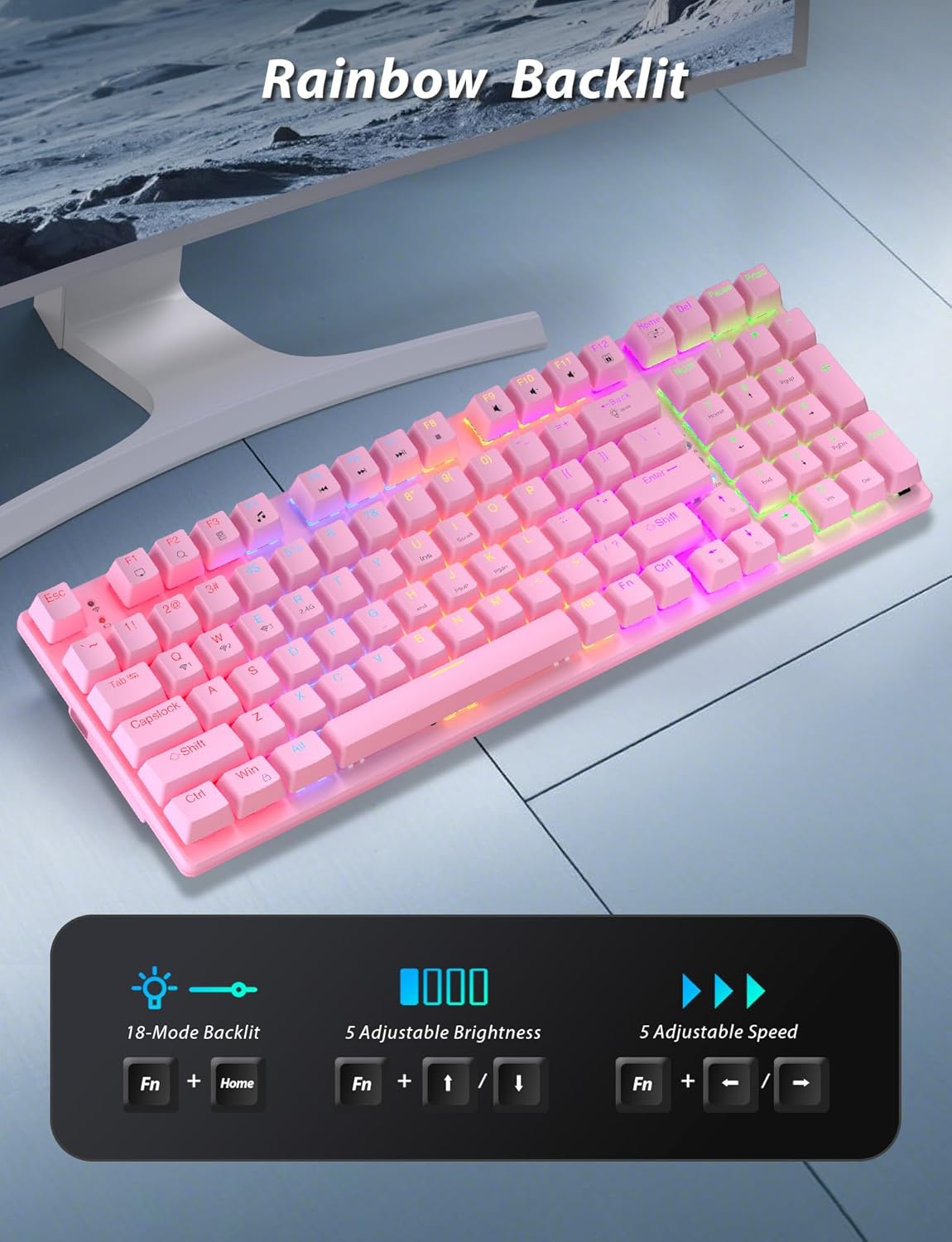
Image: A pink mechanical keyboard displaying its rainbow backlit keys, with an overlay showing the key combinations (Fn + Home, Fn + ↑/↓, Fn + ←/→) for controlling 8 modes, 5 adjustable brightness levels, and 5 adjustable speeds.

Kuva: Lähikuva view of the side of the pink mechanical keyboard, showing its ergonomic sloped design and the adjustable feet extended for comfortable typing. The accompanying mouse is also shown on a mousepad.
Hiiren toiminnot
- DPI-säätö: The mouse features 4 adjustable DPI levels (800/1600/2400/3200). Press the DPI button (usually located behind the scroll wheel) to cycle through the sensitivity settings.
- Ergonominen muotoilu: The contoured shape of the mouse is designed to fit comfortably in your hand, reducing fatigue during extended use.
- Anti-skid Scroll Wheel: Provides precise scrolling control.

Image: A wireless gaming mouse with a prominent scroll wheel and DPI button, illustrating its 4 adjustable DPI levels (800/1600/2400/3200), ergonomic shape, and forward/back buttons.
Huolto
- Puhdistus: Puhdista näppäimistön ja hiiren pinnat pehmeällä, kuivalla liinalla. Perusteellisempaan puhdistukseen käytä hieman kuivaa liinaa.amp liinaa voidaan käyttää varmistaen, ettei nestettä pääse sisäisiin osiin. Vältä voimakkaita kemikaaleja tai hankaavia materiaaleja.
- Akun vaihto: For the mouse, replace the AA battery when performance degrades. For the keyboard, recharge via the USB-C cable when the battery indicator shows low power.
- Varastointi: Kun yhdistelmää ei käytetä pitkään aikaan, säilytä sitä viileässä, kuivassa paikassa, poissa suorasta auringonvalosta ja äärimmäisistä lämpötiloista.
Vianetsintä
| Ongelma | Ratkaisu |
|---|---|
| Keyboard/Mouse not connecting via 2.4G. |
|
| Keyboard/Mouse not connecting via Bluetooth. |
|
| RGB backlighting not working or dim. |
|
| Hiiren kursori on epävakaa tai ei reagoi. |
|
Tekniset tiedot
| Ominaisuus | Yksityiskohta |
|---|---|
| Mallinumero | BK6301 |
| Näppäimistön tyyppi | 98-näppäiminen mekaaninen näppäimistö |
| Kytkimen tyyppi | Siniset kytkimet |
| Näppäimistön liitännät | USB-C (Wired), 2.4G Wireless, Bluetooth 5.0 |
| Hiiren liitettävyys | 2.4G langaton, Bluetooth |
| Hiiren DPI-tasot | 800/1600/2400/3200 |
| Taustavalo | RGB (8 Modes, 5 Brightness, 5 Speed) |
| Yhteensopivat laitteet | PC, Laptop, Smartphone, Tablet (Windows, macOS, Android) |
| Keyboard Key Life | 50 miljoonaa napsautusta |
| Näppäimistön mitat | Approx. 14.96 x 5.51 x 3.15 inches (from Package Dimensions) |
| Tuotteen paino | 2.72 pounds (combo weight) |
| Hiiren akku | 1 x AA paristo (ei sisälly) |
| Näppäimistön akku | 1 x C-paristo (mukana) Note: This seems unusual for a keyboard, usually Li-ion. Based on input "1 C batteries required. (included)". Will state as per input. |

Kuva: Lähikuva view of the mechanical blue switches on the keyboard, showing the keycap removed and the switch mechanism, along with specifications like 50,000,000 keystrokes life, key force, and stroke travel.
Takuu ja tuki
Taiahiro products are designed for reliability and performance. For warranty information or technical support, please refer to the contact details provided on the product packaging or visit the official Taiahiro websivusto. Säilytä ostokuitti takuuvaatimuksia varten.
For further assistance, you may contact Taiahiro customer service through their official channels. Please provide your product model number (BK6301) and a detailed description of the issue when seeking support.


