Johdanto
Thank you for choosing the Aiwa FP-30-2G Flip Phone. This manual provides essential information for setting up, operating, and maintaining your device. The FP-30-2G is a reliable 2G mobile phone designed for essential communication, featuring dual SIM support, Bluetooth 3.0, dual displays, an FM radio, and a dedicated SOS button for emergencies.
Please read this manual carefully before using your phone to ensure proper operation and to maximize its lifespan.
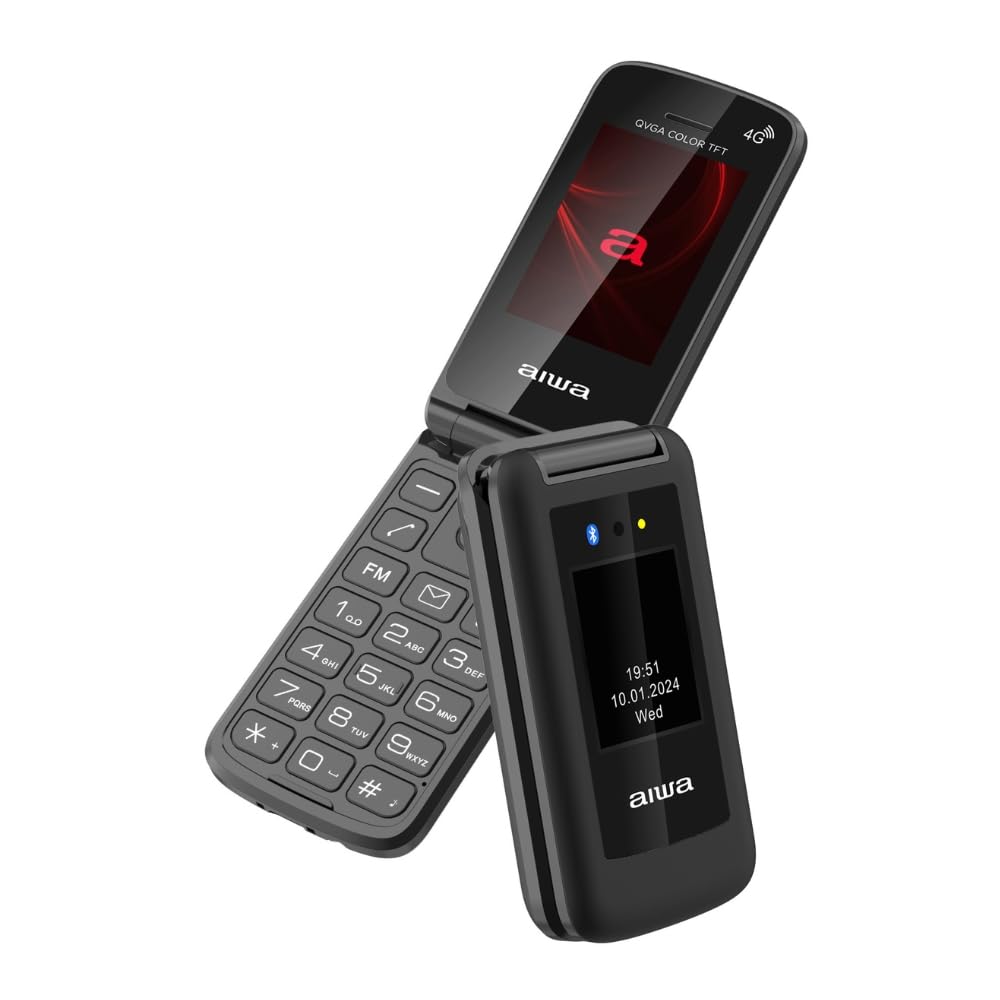
Image: Aiwa FP-30-2G Flip Phone in open position, displaying the main screen and keypad.
1. Asennus
1.1 Pakkauksen sisältö
Varmista, että kaikki tarvikkeet ovat laatikossa:
- Aiwa FP-30-2G Flip Phone
- Battery (BL-5C 1000mAh)
- AC-laturi
- USB-kaapeli
- Käyttöopas (tämä asiakirja)
1.2 Akun ja SIM-kortin asentaminen
- Irrota takakansi: Gently pry open the back cover of the phone using the notch provided.
- Aseta SIM-kortti(t): The phone supports Dual SIM. Locate the SIM card slots. Insert your 2G compatible SIM card(s) into the designated slots with the gold contacts facing down and the cut corner aligned as shown in the diagram (refer to phone's internal markings).
- Aseta MicroSD-kortti (valinnainen): If you wish to expand storage (up to 32GB), insert a MicroSD card into the T-Flash card slot.
- Aseta akku: Place the BL-5C battery into the battery compartment, ensuring the contacts align with the phone's terminals.
- Vaihda takakansi: Kohdista takakantta varovasti ja paina sitä, kunnes se napsahtaa tukevasti paikalleen.
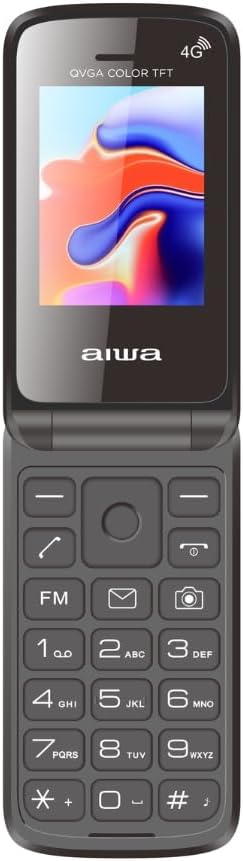
Image: Aiwa FP-30-2G Flip Phone in closed position, front view.
1.3 Akun lataaminen
Before first use, fully charge the phone's battery. Use only the provided charger and USB-C cable.
- Connect the USB-C cable to the charging port on the phone.
- Connect the other end of the USB-C cable to the AC charger.
- Liitä AC-laturi pistorasiaan.
- The charging indicator on the phone will show the charging status. Once fully charged, disconnect the charger.
Huomautus: The phone has a standby time of up to 180 hours and talk time of up to 4 hours on a full charge.
1.4 Virran kytkeminen päälle/pois
- Virran kytkeminen: Press and hold the Power/End Call button (usually red) until the screen lights up.
- Virran sammuttaminen: Press and hold the Power/End Call button until the power-off options appear, then select "Power Off" or simply hold until the phone shuts down.
2. Käyttöohjeet
2.1 Peruspuhelutoiminnot
- Soittaminen: Syötä puhelinnumero näppäimistöllä ja paina soittopainiketta (yleensä vihreä).
- Puheluun vastaaminen: Kun puhelin soi, paina soittopainiketta.
- Puhelun lopettaminen: Paina virta-/puhelun lopetuspainiketta.
- Äänenvoimakkuuden säätö: Use the side volume keys during a call.
2.2 Sending SMS Messages
- Go to the "Messages" menu.
- Select "Write Message" or "New SMS".
- Anna vastaanottajan numero tai valitse se yhteystiedoista.
- Kirjoita viestisi aakkosnumeerisella näppäimistöllä.
- Paina "Lähetä".
2.3 Dual Displays
The FP-30-2G features two displays:
- Päänäyttö: 2.4-inch (240 x 320 QVGA) screen visible when the phone is open. This is your primary interface.
- Ulkoinen näyttö: 1.77-inch (128 x 160) screen visible when the phone is closed. This display shows essential information like time, date, battery status, and incoming call notifications without needing to open the phone.
2.4 SOS-hätäpainike
The dedicated SOS button provides a quick way to contact pre-set emergency numbers.
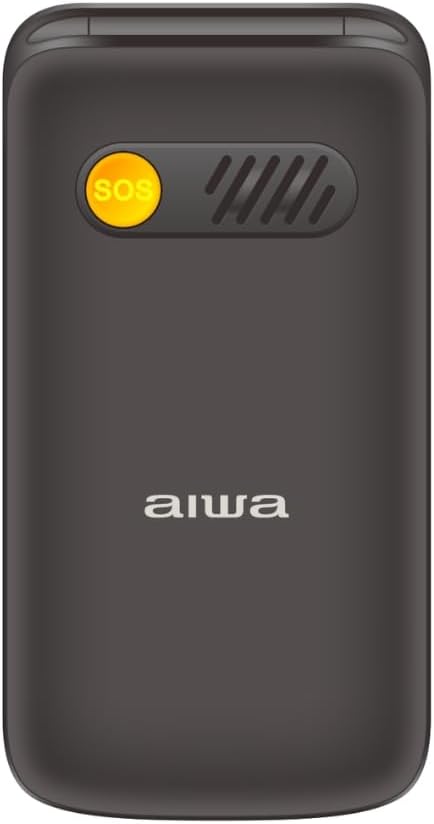
Kuva: Selkä view of the Aiwa FP-30-2G Flip Phone, highlighting the yellow SOS button and speaker grille.
- Setting Up SOS Numbers: Navigate to the "SOS Settings" in the phone's menu. Add up to 5 emergency contact numbers.
- Using the SOS Button: In an emergency, press and hold the SOS button on the back of the phone for a few seconds. The phone will automatically call the pre-set emergency numbers in sequence until one answers. It will also send an emergency SMS message to these contacts.
2.5 FM -radio
The phone includes an offline FM radio. To use it:
- Access the "FM Radio" application from the main menu.
- You may need to connect wired headphones (not included) to act as an antenna for optimal reception.
- Use the navigation keys to scan for stations or tune manually.
2.6 Bluetooth 3.0
Connect your phone to Bluetooth headsets or other compatible devices.
- Siirry kohtaan "Asetukset" > "Bluetooth".
- Ota Bluetooth käyttöön.
- Valitse "Etsi devices" or "Pair new device".
- Valitse haluamasi laite luettelosta ja muodosta pariliitos noudattamalla näytön ohjeita.
2.7 Camera and Flashlight
- Kamera: The phone features a 0.3 MP rear camera with flash. Access it from the main menu to take basic photos or QVGA videos.
- Taskulamppu: A built-in LED flashlight is available. It can usually be activated quickly by pressing and holding a specific key (refer to your phone's quick access keys, often the '0' or a dedicated side button) or through the utilities menu.
3. Huolto
3.1 Laitteen puhdistaminen
- Puhdista puhelimen ulkopinta ja näyttö pehmeällä, kuivalla ja nukkaamattomalla liinalla.
- Do not use liquid cleaners, aerosols, or harsh chemicals, as these can damage the phone.
- Pidä latausportti puhtaana pölystä ja roskista.
3.2 Akun hoito
- Vältä akun altistamista äärimmäisille lämpötiloille (kuumalle tai kylmälle).
- Älä puhkaise, pura tai muokkaa akkua.
- Jos puhelinta ei käytetä pitkään aikaan, lataa akku noin 50 %:iin ennen säilytystä.
- Replace the battery if you notice a significant decrease in performance or swelling.
3.3 Yleishoito
- Protect the phone from drops and impacts.
- Keep the phone dry. Moisture can damage internal components.
- Do not attempt to repair the phone yourself. Refer to qualified service personnel.
4. Vianmääritys
If you encounter issues with your Aiwa FP-30-2G, try the following solutions before seeking professional assistance.
| Ongelma | Mahdollinen ratkaisu |
|---|---|
| Puhelin ei käynnisty |
|
| Ei verkkosignaalia |
|
| Akku ei lataudu |
|
| SOS-painike ei toimi |
|
| Cannot hear FM radio |
|
5. Tekniset tiedot
Detailed technical specifications for the Aiwa FP-30-2G:
| Ominaisuus | Yksityiskohta |
|---|---|
| Mallinumero | FP-30-2G |
| Verkkokaistat | GSM 850/900/1800/1900Mhz (2G) |
| Bluetooth | 3.0 + EDR |
| Päänäyttö | 2.4 inches, 240 x 320 QVGA, TN Type |
| Ulkoinen näyttö | 1.77 inches, 128 x 160, TN Type |
| Kamera | 0.3 megapikseliä salamalla |
| Sisäinen muisti | 32MB + 32MB |
| Laajennettava Muisti | T-Flash Card Slot, up to 32GB |
| SIM-kortin tuki | Kaksi SIM-korttia |
| Akku | BL-5C, 1000mAh (Removable) |
| Valmiusaika | Jopa 180 tuntia |
| Puheaika | Jopa 4 tuntia |
| Laturi | 5V, 500mA with USB-C cable |
| Mitat (suljettu) | 103 x 53.5 x 21.05 mm |
| Paino (akun kanssa) | 106 g |
| Käyttöjärjestelmä | Symbian 9.1 (as per specifications, though this is unusual for a modern feature phone) |
| Audiosoitin | AMR, MID, MP3, WAV |
| Videosoitin | 3GP, MP4, AVI |
| Muut ominaisuudet | FM Radio, Torchlight, Vibration System, QVGA Video Recorder, Sound Recorder, SMS, Phonebook (500 contacts), Calendar, Calculator, Alarm, Speed Dial (M1/M2/M3), Photo Contacts |

Kuva: Sivu view of the Aiwa FP-30-2G Flip Phone, showing its compact profile.
6. Takuu ja tuki
Your Aiwa FP-30-2G Flip Phone comes with a standard manufacturer's warranty. Please refer to the warranty card included in your package for specific terms and conditions, including the warranty period and coverage details.
For technical support, service, or warranty claims, please contact Aiwa customer service through their official website or the contact information provided in your warranty documentation. Do not attempt to open or repair the device yourself, as this may void your warranty.
Säilytä ostokuittisi todisteena ostosta takuun voimassaoloa varten.


