1. Johdanto
The LILYGO T5-4.7-S3 is a versatile development board featuring a 4.7-inch E-Paper display and an ESP32-S3-WROOM-1 microcontroller. This board is designed for various applications requiring low-power display capabilities and robust wireless connectivity. This manual provides essential information for setting up, operating, and maintaining your device.
2. Turvallisuustiedot
- Handle the board with care to avoid damage to electronic components.
- Avoid exposure to extreme temperatures, moisture, or static electricity.
- Varmista oikea virtalähde voltage (typically 5V via USB-C) to prevent damage.
- Do not attempt to disassemble or modify the board beyond its intended use.
- Pidä poissa lasten ulottuvilta.
3. Pakkauksen sisältö
Varmista, että pakkauksessasi on kaikki tarvittavat osat:
- LILYGO T5-4.7-S3 Development Board with 4.7-inch E-Paper Display
- Jumper johdot
- Otsikkonastat
- Battery Connector Cable

Figure 3.1: Contents of the LILYGO T5-4.7-S3 package.
4. Tuote ohiview
The LILYGO T5-4.7-S3 integrates an ESP32-S3-WROOM-1-N16R8 MCU with a 4.7-inch E-Paper display. Key features include:
- MCU: ESP32-S3-WROOM-1-N16R8
- Näyttö: 4.7-inch E-Paper, 540 x 960 resolution, 16 gray levels, with touchscreen functionality.
- Langaton yhteys: Wi-Fi and Bluetooth V5.0.
- Muisti: 16 Mt flash-muistia, 8 Mt PSRAM-muistia.
- Reaaliaikainen kello (RTC): Supports PCF8563 RTC.
- Akun hallinta: Includes battery capacity detection.
- Liitännät: USB-C port for power and data, SD card slot, and various GPIO pins compatible with Raspberry Pi bus interface.

Kuva 4.1: Yläosa view of the LILYGO T5-4.7-S3 board.

Kuva 4.2: Etuosa view of the LILYGO T5-4.7-S3 with e-paper display.
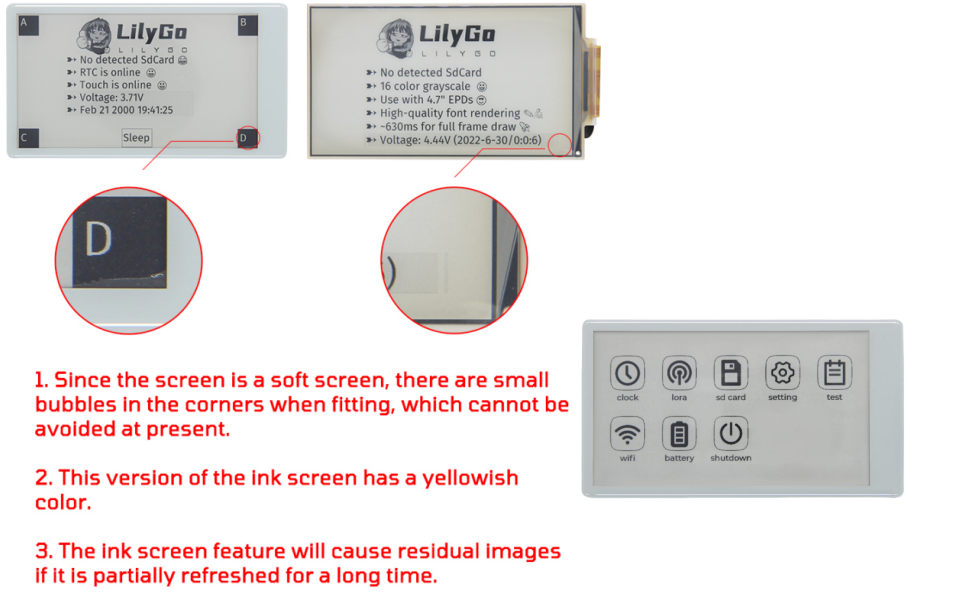
Figure 4.3: LILYGO T5-4.7-S3 E-Paper Board Pinout and Features.
4.1 E-Paper Display Characteristics
The 4.7-inch E-Paper display has specific characteristics:
- Due to the flexible nature of the screen, small bubbles may be present in the corners during fitting. This is a normal manufacturing characteristic.
- This version of the E-Paper screen may exhibit a slight yellowish tint.
- Partial refresh of the screen for extended periods can result in residual images (ghosting).

Figure 4.4: E-Paper Screen Notes.
5. Asennus
To begin using your LILYGO T5-4.7-S3 board, follow these setup steps:
- Liitä virta: Connect the board to a computer using a USB-C cable. The board will power on.
- Initial Firmware Check: The board typically comes with factory test firmware. If the screen displays content, the hardware is likely functioning correctly.
- Asenna ajurit: Ensure your computer has the necessary USB-to-serial drivers for ESP32-S3 devices. These are usually automatically installed or can be found on the Espressif websivusto.
- Valmistele kehitysympäristö: Install your preferred programming environment (Arduino IDE, VS Code with PlatformIO, or MicroPython). Refer to the official LILYGO GitHub repository for detailed setup instructions and examples: github.com/Xinyuan-LilyGO/LilyGo-EPD47/tree/esp32s3.
5.1 Laiteohjelmiston päivittäminen
To upload new firmware or examples, you will need to put the board into DFU (Device Firmware Upgrade) mode:
- Connect the board to your computer via the USB-C cable.
- Paina ja pidä painettuna BOOT -painiketta.
- Samalla kun pidät edelleen BOOT button, briefly press the RST -painiketta.
- Vapauta RST -painiketta.
- Vapauta BOOT -painiketta.
- The board is now in DFU mode and ready for firmware upload via your chosen development environment.
Video 5.1: Demonstration of the firmware flashing process for a LILYGO T-Display-S3 board. The process is similar for the T5-4.7-S3.
6. Käyttöohjeet
Once firmware is loaded, the operation of the LILYGO T5-4.7-S3 will depend on the specific application programmed onto it. Generally, interaction will be via the 4.7-inch touchscreen.
- Kosketusnäyttö: Navigate menus and interact with applications by tapping or swiping on the capacitive touchscreen.
- Painikkeet: The board may include physical buttons (e.g., RST, BOOT) that can be programmed for specific functions within your application.
- SD-kortti: Insert a microSD card into the slot for data storage or loading assets for your applications, such as maps or images.
- USB-C: Use the USB-C port for power, data transfer, and debugging.
6.1 Esimample Application: Mesh Networking
The ESP32-S3's wireless capabilities can be utilized for mesh networking, allowing devices to communicate without traditional internet infrastructure. This is particularly useful in off-grid or emergency situations.
Video 6.1: Demonstration of mesh networking capabilities using a LILYGO T-Lora Pager, showcasing potential applications for ESP32-S3 based devices like the T5-4.7-S3.
7. Ohjelmointiympäristö
The LILYGO T5-4.7-S3 board supports several popular programming environments:
- Arduino IDE: A user-friendly environment for beginners and experienced developers.
- VS Code (PlatformIO): A powerful and flexible environment for professional development.
- MicroPython: Allows programming the ESP32-S3 using Python.
- ESP-IDF: Espressif's official IoT Development Framework for advanced users.
For detailed guides, code examples, and libraries, visit the official LILYGO GitHub repository: github.com/Xinyuan-LilyGO/LilyGo-EPD47/tree/esp32s3.
8. Huolto
- Puhdistus: Use a soft, dry cloth to clean the board and screen. Avoid abrasive materials or harsh chemicals.
- Varastointi: Store the board in a cool, dry place, away from direct sunlight and extreme temperatures. The provided protective case (
 ) is recommended for storage.
 - Laiteohjelmistopäivitykset: Regularly check the LILYGO GitHub repository for firmware updates and improvements.
9. Vianmääritys
If you encounter issues with your LILYGO T5-4.7-S3 board, consider the following:
- No Display After Flashing: If the screen remains blank after uploading new firmware, ensure the firmware is compatible with the T5-4.7-S3 model. Try re-flashing the factory test firmware from the GitHub repository to verify basic hardware functionality.
- USB Port Not Recognized: Verify that the USB-C cable is functioning and properly connected. Ensure the correct drivers are installed on your computer. If using Arduino IDE, check that the correct board and COM port are selected.
- Sovellus ei toimi: Double-check your code for errors. Consult the examples and documentation on the LILYGO GitHub page.
- Screen Issues (Bubbles, Tint, Ghosting): Refer to the E-Paper Display Characteristics section (4.1) for expected behavior. These are often inherent to the e-paper technology.
For further assistance, refer to the FAQ section on the LILYGO GitHub page or contact LILYGO product support.
10. Tekniset tiedot
| Ominaisuus | Erittely |
|---|---|
| MCU | ESP32-S3-WROOM-1-N16R8 |
| Näytön tyyppi | 4.7 Inches E-Paper, Capacitive Touchscreen |
| Näytön resoluutio | 540 x 960 |
| Harmaat tasot | 16 |
| RAM | 8 MB (PSRAM) |
| Flash-muistin koko | 16 Mt |
| Langaton tyyppi | 2.4 GHz Radio Frequency (Wi-Fi), Bluetooth V5.0 |
| USB-portit | 1 (USB-C) |
| Erikoisominaisuudet | E-paper Display, Touchscreen, Programming Environment, RTC, Battery Detection |
| Mitat (P x L x K) | 120 mm x 66 mm x 12 mm (noin) |

Figure 10.1: LILYGO T5-4.7-S3 Board Dimensions.
11. Takuu ja tuki
For warranty information and technical support, please refer to the official LILYGO website or contact your retailer. LILYGO provides product service for any questions or suggestions regarding the product.


