1. Johdanto
This manual provides detailed instructions for the FREEWOLF M68 60% Wireless Gaming Keyboard. Please read this manual carefully before using the product to ensure proper operation and longevity.

Figure 1: FREEWOLF M68 Wireless Gaming Keyboard (Shimmer color variant)
2. Tuote ohiview
Tärkeimmät ominaisuudet:
- Kolmitilayhteys: Supports wired (USB-C), 2.4GHz wireless, and Bluetooth 5.0 connections.
- Usean laitteen yhteensopivuus: Connects to Windows, Mac, Linux, PC, Laptop, iPad, iOS, and Android devices.
- Kompakti 60 %:n asettelu: Features 67 keys, optimizing desktop space.
- PBT-näppäinhatut: Durable Polybutylene Terephthalate keycaps with clear legends.
- Sateenkaaren LED-taustavalo: Offers constant and breathing modes with adjustable brightness and speed.
- Pitkäkestoinen akku: Built-in 2000mAH battery provides extended usage.
- Ergonominen muotoilu: Double leg braces allow for three adjustable typing angles.
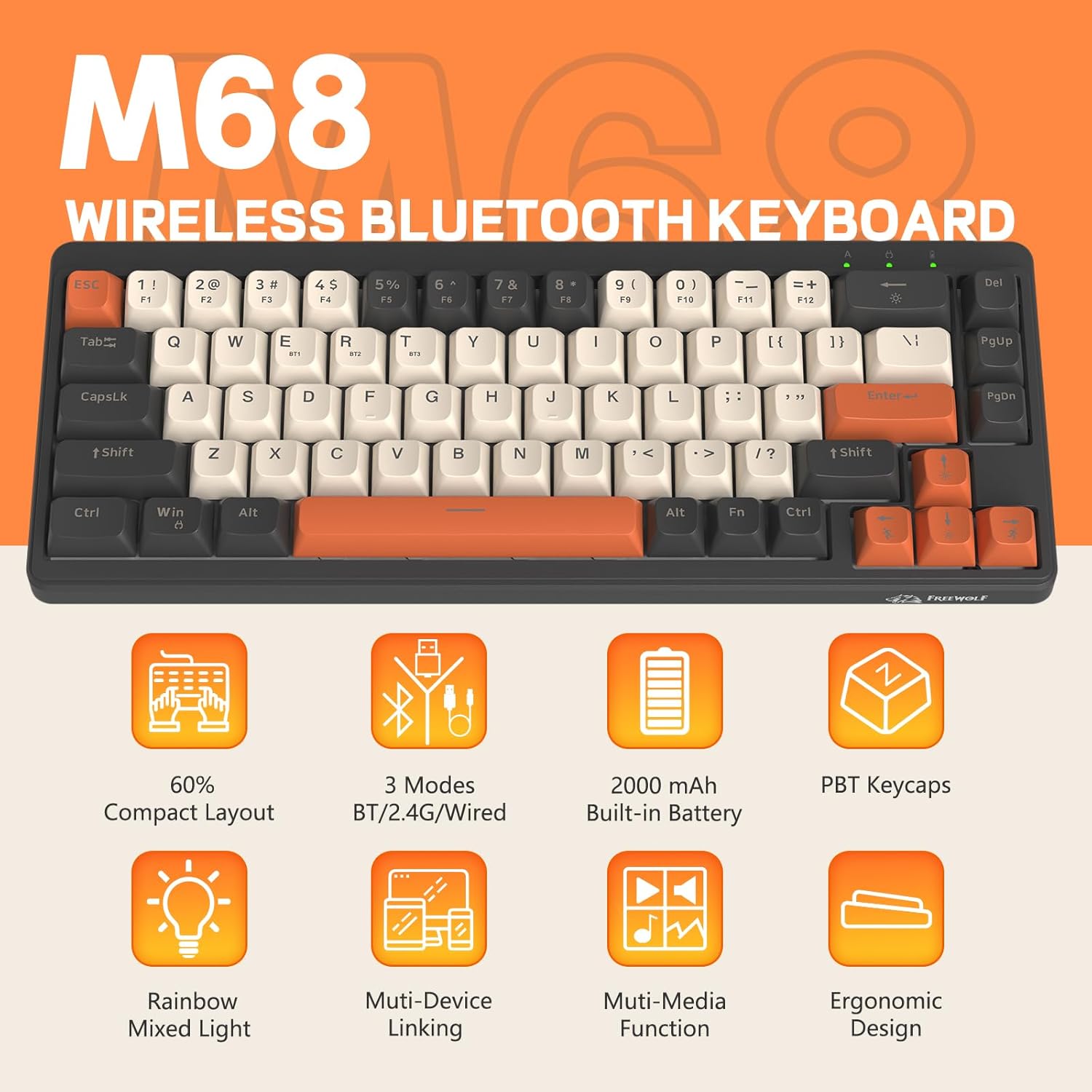
Kuva 2: Päättynytview of FREEWOLF M68 key features.
3. Asennus ja yhteys
3.1. Tri-Mode Connection Overview
The M68 keyboard supports three connection methods: wired via USB-C, 2.4GHz wireless via a USB receiver, and Bluetooth 5.0. You can switch between these modes using the dedicated switch on the keyboard.

Kuva 3: Yksityiskohtainen view of the 3-mode connection options.
3.2. Langallinen yhteys
- Paikanna näppäimistön USB-C-portti.
- Connect the provided USB-C cable to the keyboard and the other end to your computer's USB port.
- Ensure the mode switch on the keyboard is set to the wired (USB) position.
- Järjestelmä tunnistaa näppäimistön automaattisesti.
3.3. 2.4 GHz:n langaton yhteys
- Locate the 2.4GHz USB receiver (often stored in a compartment on the keyboard).
- Liitä USB-vastaanotin tietokoneesi vapaaseen USB-porttiin.
- Set the mode switch on the keyboard to the 2.4GHz wireless position.
- Näppäimistön pitäisi muodostaa yhteys automaattisesti. Jos ei, paina FN + R aloittaaksesi pariliitoksen.
3.4. Bluetooth-yhteys
The M68 can connect to up to three Bluetooth devices simultaneously.
- Aseta näppäimistön tilanvalitsin Bluetooth-asentoon.
- To enter pairing mode for a specific channel (BT1, BT2, or BT3), press and hold FN + Q (BT1:lle) FN + W (BT2:lle) tai FN + E. (for BT3) until the corresponding indicator light flashes rapidly.
- On your device (PC, laptop, tablet, phone), open Bluetooth settings and search for "FREEWOLF M68".
- Select the keyboard to pair. The indicator light will become solid once connected.
- Vaihda paritettujen Bluetooth-laitteiden välillä painamalla FN + Q/W/E lyhyesti.
4. Käyttö
4.1. Taustavalon hallinta
The M68 features customizable rainbow LED backlighting.
- FN + Askelpalautin: Toggle backlight on/off or switch between constant and breathing modes.
- FN + vasen nuoli: Vähennä taustavalon nopeutta.
- FN + oikea nuoli: Lisää taustavalon nopeutta.
- FN + ylänuoli: Lisää taustavalon kirkkautta.
- FN + alanuoli: Vähennä taustavalon kirkkautta.

Figure 4: Backlight adjustment key combinations.
4.2. Ergonominen säätö
The keyboard includes double leg braces on the back to adjust the typing angle for comfort.
- Flip the keyboard over to access the leg braces.
- Säädä kahtatage leg braces to achieve your preferred typing angle (flat, one stage, or two stages).

Figure 5: Ergonomic angle adjustments.
4.3. Akun hallinta
The keyboard has a built-in 2000mAH rechargeable battery.
- Lataus: Connect the keyboard via the USB-C cable to a power source (computer USB port or wall adapter). The charging indicator will show status.
- Akun kesto: Up to 60 hours with backlight on, and up to 200 hours with backlight off.
- Virransäästö: The keyboard will enter sleep mode after a period of inactivity to conserve battery. Press any key to wake it up.

Figure 6: Battery capacity information.
5. Huolto
- Puhdistus: Use a soft, dry cloth to clean the keyboard surface. For keycaps, you may use a slightly damp liinalla. Vältä liiallista kosteutta.
- Näppäinhatun poistaminen: If necessary, use a keycap puller to carefully remove PBT keycaps for deeper cleaning or replacement.
- Varastointi: Säilytä näppäimistöä viileässä, kuivassa paikassa, poissa suorasta auringonvalosta ja äärimmäisistä lämpötiloista.
- Vältä nesteitä: Do not expose the keyboard to liquids to prevent damage to internal components.
6. Vianmääritys
| Ongelma | Mahdollinen syy | Ratkaisu |
|---|---|---|
| Näppäimistö ei vastaa (langallinen) | Loose cable connection, incorrect mode. | Ensure USB-C cable is securely connected. Check if the mode switch is set to wired. Try a different USB port. |
| Näppäimistö ei vastaa (2.4 GHz) | USB receiver not connected, incorrect mode, pairing issue. | Ensure USB receiver is plugged in. Set mode switch to 2.4GHz. Re-pair by pressing FN + R. Try a different USB port for the receiver. |
| Näppäimistö ei vastaa (Bluetooth) | Not paired, incorrect mode, device Bluetooth off. | Ensure device Bluetooth is on. Set mode switch to Bluetooth. Enter pairing mode (FN + Q/W/E) and re-pair. Forget the device on your system and re-pair. |
| Taustavalo ei toimi tai on jumissa | Backlight off, low battery, software glitch. | Paina FN + askelpalautin to toggle. Charge the keyboard. Try resetting the keyboard (refer to advanced functions if available, or disconnect/reconnect). |
| Avaimet eivät rekisteröidy tai niitä kirjoitetaan kahteen kertaan | Pölyä/roskaa näppäinkannen alla, kytkimessä ongelma. | Carefully remove keycap and clean. If issue persists, contact support. |
7. Tekniset tiedot
| Malli | M68 |
| Merkki | VAPAA SUSSI |
| Yhteydet | Langallinen (USB-C), 2.4 GHz:n langaton, Bluetooth 5.0 |
| Avaimen asettelu | 60 % (67 näppäintä) |
| Avaimenperän materiaali | PBT (polybuteenitereftalaatti) |
| Taustavalo | Rainbow LED (RGB) |
| Akun kapasiteetti | 2000mAH |
| Yhteensopivat laitteet | Laptop, PC, Tablet (Windows, Mac, Linux, iOS, Android) |
| Tuotteen mitat | 32.51 x 12.5 x 3.99 cm |
| Paino | 600 g |
| Erikoisominaisuudet | Ergonomic (adjustable angles), Backlit |
8. Takuu ja tuki
For warranty information, technical support, or customer service inquiries, please refer to the contact information provided with your purchase or visit the official FREEWOLF websivusto.
Säilytä ostokuittisi mahdollisten takuuvaatimusten varalta.


