1. Johdanto
This manual provides detailed instructions for the installation, operation, and maintenance of your SCS Sentinel HCN0082 Outdoor Programmable Electronic Timer Plug. This device is designed to automate the switching ON and OFF of electrical appliances, helping to manage energy consumption efficiently. Please read this manual thoroughly before using the product to ensure safe and correct operation.
Turvallisuustiedot
- Ensure the timer is correctly installed and connected to a suitable power source (230V).
- Do not exceed the maximum load capacity of 16A or 3600W.
- This product is designed for outdoor use but should be protected from direct heavy rain or immersion in water.
- Älä avaa tai yritä korjata laitetta itse. Jätä kaikki huoltotyöt pätevän henkilöstön tehtäväksi.
- Pidä poissa lasten ulottuvilta.
2. Tuote ohiview
The SCS Sentinel HCN0082 is an electronic timer plug featuring a clear digital display and intuitive buttons for programming. It is housed in a robust plastic casing suitable for outdoor environments.
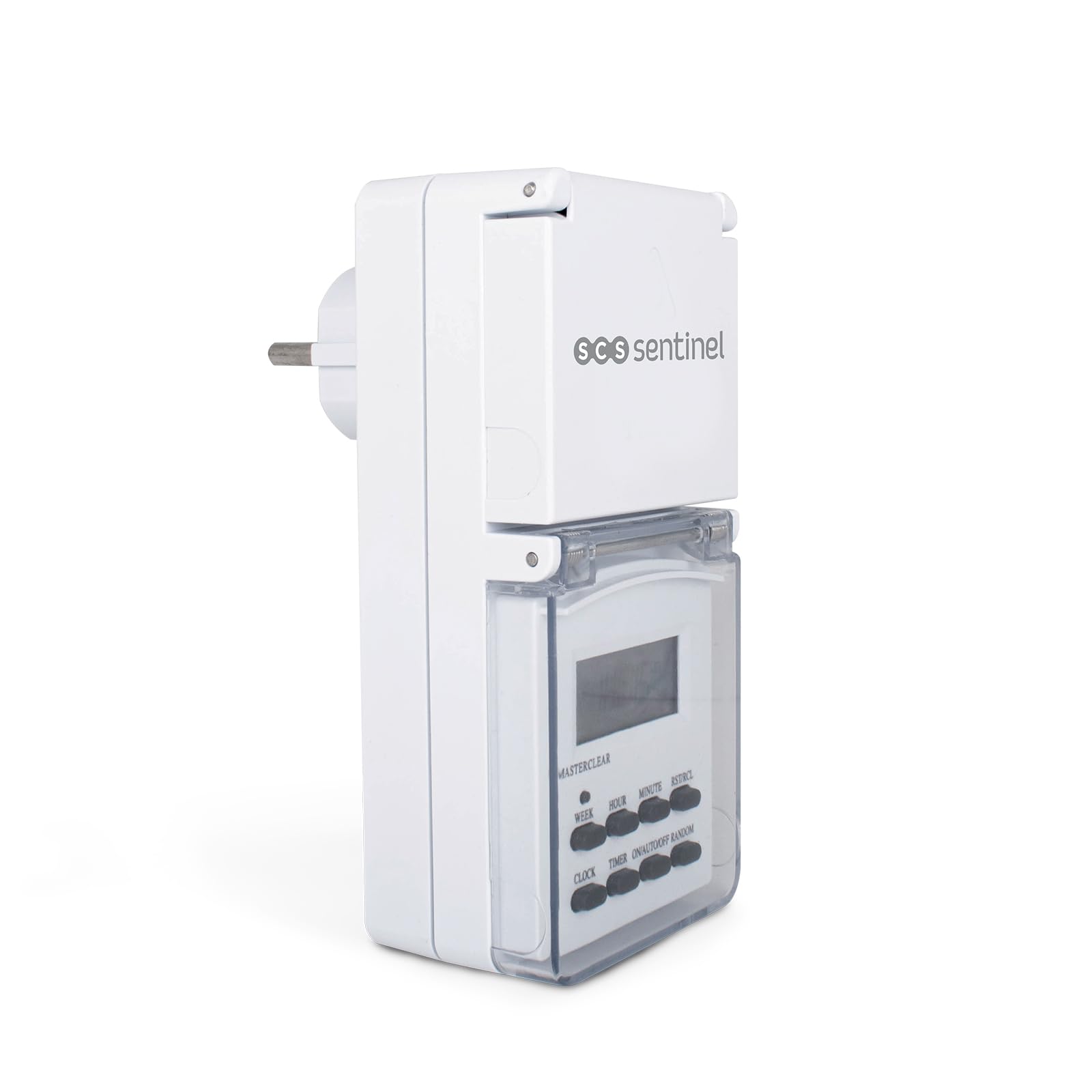
Kuva 2.1: Edessä view of the SCS Sentinel HCN0082 timer plug, showing the digital display and control buttons. The protective cover is closed.
Komponentit ja säätimet
- Digitaalinen näyttö: Näyttää nykyisen kellonajan, viikonpäivän ja ohjelmoinnin tilan.
- Painikkeet:
- VIIKKO: Valitsee viikonpäivän(t) ohjelmointia varten.
- TUNNIN: Säätää tuntia.
- MINUUTI: Säätää minuutteja.
- RST/RCL: Reset/Recall button.
- KELLO: Siirtyy kellon asetustilaan.
- AJASTIN: Siirtyy ohjelman asetustilaan.
- ON/AUTO/OFF: Selects operating mode (Always ON, Automatic, Always OFF).
- Satunnainen: Activates/deactivates random function.
- Suojakuori: A hinged cover protects the display and buttons from outdoor elements.
- Pistorasia: The output socket for connecting an appliance.
- Pistoke: The input plug for connecting to a power outlet.

Kuva 2.2: Sivu view of the timer plug, illustrating the protective cover for the output socket in an open position, revealing the socket.

Kuva 2.3: Takaisin view of the timer plug, showing the input plug designed for connection to a wall outlet.
3. Asennus
3.1 Ensimmäinen lataus ja nollaus
- Before first use, plug the timer into a live electrical outlet for at least 14 hours to charge the internal battery. This battery maintains your settings during power outages or when the timer is unplugged.
- After charging, use a pointed object (like a pen tip) to press the RST/RCL button to clear all previous settings and reset the unit. The display will show "0:00".
3.2 Nykyisen kellonajan ja päivämäärän asettaminen
- Paina ja pidä painettuna KELLO -painiketta.
- Pitämällä KELLO, paina VIIKKO -painiketta toistuvasti, kunnes oikea viikonpäivä tulee näkyviin.
- Pitämällä KELLO, paina TUNNIN button repeatedly until the correct hour is displayed.
- Pitämällä KELLO, paina MINUUTI -painiketta toistuvasti, kunnes näytössä näkyy oikea minuutti.
- Vapauta KELLO -painiketta. Nykyinen aika ja päivä on nyt asetettu.
4. Käyttöohjeet
The timer allows for up to 7 programmable ON/OFF cycles per day, with various day combinations.

Kuva 4.1: The timer plug displayed alongside its instruction manual, illustrating the compact design and the detailed guide for programming.
4.1 PÄÄLLE/POIS-syklien ohjelmointi
- Paina AJASTIN button once. The display will show "1 ON" (first ON program).
- Paina VIIKKO to select the desired day(s) for this program. Options include individual days, weekdays, weekends, or all days.
- Paina TUNNIN to set the desired hour for the "ON" time.
- Paina MINUUTI to set the desired minute for the "ON" time.
- Paina AJASTIN again. The display will show "1 OFF" (first OFF program).
- Repeat steps 2-4 to set the desired day(s), hour, and minute for the "OFF" time.
- Jatka painamista AJASTIN to cycle through and set up to 7 ON/OFF programs. Each program requires both an ON and an OFF setting.
- Kun olet asettanut kaikki haluamasi ohjelmat, paina KELLO -painiketta palataksesi nykyisen ajan näyttöön.
4.2 Manuaalinen ohitus (PÄÄLLÄ/AUTO/POIS)
Paina ON/AUTO/OFF -painiketta käyttötilojen selaamiseksi:
- PÄÄLLÄ: The connected appliance will remain continuously ON, overriding all programs.
- AUTO: The timer will operate according to the programmed ON/OFF cycles. This is the standard operating mode.
- OFF: The connected appliance will remain continuously OFF, overriding all programs.
4.3 Satunnaisfunktio
The random function can be used to simulate presence by turning the connected appliance ON and OFF at irregular intervals within a set period.
- Paina RANDOM button. The display will show "R" or "RANDOM" to indicate activation.
- When activated, the timer will turn ON and OFF randomly between 6 PM and 6 AM, with delays ranging from 10 to 31 minutes.
- Paina RANDOM uudelleen poistaaksesi tämän toiminnon käytöstä.
4.4 12/24 Hour Mode
To switch between 12-hour (AM/PM) and 24-hour time display:
- Paina ja pidä painettuna KELLO -painiketta ja paina sitten -painiketta AJASTIN button. The display will toggle between 12-hour and 24-hour format.
4.5 Summer Time Adjustment
To adjust for daylight saving time (summer time):
- Paina ja pidä painettuna KELLO -painiketta ja paina sitten -painiketta ON/AUTO/OFF button simultaneously. The display will show "S" and the time will advance by one hour.
- Repeat the action to revert to standard time.
5. Huolto
5.1 Puhdistus
- Irrota ajastin aina pistorasiasta ennen puhdistamista.
- Pyyhi ulkopuoli pehmeällä, damp liinalla. Älä käytä hankaavia puhdistusaineita tai liuottimia äläkä upota laitetta veteen.
- Ensure the protective covers for the display and socket are clean and free of debris to maintain their sealing properties.
5.2 Varastointi
- Kun ajastinta ei käytetä pitkään aikaan, säilytä sitä viileässä, kuivassa paikassa, poissa suorasta auringonvalosta ja äärimmäisistä lämpötiloista.
- It is recommended to fully charge the internal battery periodically if stored for a long time to maintain its lifespan.
6. Vianmääritys
| Ongelma | Mahdollinen syy | Ratkaisu |
|---|---|---|
| Näyttö on tyhjä tai himmeä. | Sisäisen akun varaus on heikko tai se on tyhjä. | Plug the timer into a live outlet for at least 14 hours to charge the battery. |
| Laite ei käynnisty/sammu ohjelmoinnin mukaisesti. |
|
|
| Timer settings are lost after unplugging. | Sisäinen akku ei pidä latausta. | Ensure initial charging was sufficient. If the problem persists, the internal battery may need replacement (contact support). |
| Painikkeet eivät reagoi. | Temporary software glitch or unit freeze. | Paina RST/RCL button to perform a full reset. You will need to re-program all settings. |
7. Tekniset tiedot
| Mallinumero | HCN0082 |
| Merkki | SCS Sentinel |
| Voitage | 230V (Standard European) |
| Suurin kuormitus | 16 A / 3600 W |
| Materiaali | Muovi |
| Mitat (P x L x K) | 16.5 x 16 x 7.5 cm |
| Paino | 200 g |
| Ohjelmien määrä | 7 ON/OFF cycles per day |
| Käyttöympäristö | Outdoor (with protective cover) |
8. Takuu ja tuki
8.1 Takuutiedot
The SCS Sentinel HCN0082 Outdoor Programmable Electronic Timer Plug comes with a 2 vuoden takuu, ensuring the reliability of this innovative technical product. This warranty covers manufacturing defects and ensures the product is easy to install and use as intended.

Kuva 8.1: Product packaging for the SCS Sentinel HCN0082, indicating key features including a 2-year warranty and suitability for outdoor use.
8.2 Asiakastuki
For any questions, technical assistance, or warranty claims, please contact SCS Sentinel customer support. Refer to the product packaging or the official SCS Sentinel websivusto yhteystiedot.
Säilytä ostokuittisi takuun voimassaoloa varten.