Johdanto
This manual provides essential information for the proper use and maintenance of your Motorola Edge (2021) XT2141-1 smartphone. This device is designed for use on Verizon's network and features a powerful processor, high-resolution display, and advanced camera system. Please read this manual thoroughly to ensure optimal performance and longevity of your device.
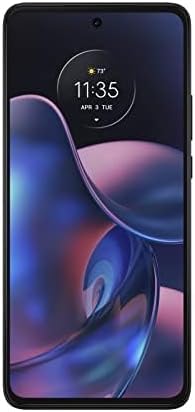
Kuva: Edessä view of the Motorola Edge (2021) XT2141-1 smartphone in Charcoal Gray.
Asennus
1. Laatikon purkaminen ja alkulataus
Carefully remove all contents from the packaging. The box typically includes the Motorola Edge (2021) XT2141-1 smartphone and a USB Cable. Connect the USB cable to the phone and a compatible power adapter (sold separately) to fully charge the device before first use.
2. SIM-kortin asennus
- Paikanna SIM-kortin alusta laitteen sivusta.
- Avaa SIM-kortin poistotyökalu (jos toimitettu, tai pieni paperiliitin) alustan pieneen reikään.
- Aseta Verizon Nano-SIM -kortti korttipaikkaan kultaiset koskettimet alaspäin.
- Työnnä pidike varovasti takaisin paikalleen, kunnes se on tasaisesti puhelimen rungon kanssa.
3. Virran kytkeminen ja alkuasetukset
Press and hold the power button until the Motorola logo appears. Follow the on-screen prompts to select your language, connect to a Wi-Fi network, and set up your Google account. This process will guide you through essential settings for your Android 13.0 operating system.
Käyttöohjeet
Perusnavigointi
- Aloitusnäyttö: Pyyhkäise vasemmalle tai oikealle päästäksesi sovellussivuille. Pyyhkäise ylhäältä alas nähdäksesi ilmoitukset ja pika-asetukset.
- Eleet: Utilize Android 13.0's gesture navigation for a fluid experience. Swipe up from the bottom to go home, swipe up and hold for recent apps, and swipe from the left or right edge to go back.
- Näyttö: The 8-inch Max Vision FHD+ display with HDR10 and a 120Hz refresh rate provides smooth visuals. Adjust display settings in the Asetukset valikosta.
Kameran käyttö
The Motorola Edge (2021) features a versatile camera system:
- 108 megapikselin pääkamera: Korkean resoluution valokuville.
- 8 megapikselin ultralaajakulmaobjektiivi: Laajempien kohtausten tallentamiseen.
- 2 megapikselin syvyysanturi: Parannettuja muotokuvatilan tehosteita varten.
Open the Camera app, select your desired mode (Photo, Video, Portrait, etc.), and tap the shutter button to capture images or start recording.
Akun hallinta
The device is equipped with a 5000mAh battery. For fast charging, use a compatible TurboPower 30 charger. To optimize battery life, manage background app usage and adjust screen brightness in Asetukset > Akku.
Yhteydet
Your device supports 2G, 3G, 4G, and 5G networks. Ensure your SIM card is active with Verizon Wireless for cellular data and calls. Wi-Fi and Bluetooth can be managed via the Quick Settings panel or Asetukset > Verkko ja internet.
Huolto
Laitteen puhdistaminen
Puhdista puhelimen näyttö ja runko pehmeällä, nukkaamattomalla liinalla. Vältä hankaavia materiaaleja tai voimakkaita kemikaaleja. Pinttyneisiin tahroihin, pyyhi kevyesti.ampen the cloth with water. Do not submerge the device in liquid.
Ohjelmistopäivitykset
Tarkista säännöllisesti ohjelmistopäivitykset ja asenna ne varmistaaksesi, että laitteessasi on uusimmat ominaisuudet, tietoturvapäivitykset ja suorituskyvyn parannukset. Siirry osoitteeseen Asetukset > Järjestelmä > Järjestelmäpäivitys.
Akun hoito
To prolong battery lifespan, avoid extreme temperatures. It is generally recommended to keep the battery charge between 20% and 80% for optimal long-term health, though occasional full charges/discharges are acceptable.
Vianetsintä
| Ongelma | Ratkaisu |
|---|---|
| Laite ei käynnisty | Ensure the battery is charged. Connect to a charger for at least 15 minutes, then try powering on again. If unresponsive, perform a force restart by holding the power button for 10-15 seconds. |
| Ei verkkosignaalia | Check if your SIM card is properly inserted. Verify that Airplane Mode is off. Restart the device. Contact Verizon Wireless customer support to confirm your service status. |
| Sovellukset kaatuvat tai jumiutuvat | Tyhjennä ongelmallisen sovelluksen välimuisti ja tiedot seuraavasti: Asetukset > Sovellukset > [Sovelluksen nimi] > Tallennustila ja välimuisti. Ensure the app is updated to the latest version. If issues persist, uninstall and reinstall the app. |
| Hidas suorituskyky | Close unnecessary background apps. Clear cached data regularly. Check for system updates. Consider freeing up storage space. |
Tekniset tiedot
| Ominaisuus | Yksityiskohta |
|---|---|
| Mallin nimi | MOTO EDGE 5G XT2141-1 |
| Käyttöjärjestelmä | Android 13.0 |
| Prosessori | Qualcomm Snapdragon 778G 5G |
| RAM | 8 Gt |
| Sisäinen tallennustila | 128 GB (Note: Product description mentions 256GB, but specifications list 128GB. Using 128GB from specifications for accuracy.) |
| Näyttö | 8-inch Max Vision FHD+ (1080 x 2340) with HDR10, 120Hz Refresh Rate |
| Pääkamera | 108MP + 8MP (Ultra-Wide) + 2MP (Depth Sensor) |
| Akun kapasiteetti | 5000 mAh with TurboPower 30 charging |
| Yhteydet | 2G, 3G, 4G, 5G, Wi-Fi, Bluetooth, GPS |
| Audio Jack | 3.5 mm |
| Väri | Hiilenharmaa |
| Mitä laatikossa on | USB-kaapeli |
Takuu ja tuki
This device is an Amazon Renewed product. Your purchase is eligible for Amazon Renewed coverage in conjunction with Amazon's Return Policy and the A-to-z Guarantee. The return policy for this specific item allows for a refund or replacement within 90 days of purchase.
For technical support or further assistance, please refer to the official Motorola support websivustolta tai ota yhteyttä Amazon Renewedin asiakaspalveluun.
- Amazon Renewed Return Policy: Lue lisää Amazon Renewedistä
- Motorolan tuki: Visit Motorola Support Websivusto