Johdanto
This manual provides essential information for setting up, operating, maintaining, and troubleshooting your HP Envy 17-DA000 Laptop. Please read this guide thoroughly to ensure proper use and to maximize the performance and longevity of your device.

Image: The HP Envy 17-DA000 Laptop with its 17.3-inch display open, showing the Windows 11 operating system desktop.
Asennus
1. Pakkauksen purkaminen ja alkutarkastus
Carefully remove the laptop and all accessories from the packaging. Inspect the laptop for any physical damage. The manufacturer box may have been opened for professional customization and testing.
2. Yhdistetään virtalähteeseen
- Liitä verkkolaite kannettavan tietokoneen virtaliittimeen.
- Liitä virtajohto pistorasiaan.
- Anna akun latautua vähintään 30 minuuttia ennen ensimmäistä käyttökertaa tai kunnes akun merkkivalo näyttää riittävää varausta.
3. Ensimmäinen käynnistys ja Windows 11:n asennus
- Käynnistä kannettava tietokone painamalla virtapainiketta.
- Suorita Windows 11 Homen asennusprosessi loppuun noudattamalla näytön ohjeita. Tämä sisältää alueen ja kielen valinnan, yhteyden muodostamisen Wi-Fi-verkkoon ja käyttäjätilin luomisen.
4. Oheislaitteiden liittäminen
Connect external devices such as a mouse, external keyboard, or monitor to the available ports on your laptop. Refer to the 'Ports and Connectors' section for port identification.
Käyttöohjeet
1. Keyboard and Touchscreen
- Taustavalaistu näppäimistö: The keyboard features backlighting for use in low-light conditions. Adjust brightness settings through the function keys or Windows settings.
- Numeronäppäimistö: A dedicated numeric keypad is integrated for efficient data entry.
- Kosketusnäyttö: The 17.3-inch FHD display supports touch input. Use gestures for navigation and interaction within Windows 11.
2. Portit ja liittimet
Your HP Envy 17-DA000 laptop is equipped with various ports for connectivity:
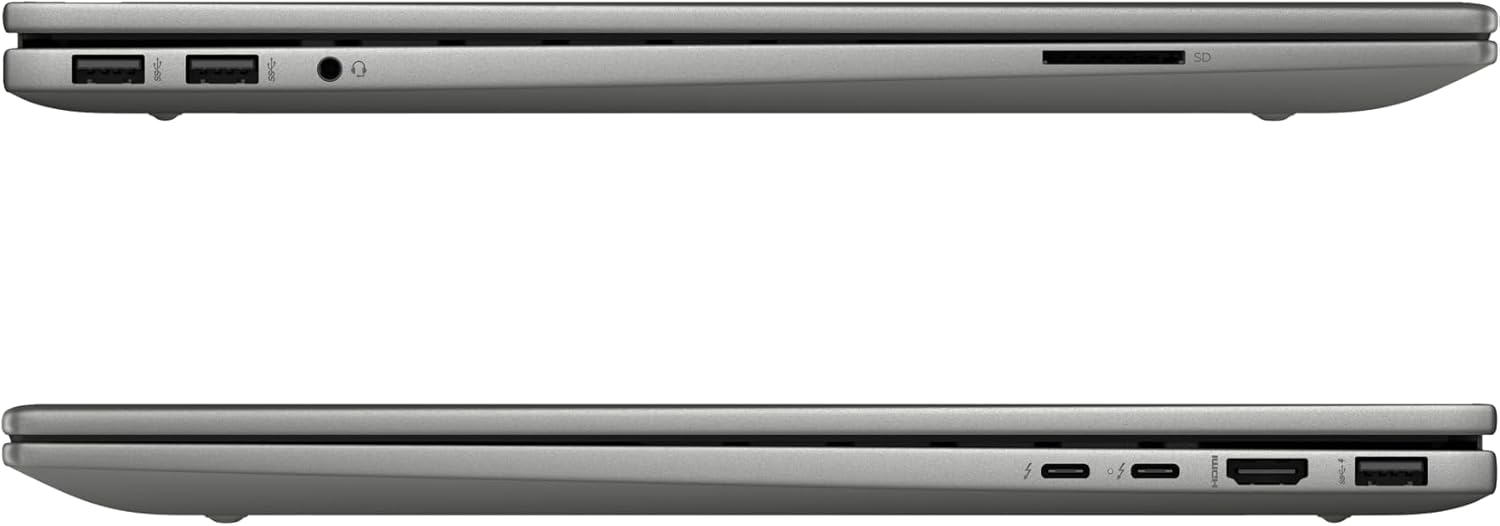
Image: Left side of the laptop, featuring two USB 3.2 Gen 2 ports, a headphone/microphone combo jack, and an SD card reader.
- Vasen puoli:
- 2x USB 3.2 Gen 2 (10 Gbps)
- 1 x kuuloke-/mikrofoniliitäntä
- 1 x SD-kortinlukija

Image: Right side of the laptop, featuring two USB-C Thunderbolt 4 ports, an HDMI 2.1 port, and one USB 3.2 Gen 2 port.
- Oikea puoli:
- 2x USB-C Thunderbolt 4 / USB4 40Gbps (with Power Delivery and DisplayPort 1.4, Power-off Charging)
- 1x USB 3.2 Gen 2 (10Gbps, with Power-off Charging)
- 1 x HDMI v2.1
3. Langaton yhteys
- Wi-Fi 6E AX211 (2x2): Yhdistä langattomiin verkkoihin internetyhteyttä varten.
- Bluetooth 5.3: Pair with compatible Bluetooth devices such as headphones, speakers, or mice.
4. Webnokka
The HP Wide Vision 5MP IR camera includes a privacy shutter. Slide the shutter to cover the camera lens when not in use to ensure privacy.
Huolto
1. Kannettavan tietokoneen puhdistaminen
- Käytä pehmeää, nukkaamatonta liinaa dampvedellä tai näytönpuhdistusaineella näytön puhdistamiseksi.
- Käytä näppäimistön ja rungon puhdistukseen pehmeää, kuivaa liinaa. Vältä voimakkaita kemikaaleja tai hankaavia materiaaleja.
- Puhdista pöly tuuletusaukoista ja porteista säännöllisesti paineilmalla.
2. Ohjelmistopäivitykset
Regularly check for and install updates for Windows 11 and HP drivers to ensure optimal performance and security. Access Windows Update through the Settings menu.
3. Akun hoito
- Vältä akun usein toistuvaa täydellistä tyhjentymistä.
- Säilytä kannettavaa tietokonetta viileässä ja kuivassa paikassa, jos sitä ei käytetä pitkään aikaan.
- Use only the provided 100W AC adapter for charging.
4. Tallennuksen hallinta
The 1TB NVMe M.2 SSD provides fast storage. Regularly back up important data and manage files to maintain sufficient free space for system performance.
Vianetsintä
Yleisiä ongelmia ja ratkaisuja
- Kannettava tietokone ei käynnisty: Ensure the AC adapter is securely connected and the battery has sufficient charge. Try a different power outlet.
- Näyttöongelmat: If the screen is blank, try connecting an external monitor to check if the issue is with the laptop's display. Adjust display settings in Windows.
- Ei Wi-Fi-yhteyttä: Check if Wi-Fi is enabled in Windows settings. Restart the laptop and your wireless router. Ensure drivers are up to date.
- Hidas suorituskyky: Sulje tarpeettomat sovellukset, tarkista haittaohjelmat, varmista riittävästi vapaata tallennustilaa ja päivitä ajurit.
Monimutkaisempien ongelmien ratkaisemiseksi katso HP:n tukipalvelu websivustolla tai ota yhteyttä asiakastukeen.
Tekniset tiedot
| Ominaisuus | Yksityiskohta |
|---|---|
| Malli | HP Envy 17-DA000 |
| Prosessori | Intel Core Ultra 7 155U (Up to 4.8 GHz, 12 Cores, 14 Threads) |
| Näyttö | 17.3-inch FHD (1920 x 1080) LED-backlit Touchscreen, 60Hz, 300 nits, 45% NTSC |
| Grafiikka | NVIDIA GeForce RTX 3050 4GB GDDR6 -näytönohjain |
| Muisti | 32 Gt:n DDR5 SDRAM-muistia, 5600 MHz |
| Varastointi | 1 Tt:n SSD-levy NVMe M.2 |
| Käyttöjärjestelmä | Windows 11 Home |
| Näppäimistö | Taustavalaistu näppäimistö numeronäppäimistöllä |
| Langaton yhteys | Intel Wi-Fi 6E AX211 (2x2), Bluetooth 5.3 |
| Portit | 2x USB-C Thunderbolt 4, 3x USB 3.2 Gen 2, 1x HDMI v2.1, 1x Headphone/microphone combo, 1x SD Card Reader |
| Webnokka | HP Wide Vision 5MP IR camera with Privacy Shutter |
| Akku | 55 Wh: n litiumioniakku |
| Mitat (PxLxK) | 15.59 x 10.18 x 0.77 tuumaa |
| Paino | 5.55 lbs |
| Väri | Platina hopea |
Takuutiedot
Tämän tuotteen mukana tulee a 12 kuukauden takuu. This warranty covers manufacturing defects and issues arising from normal use. Please retain your proof of purchase for warranty claims. The warranty does not cover damage caused by misuse, accidents, or unauthorized modifications.
Tukea
If you require technical assistance, have questions about your laptop, or need to make a warranty claim, please contact our support team. You can find contact information on the official HP support websivustolta tai tuotteen mukana toimitetuista dokumenteista.
Verkkoresursseja varten käy osoitteessa HP:n tuki Websivusto.