1. Johdanto
This manual provides detailed instructions for the installation, operation, and maintenance of the Aigo B760L D4 Motherboard. Please read this manual thoroughly before installing or using the product to ensure proper functionality and to prevent damage.
2. Turvallisuustiedot
Noudata aina seuraavia turvatoimia:
- Disconnect power before installing or removing any components.
- Käsittele emolevyä reunoista välttääksesi herkkien komponenttien koskettamista.
- Use an anti-static wrist strap to prevent electrostatic discharge (ESD) damage.
- Varmista tietokoneen kotelon asianmukainen tuuletus ylikuumenemisen estämiseksi.
- Älä altista emolevyä kosteudelle tai äärimmäisille lämpötiloille.
3. Pakkauksen sisältö
Varmista, että pakkauksessa on kaikki tarvittavat osat:
- Aigo B760L D4 Motherboard
- Käyttöopas (tämä asiakirja)
- SATA-kaapelit (määrä voi vaihdella)
- I / O-suojus
- Ohjain-CD/USB (jos sisältyy toimitukseen)
4. Tuote ohiview
The Aigo B760L D4 is an M-ATX motherboard designed for Intel LGA 1700 processors, featuring the Intel B760 chipset. It supports DDR4 memory and offers a range of connectivity options.
4.1 Emolevyn asettelu
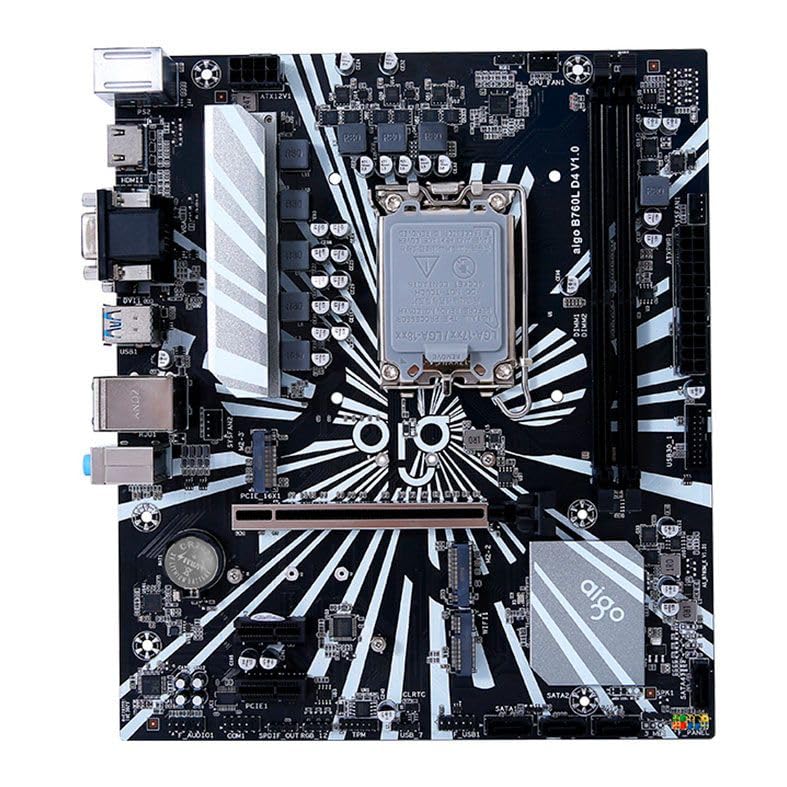
Kuva 1: Päättynytview of the Aigo B760L D4 Motherboard alongside its retail packaging.

Kuva 2: Ylhäältä alas view of the Aigo B760L D4 Motherboard, highlighting component placement.

Kuva 3: Kulmassa view of the Aigo B760L D4 Motherboard, showing the CPU socket and memory slots.
4.2 Taka I/O-paneeli

Figure 4: Rear I/O panel of the Aigo B760L D4 Motherboard, displaying various connectivity ports.
The rear I/O panel includes:
- 1 x PS/2 Keyboard and Mouse port
- 2 x USB 2.0 -porttia
- 4 x USB 3.0 -porttia
- 1 x HDMI portti
- 2 x DVI ports
- 1 x VGA portti
- 1 x RJ45 LAN port
- Audio jacks (Line In, Line Out, Mic In)
5. Asennus
5.1 CPU: n asentaminen
- Paikanna emolevyn LGA 1700 -suorittimen kanta.
- Avaa suorittimen kannan vipu ja nosta kuormituslevy.
- Kohdista suoritin huolellisesti kantaan ja varmista, että suorittimen kolmiomerkki vastaa kannan merkkiä.
- Aseta suoritin varovasti kantaan pakottamatta sitä.
- Sulje kuormalevy ja kiinnitä se vivulla.
5.2 Installing DDR4 Memory
The motherboard supports up to 64GB of DDR4 memory across two slots, with speeds from 2133 MHz to 3200 MHz in dual-channel configuration.
- Avaa DIMM-paikan molemmissa päissä olevat pidikkeet.
- Kohdista muistimoduuli korttipaikkaan ja varmista, että moduulin lovi vastaa kortin kiilaa.
- Paina muistimoduulin molempia päitä lujasti alas, kunnes klipsit napsahtavat paikoilleen.
5.3 Tallennuslaitteiden asentaminen
The motherboard features 4 x SATA 3.0 ports and 2 x M.2 NVME Dual-Protocol slots.
5.3.1 SATA-asemat
- Kytke SATA-datakaapelin toinen pää emolevyn SATA-porttiin.
- Liitä SATA-datakaapelin toinen pää SATA-kiintolevyyn tai SSD-levyyn.
- Kytke SATA-virtakaapeli virtalähteestä asemaan.
5.3.2 M.2 NVME Drives
- Paikanna emolevyltä M.2-paikka.
- Irrota M.2-väliruuvi.
- Insert the M.2 NVME drive into the slot at a 30-degree angle.
- Gently push the drive down and secure it with the standoff screw.
5.4 Virran kytkeminen
Kytke virtalähteen 24-nastainen ATX-virtaliitin ja 8-nastainen ATX 12 V -virtaliitin emolevyn vastaaviin portteihin.
5.5 Laajennuskorttien asentaminen
The motherboard includes 1 x PCIe x16 slot and 1 x PCIe x1 slot.
- Align your expansion card (e.g., graphics card) with the appropriate PCIe slot.
- Paina korttia lujasti alaspäin, kunnes se on oikein paikallaan.
- Kiinnitä kortti ruuvilla tietokoneen koteloon.
6. Käyttö
6.1 Ensimmäinen käynnistys ja BIOS-asetukset
After assembling your system, connect a monitor, keyboard, and mouse. Power on the system. During startup, press the designated key (usually DEL or F2) to enter the BIOS/UEFI setup utility. Here you can configure boot order, system time, and other advanced settings.
6.2 Käyttöjärjestelmän asennus
The Aigo B760L D4 Motherboard supports Windows 10 and Windows 11 operating systems. Insert your OS installation media (USB drive or DVD) and follow the on-screen instructions to install the operating system.
6.3 Ohjaimen asennus
After OS installation, install the necessary drivers for the chipset, audio, LAN, and other integrated components. These drivers are typically provided on a CD/USB with the motherboard or can be downloaded from the manufacturer's websivusto.
7. Huolto
- Pidä se puhtaana: Puhdista tietokoneen kotelon sisäpuoli säännöllisesti pölystä paineilmalla. Pölyn kertyminen voi johtaa ylikuumenemiseen.
- BIOS-päivitykset: Tarkista säännöllisesti valmistajan webBIOS/UEFI-päivitysten sivusto. Päivitykset voivat parantaa vakautta, yhteensopivuutta ja suorituskykyä. Noudata päivitysohjeita huolellisesti.
- Ohjaimen päivitykset: Pidä ajurit ajan tasalla varmistaaksesi optimaalisen suorituskyvyn ja yhteensopivuuden uusien ohjelmistojen ja laitteistojen kanssa.
- Ympäristönvalvonta: Operate the system in a cool, dry, and well-ventilated environment.
8. Vianmääritys
8.1 Ei virtaa
- Ensure the power supply is connected correctly to the motherboard (24-pin and 8-pin ATX 12V).
- Check if the power supply switch is in the "ON" position.
- Verify that the power button on the case is correctly connected to the motherboard's front panel header.
8.2 Ei näyttöä
- Ensure the monitor is connected to the correct video output (either integrated graphics or a dedicated graphics card).
- Aseta näytönohjain ja muistimoduulit uudelleen paikoilleen.
- Kokeile käynnistää kone vain yhdellä muistimoduulilla.
8.3 Järjestelmän epävakaus / kaatumiset
- Tarkista suorittimen ja näytönohjaimen lämpötilat varmistaaksesi, etteivät ne ylikuumene.
- Verify that all power connectors are securely attached.
- Suorita muistidiagnostiikkatyökalut tarkistaaksesi viallisen RAM-muistin.
- Ensure BIOS is updated to the latest stable version.
9. Tekniset tiedot
| Ominaisuus | Erittely |
|---|---|
| Merkki | Aigo |
| Malli | AIGO-B760L-D4 |
| Piirisarja | Intel B760 |
| CPU-liitäntä | LGA 1700 |
| Muistipaikkoja | 2 x DDR4 DIMM -paikkaa |
| Maksimimuistikapasiteetti | 64GB |
| Muistin nopeuden tuki | 2133 ~ 3200 MHz (Dual Channel) |
| Ääniliitäntä | 1 x HDMI, 2 x DVI, 1 x VGA |
| SATA Slots | 4 x SATA 3.0 |
| M.2 Slots | 2 x M.2 NVME Dual-Protocol |
| USB-portit (takana) | 2 x USB 2.0, 4 x USB 3.0 |
| Laajennuspaikat | 1 x PCIe x1, 1 x PCIe x16 |
| Käyttöjärjestelmän tuki | Windows 10/11 |
| PS / 2-portti | 1 x PS/2 Keyboard and Mouse |
| Tehovaihe | 8-vaiheinen |
| Virtaliittimet | 1 x 24-pinninen ATX, 1 x 8-pinninen ATX 12V |
| WiFi -käyttöliittymä | 1 x WiFi interface (PCIe compatible) |
| LAN-portti | 1 x RJ45 |
| Mitat | 24.4 x 21 cm (M-ATX) |
10. Takuu ja tuki
For warranty information and technical support, please refer to the documentation provided with your purchase or visit the official Aigo websivusto. Säilytä ostokuitti takuuvaatimuksia varten.


