Johdanto
Thank you for choosing the Mesqool CR1025 Digital Alarm Clock Radio. This device combines multiple functions including a digital alarm clock, Bluetooth 5.0 speaker, FM radio, night light, and dual USB charging ports. This manual provides detailed instructions to help you set up and operate your new device effectively.
Pakkauksen sisältö
- Mesqool CR1025 Digital Alarm Clock Radio
- Virtalähde
- Käyttöopas
- C Battery (for backup)
Tuote loppuview
Familiarize yourself with the components and controls of your Mesqool CR1025 Digital Alarm Clock Radio.
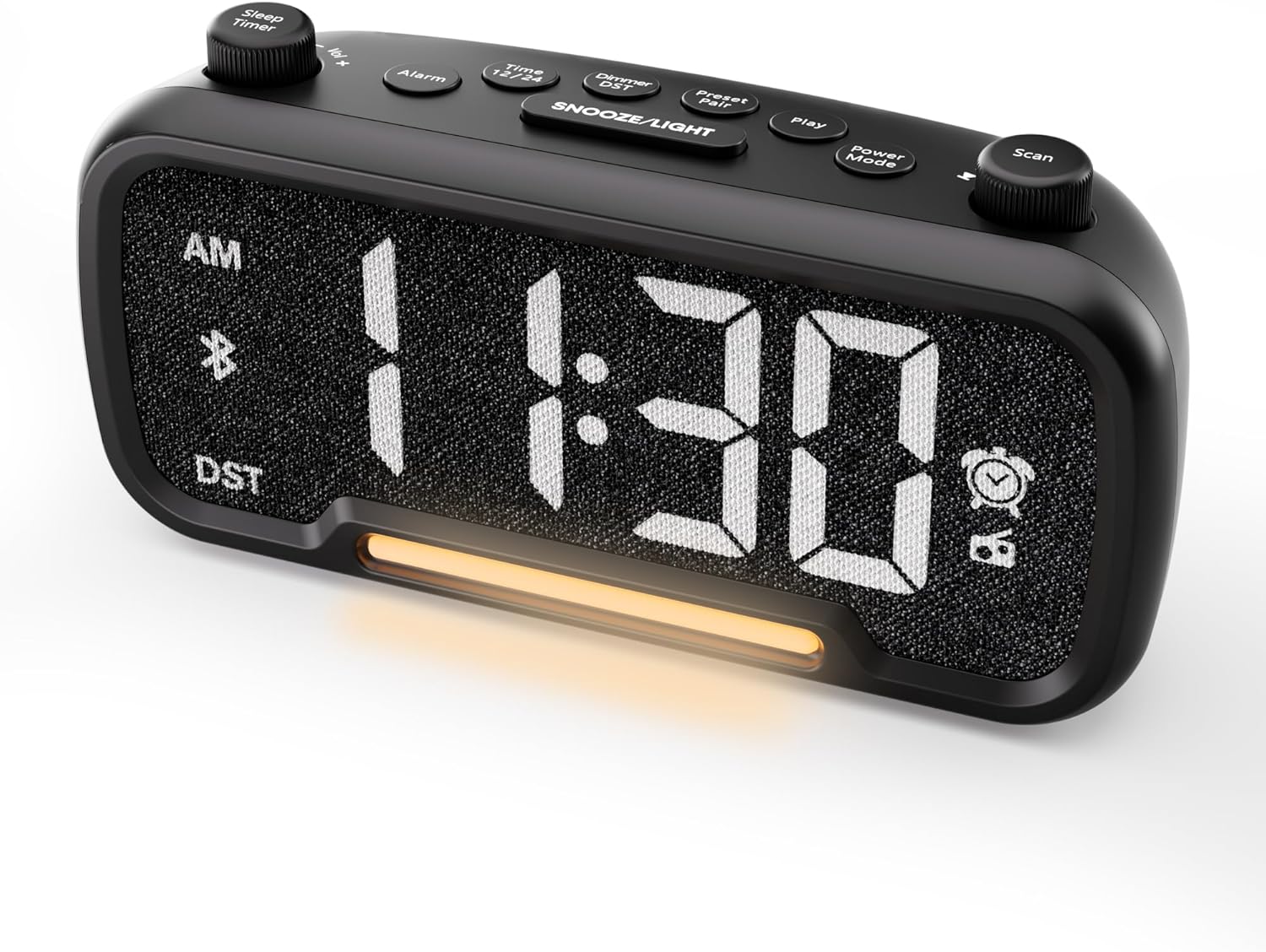

Control Buttons and Knobs:
- Sleep Timer / Vol +/- Knob (Left): Adjusts volume, sets sleep timer duration.
- Hälytyspainike: Sets and activates/deactivates alarms.
- Time 12/24 Button: Vaihtaa 12 tunnin ja 24 tunnin aikaformaattien välillä.
- Dimmer / DST Button: Adjusts display brightness, activates/deactivates Daylight Saving Time (DST).
- Preset / Pair Button: Saves FM radio presets, initiates Bluetooth pairing.
- Toistopainike: Plays/pauses media in Bluetooth mode.
- Virtatilan painike: Cycles through operating modes (FM, Bluetooth, AUX).
- Scan / TU +/- Knob (Right): Scans FM radio stations, manually tunes FM frequency.
- TORKKU/VALO-painike: Activates snooze function, turns night light on/off.

Asennus
1. Ensimmäinen käynnistys
Connect the provided power adapter to the DC 5V IN port on the back of the alarm clock and plug it into a standard wall outlet. The display will light up. Ensure the C battery is installed for backup in case of power outage.

2. Ajan asetus
- Paina ja pidä painettuna Aika 12 button for 2 seconds. The hour digits will begin to flash.
- Kierrä Vol +/- knob (left knob) to adjust the hour.
- Paina Aika 12 button again. The minute digits will begin to flash.
- Kierrä Vol +/- nuppi minuutin säätämiseksi.
- Paina Aika 12 button once more to confirm the time setting.
Video demonstrating how to set the time on the Mesqool Digital Alarm Clock Radio.
3. 12/24 tunnin aikamuoto
To switch between 12-hour and 24-hour time formats, short press the Aika 12 button. The display will change accordingly.
4. Kesäajan (DST) säätö
To activate or deactivate DST, press and hold the Dimmer / DST button for 2 seconds. The time will adjust by one hour forward or backward, and the DST indicator will appear or disappear on the display.
Käyttöohjeet
1. Hälytyksen asetus
- Paina ja pidä painettuna Hälytys button for 2 seconds. The hour digits will flash.
- Kierrä Vol +/- knob to adjust the desired alarm hour.
- Paina Hälytys -painiketta uudelleen. Minuuttinumerot vilkkuvat.
- Kierrä Vol +/- knob to adjust the desired alarm minute.
- Paina Hälytys button again. The alarm sound selection will flash (bell icon for buzzer, radio icon for FM radio). Rotate the Vol +/- knob to choose between buzzer or FM radio as the alarm sound.
- If FM radio is selected, press the Hälytys button again. The volume level will flash (L01-L16). Rotate the Vol +/- knob to set the desired alarm volume.
- Paina Hälytys button once more to confirm and activate the alarm. The alarm icon will appear on the display.
To deactivate the alarm, short press the Hälytys button. The alarm icon will disappear from the display.

Torkkutoiminto:
Kun hälytys soi, paina SNOOZE / VALO button to activate the snooze function for 9 minutes. The alarm will sound again after 9 minutes. To turn off the alarm completely, press any other button except SNOOZE / VALO.

2. FM-radion käyttö
- Paina Virtatila button repeatedly until the radio icon lights up on the display, indicating FM radio mode.
- Auto-Scan and Save Presets: Paina Scan / TU +/- knob (right knob) to automatically search for available FM stations and save them as presets (up to 20 stations). The display will show "P01", "P02", etc., as stations are saved.
- Manuaalinen viritys: Kierrä Scan / TU +/- knob to manually browse frequencies.
- Hae esiasetukset: Paina lyhyesti Esiasetus / pari -painiketta selataksesi tallennettuja esiasetettuja asemia.
- Säädä äänenvoimakkuutta: Kierrä Vol +/- knob (left knob) to adjust the radio volume (L01-L16).

Video demonstrating how to set the FM radio alarm on the Mesqool Digital Alarm Clock Radio.
3. Bluetooth-kaiuttimen käyttö
- Paina Virtatila button repeatedly until the Bluetooth icon (bt) starts flashing on the display, indicating pairing mode.
- On your mobile device, enable Bluetooth and search for "CR1025" in the list of available devices.
- Select "CR1025" to pair. Once connected, the Bluetooth icon will stop flashing and remain solid.
- You can now play audio from your device through the alarm clock's speaker.
- Käytä Vol +/- knob on the alarm clock or your mobile device to adjust the volume.
- Paina Pelata -painiketta äänen toistamiseksi tai keskeyttämiseksi.

Video demonstrating how to set up Bluetooth on the Mesqool Digital Alarm Clock Radio.
4. Yövalon käyttö
The alarm clock features a gentle night light. To turn the night light on or off, short press the SNOOZE / VALO -painiketta.

5. Dimmer Setting
The display brightness can be adjusted to 5 levels. Short press the Dimmer / DST button to cycle through the brightness levels (L01-L05). Select the level that best suits your environment.

6. Sleep Timer Setting
The sleep timer allows you to set a duration for the FM radio or Bluetooth speaker to play before automatically turning off. This is useful for falling asleep to music or podcasts.
- Kun olet FM-radio- tai Bluetooth-tilassa, paina Uniajastin button. The display will show the current sleep timer duration (e.g., "30" for 30 minutes).
- Kierrä Sleep Timer / Vol +/- knob to select the desired duration: 15, 30, 60, 90, or 120 minutes. You can also select "OFF" to disable the sleep timer.
- The timer will start counting down, and the device will automatically turn off after the selected duration.
7. USB-latausportit
The alarm clock is equipped with two USB charging ports (Type-C and USB-A) on the back, each providing 5V/1A output. These ports can be used to conveniently charge your smartphone, tablet, or other USB-powered devices.

Vianetsintä
| Ongelma | Mahdollinen ratkaisu |
|---|---|
| Kellon näyttö on tyhjä. | Ensure the power adapter is securely connected to both the clock and a working power outlet. Check if the power outlet is functional. |
| Hälytys ei soi. | Verify that the alarm is set and activated (alarm icon visible on display). Check the alarm volume level. Ensure the correct alarm sound (buzzer or FM radio) is selected. |
| Huono FM-radion vastaanotto. | Extend the FM antenna fully. Try repositioning the antenna or the clock for better signal. Perform an auto-scan again to find stronger stations. |
| Cannot pair Bluetooth device. | Ensure the clock is in Bluetooth pairing mode (flashing 'bt' icon). Make sure Bluetooth is enabled on your mobile device and it is within range. Forget "CR1025" from your device's Bluetooth list and try pairing again. |
| USB-latausportit eivät toimi. | Confirm the alarm clock is powered on. Ensure the charging cables are properly connected to both the clock and your device. Try a different USB cable or device to rule out cable/device issues. |
Tekniset tiedot
| Ominaisuus | Yksityiskohta |
|---|---|
| Merkki | mesquool |
| Mallinumero | CR1025 |
| Väri | Musta |
| Näytön tyyppi | Digitaalinen LED |
| Tuotteen mitat | 6.61 cm P x 3.31 cm L x 2.32 cm K |
| Virtalähde | Johdollinen sähkökäyttöinen (verkkolaite sisältyy hintaan) |
| Akun varmuuskopiointi | 1 C-paristo (mukana) |
| Bluetooth-versio | V5.0 |
| FM-radiotaajuus | 87.5-108 MHz |
| FM -esiasetukset | Jopa 20 asemaa |
| Näytön himmennin | 5 tasoa |
| Hälytysäänet | Summeri, FM-radio |
| Torkkuajan kesto | 9 minuuttia |
| USB-latauslähtö | Type-C & USB-A, 5V/1A each |
| Materiaali | Muovi |
| Tuotteen paino | 0.48 paunaa (noin 7.7 unssia) |
Huolto
- Puhdista laite pehmeällä, kuivalla liinalla. Älä käytä nestemäisiä puhdistusaineita tai hankaavia aineita.
- Pidä laite poissa suorasta auringonvalosta, äärimmäisistä lämpötiloista ja korkeasta kosteudesta.
- Varmista laitteen ympärillä asianmukainen tuuletus ylikuumenemisen estämiseksi.
- If the device will not be used for an extended period, remove the backup battery.
Turvallisuustiedot
- Älä altista laitetta vedelle tai kosteudelle.
- Älä yritä purkaa tai korjata laitetta itse. Ota yhteyttä pätevään huoltohenkilöstöön.
- Pidä laite poissa lasten ulottuvilta.
- Käytä ainoastaan laitteen mukana toimitettua virtalähdettä. Muiden kuin hyväksyttyjen virtalähteiden käyttö voi vahingoittaa laitetta ja mitätöidä takuun.
- Avoid placing the device near heat sources or open flames.
Takuu ja tuki
Specific warranty details are not provided in the product information. For warranty claims, technical support, or further assistance, please contact Mesqool customer service through their official website or the retailer where the product was purchased. Please retain your proof of purchase for any warranty-related inquiries.
Visit the Mesqool Store for more information: Mesqool Official Store


