Johdanto
This manual provides detailed instructions for the setup, operation, and maintenance of your Nulea KM75 Advanced Ergonomic Wireless Keyboard and Mouse Combo. Please read this manual thoroughly before using the product to ensure optimal performance and longevity.
Pakkauksen sisältö
- Nulea KM75 Ergonomic Wireless Keyboard
- Nulea Ergonomic Wireless Mouse
- 2.4G USB-vastaanotin (jaettu näppäimistölle ja hiirelle)
- USB-C latauskaapeli
- Käyttöopas (tämä asiakirja)
Tuote loppuview
Näppäimistön ominaisuudet
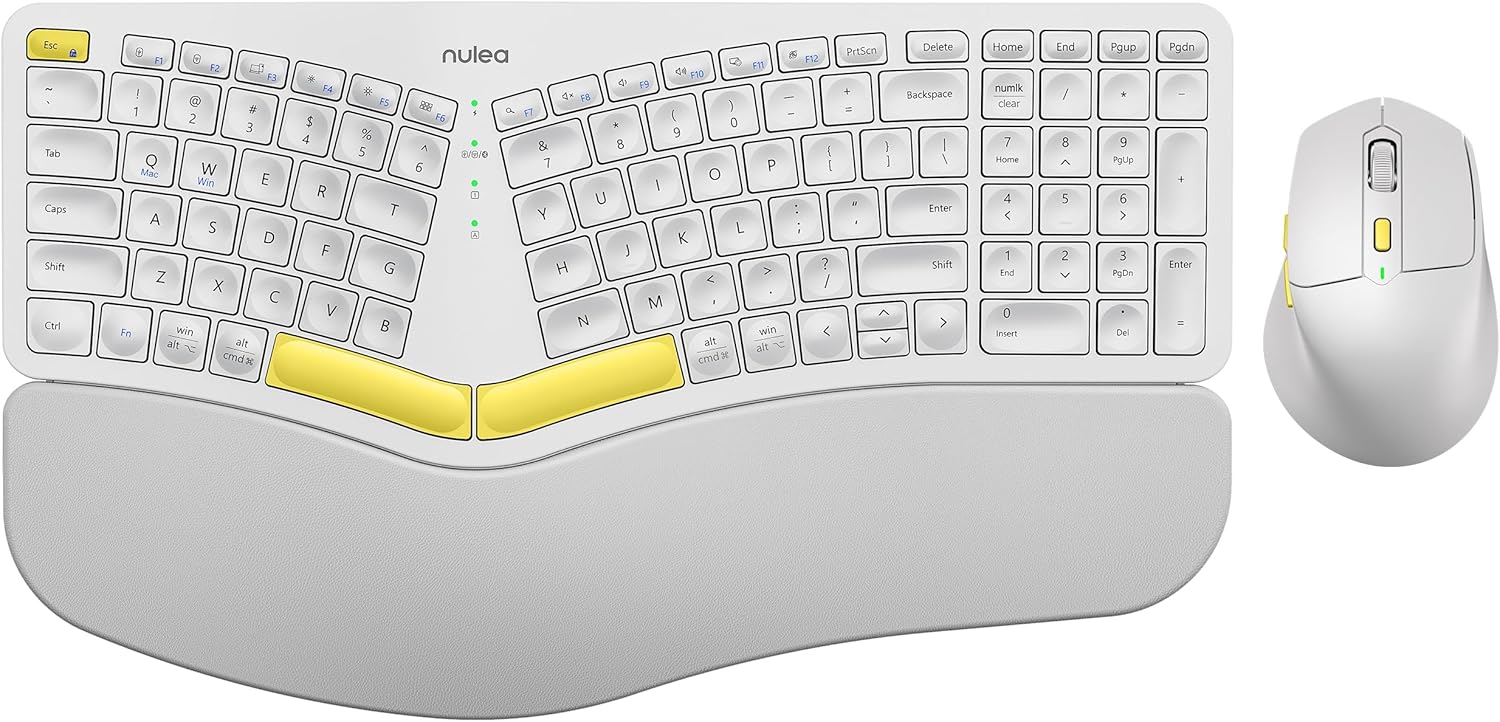
Image: The Nulea KM75 ergonomic keyboard and mouse combo. The keyboard features a curved and split layout with an integrated palm rest, and the mouse is sculpted for comfort. Both are white with yellow accents.
- Ergonomic Curved and Split Key-frame: Designed to position wrists and forearms naturally.
- Integroitu kämmentuki: Features a soft memory foam layer for wrist support.
- Adjustable Tilt Design: Allows for optimal keyboard positioning.
- Usean laitteen liitettävyys: Supports USB cable, 2.4G USB receiver, and Bluetooth.
- Ladattava akku: 500mAh capacity with USB-C charging.
- Automaattinen lepotila: Conserves power after 30 minutes of inactivity.
Hiiren ominaisuudet

Image: A close-up of the Nulea ergonomic mouse, showing its sculpted design for a natural hand posture with integrated palm and thumb rests. The mouse is white with yellow accents.
- Ergonomic Sculpted Design: Integrated palm and thumb rests for natural hand position.
- Säädettävät DPI-asetukset: Tarkkaan kohdistimen hallintaan.
- Eteen-/taaksepäin-painikkeet: Käteväksi web navigointi.
- Usean laitteen liitettävyys: Supports 2.4G USB receiver and Bluetooth.
- Ladattava akku: 300mAh capacity with USB-C charging.
- Automaattinen lepotila: Conserves power after 30 minutes of inactivity.
Asennus
1. Laitteiden lataaminen
Before initial use, fully charge both the keyboard and mouse using the provided USB-C cable. Connect the USB-C end to the device and the USB-A end to a power source (e.g., computer USB port, USB wall adapter).

Image: Illustration showing the keyboard and mouse connected via USB-C cables for charging. The keyboard has a 500mAh battery and the mouse has a 300mAh battery.
The indicator lights will show charging status and turn off when fully charged. A full charge provides approximately two months of operation.
2. Yhdistäminen 2.4G USB-vastaanottimen kautta
- Paikanna 2.4G USB-vastaanotin. Se sijaitsee yleensä hiiren pohjassa olevassa lokerossa.
- Liitä USB-vastaanotin tietokoneen vapaana olevaan USB-A-porttiin.
- Käynnistä näppäimistö ja hiiri niiden virtakytkimillä.
- For the keyboard, press Fn + F2 to select 2.4G mode.
- For the mouse, switch the mode selector on the bottom to 2.4G.
- The devices should connect automatically.

Image: A close-up of the underside of the mouse, showing the storage compartment for the 2.4G USB receiver.
3. Yhdistäminen Bluetoothin kautta
- Kytke näppäimistö ja hiiri päälle.
- For the keyboard, press Fn + F3 to select Bluetooth mode. The indicator light will blink, indicating pairing mode.
- For the mouse, switch the mode selector on the bottom to Bluetooth. The indicator light will blink.
- Ota Bluetooth käyttöön laitteellasi (tietokone, tabletti, älypuhelin) ja hae uusia laitteita.
- Select "Nulea Keyboard" and "Nulea Mouse" from the list of available devices to pair.
- Suorita pariliitos loppuun noudattamalla näytön ohjeita.
4. Yhdistäminen langallisen tilan kautta
- Connect the USB-C charging cable to the keyboard or mouse and the USB-A end to your computer.
- For the keyboard, press Fn + F1 to select wired mode.
- For the mouse, switch the mode selector on the bottom to wired mode.
- The devices will function as wired peripherals.

Image: Diagram illustrating the simple connectivity options for the Nulea KM75. Pressing Fn+F1 connects via wired, Fn+F2 via 2.4G, and Fn+F3 via Bluetooth, allowing connection to multiple devices like PCs, laptops, and mobile devices.
5. Laitteiden välillä vaihtaminen
The Nulea KM75 combo supports multi-device connectivity. You can switch between up to three connected devices (one wired, one 2.4G, one Bluetooth) by pressing the corresponding function keys on the keyboard (Fn + F1/F2/F3) and adjusting the mode selector on the mouse.
Käyttöohjeet
Näppäimistön käyttö
- Ergonominen muotoilu: The curved and split key-frame is designed for natural hand and wrist positioning. Allow some time to adapt to this layout for optimal comfort.
- Säädettävät kallistusjalat: Located on the underside of the keyboard, these legs allow you to adjust the typing angle for personalized comfort.

Image: A user demonstrating the adjustable tilt legs of the Nulea KM75 keyboard, showing how to customize the typing angle for ergonomic comfort.
- Toimintonäppäimet (Fn): Monilla näppäimillä on toissijaisia toimintoja, joihin pääsee pitämällä painettuna Fn key and pressing the desired function key (e.g., media controls, volume). Refer to the keycap legends for specific functions.
Hiiren käyttö
- DPI-säätö: Use the DPI switch button, usually located near the scroll wheel, to cycle through different sensitivity levels (DPI). This allows for precise control or faster cursor movement.

Image: A close-up of the Nulea ergonomic mouse, highlighting the DPI switch key and indicator light for adjusting cursor sensitivity.
- Sivupainikkeet: The side buttons (typically on the left for right-handed users) are often pre-programmed for forward and backward navigation in web selaimet tai file tutkimusmatkailijoita.
Huolto
- Puhdistus: Puhdista näppäimistön ja hiiren pinnat pehmeällä, kuivalla liinalla. Pinttyneeseen likaan käytä hieman kuivaa liinaa.amp voidaan käyttää miedolla saippualla kostutettua liinaa varmistaen, ettei nestettä pääse laitteeseen. Vältä voimakkaita kemikaaleja tai hankaavia materiaaleja.
- Akun hoito: To prolong battery life, avoid fully discharging the devices frequently. Recharge when the low battery indicator appears. Store in a cool, dry place if not used for extended periods.
- Varastointi: Kun USB-vastaanotinta ei käytetä, säilytä sitä hiiren sille varatussa lokerossa, jotta se ei katoa.
Vianetsintä
- Laite ei muodosta yhteyttä:
- Varmista, että sekä näppäimistö että hiiri ovat päällä.
- Verify the correct connection mode (2.4G, Bluetooth, Wired) is selected on both devices and your computer.
- Varmista 2.4G-yhteyden osalta, että USB-vastaanotin on kytketty tukevasti toimivaan USB-porttiin.
- For Bluetooth, ensure Bluetooth is enabled on your device and the devices are in pairing mode. Try re-pairing if necessary.
- Varmista, että laitteet ovat ladattuja.
- Try restarting your computer and the devices.
- Viive tai ajoittainen yhteys:
- Move the devices closer to the USB receiver or your computer to reduce interference.
- Avoid placing the receiver near other wireless devices or large metal objects.
- Varmista, että akut ovat riittävästi ladattuja.
- Keys not responding or mouse not moving:
- Tarkista akun taso ja lataa tarvittaessa.
- Ensure the devices are properly connected (see "Device not connecting" above).
- Clean any debris from around the keys or mouse sensor.
Tekniset tiedot
| Ominaisuus | Yksityiskohta |
|---|---|
| Merkki | Nulea |
| Malli | KM75 |
| Yhteydet | Bluetooth, 2.4G USB, Wired (USB-C) |
| Näppäimistön akku | 500mAh litium |
| Hiiren akku | 300mAh litium |
| Yhteensopiva käyttöjärjestelmä | Windows, Mac OS, Android |
| Erikoisominaisuudet | Ergonomic design, Curved/Split key-frame, Integrated palm rest, Adjustable tilt, Adjustable mouse DPI |
| Tuotteen paino | 4.2 paunaa (yhteensä) |
| Pakkauksen mitat | 16.97 x 11.69 x 2.05 tuumaa |
Takuu ja tuki
Nulea products are designed for reliability and performance. For warranty information, technical support, or customer service inquiries, please refer to the contact details provided on the Nulea official websivustolta tai ostodokumenteistasi. Säilytä ostokuitti takuuvaatimuksia varten.


