Johdanto
This manual provides essential information for setting up, operating, maintaining, and troubleshooting your HP Elite Mini 800 G9 Desktop Computer. This compact and powerful mini PC is designed for business environments, offering high performance in a small form factor.
The HP Elite Mini 800 G9 features an Intel Core i5-12500T processor, 16 GB DDR5 RAM, and a 256 GB SSD, running on Windows 11 Pro. Its small size allows for flexible deployment options, including mounting behind a monitor or discreet placement on a desk.
Mitä laatikossa on
Varmista, että pakkauksessa on kaikki tarvittavat osat:
- HP Elite Mini 800 G9 -pöytätietokone
- AC-sovitin
- Näppäimistö
- Hiiri
Asennus
Asenna HP Elite Mini 800 G9 -pöytätietokoneesi seuraavasti:
1. Pakkauksen purkaminen ja sijoittaminen
Carefully remove the mini PC and all accessories from the packaging. Place the mini PC on a stable, flat surface with adequate ventilation. Ensure no vents are obstructed.
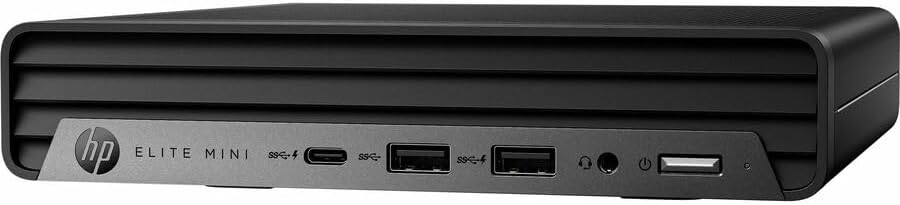
Kuva: Edessä view of the HP Elite Mini 800 G9 Desktop PC, highlighting the accessible front ports including USB-C, USB-A, and a headphone jack.
2. Oheislaitteiden liittäminen
- Yhdistä näyttö: Connect your monitor to one of the available video output ports (e.g., DisplayPort, HDMI) on the rear of the mini PC.
- Näppäimistön ja hiiren liittäminen: Plug the included keyboard and mouse into the USB ports on the mini PC.
- Yhdistä verkkoon (valinnainen): For a wired internet connection, connect an Ethernet cable from your router or network switch to the Ethernet port on the mini PC. Wireless connectivity (Wi-Fi 6) is also available.
- Liitä virta: Connect the AC adapter to the power input port on the mini PC, then plug the power cord into a wall outlet.
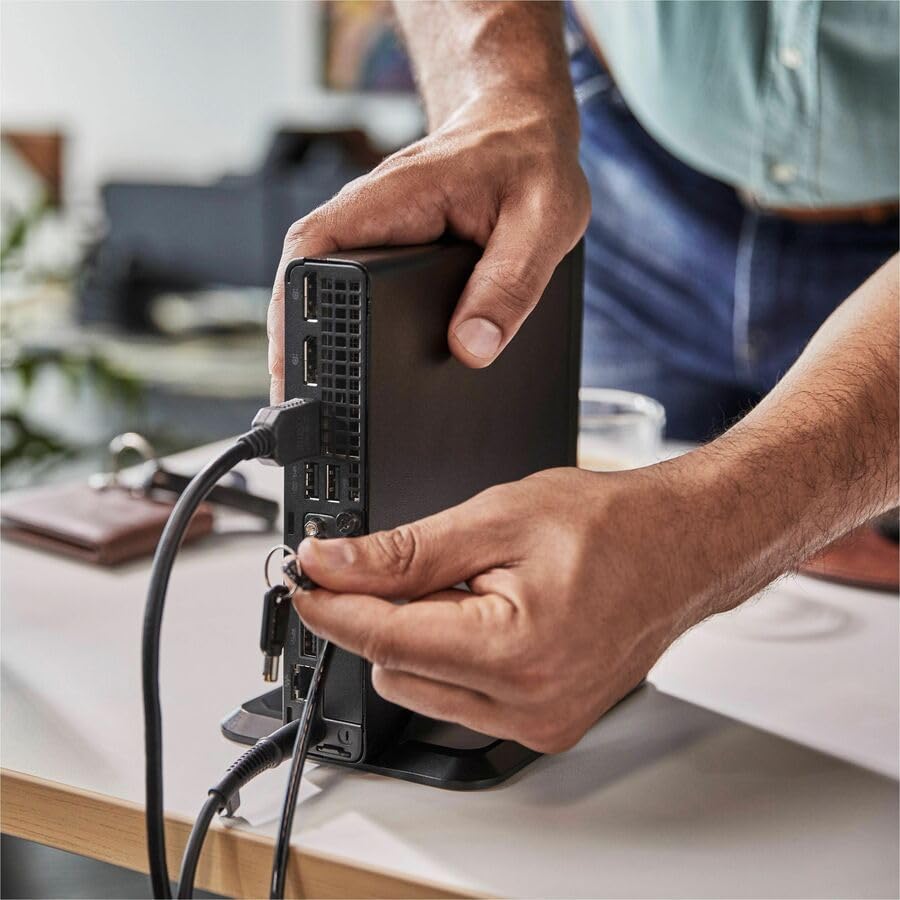
Image: A user connecting various cables, including power and display, to the rear ports of the HP Elite Mini 800 G9. This illustrates the typical connection process for peripherals.
Käyttöohjeet
Once your HP Elite Mini 800 G9 is set up, follow these steps for basic operation:
1. Virran kytkeminen
Press the power button located on the front of the mini PC. The power indicator light will illuminate, and the system will begin to boot up. The operating system (Windows 11 Pro) will load automatically.
2. Alkuasetukset (ensimmäinen käyttökerta)
Upon first boot, you will be guided through the Windows 11 Pro setup process. This includes selecting your region, language, accepting terms, and setting up a user account. Follow the on-screen prompts to complete this process.
3. Sammutus
To properly shut down the computer, click the Aloita button in Windows, then select Tehoa > Sulje. Avoid powering off the system by holding the power button, as this can lead to data loss or system corruption.

Image: A professional working at a desk, demonstrating the compact integration of the HP Elite Mini 800 G9, which is mounted discreetly behind a monitor.
Huolto
Regular maintenance helps ensure the longevity and optimal performance of your HP Elite Mini 800 G9 Desktop Computer.
1. Ohjelmistopäivitykset
Keep your operating system and drivers updated. Windows Update automatically handles OS updates. For driver updates, visit the official HP support websivusto mallillesi.
2. Puhdistus
- Ulkopuoli: Käytä pehmeää, nukkaamatonta liinaa hieman dampvedellä tai miedolla puhdistusliuoksella ulkopintojen puhdistamiseen.
- Vents: Periodically use compressed air to clear dust from the ventilation grilles to prevent overheating. Ensure the system is powered off before cleaning vents.
3. Tietojen varmuuskopiointi
Regularly back up important data to an external drive or cloud storage to prevent data loss in case of hardware failure or other issues.
Vianetsintä
Tässä osiossa käsitellään yleisiä ongelmia, joita saatat kohdata HP Elite Mini 800 G9:n kanssa.
Ei Virtaa
- Ensure the AC adapter is securely connected to both the mini PC and a working power outlet.
- Varmista pistorasian toiminta kytkemällä siihen toinen laite.
- Tarkista virtapainike vaurioiden tai esteiden varalta.
Ei näyttöä näytöllä
- Confirm the monitor is powered on and correctly connected to the mini PC's video output port.
- Varmista, että näytölläsi on valittu oikea tulolähde.
- Try connecting the mini PC to a different monitor or using a different video cable if available.
Hidas suorituskyky
- Sulje taustalla käynnissä olevat tarpeettomat sovellukset.
- Tarkista ja asenna kaikki odottavat Windows-päivitykset tai ohjainpäivitykset.
- Suorita levyn puhdistus ja eheytys (kiintolevyille, ei yleensä tarvita SSD-levyille).
- Tarkista haittaohjelmien tai virusten varalta hyvämaineisella virustorjuntaohjelmistolla.
Tekniset tiedot
Detailed technical specifications for the HP Elite Mini 800 G9 Desktop Computer:
| Ominaisuus | Yksityiskohta |
|---|---|
| Mallinumero | AS1F8AT#ABA |
| Prosessori | Intel Core i5-12500T (12th Gen, Hexa-core, 2 GHz) |
| RAM | 16GB DDR5 RAM |
| Varastointi | 256GB SSD |
| Grafiikka | Intel UHD Graphics 770 (integroitu) |
| Käyttöjärjestelmä | Windows 11 Pro |
| Langaton yhteys | Wi-Fi 6 (802.11ax), Bluetooth |
| Mitat (PxLxK) | 6.9 x 7 x 1.4 tuumaa |
| Paino | 3.13 kiloa |
| Portit (edessä) | USB-C, USB-A, Headphone/Microphone Combo |
| Portit (takana) | Multiple USB-A, Video Outputs (e.g., DisplayPort, HDMI), Ethernet, Power Input |
Takuu ja tuki
Your HP Elite Mini 800 G9 Desktop Computer comes with a standard manufacturer's warranty. For specific warranty terms and conditions, please refer to the documentation included with your product or visit the official HP support websivusto.
Jos tarvitset teknistä apua, ajurilatauksia tai muuta tukea, käy HP:n tukisivustolla. websivusto: