Johdanto
This manual provides essential instructions for setting up, operating, maintaining, and troubleshooting your OPPO Reno 12 F 5G CPH2637 smartphone. Please read this guide thoroughly to ensure proper use and to maximize the device's capabilities.
1. Asennus
1.1 Laatikon purkaminen ja alkutarkastus
Poista kaikki osat varovasti pakkauksesta. Varmista, että seuraavat osat ovat mukana:
- OPPO Reno 12 F 5G CPH2637 Smartphone
- C-tyypin USB-kaapeli
- Virtalähde
- SIM-poistotyökalu
- Pika-aloitusopas (tämä asiakirja)
Tarkista laite fyysisten vaurioiden varalta ennen jatkamista.
1.2 SIM-korttien asettaminen
The OPPO Reno 12 F 5G CPH2637 supports Dual SIM functionality.
- Paikanna SIM-kortin alusta laitteen sivusta.
- Aseta SIM-kortin poistotyökalu pieneen reikään alustan vieressä ja paina varovasti, kunnes alusta ponnahtaa ulos.
- Aseta Nano-SIM-kortit lokeron niille tarkoitettuihin paikkoihin varmistaen, että kultaiset koskettimet osoittavat alaspäin.
- Työnnä tarjotin varovasti takaisin laitteeseen, kunnes se on tasassa reunan kanssa.
1.3 Laitteen lataaminen
Ennen ensimmäistä käyttökertaa on suositeltavaa ladata laite täyteen.
- Liitä USB Type-C -kaapeli puhelimen pohjassa olevaan latausporttiin.
- Liitä kaapelin toinen pää virtalähteeseen.
- Liitä verkkolaite pistorasiaan.
- Latauksen ilmaisin ilmestyy näyttöön.
1.4 Käynnistäminen ja alkuasetukset
To power on the device, press and hold the Power button located on the side until the OPPO logo appears. Follow the on-screen instructions to complete the initial setup, including language selection, Wi-Fi connection, Google account setup, and security settings.
2. Käyttöohjeet
2.1 Perusnavigointi
The OPPO Reno 12 F 5G CPH2637 features a touchscreen interface. Use gestures such as tapping, swiping, pinching, and spreading to interact with the device. The navigation bar at the bottom of the screen typically includes Back, Home, and Recent Apps buttons.
2.2 Puheluiden soittaminen ja viestien lähettäminen
Soittaaksesi puhelun, avaa Puhelin sovelluksessa, anna numero ja napauta puhelukuvaketta. Lähetä viesti avaamalla Viestit sovelluksessa, napauta uuden viestin kuvaketta, anna vastaanottaja ja viestisi ja napauta sitten lähetä.
2.3 Verkkoihin yhdistäminen
Your device supports both Wi-Fi and 5G cellular networks.
- Wi-Fi: Siirry osoitteeseen Asetukset > Wi-Fi, turn on Wi-Fi, select your desired network, and enter the password if required.
- 5G-matkapuhelindata: Ensure your SIM card has an active 5G plan. Go to Settings > Mobile Network > Data usage to manage your cellular data.
2.4 Kameran käyttö
Avaa Kamera app from your home screen or app drawer. Tap the shutter button to take a photo. Swipe left or right to switch between different camera modes such as Photo, Video, Portrait, and Night. Tap on the screen to focus on a specific area.
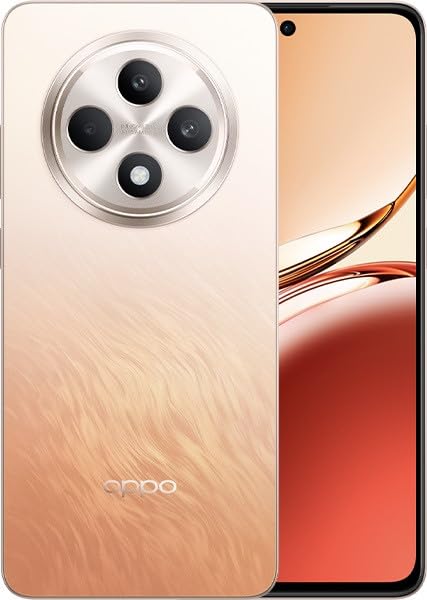
Image: OPPO Reno 12 F 5G CPH2637 smartphone in Amber Orange. This image displays the front and back of the device, highlighting its design and camera module.
2.5 Suojausominaisuudet
The device offers various security options to protect your data:
- Sormenjäljen lukituksen avaaminen: Rekisteröi sormenjälkesi Settings > Password & Biometrics > Fingerprint.
- Face Unlock: Ota kasvojentunnistus käyttöön Settings > Password & Biometrics > Face.
- Näytön lukitus: Choose a PIN, pattern, or password for screen lock in Settings > Password & Biometrics > Lock screen password.
3. Huolto
3.1 Laitteen puhdistaminen
Use a soft, lint-free cloth to clean the screen and body of your phone. Avoid using harsh chemicals, abrasive materials, or aerosol sprays, as these can damage the device's finish and coatings. For stubborn smudges, slightly dampfi liina vedellä.
3.2 Ohjelmistopäivitykset
Tarkista säännöllisesti ohjelmistopäivitykset ja asenna ne varmistaaksesi optimaalisen suorituskyvyn, suojauksen ja uusien ominaisuuksien käytön. Siirry osoitteeseen Asetukset > Tietoja laitteesta > Ajantasainen tarkistamaan saatavilla olevat päivitykset.
3.3 Akun hoito
To prolong battery life, avoid exposing the device to extreme temperatures. It is recommended to keep the battery charge between 20% and 80% for daily use. Avoid leaving the phone plugged in for extended periods after it is fully charged.
3.4 Tallennuksen hallinta
Ajoittain review ja poista tarpeettomat files, apps, and media to free up storage space. You can check storage usage in Settings > About device > Storage.
4. Vianmääritys
4.1 Laite ei käynnisty
If your device does not turn on, ensure it is sufficiently charged. Connect it to the charger for at least 15 minutes, then try pressing and holding the Power button again for 10-15 seconds.
4.2 Verkkoyhteysongelmat
If you experience issues with cellular data or Wi-Fi:
- Vaihda lentokonetila päälle ja pois päältä.
- Käynnistä laite uudelleen.
- For cellular issues, ensure your SIM card is properly inserted and your plan is active.
- For Wi-Fi issues, restart your router and ensure you are within range.
4.3 Sovellusten kaatuminen tai jumiutuminen
If an app is not responding, try force-closing it from the Recent Apps screen. If the issue persists, clear the app's cache and data in Settings > Apps > [App Name] > Storage usageViimeisenä keinona poista sovellus ja asenna se uudelleen.
4.4 Tehdasasetusten palautus
A factory reset will erase all data on your device and restore it to its original factory settings. Back up all important data before performing a factory reset. Siirry osoitteeseen Asetukset > Järjestelmäasetukset > Varmuuskopiointi ja palautus > Palauta puhelimen tehdasasetukset > Poista kaikki tiedot.
5. Tekniset tiedot
| Ominaisuus | Erittely |
|---|---|
| Merkki | OPPO |
| Mallin nimi | Reno 12 F 5G |
| Mallinumero | CPH2637 |
| Muistin tallennuskapasiteetti | 256 Gt |
| Asennetun RAM-muistin koko | 12 Gt |
| Mobiilitekniikka | 5G |
| Yhteystekniikka | 5G |
| SIM-korttipaikkojen määrä | Kaksi SIM-korttia |
| Väri | Amber Orange |
| Ihmisen käyttöliittymän syöttö | Kosketusnäyttö |
| Muototekijä | Liuskekivi |
6. Takuu ja tuki
Your OPPO Reno 12 F 5G CPH2637 is covered by a limited warranty. Please refer to the warranty card included in your product packaging for specific terms and conditions, including warranty period and coverage details. For technical support, service inquiries, or further assistance, please visit the official OPPO support websivustolla tai ota yhteyttä heidän asiakaspalvelunumeroonsa alueellasi.


