Johdanto
The Logitech Zone Wireless 2 is a premium noise-canceling headset designed for professional use, offering advanced audio clarity and comfort. This manual provides instructions for setting up, operating, maintaining, and troubleshooting your headset to ensure optimal performance.
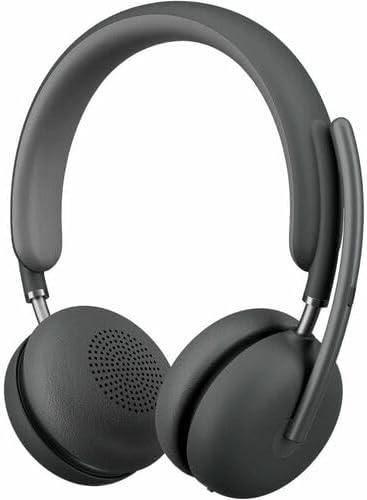
Image: The Logitech Zone Wireless 2 headset, shown in graphite color.
Tärkeimmät ominaisuudet:
- Microsoft Teams -sertifioitu: Optimized for Microsoft Teams over native Bluetooth, freeing up a USB port.
- Advanced Call Clarity: Logi Tune app feature suppresses far-end ambient noise for clearer communication.
- Four Noise-Canceling Microphones: Elevate your voice and suppress background sounds.
- Hybridiaktiivinen melunvaimennus (ANC): Offers ANC high, ANC low, transparency on, and ANC/transparency off modes for focused work.
- Personoitu ääni: Custom listening experience via Personal EQ in the Logi Tune mobile app with 40mm drivers.
- Kestävä suunnittelu: Features interchangeable earpads, a replaceable battery, 20% post-consumer recycled plastic, and low-carbon aluminum.
- Langaton vapaus: Connects simultaneously to laptop and mobile phone via Bluetooth with a range of up to 170 ft (50 meters).
- Pidentynyt akun käyttöikä: Up to 15 hours talk time and 22 hours listening time (with ANC on).
Asennus
1. Mitä laatikossa on
- Logitech Zone Wireless 2 -kuulokkeet
- Suojakotelo
- USB-C latauskaapeli
- USB-C-USB-A-sovitin
- Käyttöopas (tämä asiakirja)
- Ear Cushions (pre-installed, with additional set for replacement)

Image: The Logitech Zone Wireless 2 headset, protective case, USB-C cable, and USB-C to USB-A adapter.
2. Kuulokkeen lataaminen
- Liitä USB-C-latauskaapeli kuulokkeiden USB-C-porttiin.
- Liitä kaapelin toinen pää USB-virtalähteeseen (esim. tietokoneen USB-porttiin tai seinäadapteriin).
- Kuulokkeiden LED-merkkivalo näyttää latauksen tilan. Täysi lataus kestää noin 2 tuntia.
3. Yhteyden muodostaminen laitteisiin
The Zone Wireless 2 headset supports Bluetooth 5.2 for wireless connectivity.
Bluetooth-pariliitos:
- Power on the headset by sliding the power switch.
- Press and hold the Bluetooth pairing button on the headset until the LED indicator flashes blue rapidly.
- On your device (laptop, smartphone), go to Bluetooth settings and select "Logitech Zone Wireless 2" from the list of available devices.
- Kun yhteys on muodostettu, LED-merkkivalo palaa tasaisen sinisenä.

Image: Diagram illustrating the headset's ability to connect simultaneously to a smartphone and a laptop via Bluetooth.
Microsoft Teams Certification:
The headset is certified for Microsoft Teams over native Bluetooth. This allows for a full Teams meeting experience without requiring a separate USB dongle, preserving your device's USB ports.
4. Logi Tune App Installation
For full functionality, including Personal EQ, Advanced Call Clarity, and firmware updates, download and install the Logi Tune application on your computer or mobile device. The app provides a personalized experience and device management.

Image: A laptop screen displaying the Logi Tune application interface, showing device management and settings.
Kuulokkeen käyttö
1. Kuulokkeiden säätimet
The headset features intuitive controls for managing calls, media, and noise cancellation.

Image: A close-up of the right earcup, showing the power switch, ANC button, and other controls.
- Virtakytkin: Kytke kuulokkeet päälle tai pois päältä liu'uttamalla.
- Äänenvoimakkuuspainikkeet: Säädä äänenvoimakkuutta.
- Monitoimipainike: Play/pause media, answer/end calls.
- ANC-painike: Selaa aktiivisen melunvaimennustilan välillä.
- Mikrofonin mykistys: Flip the microphone boom up to mute, down to unmute.
2. Aktiivinen melunvaimennus (ANC)
The Hybrid ANC feature allows you to control your listening environment. Press the ANC button to switch between modes:
- Korkea ANC: Maximum noise cancellation for noisy environments.
- ANC matala: Reduced noise cancellation for less intrusive background sounds.
- Läpinäkyvyys päällä: Päästää ympäristön äänet läpi ja pitää sinut tietoisena ympäristöstäsi.
- ANC ja läpinäkyvyys pois päältä: Ei aktiivista melunvaimennusta tai läpinäkyvyystilaa.
3. Mikrofonin käyttö
The headset features four noise-canceling microphones designed to isolate your voice and suppress background noise during calls. Simply lower the microphone boom to activate the microphone for calls. Raise it to mute.

Image: A man wearing the headset, illustrating the clear audio experience with sound wave graphics around his head.
4. Audio Customization with Logi Tune
Use the Logi Tune app to personalize your audio experience:
- Personal EQ: Adjust audio frequencies to optimize sound for your hearing range.
- Advanced Call Clarity: Further refine noise suppression for incoming audio.
- Laiteohjelmistopäivitykset: Ensure your headset has the latest features and performance improvements.
Huolto
1. Puhdistus
- Pyyhi kuulokkeet pehmeällä,amp kangas.
- Vältä hankaavien puhdistusaineiden tai liuottimien käyttöä.
- Varmista, että kaikki portit ovat kuivat ennen lataamista tai kytkemistä.
2. Earpad and Battery Replacement
The Zone Wireless 2 is designed for longevity with user-replaceable components:
- Kuulokkeet: Interchangeable earpads can be replaced to maintain hygiene and comfort. Refer to the Logi Tune app or Logitech support website for instructions on how to replace them.
- Akku: The battery is designed to be replaceable, extending the product's lifespan. Contact Logitech support for information on obtaining and replacing the battery.

Image: The headset disassembled, showing the removable earpads, internal components, and a replaceable battery, highlighting its modular design.
3. Varastointi
When not in use, store the headset in its protective case to prevent damage and keep it clean.
Vianetsintä
- Ei virtaa: Ensure the headset is charged. Connect it to a power source using the USB-C cable.
- Yhteyden muodostaminen Bluetoothin kautta ei onnistu:
- Ensure the headset is in pairing mode (LED flashing blue).
- Tarkista laitteesi Bluetooth-asetukset ja varmista, että Bluetooth on käytössä.
- Kokeile käynnistää sekä kuulokkeet että laite uudelleen.
- If previously paired, remove the headset from your device's Bluetooth list and re-pair.
- Huono äänenlaatu:
- Ensure the headset is within the Bluetooth range (up to 170 ft / 50 meters).
- Tarkista muiden langattomien laitteiden aiheuttama häiriö.
- Adjust Personal EQ settings in the Logi Tune app.
- Ensure the microphone boom is properly positioned for clear voice pickup.
- ANC ei toimi tehokkaasti:
- Ensure ANC mode is activated (not in Transparency or Off mode).
- Check that the earpads are properly seated and forming a good seal around your ears.
- Logi Tune App Issues: Ensure the app is updated to the latest version. Restart the app and your headset.
Lisätietoja saat Logitechin tukipalvelusta. websivustolla tai Logi Tune -sovelluksessa.
Tekniset tiedot
| Ominaisuus | Yksityiskohta |
|---|---|
| Mallin nimi | Langaton vyöhyke 2 |
| Tuotteen mallinumero | 981-001435 |
| Yhteystekniikka | Langaton (Bluetooth 5.2) |
| Bluetooth-alue | Jopa 50 metriä (170 jalkaa) |
| Kuulokkeet Jack | USB Type C (latausta varten) |
| Ääniohjaimen tyyppi | Dynaaminen elementti (40 mm) |
| Taajuusalue | 20–20 000 Hz |
| Melunhallinta | Hybridi aktiivinen melunvaimennus |
| Mikrofoni | Four noise-canceling mics |
| Akunkesto (kuuntelu) | Jopa 22 tuntia (ANC päällä) |
| Akun kesto (puheaika) | Jopa 15 tuntia (ANC päällä) |
| Latausaika | Noin 2 tuntia |
| Tuotteen paino | 230 grammaa (8.1 unssia) |
| Tuotteen mitat | 9 x 8.75 x 2.5 tuumaa |
| Materiaali | Plastic (20% post-consumer recycled) |
| Yhteensopivat laitteet | Desktops, Laptops (PC, Mac), Smartphones |
| Valvontamenetelmä | App (Logi Tune), Media Control Buttons |
| UPC | 097855196316 |
Takuu ja tuki
Takuutiedot
Logitech products are typically covered by a limited hardware warranty. Please refer to the warranty card included with your product or visit the official Logitech websivustolta löydät alueesi ja tuotemallisi erityiset takuuehdot.
Asiakastuki
For technical assistance, troubleshooting guides, FAQs, and driver downloads, please visit the official Logitech support websivusto:
You can also utilize the Logi Tune application for device management, personalized settings, and access to support resources directly from the app.


