1. Tuote ohiview
The ProtoArc EM11 NL is an ergonomic vertical mouse designed to provide a more natural and comfortable hand position, reducing wrist strain during extended computer use. It offers versatile connectivity options, including Bluetooth 5.0 and 2.4GHz USB-A, allowing connection to up to three devices simultaneously. Featuring a built-in rechargeable battery and adjustable DPI settings, this mouse is engineered for productivity and user well-being.
2. Mitä laatikossa on
- 1 x ProtoArc Rechargeable Bluetooth Ergonomic Mouse
- 1 x 2.4G USB-A Receiver
- 1 x Type-C Charging Cable (for charging only)
- 1 x Käyttöohje

3. Tuotteen ominaisuudet
3.1 Ergonomic Vertical Design
The EM11 NL mouse features a unique ergonomic vertical design that positions your hand in a natural handshake posture. This design helps to keep your wrist straight, reducing discomfort and strain often associated with traditional horizontal mice. It promotes a relaxed forearm and wrist position, which can improve productivity and minimize the risk of repetitive strain injuries.


3.2 Usean laitteen liitettävyys
The mouse supports dual Bluetooth 5.0 and 2.4G USB-A connectivity modes, enabling simultaneous connection to up to three different devices. This allows for seamless switching between a computer, PC, or laptop, enhancing workflow efficiency.

3.3 ladattava akku
Equipped with a built-in 500mAh Li-Ion battery, the EM11 NL mouse can be conveniently recharged using the included Type-C cable. A single charge provides long-lasting battery life, supporting months of use on standby.

3.4 Adjustable DPI & High Performance
The mouse offers 1000/1600/2400 DPI levels, providing higher sensitivity and precise optical tracking. It includes back and forward buttons for easy navigation, though these are not programmable and not compatible with Mac OS systems.

3.5 Quiet Clicking
The left and right mouse buttons feature a silent click design, allowing you to focus on your work without disruptive noise. Note that the middle scroll wheel and the back/forward buttons do not have silent clicks.
4. Asennus ja asennus
4.1 Connecting via 2.4G USB-A Receiver
- Locate the 2.4G USB-A receiver stored in the compartment on the bottom of the mouse.
- Kytke USB-A-vastaanotin tietokoneen vapaana olevaan USB-A-porttiin.
- Turn on the mouse using the power switch located on the bottom. The mouse should automatically connect to your computer.
4.2 Yhteyden muodostaminen Bluetoothin kautta
- Käynnistä hiiri pohjassa olevasta virtakytkimestä.
- Press the 'Switch Button' on the bottom of the mouse to select either Bluetooth 1 (B1) or Bluetooth 2 (B2) mode. The corresponding indicator light will flash.
- Siirry tietokoneellasi tai laitteellasi Bluetooth-asetuksiin ja hae uusia laitteita.
- Select 'ProtoArc EM11 NL' from the list of available devices to pair.
- Kun pariliitos on muodostettu, merkkivalo lakkaa vilkkumasta ja pysyy tasaisena.
5. Käyttöohjeet
5.1 Painikkeiden toiminnot
The ProtoArc EM11 NL mouse is equipped with several buttons for intuitive control:
- Vasen painike: Normaali vasemman painikkeen napsautustoiminto.
- Oikea painike: Normaali hiiren kakkospainikkeen toiminto.
- Vierityspyörä: Pystysuuntaista vieritystä varten.
- DPI-painike: Vaihtaa DPI-asetuksia (1000/1600/2400).
- Eteenpäin-painike: Navigoi eteenpäin kohdassa web browsers/applications (not compatible with Mac OS).
- Taaksepäin-painike: Navigoi taaksepäin web browsers/applications (not compatible with Mac OS).
- Vaihtopainike: Toggles between 2.4G, Bluetooth 1, and Bluetooth 2 connections.
- Virtakytkin: Kytkee hiiren päälle/pois.

5.2 DPI-säätö
Press the DPI button (located near the scroll wheel) to cycle through the available sensitivity settings: 1000 DPI, 1600 DPI, and 2400 DPI. Select the setting that best suits your preference for cursor speed and precision.
5.3 Laitteiden välillä vaihtaminen
To switch between connected devices, press the 'Switch Button' on the bottom of the mouse. The indicator light will change to reflect the currently active connection (2.4G, B1, or B2).
6. Lataus
When the battery is low, the low-battery indicator light on the mouse will illuminate. Connect the included Type-C charging cable to the Type-C port on the front of the mouse and plug the other end into a USB power source (e.g., computer USB port, USB wall adapter). The Type-C cable is for charging only and does not support data transfer.

7. Hand Size Guide
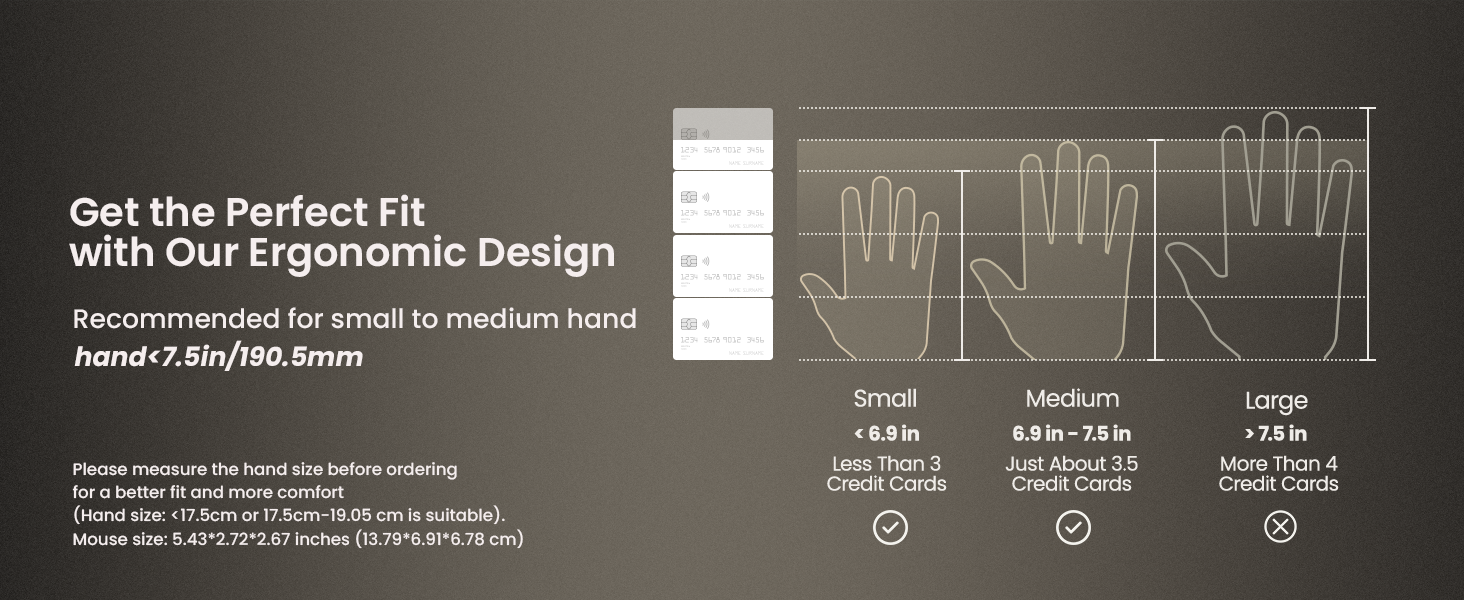
The ProtoArc EM11 NL mouse is specifically designed for small to medium-sized hands. For optimal comfort and ergonomic benefits, it is recommended for hand lengths under 7.5 inches (19.05 cm). Please measure your hand size before ordering to ensure a better fit.

8. Tekniset tiedot
| Ominaisuus | Yksityiskohta |
|---|---|
| Tuotteen mitat | 3.54 x 2.76 x 0.04 tuumaa |
| Tuotteen paino | 10.2 unssia |
| Tuotteen mallinumero | EM11 NL |
| Paristot | 1 epästandardi akku (sisältyy toimitukseen) |
| Yhteystekniikka | 2.4G USB-A Receiver, Bluetooth |
| Erikoisominaisuudet | Ergonomic Design, Multi-Device, Rechargeable, Vertical Design, Wireless |
| Liiketunnistustekniikka | Optinen |
| Väri | Valkoinen |
| Valmistaja | ProtoArc |
9. Vianmääritys
If you encounter any issues with your ProtoArc EM11 NL mouse, please try the following steps:
- Yhteysongelmat: Ensure the mouse is turned on and fully charged. For 2.4G connection, verify the USB-A receiver is securely plugged into your device. For Bluetooth, ensure Bluetooth is enabled on your device and the mouse is in the correct pairing mode (B1 or B2). Try re-pairing the mouse.
- Viive/Reagoimaton: Check for interference from other wireless devices. Ensure the mouse is within the effective range of your device. Try changing the DPI setting.
- Latausongelmat: Ensure the Type-C cable is properly connected to both the mouse and a working USB power source. Try a different USB port or charging cable.
- Cursor Inaccuracy: Ensure the optical sensor on the bottom of the mouse is clean and free from obstructions. Use the mouse on a suitable surface.
10. Takuu ja tuki
Takuutietoja ja teknistä tukea varten katso ProtoArcin virallinen verkkosivusto. websivustolta tai ota yhteyttä suoraan heidän asiakaspalveluunsa. Säilytä ostokuitti ostotodistuksena mahdollisten takuuvaatimusten varalta.


