Johdanto
This manual provides instructions for the safe and effective use of your Ashfly Portable Handheld Kids Microscope. Please read this manual thoroughly before operating the device and retain it for future reference.
The Ashfly Portable Handheld Kids Microscope is designed to introduce young scientists to the microscopic world. Featuring a 2-inch LCD screen and 200x magnification, it allows for real-time observation of small objects.
Pakkauksen sisältö
Varmista, että pakkauksessasi on kaikki alla luetellut tuotteet:
- Ashfly Portable Handheld Kids Microscope
- USB-latauskaapeli
- Rannehihna/kaulahihna
- Käyttöopas (tämä asiakirja)

Image: Contents of the Ashfly Portable Handheld Kids Microscope package, including the microscope, USB cable, and wrist strap.
Asennus
1. Laitteen lataaminen
- Locate the USB charging port on the microscope.
- Connect the provided USB charging cable to the microscope and a compatible USB power source (e.g., computer, wall adapter).
- Latauksen merkkivalo syttyy. Täyteen lataukseen kuluu noin 2–3 tuntia.
- Kun lataus on täynnä, irrota latauskaapeli.
2. Attaching the Lanyard/Wrist Strap
Thread the lanyard or wrist strap through the designated loop on the microscope to prevent accidental drops during use.
Käyttöohjeet
1. Virta päälle/pois
- To power on, press and hold the power button (usually marked with a power symbol) for a few seconds until the screen illuminates.
- Sammuta virta painamalla virtapainiketta uudelleen ja pitämällä sitä painettuna, kunnes näyttö sammuu.
2. Observing Objects
- Place the object you wish to observe on a flat surface.
- Position the microscope's lens directly over the object.
- Adjust the focus wheel (if present) or move the microscope closer/further from the object until a clear image appears on the 2-inch LCD screen.
- Use the zoom adjustment button (4x zoom) to further magnify the image up to 200x.

Image: A child holding the Ashfly microscope, observing a small object on a surface, demonstrating its handheld operation.
3. Valokuvien ja videoiden ottaminen
The microscope supports photo and video functions. It comes with built-in memory for storing observations.
- To take a photo: Press the designated photo capture button (refer to device markings).
- To record a video: Press the designated video record button to start recording, and press it again to stop.

Image: The Ashfly microscope's screen displaying a magnified image of an insect, illustrating its digital imaging capability.
4. Dual-Lens Design
This microscope features a dual-lens design. One side is the digital microscope for recording observations, and the other side is a physical magnifier for quick viewesineiden käsittelyä.
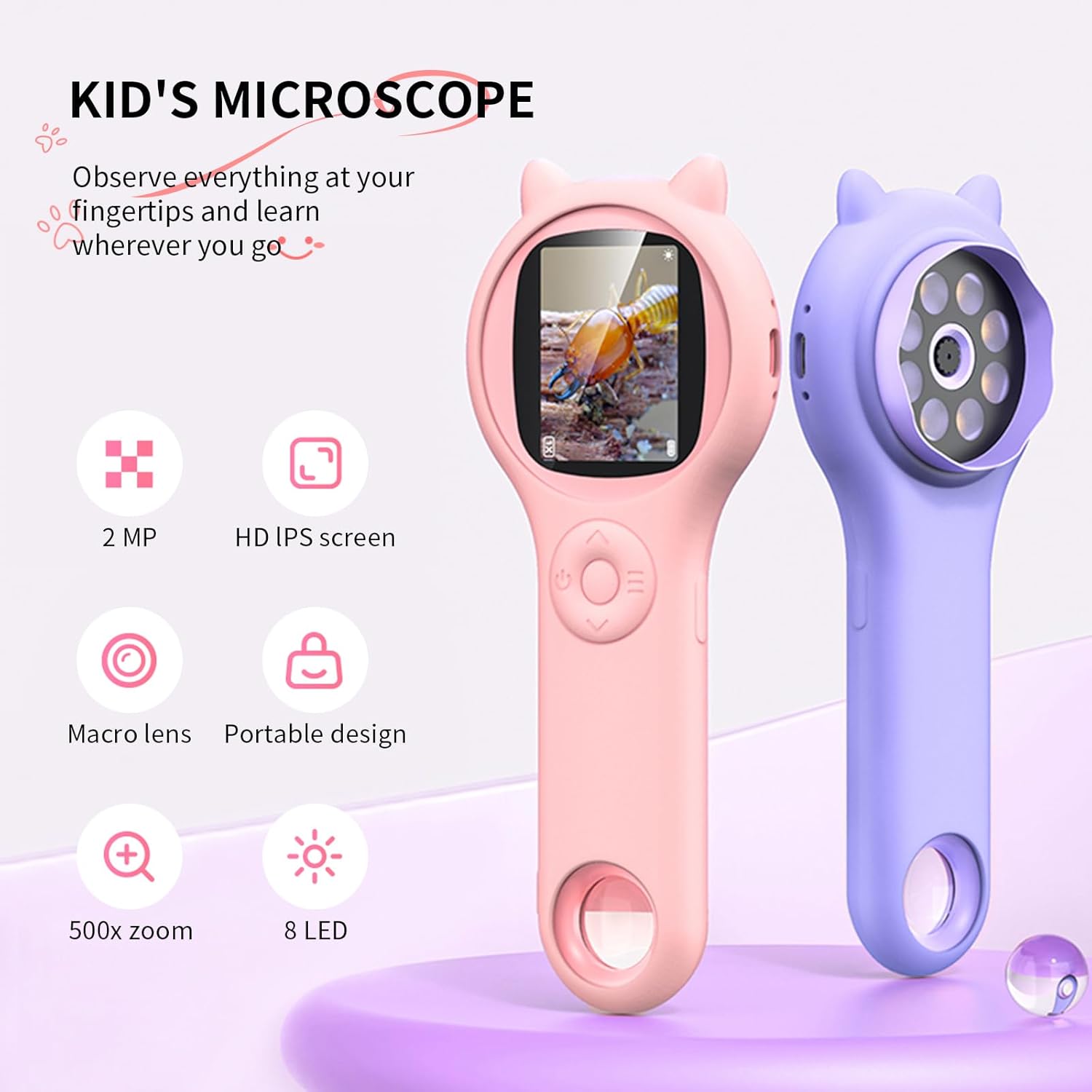
Image: Two Ashfly Kids Microscopes, one pink and one purple, illustrating the compact design and the different lenses/screens on each side.
Huolto
- Puhdistus: Use a soft, dry cloth to clean the exterior of the microscope. For the lens and screen, use a specialized lens cleaning cloth. Do not use abrasive cleaners or solvents.
- Varastointi: Säilytä mikroskooppia viileässä, kuivassa paikassa, poissa suorasta auringonvalosta ja äärimmäisistä lämpötiloista.
- Akun hoito: Akun käyttöiän pidentämiseksi vältä akun usein tapahtuvaa täydellistä tyhjentymistä. Lataa laite säännöllisesti, vaikka sitä ei käytettäisi pitkään aikaan.
Vianetsintä
| Ongelma | Mahdollinen syy | Ratkaisu |
|---|---|---|
| Laite ei käynnisty. | Akku on tyhjä. | Lataa laite mukana toimitetulla USB-kaapelilla. |
| Näytöllä oleva kuva on sumea. | Incorrect focus or distance from object. | Adjust the microscope's distance from the object or use the focus wheel (if applicable) until the image is clear. |
| Kuvia/videoita ei voi ottaa. | Sisäinen muisti on täynnä. | Transfer existing photos/videos to a computer to free up space. |
Tekniset tiedot
| Ominaisuus | Yksityiskohta |
|---|---|
| Malli | ASIN B0DBVB3RGT |
| Merkki | Ashfly |
| Suurennus | Up to 200x (with 4x zoom adjustment) |
| Näyttö | 2-inch LCD, 1080P HD digital imaging |
| Valon lähde | LED |
| Materiaali | Muovi |
| Väri | Violetti |
| Virtalähde | Paristokäyttöinen |
| Objektiiviobjektiivi | Akromaattinen |
Takuutiedot
Ashfly products are designed for quality and durability. For specific warranty details, please refer to the warranty card included with your product or visit the official Ashfly websivusto. Säilytä ostokuitti ostotodistuksena takuuvaatimuksia varten.
Asiakastuki
If you encounter any issues or have questions regarding your Ashfly Portable Handheld Kids Microscope, please contact our customer support team:
- Online-tuki: Vieraile osoitteessa Ashfly Store on Amazon usein kysytyt kysymykset ja yhteydenottovaihtoehdot.
- Sähköposti: Katso tuotteen pakkauksesta tai virallisesta websivusto suoraa sähköpostitukea varten.


