1. Johdanto
This manual provides detailed instructions for the installation, operation, and maintenance of your PNI House WiFi800 NVR and PNI IP840 Outdoor Camera Wireless Surveillance Kit. Please read this manual thoroughly before using the product to ensure proper setup and functionality. Keep this manual for future reference.
2. Turvallisuustiedot
- Varmista, että kaikki virtaliitännät ovat tukevasti kiinni ja vastaavat määritettyä jännitteellisyyttä.tage (12V DC).
- Do not expose the NVR to moisture or extreme temperatures.
- The PNI IP840 cameras are IP65 rated for outdoor use; however, avoid submerging them in water.
- Installation should be performed by qualified personnel if you are unsure about electrical connections or mounting procedures.
- Pidä tuote poissa vahvoista magneettikentistä.
- Use only original or certified replacement parts and accessories.
3. Pakkauksen sisältö
Varmista, että pakkauksessasi on kaikki alla luetellut tuotteet:
- PNI House WiFi800 NVR (1 unit)
- PNI IP840 Outdoor Cameras (2 units)
- Power Adapters (for NVR and cameras)
- USB Mouse (for NVR)
- Fixing Screws and Wall Plugs (for cameras)
- User Manuals (for NVR and cameras)

Image: PNI House WiFi800 NVR with included USB mouse and power adapter.

Image: PNI IP840 Outdoor Camera with its power adapter and mounting hardware.
4. Tuote ohiview
4.1 PNI IP840 Outdoor Camera
The PNI IP840 camera is a high-resolution wireless outdoor surveillance camera featuring 8MP 4K video, pan/tilt functionality, and advanced night vision. It is designed for robust performance in various weather conditions.
- Anturi: 1/2.7" CMOS, 8MP
- Resoluutio: 3840x2160 (4K)
- Linssi: 3.6mm, 90° viewkulma
- Panorointi/kallistus: Vaaka 355°, pystysuora 90°
- Pimeänäkö: 4 IR LEDs and 4 White LEDs, up to 15m
- Varastointi: MicroSD-korttipaikka (jopa 256 Gt, kortti ei sisälly toimitukseen)
- Liitettävyys: WiFi 2.4GHz, ONVIF support
- Ominaisuudet: Motion Detection, Human Shape Detection, Rotation after movement, ICSee app support
- Säänkestävyys: IP65 luokitus

Kuva: Edessä view of the PNI IP840 outdoor camera, showing the lens, LEDs, and antennas.

Image: Close-up of the PNI IP840 camera's connection cables for power and wired network.
4.2 PNI House WiFi800 NVR
The PNI House WiFi800 NVR (Network Video Recorder) is the central unit for managing and recording video from your surveillance cameras. It supports up to 8 channels at 5MP or 4 channels at 4K (8MP) resolution.
- Video Channels: 8 channels (5MP) / 4 channels (4K/8MP)
- Videon pakkaus: H.265AI/H.265+
- Toiston tarkkuus: 1080P (HDMI output)
- Varastointi: Supports 1x 2.5" HDD (up to 14TB) or 1x MicroSD card (up to 128GB)
- Verkkoliittymä: RJ45 10/100/1000 Mbit/s
- Langaton taajuus: 2.4 GHz (for NVR-camera communication)
- Lähdöt: 1x HDMI, 1x USB 2.0
- Ominaisuudet: Mobile/PC viewing (Android, iOS, Windows), ICSee/XMEye app support, Integrated voice prompt speaker

Image: Rear panel of the PNI House WiFi800 NVR, displaying its various ports including power, HDMI, Ethernet, USB, and reset button.

Kuva: Sivu view of the PNI House WiFi800 NVR, showing its antennas and port layout.
5. Asennus
5.1 NVR-laitteen alkuasetukset
- Liitä virta: Connect the NVR to its power adapter and plug it into an electrical outlet.
- Yhdistä näyttö: Liitä NVR näyttöön tai televisioon HDMI-kaapelilla.
- Liitä hiiri: Liitä USB-hiiri NVR-laitteen USB-porttiin navigointia varten.
- Verkkoyhteys (valinnainen): For remote access and firmware updates, connect the NVR to your router using an Ethernet cable.
- Storage Installation (Optional): If using an HDD, open the NVR casing and install a 2.5" SATA HDD. Alternatively, insert a MicroSD card into the designated slot.
5.2 Kameran asennus
- Valitse sijainti: Select a suitable outdoor location for each camera, ensuring good Wi-Fi signal strength and an unobstructed view. The IP65 rating allows for outdoor exposure.
- Kiinnitä kamera: Use the provided screws and wall plugs to securely mount the camera to a wall or ceiling.
- Liitä virta: Connect the camera to its power adapter and plug it into an electrical outlet. Ensure the power cable is protected from the elements.
5.3 Pairing Cameras with NVR
The cameras are typically pre-paired with the NVR in the kit. If not, or if adding new cameras:
- Ensure both the NVR and cameras are powered on.
- On the NVR interface (connected to a monitor), navigate to the camera management or channel settings.
- Select the option to add or search for wireless cameras. The NVR will scan for available PNI IP840 cameras.
- Suorita pariliitos loppuun noudattamalla näytön ohjeita.
5.4 Mobile App Configuration (ICSee / XMEye)
- Lataa sovellus: Download the ICSee or XMEye app from your smartphone's app store (Android or iOS).
- Rekisteröi tili: Create a new user account or log in if you already have one.
- Lisää laite: In the app, select "Add Device" or scan the QR code displayed on the NVR's monitor (if available) or the NVR itself.
- Seuraa kehotteita: Follow the in-app instructions to connect your NVR and cameras to your mobile device for remote viewvalvontaa.
6. Käyttöohjeet
6.1 Livenä View
Access live video feeds from your cameras via the NVR's connected monitor or through the ICSee/XMEye mobile application. The NVR interface allows for multi-channel display.
6.2 Tallennus
- Jatkuva tallennus: Configure the NVR to record continuously to the installed HDD or MicroSD card.
- Liiketunnistettu tallennus: Set up recording to trigger only when motion is detected by the cameras.
- Ajastettu tallennus: Define specific time periods for recording.
6.3 Toisto
Uudelleenview tallennettu footage:
- On the NVR interface, select the "Playback" option.
- Choose the desired camera, date, and time range.
- Use the controls to play, pause, fast forward, or rewind footage.
- Mobile app playback functions similarly, allowing remote access to recorded video.
6.4 Liiketunnistus ja tekoälytoiminnot
The PNI IP840 cameras feature advanced detection capabilities:
- Liiketunnistus: Configurable sensitivity to detect movement within the camera's field of view.
- Human Shape Detection: Intelligent analysis to differentiate human figures from other moving objects, reducing false alarms.
- Rotation After Movement: The camera can be set to automatically track detected movement within its pan/tilt range.
- Hälytysilmoitukset: Enable push notifications to your mobile phone when an alarm event (e.g., motion detection) occurs.
Access these settings through the NVR menu or the mobile application to customize detection zones, sensitivity, and notification preferences.
6.5 Panoroinnin/kallistuksen/zoomauksen (PTZ) ohjaus
For PNI IP840 cameras, you can remotely control the camera's orientation:
- Use the PTZ controls available in the NVR interface or the ICSee/XMEye mobile app.
- Drag your finger on the live view screen in the app to pan (horizontal 355°) and tilt (vertical 90°) the camera.
- Digital zoom functionality may be available through the app.
7. Huolto
- Puhdistus: Puhdista kameran linssit säännöllisesti pehmeällä, kuivalla liinalla varmistaaksesi selkeän kuvanlaadun. Älä käytä voimakkaita kemikaaleja.
- Laiteohjelmistopäivitykset: Periodically check for firmware updates for both the NVR and cameras through the mobile app or NVR interface. Updates can improve performance and add new features.
- Tarkista liitännät: Varmista, että kaikki virta- ja verkkokaapelit on kytketty kunnolla ja että niissä ei ole vaurioita.
- Tallennuksen hallinta: Regularly back up important recordings and manage storage space on your HDD or MicroSD card.
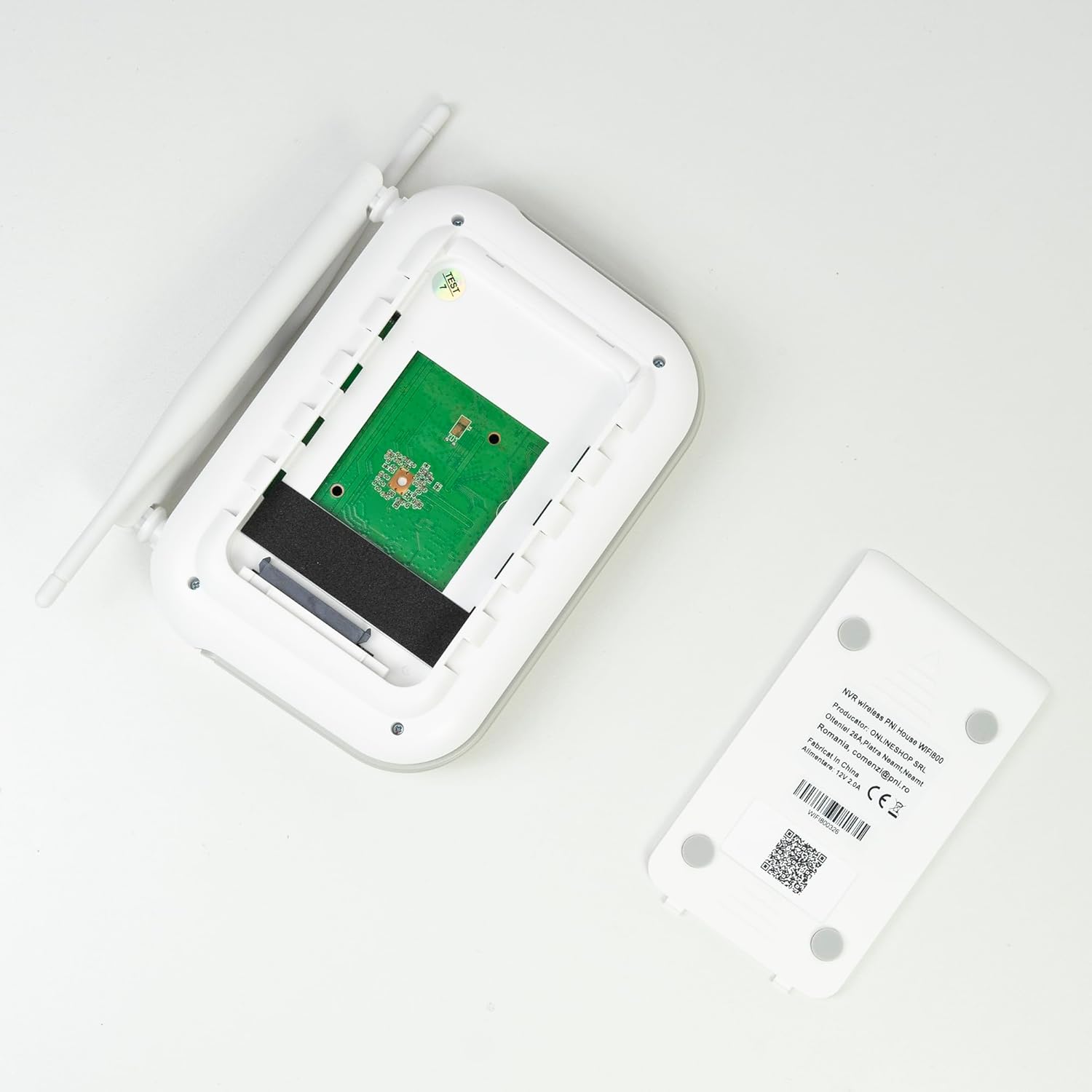
Kuva: Sisäinen view of the PNI House WiFi800 NVR, illustrating the circuit board and the bay for HDD installation.
8. Vianmääritys
- Ei kuvaa näytöllä:
- Check NVR power supply and HDMI cable connection to the monitor.
- Varmista, että näyttö on asetettu oikealle tulolähteelle.
- Kamerat eivät muodosta yhteyttä:
- Verify cameras are powered on.
- Check Wi-Fi signal strength at camera locations.
- Re-pair cameras with the NVR if necessary (refer to Section 5.3).
- Ei etäkäyttöä sovelluksen kautta:
- Ensure the NVR is connected to the internet via Ethernet.
- Tarkista älypuhelimesi internet-yhteys.
- Verify NVR is correctly added to the ICSee/XMEye app.
- Huono kuvanlaatu:
- Puhdista kameran linssit.
- Tarkista, onko kameran kuvausalueella esteitä view.
- Varmista riittävä valaistus yönäköä varten.
- Tallennusongelmat:
- Check if an HDD or MicroSD card is properly installed and formatted.
- Tarkista tallennusaikataulut ja liiketunnistusasetukset.
- Varmista, että käytettävissä on riittävästi säilytystilaa.
9. Tekniset tiedot
9.1 PNI IP840 Outdoor Camera Specifications
| Ominaisuus | Yksityiskohta |
|---|---|
| Kuvan anturi | 1/2.7" CMOS-kenno |
| Anturin resoluutio | 8 MP |
| Videon resoluutio | 3840x2160 (4K) |
| Linssin tyyppi | 3.6 mm |
| Viewkulma | 90° |
| Pan/Kallista | Vaaka: 355°, pysty: 90° |
| Infrapuna valaistus | 4x IR LEDs, 4x White LEDs |
| IR-etäisyys | Jopa 15m |
| Videon pakkaus | H.265X (compatible with H.264+/H.264) |
| Audio | Integrated Microphone and Speaker |
| Langaton taajuus | 2.4 GHz |
| Tuetut protokollat | ONVIF |
| Varastointi | MicroSD-korttipaikka (max 256GB) |
| Virtalähde | 12V/1A |
| Suojausluokka | IP65 |
| Käyttölämpötila | -26°C ~ +80°C |
| Mitat | 86x135x146mm |
| Paino | 371 grammaa |
9.2 PNI House WiFi800 NVR Specifications
| Ominaisuus | Yksityiskohta |
|---|---|
| Video Channels | 8 kanavaa 5MP / 4 kanavaa 4K (8MP) |
| Videon pakkaus | H.265AI/H.265+ |
| Toiston tarkkuus | 1080P (HDMI) |
| Tallennuskapasiteetti | 1x 2.5" HDD (max 14TB) / 1x MicroSD card (max 128GB) |
| Verkkoliitäntä | RJ45 - 10/100/1000 Mbit/s |
| Videolähtö | 1x HDMI |
| USB-liitäntä | 1x USB 2.0 |
| Prosessori | MSR621Q |
| Virtalähde | 12V/2A |
| Mitat | 170x120x35mm |
| Paino | 245 grammaa |
| Wi-Fi Frequency (NVR-Camera) | 2.4 GHz |
| Äänikehote | Yes, integrated speaker |
10. Takuu ja tuki
For warranty information, please refer to the documentation provided at the time of purchase or contact your retailer. For technical support, product inquiries, or assistance with troubleshooting, please visit the official PNI website or contact PNI customer service directly. Keep your purchase receipt as proof of purchase.
Valmistaja: ONLINESHOP SRL
Mallinumero: PNI-WF8-840-2