1. Johdanto
This manual provides comprehensive instructions for the safe and efficient use of your Motorola MOTOTRBO XPR 3500e UHF Intrinsically Safe Wi-Fi Radio. Please read this manual thoroughly before operating the device to ensure optimal performance and safety.
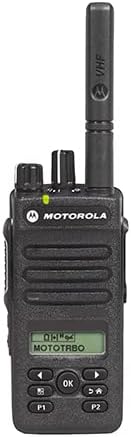
Kuva 1: Etuosa view of the Motorola MOTOTRBO XPR 3500e radio, showing its display, keypad, and antenna.
Tärkeimmät ominaisuudet
- Digital and Analog Transmissions
- 128 kanavan kapasiteetti
- Display and Limited Keypad for intuitive control
- UHF Bands for enhanced communication
- 4 Watts (UHF) Power Output
- Battery Life: Up to 19 hours (standard) and 26 hours (high-capacity battery)
- Integrated Bluetooth 4.0 (up to 33 feet range)
- UL Approved Intrinsically Safe design
- IP67 Waterproof and Dust-proof rating
- 4 Programmable Buttons for customized functions
- Integrated Wi-Fi for advanced features
2. Asennus
2.1 Pakkauksesta purkaminen
Poista kaikki osat varovasti pakkauksesta. Varmista, että seuraavat osat ovat mukana:
- Motorola MOTOTRBO XPR 3500e Radio
- Akku
- Antenni
- Laturi
- Vyöklipsi (jos mukana)
- Dokumentaatio (tämä käyttöohje)
2.2 Akun asennus
Akun asentaminen:
- Kohdista akku radion takana olevan akkulokeron kanssa.
- Liu'uta akkua paikalleen, kunnes se napsahtaa tukevasti.
- Ensure the battery latch is fully engaged to prevent accidental detachment.
Video 1: Unboxing and initial inspection of a Motorola radio battery, showing its physical characteristics and connection points.
Video 2: Esitysasing the PMNN4409AR replacement battery, detailing its features and compatibility with Motorola radios.
2.3 Antennin kiinnitys
Kierrä antennia myötäpäivään radion päällä olevaan liittimeen, kunnes se on sormitiukalla. Älä kiristä liikaa.
2.4 Akun lataaminen
Place the radio with the installed battery into the charging tray. Ensure the charging contacts on the radio align with those on the charger. The charging indicator light will illuminate to confirm charging is in progress. A full charge typically takes several hours.
3. Käyttö
3.1 Perusohjaimet
Tutustu radion säätimiin:
- Virta/äänenvoimakkuuden säädin: Located on the top, turn clockwise to power on and increase volume, counter-clockwise to decrease volume and power off.
- Kanavan valitsin: Located on the top, rotate to select desired communication channels.
- Push-to-Talk (PTT) -painike: Located on the side, press and hold to transmit, release to listen.
- Programmable Buttons (P1, P2): Located on the front, these can be customized for various functions via programming software.
- Navigointipainikkeet: Used to navigate menus on the display.
3.2 Virran kytkeminen päälle/pois
To power on the radio, rotate the Power/Volume knob clockwise until you hear a click. To power off, rotate it counter-clockwise until it clicks.
3.3 Kanavan valinta
Rotate the Channel Selector knob to choose from the available 128 channels. The selected channel number will be shown on the radio's display. Some Motorola radios feature voice announcements for battery level and channel selection, which can be helpful in low-light conditions or when the display is not easily visible.
Video 3: An informational video from Motorola Solutions highlighting features like voice announcement, channel alias, and NOAA weather alerts, applicable to various Motorola business radios including the XPR 3500e series.
3.4 Äänenvoimakkuuden säätö
Adjust the volume by rotating the Power/Volume knob. Turn clockwise to increase volume and counter-clockwise to decrease it.
3.5 Lähetys ja vastaanotto
To transmit, press and hold the PTT button, speak clearly into the microphone, and then release the button to listen for a response. Ensure the channel is clear before transmitting.
3.6 ohjelmoitavaa painiketta
The P1 and P2 buttons can be programmed for quick access to frequently used functions such as scan, monitor, or emergency alerts. Refer to the radio's programming software for customization options.
3.7 Wi-Fi- ja Bluetooth-yhteydet
The XPR 3500e features integrated Wi-Fi and Bluetooth 4.0 for enhanced connectivity. Wi-Fi can be used for firmware updates and data applications, while Bluetooth allows for wireless accessories like headsets. Consult the radio's programming guide for detailed setup of these features.
3.8 NOAA:n säävaroitus
The radio supports NOAA Weather Alerts, providing automatic notifications for severe weather conditions. This feature helps ensure preparedness for unexpected weather events. This functionality is typically available in US models with a channel selector knob.
4. Huolto
4.1 Puhdistus
Puhdista radion ulkopinta pehmeällä,amp cloth. Do not use harsh chemicals or abrasive cleaners. Ensure all ports and covers are sealed before cleaning to maintain its IP67 rating.
4.2 Akun hoito ja säilytys
To prolong battery life, avoid fully discharging the battery frequently. Store the battery in a cool, dry place when not in use. Do not expose the battery to extreme temperatures or direct sunlight.
5. Vianmääritys
- Radio ei käynnisty: Ensure the battery is correctly installed and charged. Check the power/volume knob position.
- Ei voi lähettää tai vastaanottaa: Verify that the radio is on the correct channel and within range of other radios. Check antenna connection.
- Huono äänenlaatu: Adjust the volume. Ensure the microphone and speaker are not obstructed. Check for interference.
- Akku ei lataudu: Ensure the charger is properly connected to a power source and the radio is correctly seated in the charging tray.
For further assistance, refer to the support section or contact Motorola Solutions customer service.
6. Tekniset tiedot
| Ominaisuus | Yksityiskohta |
|---|---|
| Mallinumero | XPR3500E |
| Tuotteen paino | 2.04 kiloa |
| Pakkauksen mitat | 9.57 x 6.14 x 4.53 tuumaa |
| Kanavien lukumäärä | 128 |
| Erikoisominaisuus | Rechargeable, Intrinsically Safe (UL Rated), Wi-Fi, Bluetooth |
| Taajuusalue | 400-470 MHz (UHF) |
| Suurin puhealue | 33 Feet (Bluetooth range, actual radio range varies by terrain) |
| Voitage | 7.4 volttia (DC) |
| Vedenkestävyystaso | IP67 Waterproof and Dust-proof |
| Mukana olevat komponentit | Laturi |
| Yhteensopivat laitteet | Wi-Fi enabled devices, Bluetooth compatible devices, other Motorola Solutions two-way radios, compatible charging devices, and devices operating in the 400-470 MHz frequency range |
| Akun kesto | 19 Hours (standard), up to 26 hours (high-capacity) |
7. Takuutiedot
This product comes with a 1-year manufacturer's warranty. For detailed terms and conditions, please refer to the warranty card included with your product or visit the official Motorola Solutions websivusto.
8. Tukea
For additional support, frequently asked questions, or to purchase accessories, please visit the official Motorola Solutions Store: