1. Johdanto
Thank you for choosing the Techno Line WD2200 Weather Station. This device provides comprehensive weather data, including indoor and outdoor temperature and humidity, barometric pressure, and a 3-day weather forecast. It also features connectivity with the 'Direct Weather' application for smartphones (iOS and Android), allowing you to view data on your mobile device. This manual will guide you through the setup, operation, and maintenance of your weather station to ensure optimal performance.
2. Turvallisuustiedot
- Lue kaikki ohjeet huolellisesti ennen laitteen käyttöä.
- Pidä laite poissa äärimmäisistä lämpötiloista, suorasta auringonvalosta, voimakkaista tärinöistä ja iskuista.
- Älä upota laitetta veteen tai muihin nesteisiin.
- Älä yritä purkaa tai korjata laitetta itse. Jätä kaikki huoltotyöt pätevän henkilöstön tehtäväksi.
- Hävitä käytetyt paristot vastuullisesti paikallisten määräysten mukaisesti.
- Varmista, että paristot on asetettu oikein päin.
3. Pakkauksen sisältö
Tarkista, että pakkauksessa on kaikki seuraavat osat:
- WD2200 Weather Station (Main Unit)
- TX205DTH Outdoor Transmitter (Sensor)
- Käyttöopas
Huomautus: Paristot eivät sisälly toimitukseen ja ne on ostettava erikseen.
4. Tuote ohiview
The Techno Line WD2200 Weather Station consists of a main display unit and an external wireless sensor. The main unit displays all collected data and forecasts, while the external sensor measures outdoor temperature and humidity.
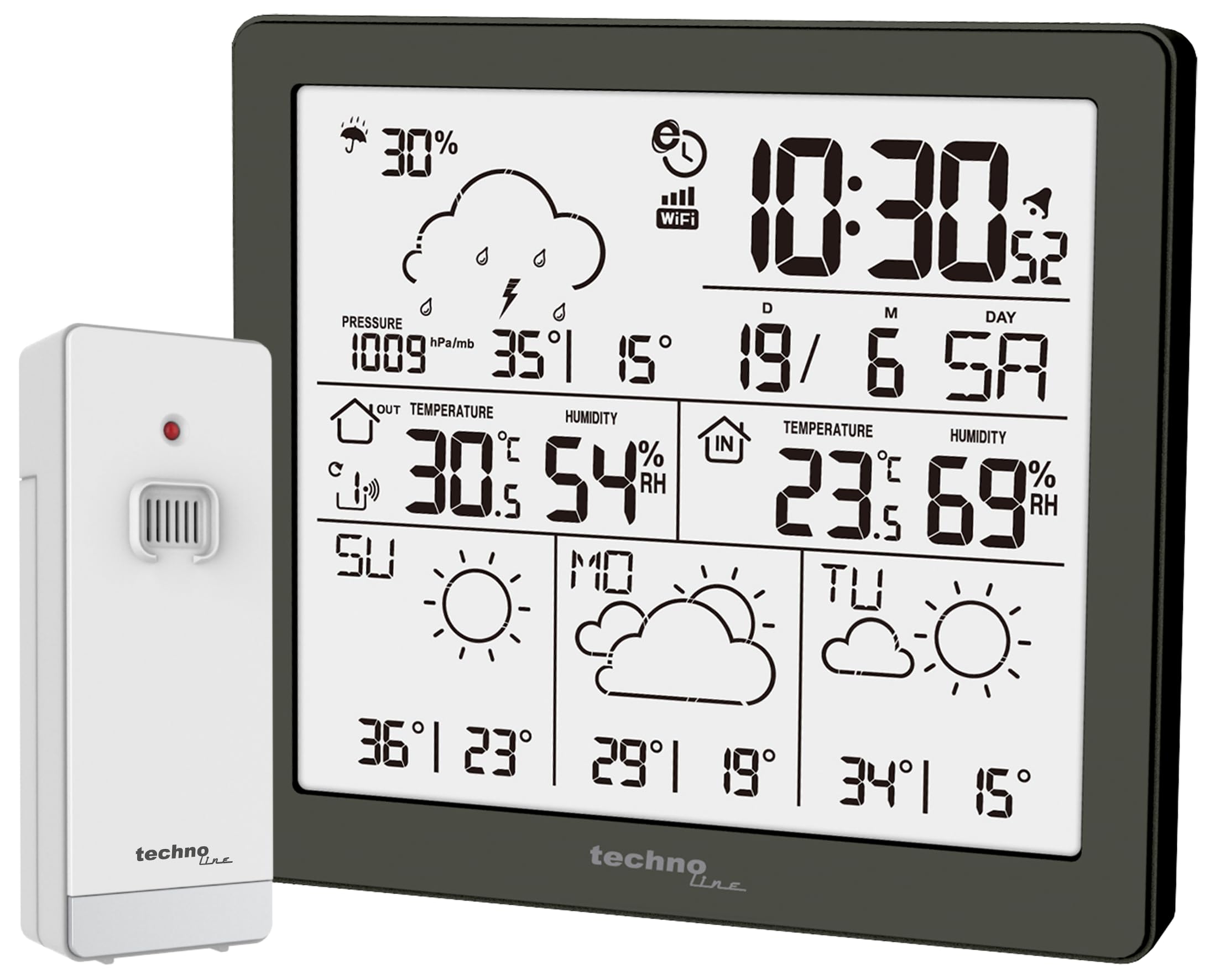
Kuva 1: Edessä view of the Techno Line WD2200 Weather Station display. The display shows time, date, indoor and outdoor temperature and humidity, barometric pressure, precipitation probability, and a 3-day forecast with corresponding weather icons and min/max temperatures.
Näyttöelementit:
- Ylävasen: Precipitation probability (e.g., 30%).
- Yläoikea: Current time (e.g., 10:30) and date (e.g., 19/6 SA for June 19th, Saturday).
- Middle Left (Outdoor Data): Barometric pressure (e.g., 1009 hPa/mb), outdoor temperature (e.g., 30.5°C), and outdoor humidity (e.g., 54% RH).
- Middle Right (Indoor Data): Indoor temperature (e.g., 23.6°C) and indoor humidity (e.g., 69% RH).
- Alaosa: 3-day forecast (e.g., Sunday, Monday, Tuesday) with weather icons (sunny, cloudy) and corresponding minimum and maximum temperatures (e.g., SU: 36°/23°, MO: 29°/19°, TU: 34°/15°).
5. Asennus
5.1 Akun asennus
- Outdoor Transmitter (TX205DTH): Open the battery compartment on the back of the sensor. Insert 2 x AA Mignon LR06 batteries, observing the correct polarity (+/-). Close the compartment securely.
- Main Unit (WD2200): Open the battery compartment on the back of the main unit. Insert 4 x AA Mignon LR06 batteries, observing the correct polarity (+/-). Close the compartment securely.
Note: It is recommended to insert batteries into the outdoor sensor first, then into the main unit, to ensure proper pairing.
5.2 Initial Power-On and Sensor Pairing
Upon inserting batteries into the main unit, the display will light up, and the unit will begin searching for the outdoor sensor. The outdoor temperature and humidity readings should appear on the main unit within a few minutes. If the outdoor data does not appear, refer to the Troubleshooting section.
5.3 App Connection (Direct Weather)
The WD2200 Weather Station connects to your smartphone via Bluetooth for enhanced data viewing and settings management through the 'Direct Weather' app.
- Download the 'Direct Weather' app from the App Store (iOS) or Google Play Store (Android).
- Varmista, että Bluetooth on käytössä älypuhelimellasi.
- Open the 'Direct Weather' app and follow the on-screen instructions to pair with your WD2200 Weather Station. The app will guide you through the connection process.
6. Sääaseman käyttö
6.1 Näytön lukeminen
The main unit's display provides a comprehensive overview nykyisistä ja ennustetuista sääolosuhteista:
- Aika ja päivämäärä: Automatically synchronized via the app or manually set.
- Sisälämpötila ja kosteus: Pääyksikön mittaamana.
- Ulkolämpötila ja kosteus: Received from the TX205DTH outdoor sensor.
- Ilmanpaine: Näyttää nykyisen ilmanpaineen.
- Precipitation Probability: Indicates the likelihood of rain or snow.
- 3 päivän ennuste: Provides weather icons and expected high/low temperatures for today and the next three days.
6.2 Using the Direct Weather App
The 'Direct Weather' app offers additional functionalities:
- Yksityiskohtaiset tiedot View: Access historical data and more detailed graphs of temperature, humidity, and pressure.
- Asetukset Asetukset: Adjust time, date, measurement units (°C/°F, hPa/inHg), and other preferences directly from your phone.
- Hälytykset: Set up custom alerts for specific temperature or humidity thresholds.
7. Huolto
7.1 Puhdistus
Pyyhi pääyksikkö ja ulkoanturi pehmeällä, kuivalla liinalla.amp liinalla. Älä käytä hankaavia puhdistusaineita tai liuottimia, sillä ne voivat vahingoittaa pintoja tai elektronisia komponentteja.
7.2 Pariston vaihto
When the battery indicator appears on the display, replace the batteries in the respective unit (main station or outdoor sensor). Always replace all batteries in a unit at the same time with new ones of the same type.
7.3 Ulkoanturin sijoittelu
For accurate outdoor readings, place the TX205DTH sensor in a shaded area, protected from direct sunlight and precipitation. Ensure it is within the effective transmission range of the main unit (typically up to 30 meters, depending on obstacles).
8. Vianmääritys
- Ei näyttöä: Tarkista paristojen napaisuus ja varmista, että paristot ovat tuoreita.
- Outdoor Data Not Appearing:
- Ensure batteries in the outdoor sensor are correctly installed and fresh.
- Relocate the outdoor sensor closer to the main unit.
- Press the reset button on both the main unit and the outdoor sensor (if available) and allow them to re-pair.
- Väärät lukemat: Ensure both units are placed in appropriate locations (main unit indoors, sensor outdoors in a shaded, protected area). Allow some time for readings to stabilize after setup or relocation.
- Sovellusten yhteysongelmat:
- Varmista, että Bluetooth on käytössä älypuhelimellasi.
- Restart the 'Direct Weather' app.
- Try unpairing and re-pairing the device within the app's settings.
9. Tekniset tiedot
| Mallinumero | WD2200 |
| Main Unit Dimensions (L x H x P) | 129 x 118 x 29 mm |
| Outdoor Sensor Dimensions (L x H x P) | 40 x 102 x 26 mm |
| Pääyksikön virtalähde | 4 x AA Mignon LR06 batteries (not included) |
| Outdoor Sensor Power Supply | 2 x AA Mignon LR06 batteries (not included) |
| Yhteystekniikka | Bluetooth |
| Suositeltu käyttö | Home weather monitoring |
| Erikoisominaisuus | Lightweight, App integration |
10. Takuu ja tuki
Techno Line products are designed for reliability and performance. For information regarding warranty terms and conditions, please refer to the documentation provided at the time of purchase or visit the official Techno Line website. For technical support or further assistance, please contact your retailer or the manufacturer's customer service department.


