1. Johdanto
Thank you for choosing the ErGear EGESD8 Electric Standing Desk. This manual provides essential information for the safe and efficient assembly, operation, and maintenance of your new desk. Please read these instructions carefully before use and retain them for future reference. This electric standing desk is designed to offer ergonomic flexibility, allowing you to easily switch between sitting and standing positions, promoting a healthier work environment.

ErGear Electric -seisomapöytä, esittelyssäasing its sleek design and spacious desktop in a contemporary workspace.
2. Turvallisuusohjeet
Turvallisen käytön varmistamiseksi ja vaurioiden välttämiseksi noudata seuraavia ohjeita:
- Varmista, että kaikki liitännät ovat kunnossa ennen pöydän käyttöä.
- Pidä lapset ja lemmikit poissa pöydältä käytön aikana.
- Do not place hands or other body parts near moving parts to avoid injury.
- Do not overload the desk. The maximum weight capacity is 80 kg.
- Vältä nesteiden asettamista suoraan ohjauspaneelille tai sähkökomponenttien lähelle.
- If the desk makes unusual noises or movements, discontinue use and consult the troubleshooting section or contact support.
- Käytä vain mukana toimitettua virtalähdettä ja kaapeleita.

This image highlights the robust construction of the ErGear Electric Standing Desk, capable of supporting up to 80 kg, ensuring stability even under significant load.
3. Pakkauksen sisältö
Tarkista, että kaikki osat ovat mukana ja ehjät:
- Desktop Panels (assembled)
- Pöydän jalat (2)
- Jalkatuet (2)
- Sivukannattimet (2)
- poikkipuu
- Vaihteiston sauva
- Ohjauspaneeli
- Virtalähde ja kaapeli
- Cable Grommets (2)
- Headphone Hooks (2)
- Kokoonpanotarvikkeet (ruuvit, kuusiokoloavain)
- Käyttöopas
4. Kokoamisohjeet
Kokoa ErGear-sähkökäyttöinen seisomapöytäsi seuraavasti. Kokoamiseen on suositeltavaa osallistua kaksi henkilöä.
Official assembly video for the ErGear Electric Standing Desk, demonstrating step-by-step installation.
Vaihe 1: Kokoa kehys
- Attach the side brackets to the desk legs using the provided screws and Allen wrench.
- Secure the foot pads to the bottom of each leg.
- Connect the two leg assemblies with the crossbar, ensuring all screws are tightened.
Step 2: Fix the Transmission Rod
- Insert the transmission rod into the designated openings on both desk legs.
- Ensure the rod is properly seated and secured with the retaining clips or screws.
Step 3: Assemble the Desktop Panel
- Lay the desktop panels face down on a soft, clean surface.
- Align the panels and secure them together using the provided connectors and screws.
Step 4: Attach the Frame to the Desktop
- Carefully place the assembled desk frame onto the underside of the desktop.
- Align the pre-drilled holes and secure the frame to the desktop using the appropriate screws.
- Kiinnitä ohjauspaneeli pöytälevyn alapuolelle kätevään paikkaan mukana toimitetuilla ruuveilla.
- Install the headphone hooks to the underside of the desktop as desired.
Vaihe 5: Kytke kaapelit
- Connect the motor cables from the legs to the control box.
- Connect the control panel cable to the control box.
- Connect the power adapter to the control box and then to a power outlet.
Step 6: Fix the Cable Grommets
- Insert the cable grommets into the pre-cut holes on the desktop to manage cables.
5. Käyttöohjeet
Your ErGear Electric Standing Desk features an intuitive control panel for easy height adjustment.
Lyhyt videoesitysasing key features of the ErGear Electric Standing Desk, including height adjustment and stability.
Ohjauspaneeli ohiview

The desk's intelligent control panel features an LED display showing current height in centimeters, along with up/down arrows and four memory preset buttons for quick adjustments.
- Ylös/alas-nuolet (▲ / ▼): Press and hold to adjust the desk height manually.
- LED-näyttö: Shows the current height of the desk in centimeters.
- Memory Presets (1, 2, 3, 4): Store and recall preferred height settings.
Korkeuden säätö
The desk can be adjusted between 72 cm ja 118 cm.
- Manuaalinen säätö: Press and hold the up (▲) or down (▼) arrow button until the desk reaches your desired height.
- Muistiasetusten käyttäminen: Press the corresponding memory button (1, 2, 3, or 4) to automatically move the desk to the saved height.
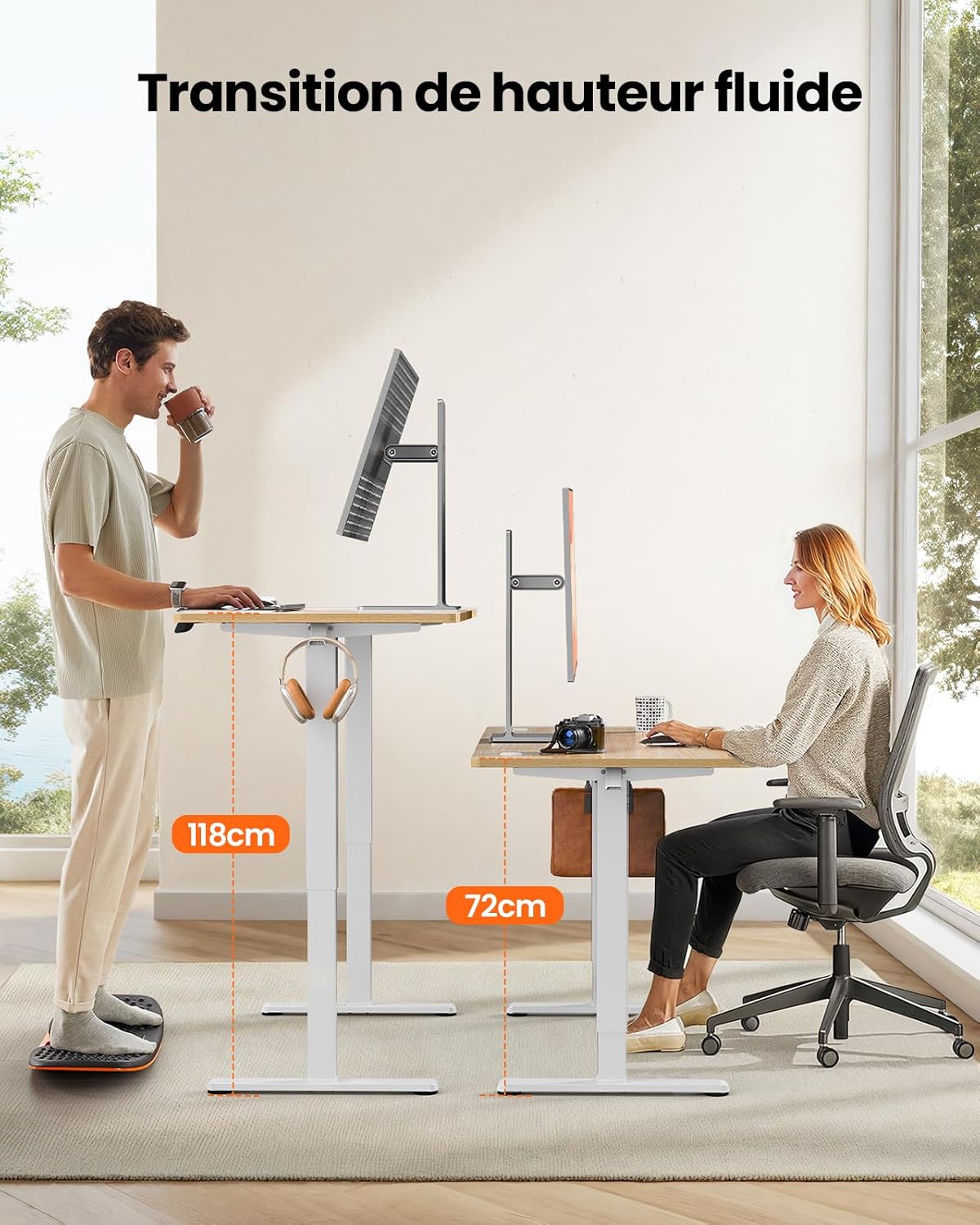
This image demonstrates the adjustable height range of the ErGear Electric Standing Desk, showing a user sitting at 72cm and standing at 118cm, emphasizing ergonomic flexibility.
Muistiasetusten asettaminen
- Säädä pöytä haluamaasi korkeuteen ylös/alas-nuolinäppäimillä.
- Press the 'M' button (if available, or a 'Set' button) followed by the desired memory button (1, 2, 3, or 4). The display will typically flash or beep to confirm the setting is saved.
Hiljainen toiminta
The desk operates with a quiet motor, producing a noise level of ≤ 55 dB, ensuring a peaceful work environment.

Illustrates the ultra-quiet operation of the ErGear Electric Standing Desk, with a noise level of 55dB, ensuring a peaceful and undisturbed work environment.
6. Huolto
Säännöllinen huolto pidentää työpöytäsi käyttöikää:
- Puhdistus: Wipe the desk surface and legs with a soft, damp liinalla. Vältä voimakkaita kemikaaleja tai hankaavia puhdistusaineita.
- Kaapelin hallinta: Periodically check that all cables are neatly organized and not pinched or tangled. Utilize the integrated cable grommets and hooks.
- Screw Tightness: Occasionally check and tighten any loose screws on the frame or desktop connections.
- Tarkastus: Inspect the desk for any signs of wear or damage. If any issues are found, contact customer support.

Yksityiskohta view of the desk's integrated cable grommets and convenient hooks, designed to help maintain a tidy and organized workspace by managing cables and accessories.
7. Vianmääritys
Jos työpöydässäsi ilmenee ongelmia, tutustu seuraaviin yleisiin ongelmiin ja ratkaisuihin:
| Ongelma | Mahdollinen syy | Ratkaisu |
|---|---|---|
| Työpöytä ei liiku. | Virtakaapeli irti, moottorikaapeli löysällä, ylikuormitus. | Tarkista kaikki virta- ja moottoriliitännät. Vähennä pöydän painoa. |
| Pöytä liikkuu epätasaisesti. | Epätasainen kuorma, löysät ruuvit, tukos. | Jaa paino tasaisesti. Tarkista ja kiristä kaikki kokoonpanoruuvit. Varmista, ettei tiellä ole esteitä. |
| Pöytä pysähtyy säädön aikana. | Overload protection activated, obstruction. | Remove some weight. Check for obstructions. Wait a few minutes before trying again. |
| Ohjauspaneeli ei vastaa. | Control panel cable loose, power issue. | Check control panel cable connection. Verify power supply. |
If the problem persists after trying these solutions, please contact ErGear customer support.
8. Tekniset tiedot
| Ominaisuus | Yksityiskohta |
|---|---|
| Merkki | ErGear |
| Mallinumero | EGESD8 |
| Väri | Beige and Natural |
| Pöytälevyn mitat (P x L) | 120 cm x 60 cm |
| Korkeuden säätöalue | 72 cm - 118 cm |
| Materiaali | Wood (Desktop), Metal (Base) |
| Paino Kapasiteetti | 80 kg |
| Moottorin melutaso | ≤ 55 dB |
| Erikoisominaisuudet | Ergonomic, Electric, 4 Memory Presets, Cable Grommets, Headphone Hooks |
| Tuotteen paino | 19.05 kg |

A clear diagram illustrating the overall dimensions of the ErGear Electric Standing Desk, including its 120cm x 60cm desktop and adjustable height range of 72cm to 118cm.
9. Takuu ja tuki
ErGear products are designed for durability and performance. This product comes with a standard manufacturer's warranty. For specific warranty details, please refer to the warranty card included in your package or visit the official ErGear websivusto.
If you have any questions, require technical assistance, or need to report a missing or damaged part, please contact ErGear customer support through the retailer where you purchased the product or via the contact information provided on the official ErGear websivusto.
Please have your model number (EGESD8) and purchase information ready when contacting support.


