1. Johdanto
Thank you for choosing the MageGee MK-Storm Mechanical Gaming Keyboard. This 104-key wired keyboard is designed for an enhanced typing and gaming experience, featuring durable brown switches, blue backlighting, and anti-ghosting technology. This manual provides essential information for setup, operation, and maintenance to ensure optimal performance.
2. Tärkeimmät ominaisuudet
- Blue Backlit Gaming Keyboard: Features 20 different backlit modes, 5 brightness levels, and 5 speed adjustments. The backlight can be easily turned off.
- Mechanical Brown Switches: Offers moderate trigger key travel and force, suitable for both typing and gaming. Provides tactile feedback with a slight sound.
- Anti-Ghosting Keyboard: All 104 keys have individual switches with full N-key rollover, ensuring faster response and simultaneous key presses without conflict.
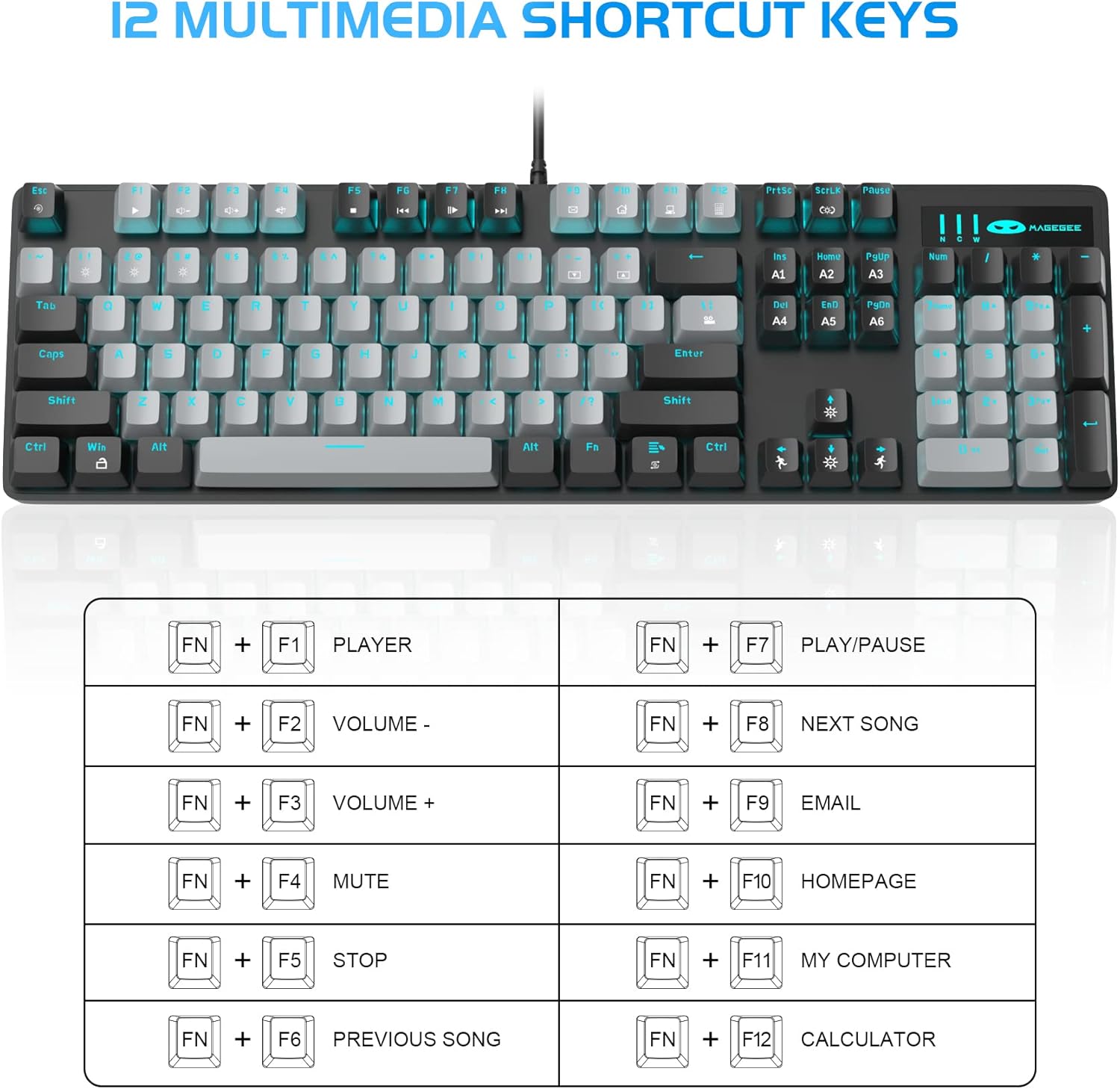
- 12 Multimedia Combination Keys: Quick operations via FN+ F1~F12 for media control and office functions.
- Ergonominen muotoilu: Premium metal panel construction for stability. Ergonomic key layout and two-step adjustable feet for comfortable typing angles.
- Laaja yhteensopivuus: USB wired connection compatible with Windows 2000/Vista/Win7/Win8/Win10/MAC/Linux.

3. Pakkauksen sisältö
The MageGee MK-Storm Mechanical Gaming Keyboard package includes the following items:
- MageGee Mechanical Gaming Keyboard (MK-Storm)
- USB Wired Cable (attached to keyboard)
- Avaimen vedintyökalu
- 16 Extra Keycaps (color scheme varies by keyboard variant)
- Käyttöopas
4. Asennus
- Yhdistä näppäimistö: Plug the USB connector of the keyboard cable into an available USB port on your computer (PC, laptop, or desktop).
- Ohjaimen asennus: Näppäimistö on plug-and-play-tyyppinen. Käyttöjärjestelmäsi pitäisi automaattisesti tunnistaa ja asentaa tarvittavat ajurit. Perustoiminnot eivät yleensä vaadi lisäohjelmistojen asentamista.
- Näppäimistön kulman säätäminen: Flip out the two-step feet on the underside of the keyboard to adjust the typing angle to your preference.

5. Käyttöohjeet
5.1 taustavalon ohjaus
The MK-Storm keyboard features a single blue backlight with multiple modes and adjustable settings.
- Vaihda taustavalon tila: Paina FN + INS selataksesi kolmen eri taustavalotilan välillä.
- Säädä kirkkautta: Paina FN + ↑ (Up Arrow) to increase brightness (5 levels). Press FN + ↓ (Alaspäin osoittavaa nuolta) vähentääksesi kirkkautta.
- Säädä nopeutta: Paina FN + ← (Left Arrow) to decrease animation speed (5 levels). Press FN + → (Oikea nuoli) animaation nopeuden lisäämiseksi.
- Taustavalon sammuttaminen: The backlight can be turned off by cycling through the brightness levels until it is off, or by selecting a mode that has no illumination.

5.2 Multimedianäppäimet
Access multimedia and system functions quickly using the FN key in combination with the F1-F12 keys.
| Näppäinyhdistelmä | Toiminto |
|---|---|
| FN + F1 | Pelaaja |
| FN + F2 | Äänenvoimakkuus - |
| FN + F3 | Äänenvoimakkuus + |
| FN + F4 | Mykistä |
| FN + F5 | Stop |
| FN + F6 | Edellinen kappale |
| FN + F7 | Toista/Tauko |
| FN + F8 | Seuraava kappale |
| FN + F9 | Sähköposti |
| FN + F10 | Kotisivu |
| FN + F11 | Oma tietokone |
| FN + F12 | Laskin |
5.3 Mukautettu ammattilainenfiles (If applicable)
The keyboard supports custom lighting profiles. Refer to the manufacturer's website or included software (if any) for detailed instructions on programming and saving custom lighting zones or key assignments. Once programmed, these profiles can often be accessed directly from the keyboard using FN key combinations (e.g., FN+1, FN+2, FN+3 for different profiles).
6. Räätälöinti
The MageGee MK-Storm keyboard allows for customization of keycaps and switches.
- Näppäinhatun vaihto: Use the included keycap puller tool to carefully remove existing keycaps. Align the new keycap with the switch stem and press down gently until it clicks into place.
- Kytkimen vaihto: The keyboard comes with extra brown switches. To replace a switch, first remove the keycap. Then, use a switch puller (not included, but often similar to a keycap puller) to gently extract the switch from the PCB. Insert the new switch, ensuring the pins align correctly, and press firmly until it seats properly.


7. Huolto
- Puhdistus: The floating keys design makes cleaning easier. Use a soft brush or compressed air to remove dust and debris from between the keycaps. For stubborn dirt, remove keycaps using the provided tool and wipe the keyboard surface with a slightly damp cloth. Ensure the keyboard is disconnected before cleaning.
- Varastointi: Säilytä näppäimistöä kuivassa, viileässä paikassa, poissa suorasta auringonvalosta ja äärimmäisistä lämpötiloista.
- Kaapelihuolto: Vältä USB-kaapelin liiallista taivuttamista tai kiertämistä, jotta se ei vaurioidu.
8. Vianmääritys
- Näppäimistö ei vastaa:
- Varmista, että USB-kaapeli on kytketty kunnolla sekä näppäimistöön että tietokoneeseen.
- Kokeile kytkeä näppäimistö tietokoneen toiseen USB-porttiin.
- Käynnistä tietokone uudelleen.
- Testaa näppäimistöä toisella tietokoneella sulkeaksesi pois järjestelmäkohtaisen ongelman.
- Taustavalo ei toimi/on virheellinen:
- Ensure the backlight is not turned off (FN + ↓ to increase brightness).
- Cycle through backlight modes using FN + INS.
- Check if any specific software is interfering with the lighting settings.
- Avaimet eivät rekisteröidy:
- Puhdista kyseisen avaimen ympäristö varmistaaksesi, ettei roskat tukki kytkintä.
- If a specific switch is faulty, consider replacing it with one of the spare switches provided, following the customization instructions.
9. Tekniset tiedot
| Ominaisuus | Yksityiskohta |
|---|---|
| Merkki | MageGee |
| Mallinumero | MK-myrsky |
| Näppäinten asettelu | 104 kosketinta (täysikokoinen) |
| Kytkimen tyyppi | Mechanical Brown Switches |
| Taustavalo | Blue Backlit (20 modes, 5 brightness, 5 speed) |
| Yhteydet | USB langallinen |
| Anti-Ghosting | Täysi N-näppäimen kierto |
| Multimedia-näppäimet | 12 (FN + F1–F12) |
| Materiaali | Metal Panel Construction |
| Yhteensopivat laitteet | Kannettava tietokone, PC |
| Käyttöjärjestelmät | Windows 2000/Vista/Win7/Win8/Win10/MAC/Linux |
| Tuotteen paino | 2.77 kiloa |
| Pakkauksen mitat | 17.63 x 12.36 x 1.89 tuumaa |

10. Takuu ja tuki
For warranty information, technical support, or any product-related inquiries, please contact MageGee customer service through the retailer where the product was purchased or visit the official MageGee websivusto. Säilytä ostokuitti takuuvaatimuksia varten.


