1. Johdanto
The Parsonver Smartwatch Z139 is designed to enhance your daily life with a variety of intelligent functions. This manual provides detailed instructions for setting up, operating, and maintaining your smartwatch to ensure optimal performance and user experience.
Key features include Bluetooth calling, comprehensive health monitoring (heart rate, blood oxygen, sleep), over 100 sports modes, and smart notifications.
2. Aloittaminen: Asennus
2.1 Pakkauksen sisältö
- Parsonver Smartwatch Z139
- Latauskaapeli
- Käyttöopas
2.2 Älykellon lataaminen
Lataa älykellosi täyteen ennen ensimmäistä käyttökertaa. Liitä magneettinen latauskaapeli kellon takana oleviin latausliittimiin ja kytke USB-pää virtalähteeseen (ei sisälly toimitukseen) tai tietokoneen USB-porttiin.
2.3 Sovelluksen asennus ja pariliitos
To unlock the full potential of your Parsonver Smartwatch, download the companion app on your smartphone. The app is compatible with iOS 9.0/Android 6.0 or above.
- Scan the QR code in the manual or search for "Parsonver" in your phone's app store (Google Play Store for Android, Apple App Store for iOS).
- Asenna ja avaa sovellus.
- Follow the on-screen instructions in the app to create an account and pair your smartwatch via Bluetooth. Ensure Bluetooth is enabled on your smartphone.
- During pairing, grant necessary permissions for notifications, location, and health data synchronization.

Image: The Parsonver Smartwatch Z139, showcasing its main display with time, date, and step count.
3. Käyttöohjeet
3.1 Bluetooth-puhelut ja älykkäät ilmoitukset
Once connected via Bluetooth, you can manage calls directly from your smartwatch.
- Puheluihin vastaaminen/puheluiden soittaminen: Use the watch's interface to answer incoming calls or dial numbers. The watch features high-quality speakers and a high-definition microphone for clear communication.
- Ilmoitukset: Receive alerts for SMS, WhatsApp, Facebook, emails, and other app notifications directly on your watch. The watch will vibrate to inform you of new messages.
- Ääni-avustaja: Utilize the integrated voice assistant for hands-free control and information access.
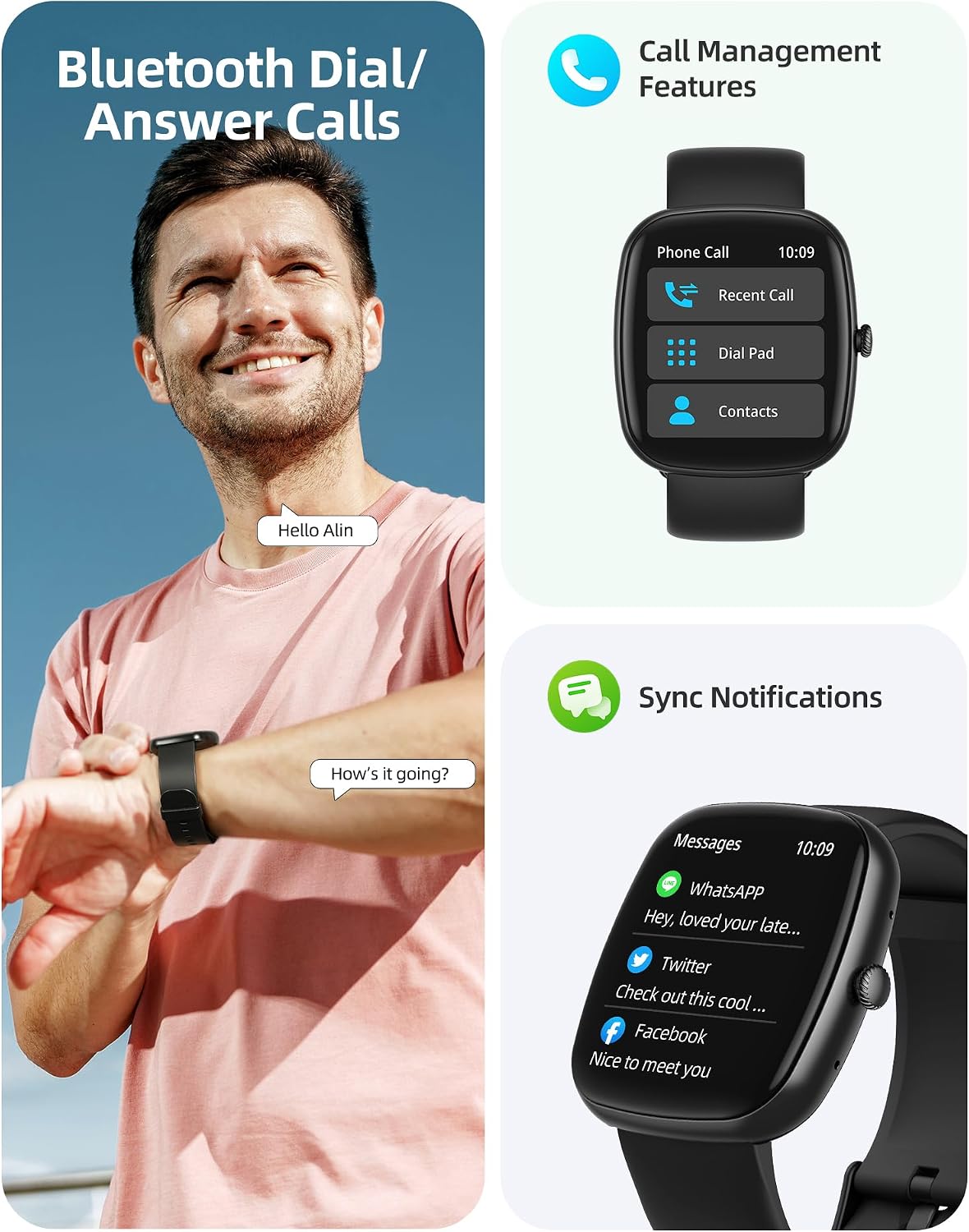
Image: A user interacting with the smartwatch for Bluetooth calls, demonstrating the call management interface.
3.2 Terveyden seuranta
The smartwatch features advanced sensors for continuous health tracking.
- Sykemittaus: Measures and records your heart rate throughout the day. The app displays trends and alerts for abnormal readings.
- Veren hapen (SpO2) seuranta: Seuraa veresi happisaturaatiotasoja.
- Unenvalvonta: Analyzes your sleep patterns, including deep sleep, light sleep, and awake times, to help optimize your sleep habits.
- Stressin seuranta: Antaa tietoa stressitasoistasi.
- Naisten terveyden seuranta: Records menstrual cycles and ovulation periods.

Image: Visual representation of the smartwatch's health monitoring capabilities, including heart rate, blood oxygen, and pressure readings.
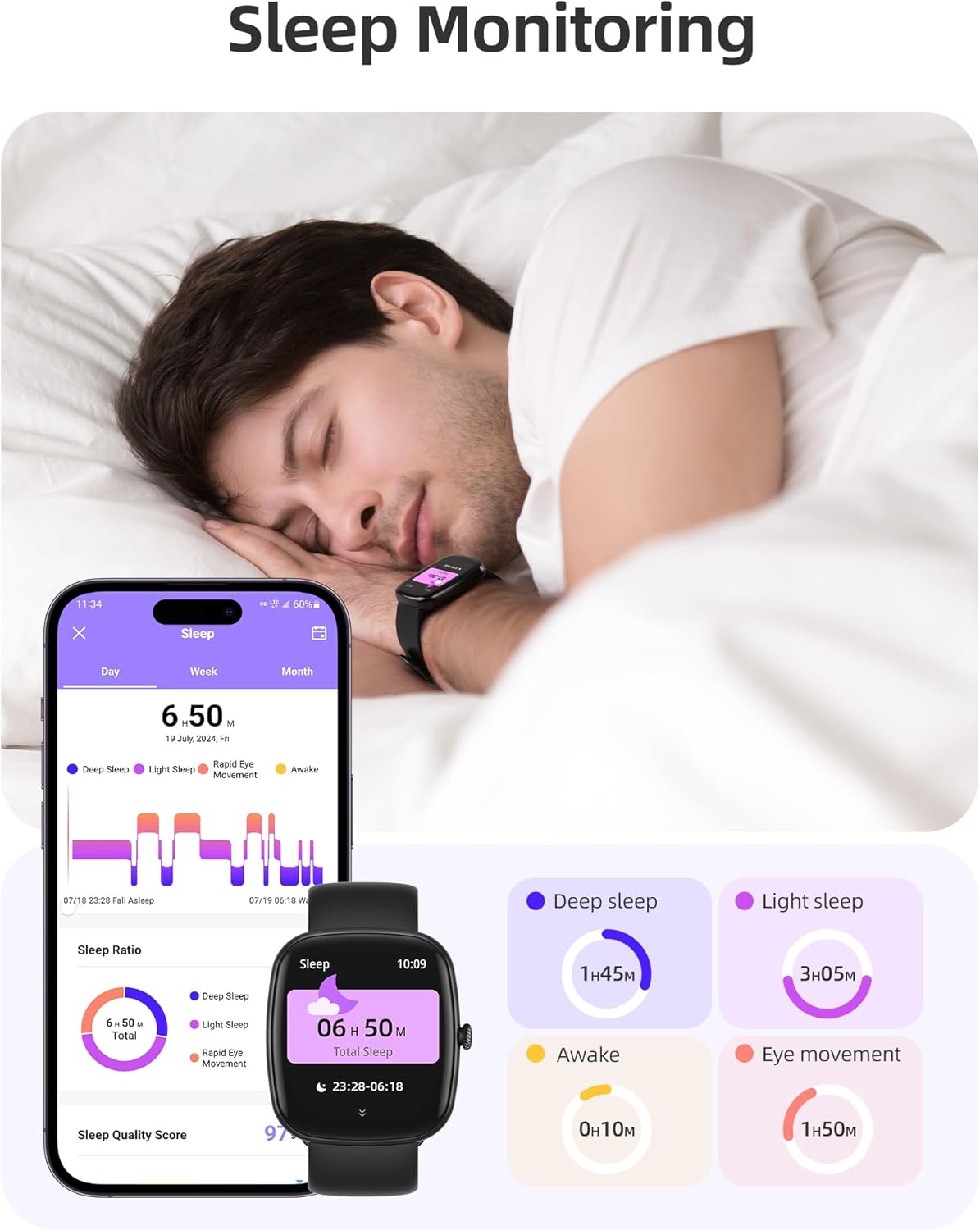
Image: The smartwatch monitoring sleep, with a detailed breakdown of sleep stages displayed on the companion app.
3.3 Urheilutilat ja aktiivisuuden seuranta
The activity tracker supports over 100 sports modes to monitor your workouts effectively.
- Käytettävissä olevat tilat: Includes yoga, running, jumping, cycling, badminton, football, rowing, and many more.
- Tiedon seuranta: Records steps, distance, calories burned, and real-time heart rate during exercise.
- Päivittäinen valmiuspistemäärä: Provides a summary of your daily activity and recovery.

Image: The smartwatch tracking a user's activity during a run, displaying key metrics like calories, steps, heart rate, and distance.
3.4 App Experience and BMI Tracking
The companion app offers additional features for health management.
- Weight and BMI Tracking: Manually input your weight in the app to track changes and automatically calculate your Body Mass Index (BMI). View daily, weekly, monthly, and yearly weight trends.
- Koulutuskurssit: Access integrated training courses from beginner to advanced levels.
- Relaxation Features: Includes white noise, meditation exercises, and relaxation training.

Image: The companion app displaying weight and BMI tracking features, helping users monitor their body composition.
3.5 mukautettavaa kellotaulua
Personalize your smartwatch with over 200 different watch face designs available through the app.

Image: A selection of customizable watch faces, demonstrating the variety of styles and information layouts available.
3.6 Muita käytännön toimintoja
Älykellossa on useita muita hyödyllisiä ominaisuuksia:
- Sääennuste: View 7-day weather forecasts.
- Musiikin hallinta: Ohjaa musiikin toistoa suoraan ranteestasi.
- Kameran ohjaus: Ohjaa älypuhelimesi kameraa etänä.
- Herätyskello: Aseta useita hälytyksiä.
- Sekuntikello ja ajastin: Precise timing for various activities.
- Muistutus istumisesta: Kehottaa sinua liikkumaan taukojen jälkeen.
- Hengitysharjoitukset: Guided exercises to reduce stress.
- Etsi puhelin: Locate your paired smartphone with a tap on your watch.
- Kirkkauden säätö: Continuously adjustable screen brightness for optimal visibility in any lighting condition.

Kuva: Yliview of the various practical functions available on the Parsonver Smartwatch Z139.
4. Huolto
Proper care ensures the longevity and performance of your smartwatch.
- Puhdistus: Puhdista kello ja ranneke säännöllisesti pehmeällä, kuivalla liinalla. Vältä voimakkaita kemikaaleja.
- Vedenkestävyys: The smartwatch has an IP68 water resistance rating, meaning it can withstand hand washing, rain, and splashes. Do not use it for swimming, diving, or in saunas.
- Lataus: Use only the provided charging cable. Avoid exposing charging contacts to moisture.
- Varastointi: Säilytä kelloa viileässä ja kuivassa paikassa, kun sitä ei käytetä.
5. Vianmääritys
Jos älykellosi kanssa ilmenee ongelmia, kokeile seuraavia vaiheita:
- Kello ei käynnisty: Varmista, että kello on ladattu täyteen.
- Ei voi yhdistää puhelimeen:
- Varmista, että Bluetooth on käytössä puhelimessasi ja kellossasi.
- Varmista, että kello on puhelimesi kantaman sisällä.
- Käynnistä sekä kello että puhelimesi uudelleen.
- Try unpairing and re-pairing through the app.
- Ilmoituksia ei vastaanotettu:
- Check app permissions on your phone to ensure notifications are allowed for the Parsonver app.
- Verify that notifications are enabled within the Parsonver app settings.
- Varmista, että kello on yhdistetty oikein Bluetoothin kautta.
- Epätarkat terveystiedot:
- Varmista, että kello on tiukasti ranteessasi, ei liian tiukasti tai liian löysästi.
- Puhdista kellon takana oleva anturi.
- Vältä liiallista liikettä mittausten aikana.
- Näyttö ei reagoi: Kokeile käynnistää kello uudelleen. Jos ongelma jatkuu, ota yhteyttä asiakastukeen.
6. Tekniset tiedot
| Ominaisuus | Erittely |
|---|---|
| Merkki | Parsonver |
| Mallinumero | Z139 |
| Näytön koko | 1.83 tuumaa |
| Käyttöjärjestelmän yhteensopivuus | iOS 9.0/Android 6.0 or above Smartphones |
| Yhteystekniikka | Bluetooth |
| Erikoisominaisuudet | Bluetooth Calls, 100+ Sports Modes, Heart Rate Monitoring, SpO2 Monitoring, Sleep Monitoring, IP68 Water Resistance, Music Control, Camera Control, Weather, Alarm, Timer, Stopwatch, Sedentary Reminder, Breathing Exercises, Find Phone, Brightness Adjustment, Women's Health Tracking |
| Akun koostumus | Litium-polymeeri |
| Akun kapasiteetti | 230 mAh |
| Vedenkestävyysluokitus | IP68 (Not for swimming/diving/sauna) |
| Muistin tallennuskapasiteetti | 512 Mt |
| GPS | Älypuhelimen kautta |
7. Takuu ja tuki
For warranty information and customer support, please refer to the documentation included with your purchase or visit the official Parsonver website. Typically, products are covered by a manufacturer's warranty against defects in materials and workmanship for a specified period from the date of purchase. Please retain your proof of purchase.
If you experience any issues not covered in this manual, or require further assistance, please contact Parsonver customer service.


