Johdanto
The KEYCOOL K19 Wireless Numeric Keyboard is a versatile and ergonomic peripheral designed for enhanced productivity across various operating systems. Featuring triple mode connectivity, hot-swappable switches, and a multi-function knob, this keypad offers a customizable and efficient user experience. This manual provides detailed instructions for setup, operation, maintenance, and troubleshooting to ensure optimal performance of your K19 numeric keyboard.
Tärkeimmät ominaisuudet
- Kolmoistilan yhteys: Seamlessly switch between wired (USB-C), Bluetooth 5.0, and 2.4GHz wireless connections for maximum flexibility.
- Vaihdettavat kytkimet: Customize your typing experience by easily changing 3-pin or 5-pin mechanical switches without soldering.
- Monitoiminuppi: Control RGB lighting effects, adjust volume, and manage media functions with a versatile rotary knob.
- RGB-taustavalo: Enjoy dynamic and customizable RGB lighting modes to personalize your setup.
- Tiivisteellinen rakenne: Designed with imported PORON foam tape for a pleasant and satisfying typing sound.
- Ergonominen muotoilu: Features a sloped keyboard and durable PBT keycaps for comfortable and long-lasting use.
- Laaja yhteensopivuus: Compatible with Windows, Mac, Linux, Android, and iOS systems.

Kuva: Yliview of the K19 Mechanical Numeric Keypad's core features.
Pakkauksen sisältö
Upon opening your KEYCOOL K19 package, please verify that all the following items are included:
- Langaton K19 numeronäppäimistö
- USB-kaapeli
- Näppäimistön vetäjä
- Kytkimen vedin
- Additional Keycaps (e.g., Esc, Fan icon)
- Additional Switches
- Käyttöopas / Pika-aloitusopas
Video: Unboxing the Keycool K19 numeric keyboard and its included accessories.
Asennus
Näppäimistön lataaminen
Before initial use, ensure the K19 numeric keyboard is fully charged. Connect the provided USB-C cable to the keyboard's USB-C port and the other end to a power source (e.g., computer USB port, wall adapter). The charging indicator light will show the charging status.
Yhteystilat
The K19 supports three connection modes: Wired, 2.4GHz Wireless, and Bluetooth. Use the switch located on the keyboard to select your desired mode.
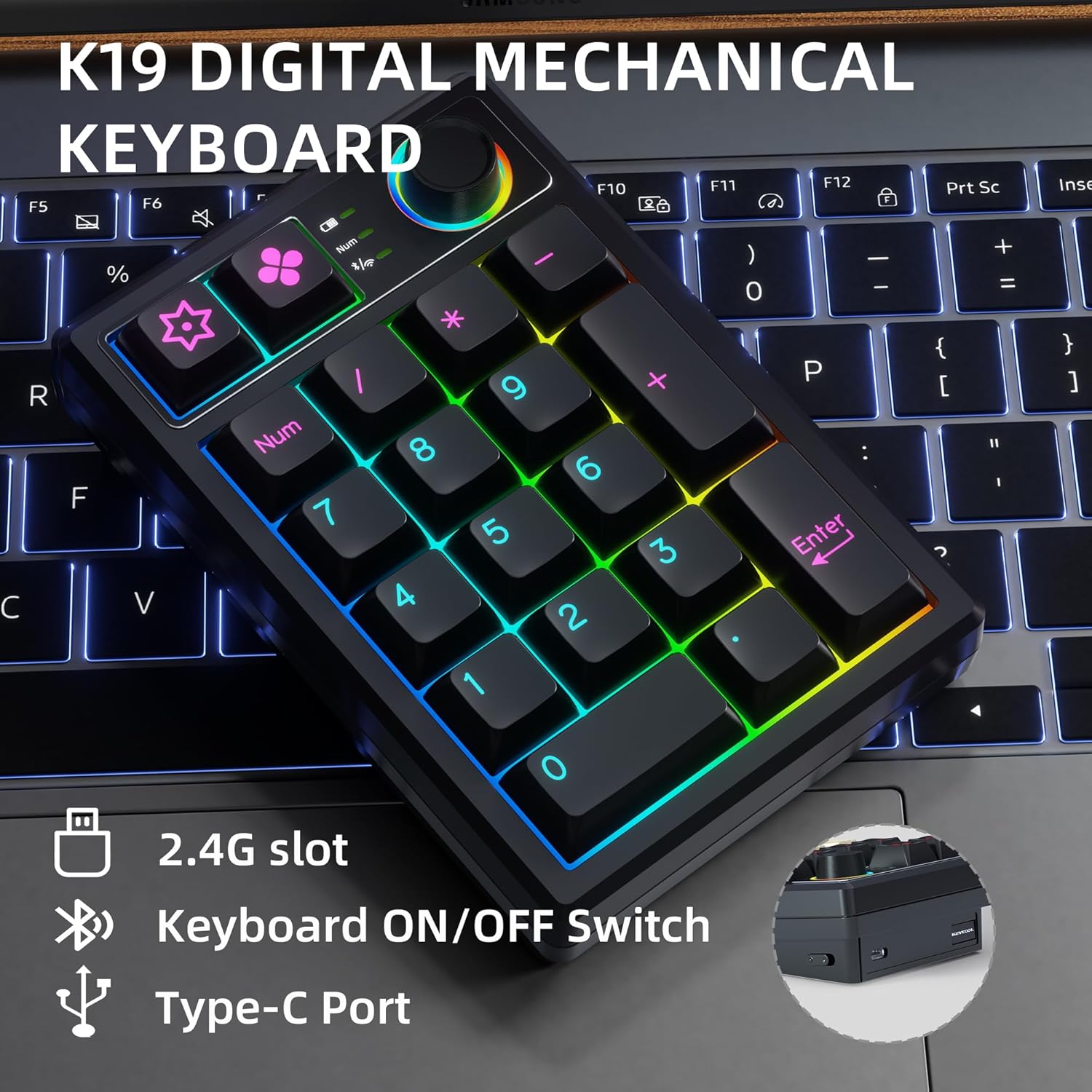
Image: Key connection points on the K19 numeric keyboard.
1. Langallinen yhteys
- Ensure the keyboard's mode switch is set to the wired (USB) position.
- Liitä USB-C-kaapeli näppäimistöstä tietokoneen USB-porttiin.
- Näppäimistö tunnistetaan automaattisesti ja on käyttövalmis.
2. 2.4 GHz:n langaton yhteys
- Locate the 2.4G USB receiver, usually stored in a slot on the keyboard.
- Liitä USB-vastaanotin tietokoneesi vapaaseen USB-porttiin.
- Set the keyboard's mode switch to the 2.4G wireless position.
- Näppäimistön pitäisi muodostaa yhteys automaattisesti.
3. Bluetooth-yhteys
- Set the keyboard's mode switch to the Bluetooth position.
- Ota Bluetooth käyttöön laitteellasi (tietokone, tabletti, älypuhelin) ja hae uusia laitteita.
- Select "KEYCOOL K19" from the list of available devices to pair.
- Suorita pariliitos loppuun noudattamalla näytön ohjeita.
Ohjainten ja ohjelmistojen asennus
For advanced customization, including key remapping and macro settings, you may download the official driver software from the KEYCOOL websivusto: www.kc-keycool.com. Install the software according to the instructions provided on the websivusto.

Image: Driver download site for KEYCOOL products.
Käyttöohjeet
Monitoiminen nuppi
The rotary knob on the K19 numeric keyboard provides quick access to various functions:
- RGB-valaistuksen säätö: Rotate the knob to cycle through different RGB lighting effects or adjust brightness. Press the knob to switch between lighting modes or turn lighting on/off.
- Median hallinta: The knob can also be configured via software to control media functions such as volume adjustment (rotate) or play/pause (press).
RGB-taustavalo
The K19 features vibrant RGB backlighting with multiple effects. Use the multi-function knob or specific key combinations (refer to the Quick Start Guide or software) to customize the lighting to your preference.
Video: Demonstration of the RGB backlit effects on the K19 numeric keyboard.

Image: The K19 numeric keyboard showcasinsen RGB-valaistus.
Hot-Swap-kytkimet
The K19 allows you to easily change mechanical switches without soldering. This feature enables you to customize the feel and sound of your keypad. Use the included switch puller to carefully remove existing switches and insert new 3-pin or 5-pin compatible switches.

Kuva: Lähikuva view of the K19's hot-swappable switch sockets.
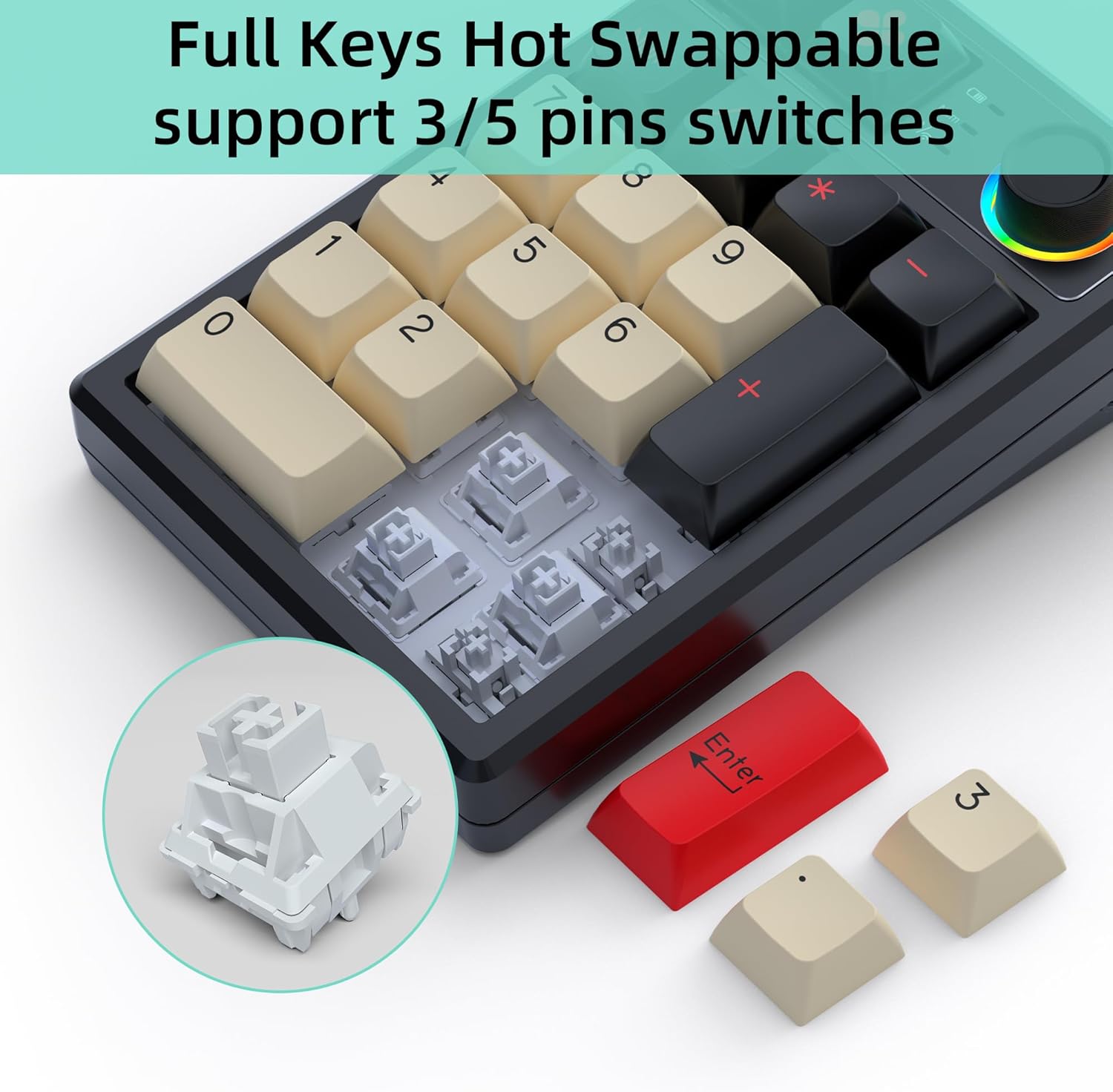
Image: Illustration of replacing keycaps and switches on the K19.
Personalized Programmable Keys
Utilize the dedicated software (downloadable from www.kc-keycool.com) to customize key functions, create macros, and fine-tune lighting effects according to your workflow and preferences. The custom settings are stored directly on the keypad, allowing you to use your personalized layout across different devices without needing the software running in the background.

Image: Software interface for customizing the K19 numeric keyboard.
Huolto
- Puhdistus: Use a soft, dry cloth to wipe the surface of the keyboard. For deeper cleaning, gently remove keycaps with the provided keycap puller and use compressed air to clear dust and debris from between the switches.
- Vältä nesteitä: Älä altista näppäimistöä nesteille. Jos ainetta roiskuu, irrota näppäimistö välittömästi ja anna sen kuivua kokonaan ennen uudelleenkytkemistä.
- Varastointi: Säilytä näppäimistöä viileässä, kuivassa paikassa, poissa suorasta auringonvalosta ja äärimmäisistä lämpötiloista.
Vianetsintä
| Ongelma | Mahdollinen ratkaisu |
|---|---|
| Näppäimistö ei vastaa langattomassa tilassa. | Ensure the keyboard is charged, the mode switch is set correctly (2.4G or Bluetooth), and the receiver is properly plugged in (for 2.4G) or Bluetooth is paired (for Bluetooth). Try re-pairing or reconnecting. |
| Avaimet eivät rekisteröidy tai niitä kirjoitetaan kahteen kertaan. | This may indicate a loose or faulty switch. Use the switch puller to remove the affected switch and re-insert it firmly. If the issue persists, try replacing the switch with one of the spares. |
| RGB-valaistus ei toimi tai on jumissa. | Check the multi-function knob settings. Ensure the keyboard is not in power-saving mode. Refer to the user manual or software for specific lighting control key combinations. |
| Bluetooth-yhteys epävakaa. | Ensure no strong interference sources are nearby. Try moving the keyboard closer to your device. Disconnect and re-pair the Bluetooth connection. |
| Software not recognizing the keyboard. | Ensure the keyboard is connected via wired mode when using the software. Reinstall the software if necessary. |
Tekniset tiedot
| Attribuutti | Yksityiskohta |
|---|---|
| Mallinumero | K19+1Knob |
| Tuotteen mitat | 5.2 x 3.5 x 1.25 tuumaa (13.2 x 8.9 x 3.2 cm) |
| Tuotteen paino | 11.7 unssia (331.7 g) |
| Yhteystekniikka | Bluetooth, Wi-Fi 2.4G, USB-C (Triple Mode) |
| Näppäimistön kuvaus | Mekaaninen |
| Avainten määrä | 21 (19 keys + 1 knob) |
| Erikoisominaisuudet | Portable, Volume Roller, Backlit, Hot-Swappable |
| Yhteensopivat laitteet | Laptop, PC, Gaming Console, Tablet, Smartphone |
| Väri | Musta |
| Akun kapasiteetti | 1500mAh (as per feature bullets) |
| Alkuperämaa | Kiina |
Takuu ja tuki
KEYCOOL products are manufactured to high-quality standards. For warranty information, technical support, or any inquiries regarding your K19 Wireless Numeric Keyboard, please refer to the contact details provided on the official KEYCOOL websivusto (www.kc-keycool.com) tai ota yhteyttä jälleenmyyjään.


