Johdanto
This manual provides detailed instructions for setting up, operating, and maintaining your Ajazz AK820MAX 75% Mechanical Keyboard. Please read this manual thoroughly before using the product to ensure optimal performance and longevity.
Tuotteen ominaisuudet
- TFT Smart Display & Knob: Features a high-definition TFT color screen displaying time, connectivity modes, battery status, and custom GIF animations. The integrated knob allows for quick adjustments.
- Tiivisteen rakenne ja piirilevyn yhden avaimen ura: Designed with a gasket structure and 1.2mm thick PCB single key slotting for enhanced resilience, stability, and a softer, more elastic typing feel. Multiple internal fillings reduce noise for a pure and pleasant sound.
- Kolmitilayhteys: Supports wireless connectivity via Bluetooth 5.1, 2.4GHz, or a wired Type-C USB cable. Easily switch between modes for efficient multitasking across various devices.
- Pitkäkestoinen akku: Equipped with an 8000mAh battery for extended use without frequent recharging.
- RGB Backlighting with Music Rhythm: Offers 20 customizable backlighting effects, including a mode that synchronizes with music playback.
- 75% Hot-Swappable Layout: A compact 75% layout saves desktop space. The 3/5-pin PCB mounting design allows for easy hot-swapping of mechanical switches, enabling customization of typing preferences.
Pakkauksen sisältö
Avattuasi pakkauksen varmista, että kaikki seuraavat osat ovat mukana:
- Ajazz AK820MAX Mechanical Keyboard
- C-tyypin USB-kaapeli
- Käyttöopas

Image: The Ajazz AK820MAX keyboard, USB-C cable, and user manual as they appear when unboxed.
Asennus
- Näppäimistön lataaminen: Connect the provided USB Type-C cable to the keyboard's Type-C port and the other end to a USB power source (e.g., computer, wall adapter). The TFT display will indicate charging status.
- Adjusting Keyboard Angle: Flip the keyboard over and extend the adjustable feet on the underside to achieve your preferred typing angle.
- Selecting Connectivity Mode:
- Langallinen tila: Connect the USB Type-C cable to your computer. The keyboard will automatically switch to wired mode.
- 2.4 GHz:n langaton tila: Locate the 2.4GHz receiver (usually stored in a slot on the keyboard's underside). Plug the receiver into an available USB port on your computer. Switch the mode selector on the keyboard to 2.4G.
- Bluetooth-tila: Switch the mode selector on the keyboard to BT. On your device (PC, laptop, tablet), search for Bluetooth devices and select "AK820MAX" to pair.

Kuva: Sivu view of the keyboard highlighting the USB-C port and switches for selecting wired, 2.4G, or Bluetooth connectivity modes.

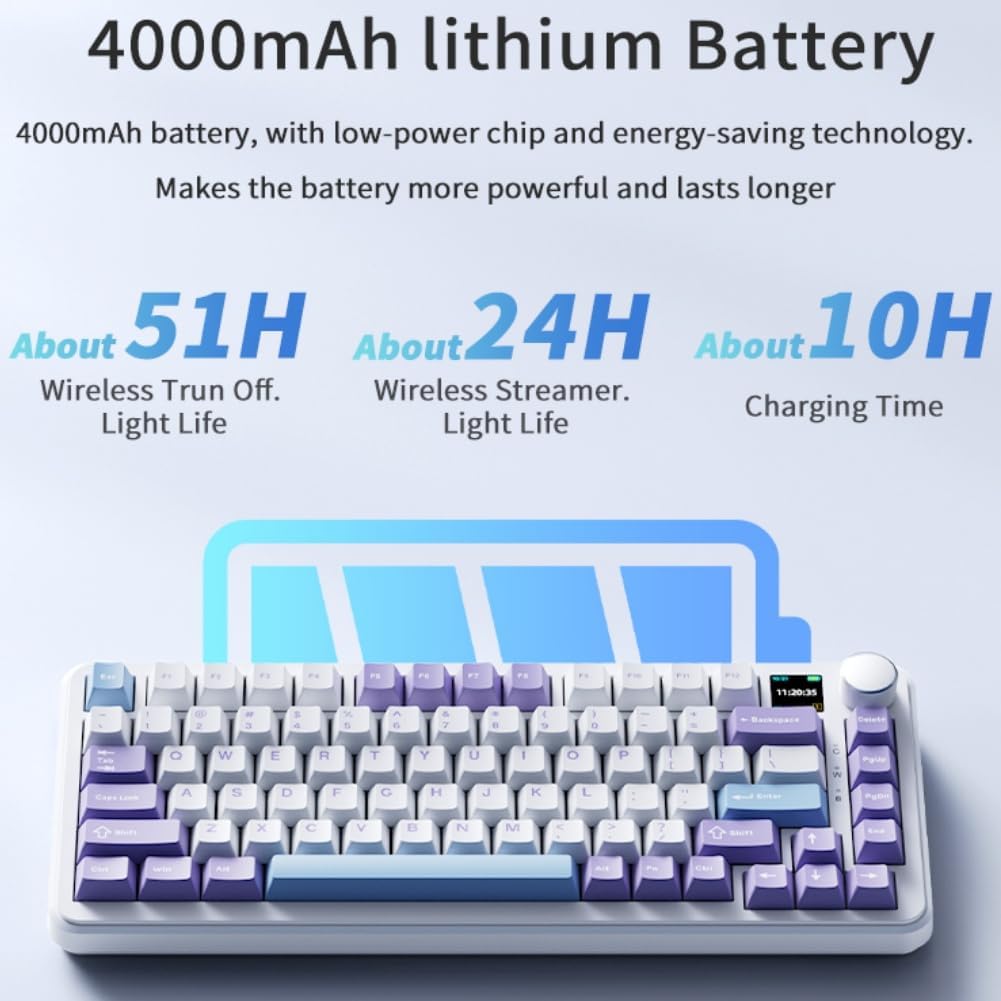
Image: The keyboard displaying battery life information on its TFT screen, indicating approximate usage times for wireless with lights off and wireless streamer light life, along with charging time.
Käyttöohjeet
TFT Smart Display and Knob Functions
The integrated TFT color screen and multi-function knob provide quick access to various settings:
- Knob Rotation: Rotate the knob to navigate through menu options or adjust values (e.g., brightness, speed).
- Knob Press: Vahvista valinta tai siirry valikkoon painamalla nuppia.
- Näytä tiedot: The screen shows current time, active connectivity mode (wired, 2.4G, BT), and battery level.
- Custom GIF Animations: The display supports custom colorful GIF animations. Refer to the software for customization options.

Image: A close-up of the keyboard's 0.85-inch TFT color screen, illustrating its capability to display settings such as backlight brightness, speed, color, and effect modes.
RGB-taustavalon säätö
The keyboard features 20 backlighting effects. Use the knob or dedicated function keys (refer to the keyboard's keycap legends or software) to:
- Change lighting effects.
- Säädä kirkkaustasoja.
- Modify animation speed.
- Valitse tiettyjä värejä.
- Activate music rhythm mode, where lighting fluctuates with audio.
Hot-Swap-kytkimet
The AK820MAX supports hot-swappable mechanical switches, allowing you to change switches without soldering.
- Irrota näppäinhattu varovasti näppäinhatun ulosvetäjällä.
- Irrota kytkin varovasti piirilevystä kytkimen ulosvetimellä.
- Kohdista uuden kytkimen nastat piirilevyn reikiin ja paina sitä lujasti, kunnes se napsahtaa paikalleen. Varmista, etteivät nastat ole taipuneet.
- Vaihda näppäinhattu.
Kuva: Lähikuva view of the keyboard's hot-swappable key switches, demonstrating the ease with which switches can be changed to customize typing preferences.

Kuva: Yksityiskohtainen view of the keyboard's PCB, showcasing the 1.2mm thick single key slot design for improved switch stability and feel.

Image: A diagram illustrating the internal gasket structure of the keyboard, which contributes to a softer and more elastic typing experience.

Image: A cross-section diagram detailing the five-layer internal filling, including silicone bottom pad, IXPE switch pad, and PET voice actor pad, designed to reduce noise and produce a pure sound.
Huolto
- Puhdistus: Pyyhi näppäimistön pinta pehmeällä, kuivalla liinalla. Perusteellisempaa puhdistusta varten irrota näppäinhatut ja poista roskat paineilmalla.
- Kytkimen hoito: Avoid spilling liquids on the keyboard. If a switch feels inconsistent, it may need to be replaced or lubricated.
- Varastointi: Säilytä näppäimistöä viileässä, kuivassa paikassa, poissa suorasta auringonvalosta ja äärimmäisistä lämpötiloista.
Vianetsintä
- Näppäimistö ei vastaa:
- Varmista, että näppäimistö on ladattu.
- Check the connectivity mode switch (wired, 2.4G, BT) matches your connection type.
- Varmista, että 2.4 GHz:n taajuudella vastaanotin on kytketty oikein.
- Varmista Bluetooth-yhteyden osalta, että näppäimistö on paritettu ja että se on kantaman sisällä. Kokeile paritusta uudelleen.
- Kokeile yhdistää USB-C-kaapelilla sulkeaksesi pois langattoman verkon ongelmat.
- RGB-valot eivät toimi/toimivat väärin:
- Check brightness settings using the knob or software.
- Ensure the keyboard software is up to date.
- Reset lighting effects to default via software or keyboard shortcuts (refer to specific key combinations if available).
- Avaimet eivät rekisteröidy:
- If a specific key is not working, try hot-swapping the switch with a known working one to determine if the switch or PCB socket is faulty.
- Varmista, että näppäinhattu on kunnolla paikallaan.
Tekniset tiedot
| Ominaisuus | Yksityiskohta |
|---|---|
| Mallinumero | AK820MAX |
| Layout | 75 % (81 näppäintä) |
| Yhteydet | Bluetooth 5.1, 2.4 GHz:n langaton, USB Type-C -langallinen |
| Kytkimen tyyppi | Hot-swappable Mechanical (Avocado Switch) |
| Taustavalo | RGB (20 effects, music rhythm) |
| Näyttö | 0.85-inch TFT Color Smart Display |
| Akun kapasiteetti | 8000mAh litiumpolymeeri (ladattava) |
| Yhteensopivat laitteet | PC, kannettava tietokone, tabletti |
| Mitat | 15.75 x 6.89 x 2.71 tuumaa |
| Tuotteen paino | 2.75 kiloa |
| Valmistaja | Odpaltoy |
Takuu ja tuki
For warranty information and technical support, please refer to the warranty card included with your product or contact the manufacturer directly. You can also visit the official Ajazz websivusto usein kysyttyjen kysymysten ja lisäresurssien osalta.
Manufacturer: Odpaltoy
Contact: Please refer to the contact information provided in the product packaging or on the manufacturer's official websivusto tukikyselyitä varten.