1. Johdanto
This manual provides essential information for the proper use and maintenance of your Realme 12 Plus 5G RMX3867 smartphone. Please read this guide thoroughly before operating your device to ensure optimal performance and longevity. Keep this manual for future reference.
2. Pakkausluettelo
Upon opening the package, verify that all items listed below are present and in good condition. If any items are missing or damaged, please contact your retailer.

Image: Contents of the Realme 12 Plus 5G RMX3867 retail box. Includes the phone, phone case, quick guide, detachable camera decoration replacement guide, safety guide, screwdriver, two screws, USB cable, and SIM card ejector.
- Realme 12 Plus 5G RMX3867 Smartphone
- Puhelinkotelo
- Pikaopas
- Detachable Camera Decoration Replacement Guide
- Turvallisuusopas
- Ruuvimeisseli
- Ruuvit (x2)
- USB-kaapeli
- SIM-kortin poisto
Note: Some accessories, such as the detachable camera decoration, may come in a separate package or require assembly. Refer to the specific guides provided.

Image: Contents of the Detachable Camera Decoration Protective Cover Set. Includes a packaging box, detachable deco case (x1), two screws, and a phone case (x1).
3. Asennus
3.1. SIM-kortin asennus
- Etsi SIM-kortin alusta laitteen sivusta.
- Insert the provided SIM card ejector tool into the small hole next to the tray.
- Työnnä varovasti, kunnes lokero ponnahtaa ulos.
- Place your Nano-SIM card(s) into the tray with the gold contacts facing down. Ensure the card is correctly oriented according to the tray's diagram.
- Aseta pidike varovasti takaisin puhelimeen, kunnes se napsahtaa paikalleen.

Kuva: Pohja view of the Realme 12 Plus 5G RMX3867, showing the USB-C port, speaker grille, microphone, and SIM card tray slot.
3.2. Virta päälle / pois
- Virran kytkeminen: Press and hold the Power button (located on the right side of the device) until the realme logo appears.
- Virran sammuttaminen: Paina virtapainiketta ja pidä sitä painettuna, kunnes virranhallinta-asetusten valikko tulee näkyviin. Napauta "Sammuta" ja vahvista.
- Käynnistää uudelleen: Press and hold the Power button until the power options menu appears. Tap "Restart" and confirm.

Kuva: Sivu view of the Realme 12 Plus 5G RMX3867, highlighting the power button and volume rocker on the right edge of the device.
3.3. Alkuasetukset
The first time you power on your device, you will be guided through the initial setup process. This includes:
- Kielen valitseminen.
- Yhdistetään Wi-Fi-verkkoon.
- Google-tilisi määrittäminen.
- Configuring screen lock (PIN, pattern, password, fingerprint, face unlock).
- Tiedon siirtäminen vanhasta laitteesta (valinnainen).
4. Laitteen käyttö
4.1. Perusnavigointi
- Kosketuseleet: Your device supports various touch gestures for navigation, including tap, swipe, pinch-to-zoom, and long press.
- Aloitusnäyttö: Sovellustesi ja widgetiesi keskus. Pyyhkäise vasemmalle tai oikealle päästäksesi lisänäyttöihin.
- Ilmoituspaneeli: Pyyhkäise näytön yläreunasta alaspäin päästäksesi ilmoituksiin ja pika-asetuksiin.
- Sovelluslaatikko: Pyyhkäise näytön alareunasta kohtaan view kaikki asennetut sovellukset.

Kuva: Edessä view of the Realme 12 Plus 5G RMX3867, displaying its large screen with a punch-hole camera cutout at the top center.
4.2. Kameran toiminnot
The Realme 12 Plus 5G RMX3867 features a powerful 200MP main camera. To access the camera, tap the Camera icon on your home screen or app drawer.
- Valokuvaustilat: Switch between various modes like Photo, Portrait, Night, Pro, and more.
- Videotallennus: Record high-quality videos. Adjust resolution and frame rate in settings.
- Asetukset: Access camera settings to customize features such as HDR, AI enhancements, and grid lines.
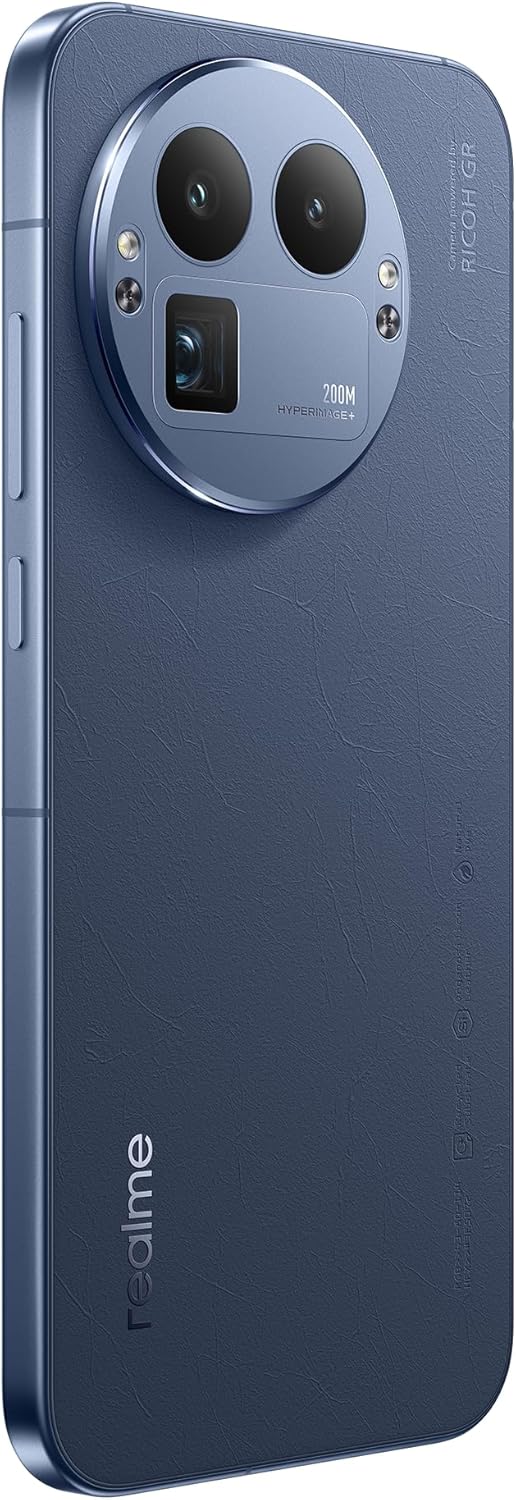
Kuva: Takaosa view of the Realme 12 Plus 5G RMX3867, showcasing the prominent circular camera module with multiple lenses and a "200M HYPERIMAGE+" label.
4.3. Yhteydet
- 5G-verkko: Your device supports 5G connectivity for faster mobile data speeds. Ensure your SIM card and plan support 5G.
- Wi-Fi: Yhdistä langattomiin verkkoihin internetyhteyttä varten. Siirry kohtaan Asetukset > Wi-Fi hallitaksesi yhteyksiä.
- Bluetooth: Pair with Bluetooth devices like headphones, speakers, or car systems. Go to Settings > Bluetooth.
- USB-C: Käytä USB-C-porttia lataamiseen ja tiedonsiirtoon.
4.4. Suojausominaisuudet
- Sormenjälkitunnistin: Unlock your device quickly and securely using the in-display fingerprint sensor. Register your fingerprints in Settings > Security & Privacy > Fingerprint.
- Face Unlock: Use facial recognition to unlock your phone. Set up Face Unlock in Settings > Security & Privacy > Face.
- Näytön lukitus: Choose from PIN, pattern, or password for basic screen security.
5. Huolto
5.1. Laitteen puhdistaminen
- Pyyhi puhelimen näyttö ja runko pehmeällä, nukkaamattomalla liinalla.
- Vältä voimakkaiden kemikaalien, hankaavien materiaalien tai aerosolisuihkeiden käyttöä.
- Pinttyneisiin tahroihin, hieman dampKostuta liina vedellä tai elektroniikalle tarkoitetulla näytönpuhdistusaineella.
5.2. Ohjelmistopäivitykset
Tarkista ja asenna säännöllisesti ohjelmistopäivitykset varmistaaksesi, että laitteessasi on uusimmat ominaisuudet, tietoturvapäivitykset ja suorituskyvyn parannukset. Siirry kohtaan Asetukset > Tietoja laitteesta > Ajantasainen tarkistaaksesi päivitykset.
5.3. Akun hoito
- Vältä äärimmäisiä lämpötiloja, sillä ne voivat lyhentää akun käyttöikää.
- Käytä ainoastaan alkuperäistä laturia ja kaapelia tai sertifioituja yhteensopivia lisävarusteita.
- Do not let the battery drain completely frequently. It is generally recommended to keep the battery level between 20% and 80%.
6. Vianmääritys
6.1. Yleisiä ongelmia ja ratkaisuja
| Antaa | Ratkaisu |
|---|---|
| Laite ei käynnisty | Varmista, että akku on ladattu. Paina virtapainiketta ja pidä sitä painettuna vähintään 10–15 sekuntia. |
| Sovellukset kaatuvat tai jumiutuvat | Sulje sovellus ja avaa se uudelleen. Tyhjennä sovelluksen välimuisti (Asetukset > Sovellukset > [Sovelluksen nimi] > Tallennustila > Tyhjennä välimuisti). Käynnistä laite uudelleen. |
| Huono akun kesto | Check background app usage. Reduce screen brightness. Disable unnecessary features like GPS or Bluetooth when not in use. |
| Ei voi muodostaa yhteyttä Wi-Fi-verkkoon | Restart your router and phone. Forget the network and reconnect. Ensure Wi-Fi is enabled on your device. |
6.2. Tehdasasetusten palautus
Jos kohtaat jatkuvia ongelmia, tehdasasetusten palautus saattaa ratkaista ne. Varoitus: Tehdasasetusten palautus poistaa kaikki puhelimesi tiedot. Varmuuskopioi tärkeät tiedot ennen jatkamista.
- Siirry kohtaan Asetukset > Järjestelmä > Nollausasetukset.
- Tap "Erase all data (factory reset)".
- Vahvista päätöksesi ja anna PIN-koodisi/salasanasi pyydettäessä.
- Laite käynnistyy uudelleen ja aloittaa nollausprosessin.
7. Tekniset tiedot
Below are the key technical specifications for the Realme 12 Plus 5G RMX3867:
| Ominaisuus | Yksityiskohta |
|---|---|
| Merkki | realme |
| Mallin nimi | Realme 12 Plus 5G (RMX3867) |
| Käyttöjärjestelmä | Android |
| Muistin tallennuskapasiteetti | 256 Gt |
| Asennetun RAM-muistin koko | 12 Gt |
| CPU malli | Snapdragon |
| Prosessorin nopeus | 1200 MHz |
| Näytön koko | 6.4 tuumaa |
| Näytön tyyppi | AMOLED |
| Resoluutio | 1440 x 2560 |
| Tehokas videoresoluutio | 200 MP |
| Mobiilitekniikka | 5G |
| Akun kapasiteetti | 7000 miljoonaaamp Tuntia |
| Akun keskimääräinen käyttöikä | 21 tuntia |
| Ihmisen käyttöliittymän syöttö | Kosketusnäyttö |
| Tuotteen mallinumero | GT 8 Pro (Note: Product title is Realme 12 Plus 5G RMX3867) |
Note: Some specifications may vary slightly based on region or specific product variant. The model number in the product title is RMX3867, while some specifications list 'GT 8 Pro'. Please refer to your device's packaging for the most accurate model information.
8. Takuu ja tuki
Your Realme 12 Plus 5G RMX3867 device comes with a limited warranty. Please refer to the warranty card included in your product packaging for detailed terms and conditions, including warranty period and coverage.
Teknistä tukea, huoltoa tai lisäkysymyksiä varten käy virallisella Realme-tukisivustolla. website or contact their customer service. Contact information can typically be found on the realme official website or in the "Safety Guide" included with your device.
Säilytä ostokuitti takuuvaatimuksia varten.


